 Mini-Module

Summary
The Registry Forensics - 2 module is designed for cybersecurity Experts: Security professionals seeking to improve their understanding of Windows Registry artifacts to detect and respond to potential security incidents, Computer Forensics Students: Students pursuing a career in digital forensics or cybersecurity and looking to gain practical knowledge in Windows Registry analysis, and Digital Forensics Professionals: Forensic investigators, digital examiners, and analysts who want to enhance their knowledge and skills in Windows Registry analysis as part of their investigative process. Throughout this module, students will develop proficiency in utilizing Registry forensics as part of a broader digital investigation process, enhanced skills in identifying and preserving critical evidence stored in the Windows Registry during forensic examinations, and improved capabilities in conducting in-depth investigations using Windows Registry data.
Recommended prior knowledge:
-
Windows Operating System Fundamentals: Familiarity with the structure, file system, and basic operations of the Windows operating system is essential. This includes knowledge of user profiles, system directories, and common Registry keys
-
Basic Digital Forensics Knowledge: Participants should have a fundamental understanding of digital forensics principles, investigative methodologies, and evidence handling procedures
-
Windows Registry Basics: Participants should have a good grasp of Registry concepts, including keys, values, data types, and hives. Knowledge of how Registry data is organized and stored is crucial
MUICache
MUI stands for Multilingual User Interface. It is a technology that allows Windows systems to have a single application localized for multiple languages. Developers create a .MUI file for each language supported by the application and these files enable the user to switch the language. The MUI files generate the MUICache key in the registry. MUICache key contains information about the files that are executed on the system which the operating system extracts when a new application is used.
MUICache artifact can provide useful information regarding applications and tools installed and run via a user account. This artifact may also provide an indication of malicious activities on the system; as the information within the MUICache key is maintained even if the malicious actor has deleted the applications from the device. In addition, if the values for an app were deleted from the key, they will reappear again when the next time the user runs that application.
Another important thing about MUICache artifact is that it displays the original application name and the original company name which created the executable. Even if we the application is renamed on the system and then executed the MUICache data, it will still show the corresponding original application name. We know how much threat actors love to rename malicious tools to something less shady, for instance they can rename sharphound tool to “WindowsCleaner” name, but the MUICache artifact will have a data column which will display the original exe file name which the developer intended. Let's discuss this more in depth.
MUICache is located in USRCLASS.dat hive which indicates that it’s an artifact unique to each user on the system. The path of this artifact is:
Local Settings\Software\Microsoft\Windows\Shell\MuiCache
MUICache have 2 records for every .exe executed, one with the data containing application company name and one with the data containing friendly application name which is the original .exe file name. Let's open up the USRCLASS..dat with the registry explorer and navigate to the path.
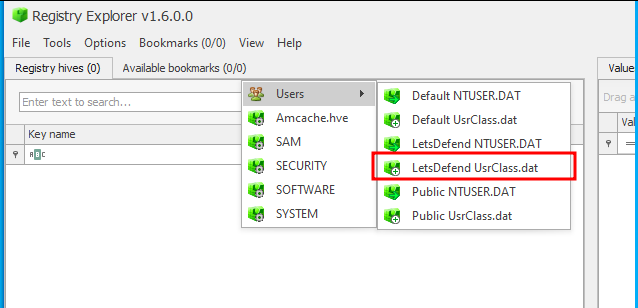
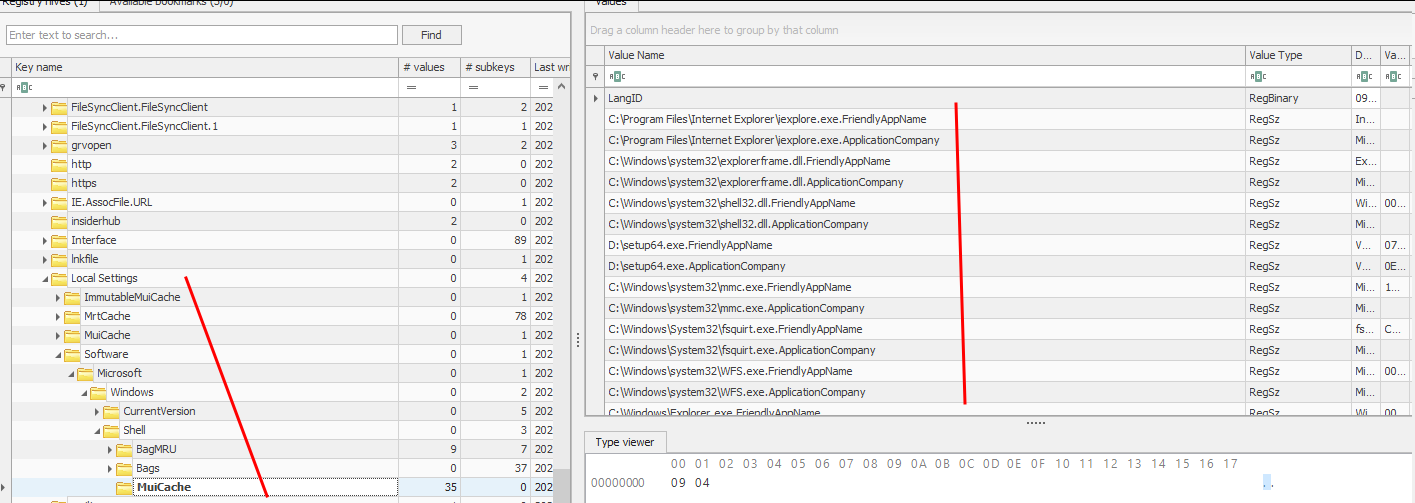
Now let's explore the key value pairs in the MuiCache subkey.
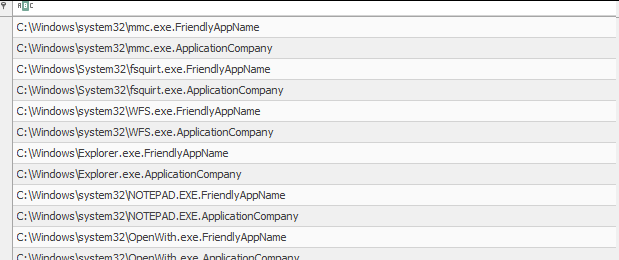
Here we can see that there are 2 records for every executed file, one is friendly app name and the other one is the name of the application company.
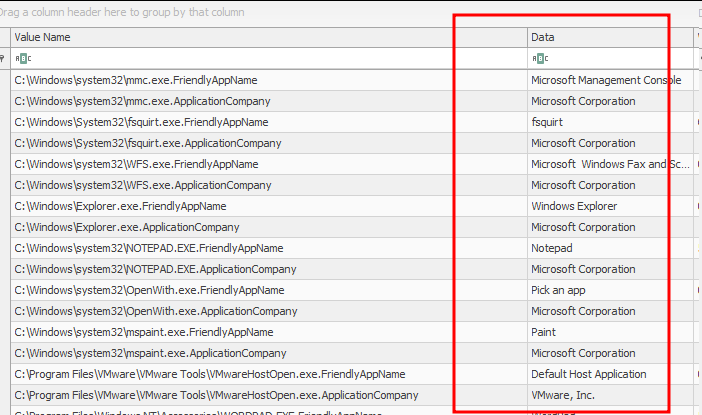
And here we see the corresponding data to that executable. Let's take a specific example to expand upon.

Here we see that the app name is gkape.exe and this is also the original executable for GUI Kape interface. We can also see the company name “Kroll” which is indeed the company who made Kape.
Now let's discuss about muicache_view by NirSoft which is another tool that shows us MUICache entries automatically. You can get it at the following link: (https://www.nirsoft.net/utils/muicache_view.html)
Note: muicache_view tool works on the live systems only meaning when we run it, it fetches muicache from the registry hive of the running system automatically. If we have acquired registry hives we can’t use this tool there.
All we did was to execute the tool and it displays all the entries from the live system.
