Introduction
This blog post will focus on PDF files that have been created with a Canary Token embedded. Although this is a legitimate tool, it could also be utilised by an attacker to conduct reconnaissance on a target. If you suspect that someone may be sending you a PDF file with the intention of conducting reconnaissance, or just interested in how Canary Tokens work, then this article will be of particular interest to you.
What is a Canary Token?
Canary Tokens are a free tool developed by Thinkist Canary. The tool can be used and accessed from here. They were created to assist organisations with creating simple and effective honey pots. These are ordinary files (PDFs, AWS Keys, Windows folders, etc) which have a web beacon implanted into them. The aim is to create files across different areas of your infrastructure with a naming convention that would appeal to an attacker, for example, "passwords.doc".
If an attacker were to gain access to one of your systems, they should be enticed to open these files. Once these files are opened, an API call is made and you should receive an email notification with a number of artefacts, such as the IP address of whoever opened the file, the token name, and a timestamp of when the file was accessed.
That being said, this same concept could be used by an adversary seeking to conduct reconnaissance. Therefore, understanding how to examine PDF files for this technique will be useful for any Security Analyst.
PDFs and FlateDecode
PDFs are composed of streams of objects. A stream in the case of PDFs, simply refers to sequences of 8-bit bytes data. These may be of unlimited length and can be compressed or encoded. For this reason, they are used to store other data such as font files and image data. The data in a PDF can be encoded using different stream filters. In the case of a Canary Token, this has been done with the use of the /FlateDecode filter. The purpose of a stream filter is to specify how the sequence of bytes should be decoded.
Extracting the token with a script
Numerous tools can be used to parse a PDF file, such as PDF-Parser which is currently included in Kali Linux. However, the only way to extract a Canary Token from a PDF will be to use a tool that specifically examines all of the FlateDecode streams within the document, unzips this data, and then prints it out for us. One such tool that can do this is "pdf_flatedecode.py" which was developed by "averagesecurityguy" on GitHub and can be viewed here.
How to use the script
The first step is to ensure that you have downloaded a Canary Token (PDF). Once you have done this, you can download the "pdf_flatedecode.py" script from the GitHub page on the link above. For the purposes of this example, I will be placing all files onto the desktop.
The next step is to open the script in a text editor and rename "some_doc.pdf" with the filename of your Canary Token as you can see in the below screenshot:
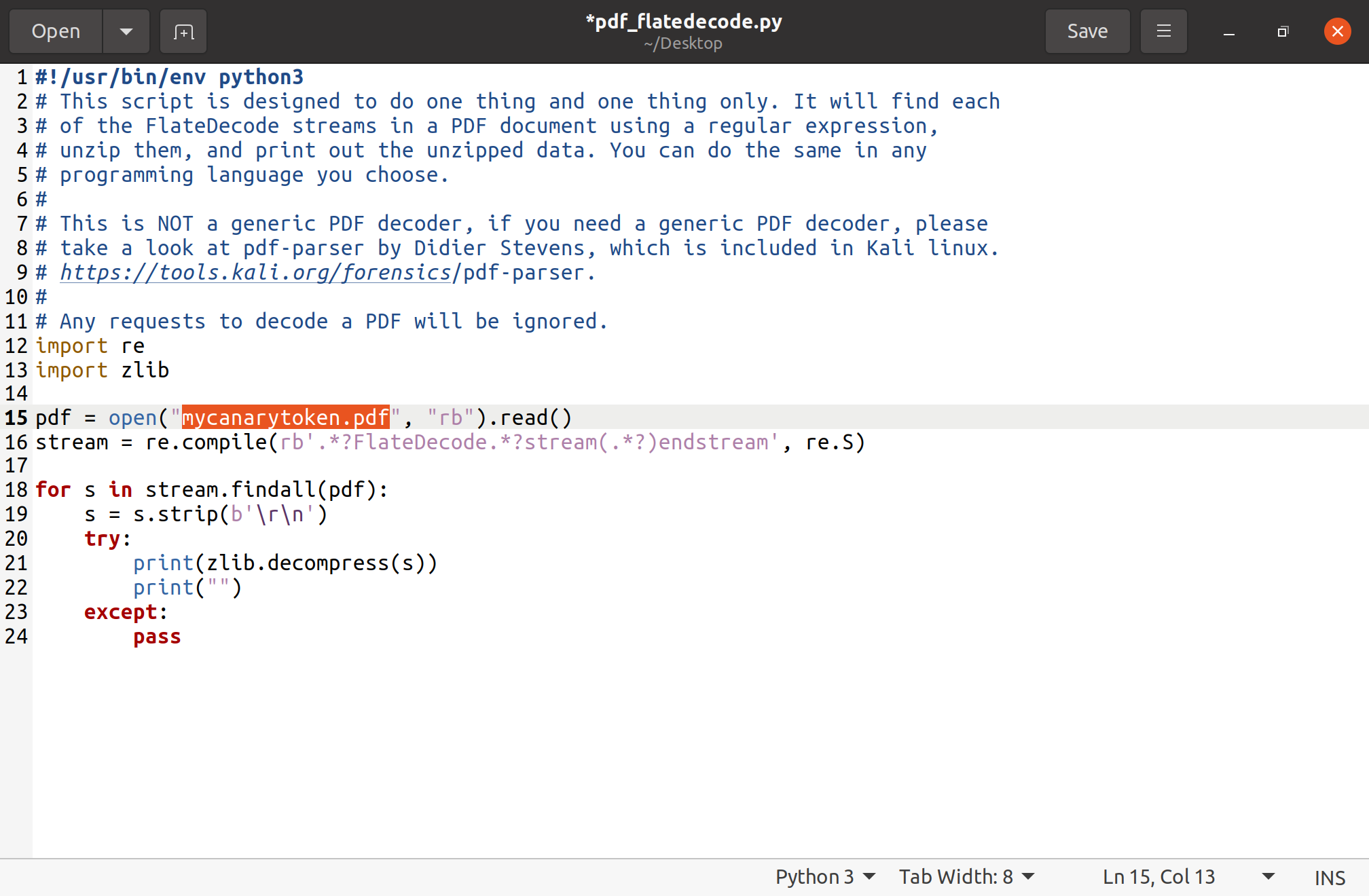
Once you have done that, simply run the following commands on the terminal:
1. cd Desktop (or whichever location you have placed the files)
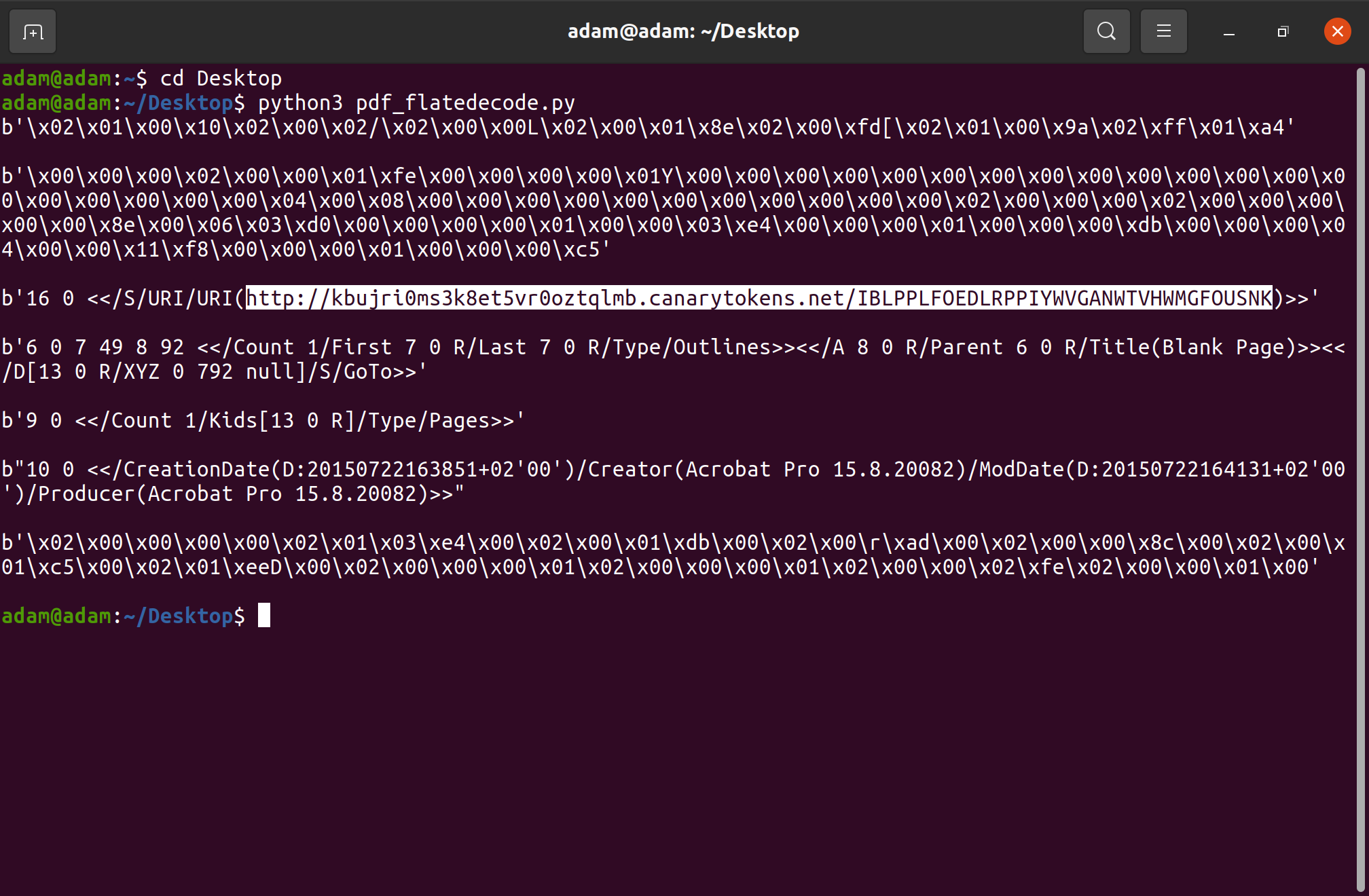
2. python3 pdf_flatedecode.py
The script should then run and you will be able to see the URL that is used to make an API call for the web beacon after the FlateDecode data has been unzipped and printed out, as seen in the following screenshot:
Conclusion
In summary, this script may be a useful addition to a Security Analyst's arsenal of tools in the event of needing to examine a PDF file suspected of reconnaissance. It will also be able to pull apart other files which are obfuscated with malicious code with the use of the /FlatedDecode filter. For more information on how PDFs are used to deliver payloads through the use of obfuscation, please see this paper that was published by GIAC and written by Chad Robertson, "PDF Obfuscation - A Primer".
Comments
Join the discussionNo comments yet. Be the first to comment.
