| Metadata | Value |
|---|---|
| Contributors | Marcel Lupo |
| Categories | Community, GitHub, Azure DevOps, Other |
| Definition type | Dockerfile |
| Supported architecture(s) | x86-64, arm64/arch64 for bullseye based images |
| Works in Codespaces | Yes |
| Container host OS support | Linux |
| Container OS | Debian |
| Languages, platforms | Azure, HCL, PowerShell |

Also see this Blog Post for additional config options.
This contribution is made was made as part of the GitHub + DEV 2023 Hackathon

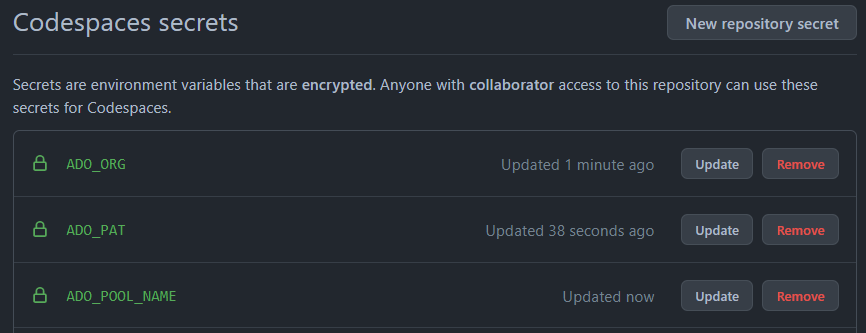
Use and utelise your codespace compute power to also run a self hosted azure pipelines agent. This devcontainer can be used as a codespace that will create and attach a self-hosted azure pipelines agent inside of the codespace and attach/register the ADO agent with an Azure DevOps agent pool by using secrets for codespaces as parameter values:

The runner registers itself to an agent pool based on above shown secrets.


A devcontainer that spins up and runs a self hosted Azure Pipelines Agent inside the compute of a Codespace.
| Options Id | Description | Type | Default Value |
|---|---|---|---|
| imageVariant | Debian version (use bullseye on local arm64/Apple Silicon) | string | bullseye |
| agentVersion | Choose version of GitHub Runner to Install | string | 2.218.1 |
This template definition will install additional features by default: common-debian tools, shellcheck, GitHub-CLI.
"features": {
  "ghcr.io/devcontainers/features/common-utils:2": {},
  "ghcr.io/lukewiwa/features/shellcheck:0": {},
  "ghcr.io/devcontainers/features/github-cli:1": {},
}
Additional non-included Codespace features can also be installed; e.g. Terraform, Azure-CLI, PowerShell, etc..
The start.sh startup script will bootstrap the baked in Azure Pipelines agent inside of the Codespace when the Codespace starts up. Parameters are taken from GitHub Secrets (Codespaces):
ADO_ORG=$ADO_ORG
ADO_PAT=$ADO_PAT
ADO_POOL_NAME=$ADO_POOL_NAME
These parameters (environment variables) are used to configure and register the self hosted ADO agent against the correct agent pool. Provide the Azure DevOps Org name via the 'ADO_ORG' environment variable, agent pool name via 'ADO_POOL_NAME' and a PAT token with 'ADO_PAT'.
You can store these parameters as encrypted secrets for codespaces.
-
Navigate to the repository
'Settings'page and select'Secrets -> Codespaces', click on'New repository secret'.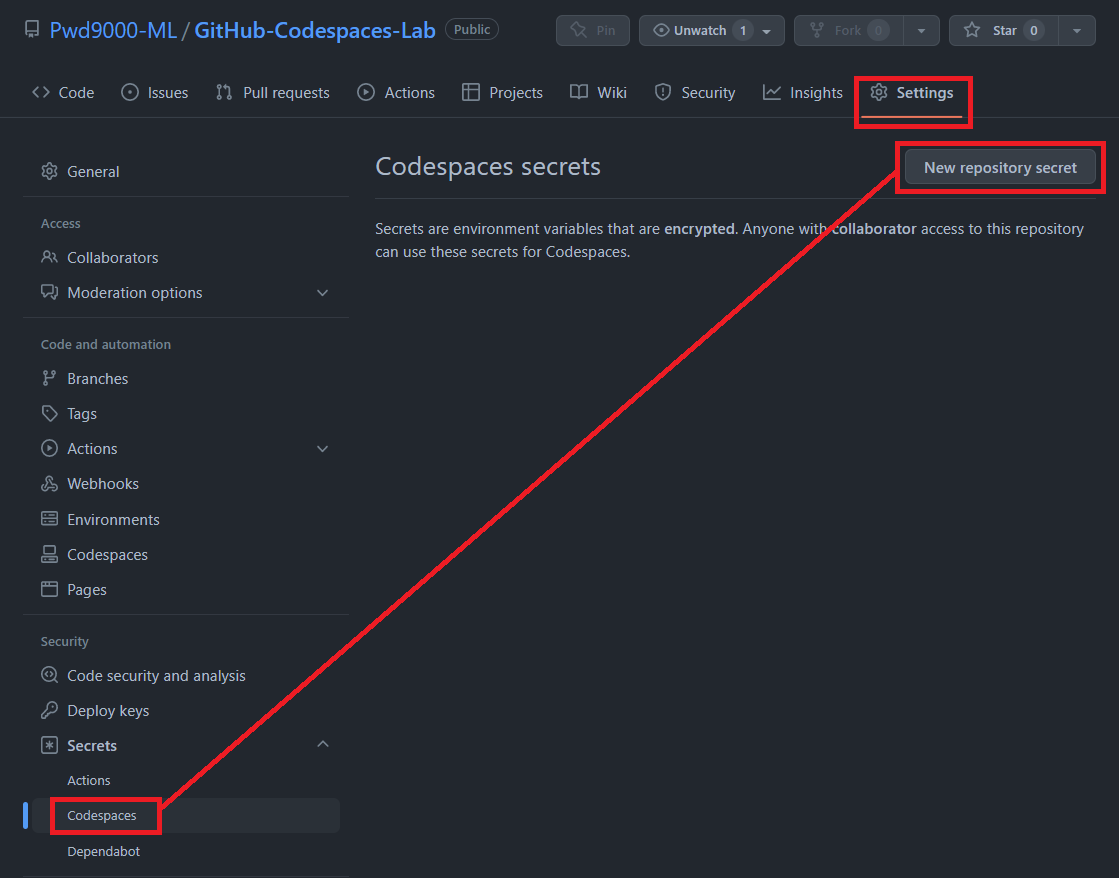
-
Create each Codespace secret with the values for your environment.

The minimum permission scopes required on the PAT TOKEN to register a self hosted ADO agent are: "Agent Pools:Read", "Agent Pools:Read&Manage": 
-
If this is your first time using a development container, please see getting started information on setting up Remote-Containers or creating a codespace using GitHub Codespaces.
-
Start VS Code and open your project folder or connect to a codespace.
-
Press F1 select and Add Development Container Configuration Files... command for Remote-Containers or Codespaces.
Note: If needed, you can drag-and-drop the
.devcontainerfolder from this sub-folder in a locally cloned copy of this repository into the VS Code file explorer instead of using the command. -
Select this definition. You may also need to select Show All Definitions... for it to appear.
-
Finally, press F1 and run Remote-Containers: Reopen Folder in Container or Codespaces: Rebuild Container to start using the definition.
Copyright (c) Microsoft Corporation. All rights reserved.
Licensed under the MIT License. See LICENSE.
