

Skills Repositories
Note
Skills repositories is an open beta feature.
Skills is a package type in JFrog Artifactory for sharing and consuming AI agent capabilities (skills) compatible with the ClawHub protocol. Artifactory acts as a private skill registry so teams can publish, discover, and install skills from a single place.
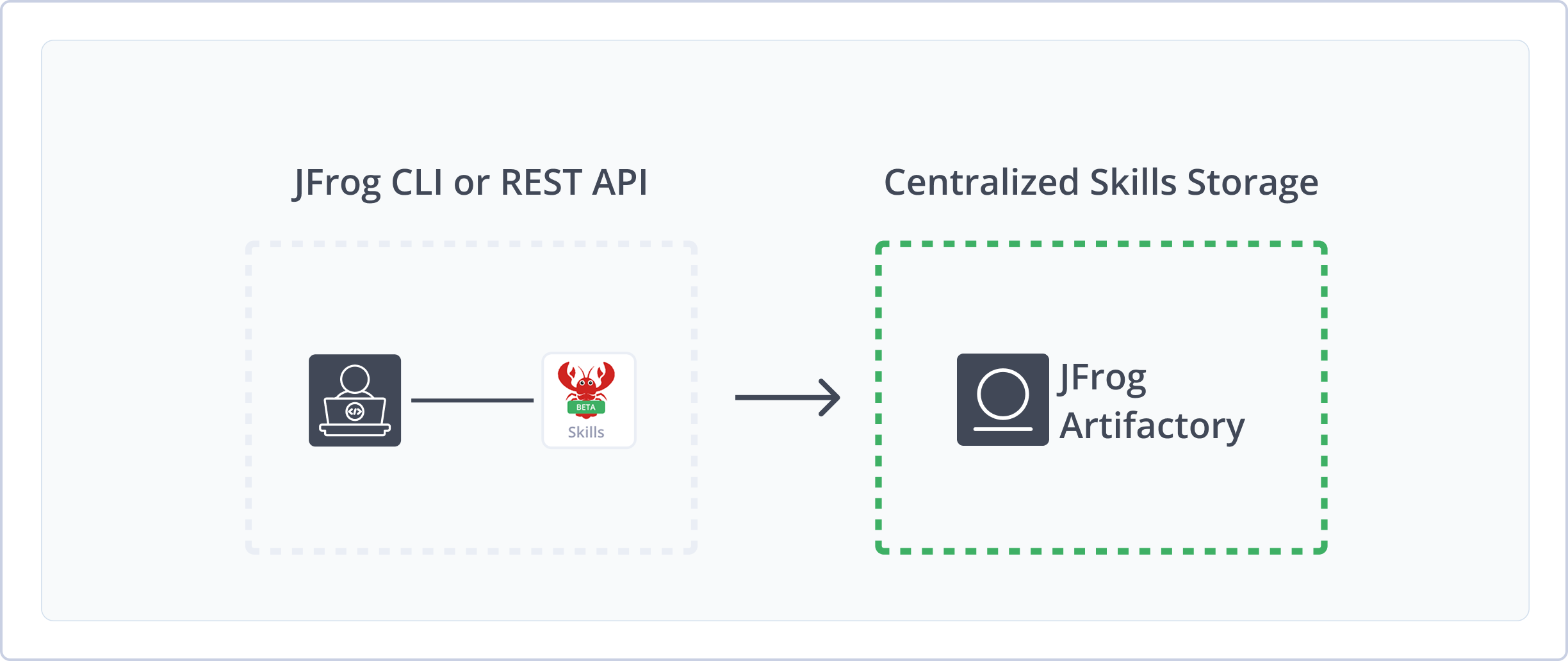
Artifactory supports local Skills repositories with the following capabilities:
- Private skill storage: Host and share your own skills in local repositories.
- REST API: Publish and download skills using the ClawHub v1–compatible API.
- Metadata and search: Artifactory indexes skills and populates the Packages UI from
SKILL.mdmanifests.
Get Started with Skills
To get started working with Skills repositories using the JFrog CLI, complete the following main steps:
For information about working with Skills repositories via REST API, see REST API for Skills Repositories.
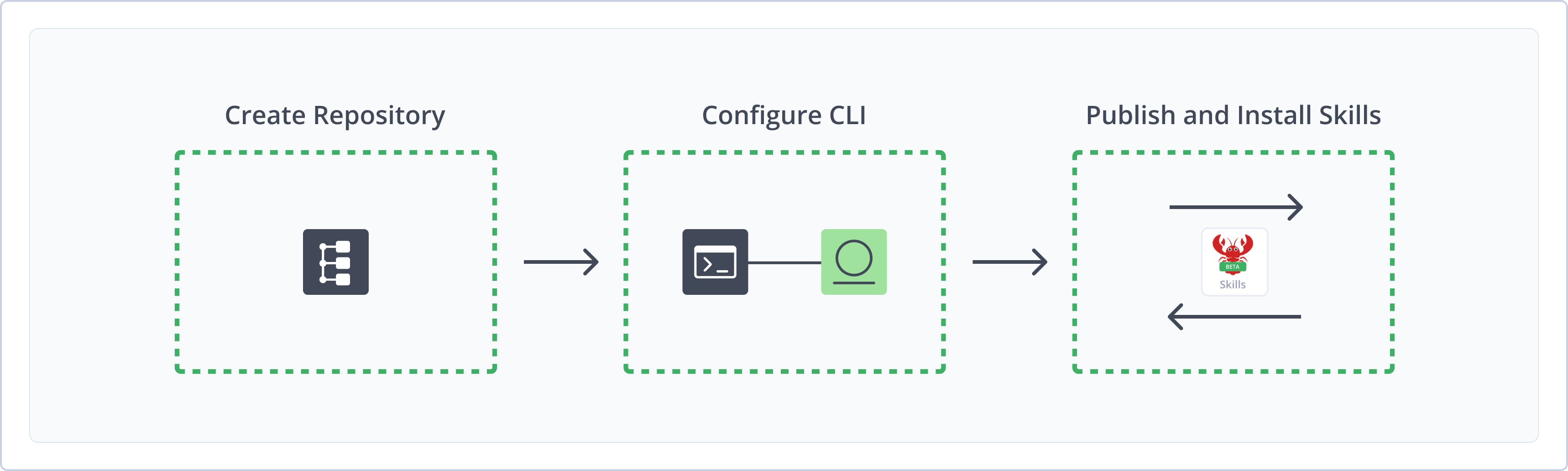
Create Skills Repository
This topic describes how to create a Skills repository. This is required before deploying and resolving skills. Artifactory supports local Skills repositories to store and share first- and second-party packages and artifacts with your organization.
For more information, see Repository Management.
Prerequisite: You need Admin or Project Admin permissions in Artifactory to create a repository.
To create a Skills repository:
-
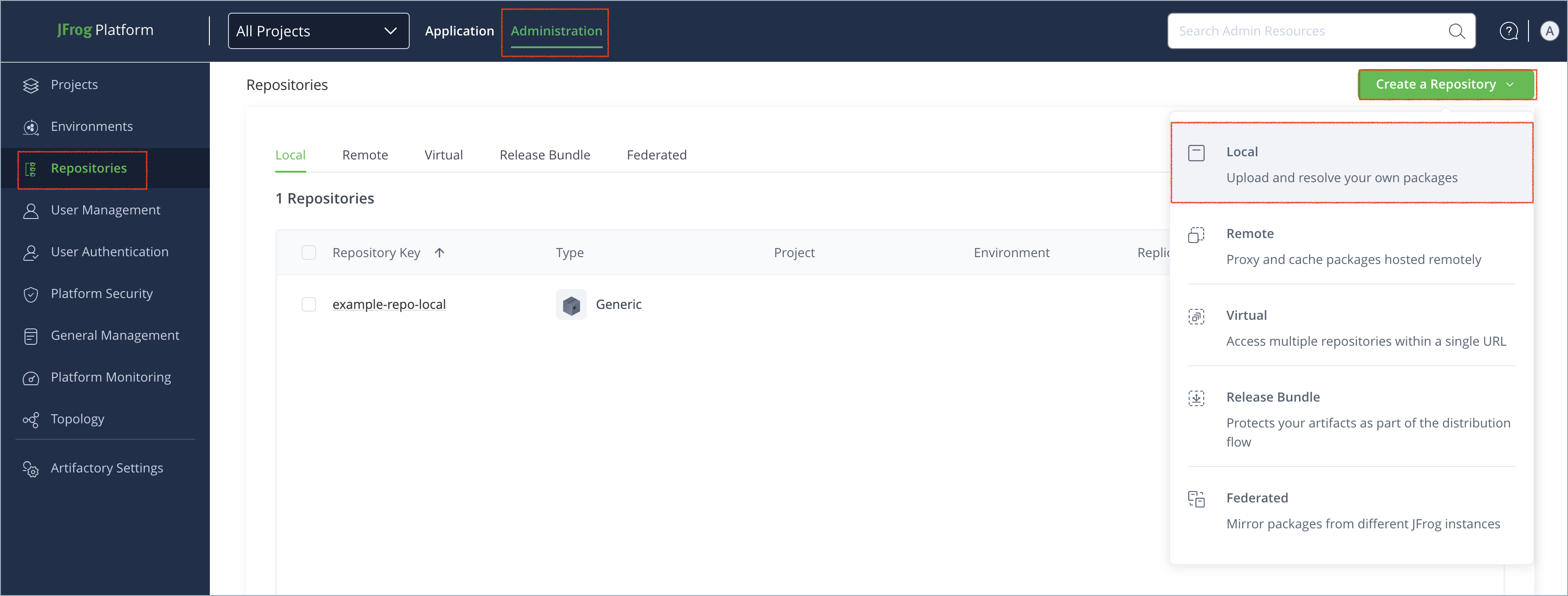
In the Administration tab, click Repositories > Create a Repository.
-
Select Local.
-
Select the Skills package type.
-
In the Repository Key field, type a meaningful name for the repository. For example,
skills-local. For more information on local repositories and their settings, see Local Repositories. -
Click Create Repository. The repository is created and the Repositories window is displayed.
Configure JFrog CLI for Skills
You can work with Skills repositories in Artifactory through the JFrog CLI (jf) or REST API. To use jf skills, you first have to configure the CLI to use your Artifactory server for Skills.
Note
The
jf skillscommand is supported from JFrog CLI version 2.98.0.
Prerequisites:
-
JFrog CLI v2.98.0 or newer downloaded and installed on your machine. For more information, see Install JFrog CLI.
You can verify your JFrog CLI installation with the command
jf --version. -
A Skills local repository.
To configure JFrog CLI for use with Skills repositories:
- Run the following command to add your Artifactory server:
Where:
jf config add <SERVER-NAME> \ --url <JFrogPlatformURL> \ --access-token <AUTH> \ --interactive=false<SERVER-NAME>: A name of your choice for the new server<JFrogPlatformURL>: The URL of your JFrog Platform<AUTH>: Your Artifactory identity token
For example:
jf config add skills \ --url https://company.jfrog.io \ --access-token Random_Token18Hrug38Wfskuyig45 \ --interactive=false - Run the following commands to set the server as your default and verify the configuration:
Where
jf config use <SERVER-NAME> jf config show<SERVER-NAME>is the name you assigned to your Skills server. For example:jf config use skills jf config show
Note
You can also use JFrog Set Me Up to copy the snippet populated with your token and environment. For more information, see Use Artifactory Set Me Up for Configuring Package Manager Clients.
Next steps:
Publish Skills with JFrog CLI
When publishing skills with the jf skills publish command, the version is read from the version field in the SKILL.md frontmatter. You can optionally specify a version, or publish with evidence signing.
If you have JFrog AI Catalog, you can enable semantic scanning to check uploaded skills for malicious code before distribution and consumption. For more information, see Semantic Scanning.
To publish a skill to Artifactory:
- Run the following command:
Where:
jf skills publish <PATH_TO_SKILL_FOLDER> --repo <REPOSITORY_NAME><PATH_TO_SKILL_FOLDER>: The path to the skill folder on your local machine<REPOSITORY_NAME>: The name of your local Skills repository in Artifactory For example:
jf skills publish ~/skills_dev/myskill --repo skills-local
Tip
To override the automatically detected version, use the
--versionflag and specify the version number.
Note
You can also use JFrog Set Me Up to copy the snippet populated with your token and environment. For more information, see Use Artifactory Set Me Up for Configuring Package Manager Clients.
Publish Skills with Evidence Signing
With Enterprise+, you can publish skills with evidence signing to attach a cryptographic attestation to the published artifact.
To publish skills with evidence signing:
- Run the following command:
Where:
jf skills publish <PATH_TO_SKILL_FOLDER> --repo <REPOSITORY_NAME> \ --signing-key ./private.key \ --key-alias my-evd-key<PATH_TO_SKILL_FOLDER>: The path to the skill folder on your local machine<REPOSITORY_NAME>: The name of your local Skills repository in Artifactory
For example:
jf skills publish ~/skills_dev/myskill --repo skills-local \
  --signing-key ./private.key \
    --key-alias my-evd-key
Alternatively, you can set EVD_SIGNING_KEY_PATH and EVD_KEY_ALIAS environment variables.
Note
You can also use JFrog Set Me Up to copy the snippet populated with your token and environment. For more information, see Use Artifactory Set Me Up for Configuring Package Manager Clients.
Next steps:
Install Skills with JFrog CLI
You can install skills using jf skills install. During installation, jf skills install automatically verifies evidence using public keys stored in Artifactory (--use-artifactory-keys). No local signing keys are needed on the installer's side.
If verification fails:
- Interactive terminal: You are prompted to proceed or abort.
- CI or
--quietmode: The install fails automatically.
To install skills using JFrog CLI:
- Run one of the following commands:
-
To install a specific version:
jf skills install <SKILL_NAME> <REPOSITORY_NAME> --version <SKILL_VERSION>Where:
<SKILL_NAME>: The name of the skill to install<REPOSITORY_NAME>: The name of the target Skills repository<SKILL_VERSION>: The version of the skill to install
For example:
jf skills install myskill skills-local --version 1.0.0 -
To install the latest version:
jf skills install <SKILL_NAME> <REPOSITORY_NAME> --version latestWhere:
<SKILL_NAME>: The name of the skill to install<REPOSITORY_NAME>: The name of the target Skills repository For example:
jf skills install myskill skills-local --version latestNote
The
--version latestflag resolves to the greatest available SemVer in the repository. -
To install to a custom path:
jf skills install <SKILL_NAME> <REPOSITORY_NAME> --version <SKILL_VERSION> --path <PATH>Where:
<SKILL_NAME>: The name of the skill to install<REPOSITORY_NAME>: The name of the target Skills repository<SKILL_VERSION>: The version of the skill to install<PATH>: The destination path in Artifactory
For example:
jf skills install myskill skills-local --version latest --path /dev/newskills
-
Note
You can also use JFrog Set Me Up to copy the snippet populated with your token and environment. For more information, see Use Artifactory Set Me Up for Configuring Package Manager Clients.
Additional Skills Repository Information
The following pages provide additional information about using Skills repositories in Artifactory:
- Delete Skills
- Semantic Scanning
- Metadata and Package Identification
- REST API for Skills Repositories
Delete Skills
Use jf skills delete to remove a specific skill version from a Skills repository. This is useful when you need to remove deprecated, incorrect, or blocked versions while keeping other versions of the same skill.
To delete a skill version:
-
Run the following command:
jf skills delete <SKILL_NAME> --version <SKILL_VERSION> [--repo <REPOSITORY_NAME>]Where:
<SKILL_NAME>: The skill slug to delete<SKILL_VERSION>: The version to delete<REPOSITORY_NAME>: The Skills repository key. If omitted, CLI can auto-discover it when only one Skills repository is available.
For example:
jf skills delete myskill --version 1.0.0 --repo skills-localThe command deletes the selected version path from the repository. There is no interactive confirmation prompt.
Tip
To verify the target without deleting it, use
---dry-run:jf skills delete myskill --version 1.0.0 --repo skills-local --dry-runThe output shows what would be deleted.
Semantic Scanning
Note
Semantic scanning is available as part of JFrog AI Catalog. For more information, see JFrog AI Catalog.
Semantic scanning adds a security gate to jf skills publish by checking each uploaded skill before distribution. This check helps prevent distribution and consumption of malicious skills, giving you stronger supply chain protection with minimal impact on the existing publish workflow.
Semantic Scanning Requirements
To enable semantic scanning, the following requirements must be met:
- Your organization must be licensed for the JFrog AI Catalog. For more information, see JFrog AI Catalog.
- Xray indexing must be enabled for the Skills repository. For more information, see Enable Indexing in Xray.
Scan Results and Behavior
When semantic scanning is enabled, each skill is checked after executing the jf skills publish command.
If the skill is approved, publish completes successfully. If the scan identifies the skill as malicious (BLOCKED), the command fails and the skill is not published. By default, the blocked skills remain in the repository for administrator review.
The following arguments are available to modify jf skills publish with semantic scanning:
--auto-delete-on-failure: Automatically delete blocked artifacts instead of keeping them for administrator review--skip-scan: Skip semantic scanning even when it is enabled. You can also skip semantic scanning by setting the JFrog CLI environment variableJFROG_CLI_SKIP_SKILLS_SCAN=true.
When scanning is not available for the repository, or if your environment is not entitled for this check, publish continues without failing.
Metadata and Package Identification
Artifactory treats each stored zip as a skill package at path {slug}/{version}/{slug}-{version}.zip. It extracts skill identity and metadata from:
- Path: The
slugandversionare taken from the storage path. - SKILL.md: When the zip contains a file named SKILL.md, Artifactory parses the YAML frontmatter (the block between the first
---and the next---). It supports the metadata blocksmetadata.skills,metadata.clawdbot, andmetadata.clawdis. From that it populates package properties and the Packages UI (for example, name, description, version, author, tags, displayName, summary, changelog).
Artifactory Property Keys
Metadata is stored as Artifactory properties under the skill.* namespace, including: skill.name, skill.version, skill.description, skill.author, skill.tags, skill.displayName, skill.summary, skill.changelog, skill.fingerprint, and others.
Note
The Packages page is for browsing and discovery. It is not a replacement for ClawHub client behavior or version resolution.
REST API for Skills Repositories
This section contains information for how to work with Skills repositories using REST API.
Configure Client or Scripts for Skills Repositories
To use Skills with Artifactory, configure your client or scripts with the registry URL and credentials.
Prerequisites:
- A local Skills repository (see Create Skills Repository).
- A client that can send HTTP requests (for example,
curl, or a ClawHub-compatible CLI).
Configuration:
The registry base URL for your Skills repository is:
https://<USERNAME>:<AUTH>@<JFrogPlatformURL>/artifactory/api/skills/<REPOSITORY_NAME>Where:
<USERNAME>: Your Artifactory username<AUTH>: Your Artifactory identity token or password<JFrogPlatformURL>: Your JFrog Platform URL<REPOSITORY_NAME>: The repository name
Discovery (optional):
You can request the well-known discovery document for auto-discovery. This endpoint allows anonymous access:
GET https://<JFrogPlatformURL>/artifactory/api/skills/<REPOSITORY_NAME>/.well-known/clawhub.jsonNote
Only the
.well-known/clawhub.jsonendpoint allows anonymous access. All other Skills endpoints (list, download, publish, resolve) require Artifactory credentials. Use credentials in the URL, an Artifactory token, or.netrcas described in Artifactory authentication documentation.
Deploy Skills via REST API
Publishing a skill uploads a zip bundle to the repository. The server expects a multipart form with a JSON payload and one or more files. It builds the zip and stores it at {slug}/{version}/{slug}-{version}.zip.
Endpoint:
POST https://<JFrogPlatformURL>/artifactory/api/skills/<REPOSITORY_NAME>/api/v1/skillsContent-Type: multipart/form-data
Required parts:
- payload: JSON object with at least:
slug(string): Skill identifier. Mandatory pattern: lowercase letters, digits, and hyphens only. The slug must start with a letter or digit (^[a-z0-9][a-z0-9-]*$).version(string): Version of the skill (for example, semantic version). Optional fields:displayName,summary,changelog,tags.
- files[]: One or more file parts. The server bundles them into a zip. Include a file named SKILL.md so Artifactory can extract metadata for the Packages UI and search.
Mandatory naming: The stored zip path is {slug}/{version}/{slug}-{version}.zip. The slug must match the pattern described in the payload requirements.
Mandatory for metadata: The zip should contain a file named SKILL.md (at root or in a subdirectory). Artifactory parses the YAML frontmatter in SKILL.md to populate the Packages UI and search. If SKILL.md is missing, the package is still stored but metadata may be incomplete.
Example (publish a skill):
curl -X POST -u "<USERNAME>:<AUTH>" \
  -F 'payload={"slug":"my-skill","version":"1.0.0"}' \
  -F 'files[][email protected]' \
  -F 'files[]=@src/action.js' \
  "https://<JFrogPlatformURL>/artifactory/api/skills/<REPOSITORY_NAME>/api/v1/skills"
Note: Replace <USERNAME>, <AUTH>, <JFrogPlatformURL>, and <REPOSITORY_NAME> with your values. You can use Set Me Up in Artifactory to obtain a pre-filled snippet where applicable.
Check Scan Status for a Skill
Checks the semantic scan gate status for a published skill artifact path in the repository. This endpoint is served by the Artifactory Skills package handler and returns the current scan verdict for the requested artifact.
GET https://<JFrogPlatformURL>/artifactory/api/skills/<REPOSITORY_NAME>/xrayStatus?path=<URL_ENCODED_IN_REPO_PATH>Mandatory query parameter:
path: URL-encoded in-repository artifact path (for example,my-skill/1.0.0/my-skill-1.0.0.zip).
Status values:
NOT_IN_ENTITLEMENT: Skills Xray entitlement is not enabled. Caller can skip scan polling.XRAY_DISABLED_FOR_REPO: Xray scanning is disabled for this repository.SCAN_IN_PROGRESS: Scan is still running. Caller should poll until a terminal status is returned.APPROVED: Artifact passed the scan gate.BLOCKED: Artifact was identified as malicious or violating policy.
Example (check scan status):
curl -u "<USERNAME>:<AUTH>" \
  "https://<JFrogPlatformURL>/artifactory/api/skills/<REPOSITORY_NAME>/xrayStatus?path=my-skill%2F1.0.0%2Fmy-skill-1.0.0.zip"
Example response:
{
  "status": "APPROVED",
  "repoKey": "skills-local",
  "path": "my-skill/1.0.0/my-skill-1.0.0.zip"
}Note
This endpoint uses
api/skills/{repoKey}/xrayStatusand does not include the/api/v1/segment used by most other Skills endpoints.
Install Skills via REST API
You can download a skill by slug and version, resolve a version by fingerprint (hash), or fetch a single file (for example, SKILL.md).
Download by Slug and Version
Returns the skill as a zip archive.
GET https://<JFrogPlatformURL>/artifactory/api/skills/<REPOSITORY_NAME>/api/v1/download?slug=<SLUG>&version=<VERSION>Example (download skill zip):
curl -u "<USERNAME>:<AUTH>" -o my-skill.zip \
  "https://<JFrogPlatformURL>/artifactory/api/skills/<REPOSITORY_NAME>/api/v1/download?slug=my-skill&version=1.0.0"
Download by Fingerprint
Resolves a skill version by its bundle fingerprint (SHA-256 hash). Returns JSON with the resolved version information.
GET https://<JFrogPlatformURL>/artifactory/api/skills/<REPOSITORY_NAME>/api/v1/resolve?slug=<SLUG>&hash=<HASH>Mandatory: hash must be a 64-character lowercase hexadecimal SHA-256 fingerprint.
Example (resolve version by fingerprint):
curl -u "<USERNAME>:<AUTH>" \
  "https://<JFrogPlatformURL>/artifactory/api/skills/<REPOSITORY_NAME>/api/v1/resolve?slug=my-skill&hash=<64-char-hex>"
Get a Single File
Download one file from a skill version (for example, SKILL.md).
GET https://<JFrogPlatformURL>/artifactory/api/skills/<REPOSITORY_NAME>/api/v1/skills/<SLUG>/file?version=<VERSION>&path=<FILE_PATH>Example (fetch SKILL.md from a skill version):
curl -u "<USERNAME>:<AUTH>" \
  "https://<JFrogPlatformURL>/artifactory/api/skills/<REPOSITORY_NAME>/api/v1/skills/my-skill/file?version=1.0.0&path=SKILL.md"
Additional API Endpoints
The following endpoints are available for listing, searching, and inspecting skills.
| Action | Method | Endpoint |
|---|---|---|
| List skills | GET | .../api/v1/skills?limit=200&cursor=&sort=updated |
| Skill detail | GET | .../api/v1/skills/{slug} |
| List versions | GET | .../api/v1/skills/{slug}/versions |
| Version detail | GET | .../api/v1/skills/{slug}/versions/{version} |
| Search | GET | .../api/v1/search?q=<query>&limit=20&offset=0 |
Search limit is clamped between one and 100. Default sort for list is updated.
Examples:
List skills (first page, sort by updated):
curl -u "<USERNAME>:<AUTH>" \
  "https://<JFrogPlatformURL>/artifactory/api/skills/<REPOSITORY_NAME>/api/v1/skills?limit=200&sort=updated"
Example response:
{
  "items": [
    {
      "slug": "my-skill",
      "displayName": "My Skill",
      "summary": "Does something useful.",
      "updated": "2025-01-15T10:30:00Z",
      "versions": 3
    },
    {
      "slug": "other-skill",
      "displayName": "Other Skill",
      "summary": "Another capability.",
      "updated": "2025-01-14T08:00:00Z",
      "versions": 1
    }
  ],
  "nextCursor": "eyJvZmZzZXQiOjJ9",
  "total": 2
}
Skill detail (metadata for one skill):
curl -u "<USERNAME>:<AUTH>" \
  "https://<JFrogPlatformURL>/artifactory/api/skills/<REPOSITORY_NAME>/api/v1/skills/my-skill"
Example response:
{
  "slug": "my-skill",
  "displayName": "My Skill",
  "summary": "Does something useful for your agent.",
  "tags": ["automation", "tools"],
  "versions": 3,
  "latestVersion": "1.2.0",
  "updated": "2025-01-15T10:30:00Z"
}
List versions for a skill:
curl -u "<USERNAME>:<AUTH>" \
  "https://<JFrogPlatformURL>/artifactory/api/skills/<REPOSITORY_NAME>/api/v1/skills/my-skill/versions"
Example response:
{
  "slug": "my-skill",
  "versions": [
    {
      "version": "1.2.0",
      "fingerprint": "a1b2c3d4e5f6...",
      "published": "2025-01-15T10:30:00Z",
      "changelog": "Added new action."
    },
    {
      "version": "1.1.0",
      "fingerprint": "f6e5d4c3b2a1...",
      "published": "2025-01-10T14:00:00Z",
      "changelog": "Bug fixes."
    },
    {
      "version": "1.0.0",
      "fingerprint": "1234567890ab...",
      "published": "2025-01-01T09:00:00Z"
    }
  ]
}
Version detail (metadata for one version):
curl -u "<USERNAME>:<AUTH>" \
  "https://<JFrogPlatformURL>/artifactory/api/skills/<REPOSITORY_NAME>/api/v1/skills/my-skill/versions/1.0.0"
Example response:
{
  "slug": "my-skill",
  "version": "1.0.0",
  "displayName": "My Skill",
  "summary": "Does something useful.",
  "fingerprint": "a1b2c3d4e5f6789012345678901234567890abcdef1234567890abcdef123456",
  "changelog": "Initial release.",
  "published": "2025-01-01T09:00:00Z",
  "downloadUrl": ".../api/v1/download?slug=my-skill&version=1.0.0"
}
Search skills by query:
curl -u "<USERNAME>:<AUTH>" \
  "https://<JFrogPlatformURL>/artifactory/api/skills/<REPOSITORY_NAME>/api/v1/search?q=my-query&limit=20&offset=0"
Example response:
{
  "results": [
    {
      "slug": "my-skill",
      "version": "1.2.0",
      "displayName": "My Skill",
      "summary": "Does something useful.",
      "match": "summary"
    },
    {
      "slug": "my-other-tool",
      "version": "2.0.0",
      "displayName": "My Other Tool",
      "summary": "Related to my-query.",
      "match": "slug"
    }
  ],
  "total": 2,
  "limit": 20,
  "offset": 0
}
Limitations of Skills Repositories in Artifactory
The following are limitations of Skills repositories in Artifactory:
- Slug format: When working with the API, slugs must match
^[a-z0-9][a-z0-9-]*$(lowercase letters, digits, and hyphens. The slug must start with a letter or digit). - Metadata parsing: The maximum size for parsing a
SKILL.mdfile is 5 MB. Larger files are not parsed for metadata. - Local repositories only: Remote and virtual Skills repositories are currently not supported.
- No server-side dependency resolution: Artifactory serves artifacts and metadata only. Dependency resolution is performed by the ClawHub-compatible client.
Updated 2 days ago
