Security and AI Essentials
Protect your organization with AI-powered, end-to-end security.
Defend Against Threats
Get ahead of threat actors with integrated solutions.
Secure All Your Clouds
Protection from code to runtime.
Secure All Access
Secure access for any identity, anywhere, to any resource.
Protect Your Data
Comprehensive data security across your entire estate.
Recent Blogs
Enterprise inboxes are overwhelmed with graymail — legitimate, bulk email like newsletters, vendor promotions, and product updates that isn't malicious but buries the messages that matter. When high ...
Apr 22, 2026351Views
0likes
0Comments

Understand how many Microsoft Entra licenses you’re entitled to and how many you’re using—so you can plan, optimize, and budget with confidence.
Apr 22, 2026543Views
0likes
0Comments

A huge thanks to Paul Kew - this lab wouldn't have been possible without his contributions.
Security operations is one of those things that’s hard to learn from slides alone. You need to feel what ...
Apr 22, 20261.4KViews
2likes
1Comment
We are excited to introduce the new home of the Microsoft Security Community!
At aka.ms/securitycommunity, you can explore upcoming events, access technical content, and find new ways to connect wi...
Apr 21, 2026352Views
0likes
0Comments
Recent Discussions

'Registering user becomes local admin on Joined Devices' - WHAT
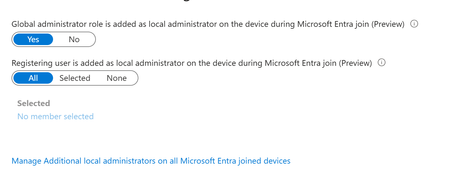
Stumbled on a tenant with 'JOIN' available for all users. Haven't worked with this much - most tenants I see only have registration. But then I noticed the horrifying 'Registering user is added as local administrator on the device during Microsoft Entra join' option was ALSO set to ALL. This is a tenant we just took on, but I've never seen that control before. This is terrifying, considering AFAIK, there is no real way for a registering user to know if they're registering or joining. Beneath it is an option to 'Manage Additional local administrators on all Microsoft Entra joined devices', which leads to the Role page for Device Administrators, which is empty. Under Description, this describes what APPEARS to be to be the same thing mentioned in the previous control - 'Users with this role become local machine administrators on all Windows 10 devices that are joined to Microsoft Entra'. But no one is assigned this. Conveniently, on my own tenant, I happened to let someone JOIN yesterday. We have this limited to 2 (now 3) people - most just register... But this user Joined, and the 'Joining user becomes local admin' option was on ALL. But I can't validate that the user ever become local admin. They don't have the role, their device shows as joined, but there's no additional roles. The audit logs don't look weird. They're not in that 'Device Administrators' group, which describes itself as 'Users with this role become local machine administrators on all Windows 10 devices that are joined to Microsoft Entra'. Thoughts? Freaking out, honestly. We have a mix of DC and Cloud users. I've inherited them all, and had the understanding that Join was essentially registration but with Org ownership. I've tried to get some input from Copilot, but he has basically waffled between 'No, this setting is just badly named' and 'no, actually it's this other setting' and 'no, you know what, it all makes sense somehow'. 1. Does that option actually set the joining user as global admin? Is that really the default setting? 2. can you validate this ANYWHERE in Entra? Or does it just disappear? 3. what is that Device Admin group? A separate group, independent of these two settings, that gives local admin? 4. Is there a graph endpoint that can be used to set this? Thanks
MFA Options for Employees without Phones
Hello everbody, we're currently trying to implement MFA in our company, but approximately 1/10 of our employees have a workphone and are not allowed to use their personal phone. Since we also recently introduced Intune, the idea was to just use Windows Hello for Business, but when trying to provision it, we realized that you need to have MFA active for an account to be able to even activate it? Which kinda defeats the purpose. So my question is, is there some way to circumvent the MFA requirement for WHfB? Or what other options do we realistically have? Thanks in Advance!
Unified Catalog Self-serve analytics integration
I'm hoping someone has gone through the process of setting up the Self-serve analytics in the Unified Catalog settings to push the Unified Catalog information down to a Fabric Lakehouse. I created a Workspace, and then created a lakehouse in this workspace, and created a folder under the files section in the lakehouse. I used the MSI that is shown in Purview when you configure the storage for the connection and granted it contriubutor access to the Workspace. I then went into Purview, settings for Unified Catalog, and in the solution integrations, set up Fabric storage and provided the URL to the File folder I set up on the lakehouse. I tested the connection and it tested successfully. When I set up the scheduler to run, I received the following: The blacked out is the Workspace ID. I'm trying to understand what I'm missing, I'm assuming write permissions are missing somewhere, but I'm not sure. Any assistance is appreciated.30Views0likes3Comments
Microsoft Purview PowerShell: Interactive Sign-In Basics + Fixing Common Connect-IPPSSession Errors
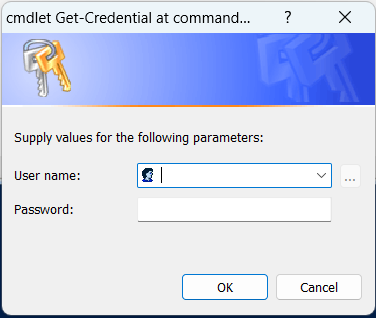
If you’re new to Microsoft Purview PowerShell and your interactive sign-in fails when you run Connect-IPPSSession, you’re not alone. In this post, I’ll walk through the quick setup (module install + connection) and then cover practical fixes for a common authentication failure: “A window handle must be configured” (WAM / MSAL window handle error). Once connected, you can run Purview-related cmdlets for tasks like working with sensitivity labels, DLP policies, eDiscovery, and other compliance operations (depending on your permissions). Step 1: Install the Exchange Online PowerShell module Install-Module ExchangeOnlineManagement Import-Module ExchangeOnlineManagement Step 2: Connect to Microsoft Purview (Security & Compliance) PowerShell For interactive sign-in, you can start with the standard connection pattern below (replace the placeholder with your User Principal Name) Common issue: Interactive sign-in fails with a WAM “window handle” error The ExchangeOnlineManagement module uses modern authentication. In some hosts/environments, the sign-in UI can’t attach to a parent window, so token acquisition fails and you may see the error below. This is commonly associated with WAM (Web Account Manager) / MSAL interactive sign-in. Error Acquiring Token: A window handle must be configured. See https://aka.ms/msal-net-wam#parent-window-handles A window handle must be configured. See https://aka.ms/msal-net-wam#parent-window-handles At C:\Program Files\WindowsPowerShell\Modules\ExchangeOnlineManagement\3.9.2\netFramework\ExchangeOnlineManagement.psm1:591 char:21 + throw $_.Exception.InnerException; + ~~~~~~~~~~~~~~~~~~~~~~~~~~~~~~~~~ + CategoryInfo : OperationStopped: (:) [], MsalClientException + FullyQualifiedErrorId : A window handle must be configured. See https://aka.ms/msal-net-wam#parent-window-handles You’ll often hit this on secured devices, PowerShell ISE, or hardened corporate images. Below are two solutions to bypass this error. Start with the recommended option first. 1. Recommended workaround: Use Get-Credential without disabling WAM This approach avoids the WAM-based interactive prompt. You’ll be asked for credentials via a standard PowerShell credential dialog, and the module will complete modern authentication. $cred = Get-Credential Connect-IPPSSession -Credential $cred A credential prompt appears: Enter your username and password. After authentication, you should be connected to the Security & Compliance (Microsoft Purview) PowerShell session. As a quick validation, try a lightweight cmdlet such as Get-Label or Get-DlpCompliancePolicy (availability depends on permissions). If this works in your environment, it’s a simple way to proceed without changing system-wide WAM behavior. 2. Alternative workaround: Disable WAM for the session (use with caution) If the interactive UI is failing, you can try disabling WAM. Newer versions of the ExchangeOnlineManagement module support a -DisableWAM switch on the connection cmdlets, which bypasses the WAM broker and can avoid the “window handle” failure. Connect-IPPSSession -UserPrincipalName <yourUPN> -DisableWAM If you can’t use -DisableWAM or if it is not working as expected (or you’re troubleshooting a specific host issue), some admins set an environment variable to disable WAM for MSAL using the commands below. Treat this as a temporary troubleshooting step and follow your organization’s security guidance. $env:MSAL_DISABLE_WAM = "1" setx MSAL_DISABLE_WAM 1 Important warning! Changing authentication/broker behavior can have security and supportability implications. Use this only for troubleshooting and revert when you’re done using the following commands. $env:MSAL_DISABLE_WAM = "0" setx MSAL_DISABLE_WAM 0 Quick summary If you’re scripting for Microsoft Purview and interactive sign-in fails due to the WAM “window handle” error, try the sequence below. Install-Module ExchangeOnlineManagement Import-Module ExchangeOnlineManagement $cred = Get-Credential Connect-IPPSSession -Credential $cred Hope this helps! If you’ve hit this in a specific host (PowerShell ISE vs Windows PowerShell vs PowerShell 7, RDP/jump box, etc.), share what worked for you in the comments. Thanks for reading. Happy Scripting! Reference: Connect to Security & Compliance PowerShell | Microsoft Learn143Views3likes2CommentsPurview DLP Behaviours in Outlook Desktop
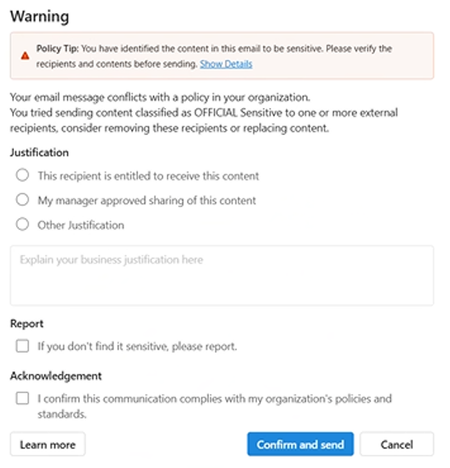
We are currently testing Microsoft Purview DLP policies for user awareness, where sensitive information shared externally triggers a policy tip, with override allowed (justification options enabled) and no blocking action configured. We are observing the following behaviours in Outlook Desktop: Inconsistent policy tip display (across Outlook Desktop Windows clients) – For some users, the policy tip renders correctly, while for others it appears with duplicated/stacked lines of text. This is occurring across users with similar configurations. Override without justification – Users are able to click “Send Anyway/Confirm and send” without selecting any justification option (e.g. business justification, manager approval, etc.), which bypasses the intended control. New Outlook: Classic Outlook: This has been observed on Outlook Desktop (Microsoft 365 Apps), including: Version 2602 (Build 19725.20170 Click-to-Run) Version 2602 (Build 16.0.19725.20126 MSO) Has anyone experienced similar behaviour with DLP policy tips or override enforcement in Outlook Desktop? Keen to understand if this is a known issue or if there are any recommended fixes or workarounds.
Enable per‑user language selection for phishing simulation emails and landing pages
We use Attack Simulation Training to deliver phishing simulations to a global, multilingual user base. While Microsoft Defender supports multi‑language content, phishing simulation emails and landing pages are currently delivered in a single selected language per campaign. We are requesting a feature that allows phishing simulation emails and associated landing pages (including credential‑harvest pages) to automatically render in each user’s preferred language, based on: Outlook mailbox language settings, and/or Microsoft Entra ID user language preferences This capability would: Improve realism and accuracy of phishing simulations Ensure users experience simulations in the same language they normally work in Improve behavioral measurement in global organizations Reduce the need to create and manage multiple parallel simulations by language Providing consistent, per‑user language alignment across simulation emails, landing pages, and follow‑up training would significantly enhance the effectiveness of Attack Simulation Training for large, multilingual enterprises.
Purview Access Policy - Privacy reviewer
Hey all, I am setting up access policies for data products under un PurView, and I expected to allocate a privacy reviewer, but this is not the case. There is only a checkbox showing that a compliance review is required. Why is the privacy reviewer chosen by the data consumer in the request access form? Does it mean that the consumer can choose whomever they see fit? Or is there a different place to set up the compliance reviewers? Thanks, Zoltan326Views2likes2CommentsPurview EXPORTS unreliable and missing "Top-of-information-store" folder
Has anyone noticed an issue where the exported PST files are either empty or missing folders? I don't normally check every PST file that I export, but after hearing from customers that there are either no emails or missing folders, I started to check after each export. I am noticing that the Seach and Export process seems to be fine and the Downloaded PST file show the correct size, but when i open the PST files, I'm seeing that they contain no emails OR they are missing folders - including the "Top-of-information-store" folder. When i look at the Properties > Folder Size settings, i can see that the PST file thinks that all the folders are there. This is incredibly tough to work with since I am now checking each PST file and then having to rerun the search/export/download all over again. It's been like this for about 3 weeks.272Views0likes6CommentsEnable automatic per‑user language selection for Defender training modules
We use Attack Simulation Training and Microsoft Defender training modules as part of our security awareness program for a global audience. Currently, training content is assigned in a single language per campaign, even though users already have preferred language settings defined in Outlook and Microsoft Entra ID (Azure AD). This creates challenges for multinational organizations and often requires duplicating campaigns or accepting that some users receive training in a non‑preferred language. We are requesting a capability that allows Defender training modules to automatically display in each user’s preferred language, based on: Outlook mailbox language settings, and/or Microsoft Entra ID user language preferences Enabling per‑user language selection would: Improve comprehension and learning outcomes Increase training effectiveness for non‑native speakers Reduce administrative overhead and duplicated campaigns Align Defender training with existing Microsoft 365 localization behavior Defender already supports training content in multiple languages. Allowing dynamic language delivery per user would significantly improve scalability and usability for enterprise security awareness programs.
Endpoint DLP Collection Evidence on Devices
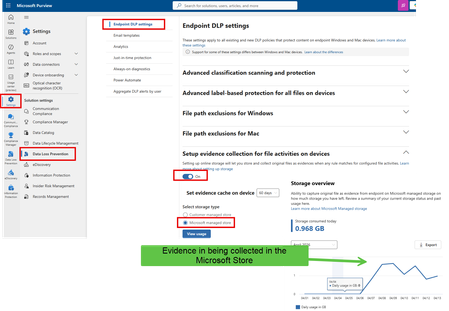
Hello team, I am trying to setup the feature collect evidence when endpoint DLP match. Official feature documentation: https://learn.microsoft.com/en-us/purview/dlp-copy-matched-items-learn https://learn.microsoft.com/en-us/purview/dlp-copy-matched-items-get-started unfortunately, it is not working as described in the official documentation, I opened ticket with Microsoft support and MIcrosoft Service Hub, Unfortunatetly, they don't know how to setup it, or they are unable to solve the issue. Support ticket: TrackingID#26040XXXXXXX9201 Service Hub ticket: https://support.serviceshub.microsoft.com/supportforbusiness/onboarding?origin=/supportforbusiness/create TrackingID#26040XXXXXXXX924 I follow the steps to configure: based on the Microsoft documentation, I should be able to see the evidence in Activity explorer or Purview DLP alert or Defender Alerts/Incidents.Kerberos and the End of RC4: Protocol Hardening and Preparing for CVE‑2026‑20833
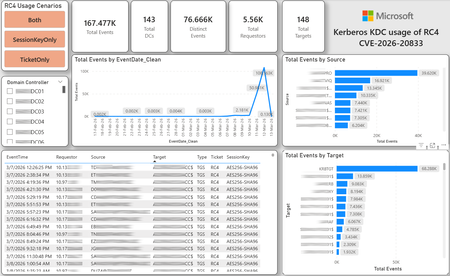
CVE-2026-20833 addresses the continued use of the RC4‑HMAC algorithm within the Kerberos protocol in Active Directory environments. Although RC4 has been retained for many years for compatibility with legacy systems, it is now considered cryptographically weak and unsuitable for modern authentication scenarios. As part of the security evolution of Kerberos, Microsoft has initiated a process of progressive protocol hardening, whose objective is to eliminate RC4 as an implicit fallback, establishing AES128 and AES256 as the default and recommended algorithms. This change should not be treated as optional or merely preventive. It represents a structural change in Kerberos behavior that will be progressively enforced through Windows security updates, culminating in a model where RC4 will no longer be implicitly accepted by the KDC. If Active Directory environments maintain service accounts, applications, or systems dependent on RC4, authentication failures may occur after the application of the updates planned for 2026, especially during the enforcement phases introduced starting in April and finalized in July 2026. For this reason, it is essential that organizations proactively identify and eliminate RC4 dependencies, ensuring that accounts, services, and applications are properly configured to use AES128 or AES256 before the definitive changes to Kerberos protocol behavior take effect. Official Microsoft References CVE-2026-25177 - Security Update Guide - Microsoft - Active Directory Domain Services Elevation of Privilege Vulnerability Microsoft Support – How to manage Kerberos KDC usage of RC4 for service account ticket issuance changes related to CVE-2026-20833 (KB 5073381) Microsoft Learn – Detect and Remediate RC4 Usage in Kerberos AskDS – What is going on with RC4 in Kerberos? Beyond RC4 for Windows authentication | Microsoft Windows Server Blog So, you think you’re ready for enforcing AES for Kerberos? | Microsoft Community Hub Risk Associated with the Vulnerability When RC4 is used in Kerberos tickets, an authenticated attacker can request Service Tickets (TGS) for valid SPNs, capture these tickets, and perform offline brute-force attacks, particularly Kerberoasting scenarios, with the goal of recovering service account passwords. Compared to AES, RC4 allows significantly faster cracking, especially for older accounts or accounts with weak passwords. Technical Overview of the Exploitation In simplified terms, the exploitation flow occurs as follows: The attacker requests a TGS for a valid SPN. The KDC issues the ticket using RC4, when that algorithm is still accepted. The ticket is captured and analyzed offline. The service account password is recovered. The compromised account is used for lateral movement or privilege escalation. Official Timeline Defined by Microsoft Important clarification on enforcement behavior Explicit account encryption type configurations continue to be honored even during enforcement mode. The Kerberos hardening associated with CVE‑2026‑20833 focuses on changing the default behavior of the KDC, enforcing AES-only encryption for TGS ticket issuance when no explicit configuration exists. This approach follows the same enforcement model previously applied to Kerberos session keys in earlier security updates (for example, KB5021131 related to CVE‑2022‑37966), representing another step in the progressive removal of RC4 as an implicit fallback. January 2026 – Audit Phase Starting in January 2026, Microsoft initiated the Audit Phase related to changes in RC4 usage within Kerberos, as described in the official guidance associated with CVE-2026-20833. The primary objective of this phase is to allow organizations to identify existing RC4 dependencies before enforcement changes are applied in later phases. During this phase, no functional breakage is expected, as RC4 is still permitted by the KDC. However, additional auditing mechanisms were introduced, providing greater visibility into how Kerberos tickets are issued in the environment. Analysis is primarily based on the following events recorded in the Security Log of Domain Controllers: Event ID 4768 – Kerberos Authentication Service (AS request / Ticket Granting Ticket) Event ID 4769 – Kerberos Service Ticket Operations (Ticket Granting Service – TGS) Additional events related to the KDCSVC service These events allow identification of: the account that requested authentication the requested service or SPN the source host of the request the encryption algorithm used for the ticket and session key This information is critical for detecting scenarios where RC4 is still being implicitly used, enabling operations teams to plan remediation ahead of the enforcement phase. If these events are not being logged on Domain Controllers, it is necessary to verify whether Kerberos auditing is properly enabled. For Kerberos authentication events to be recorded in the Security Log, the corresponding audit policies must be configured. The minimum recommended configuration is to enable Success auditing for the following subcategories: Kerberos Authentication Service Kerberos Service Ticket Operations Verification can be performed directly on a Domain Controller using the following commands: auditpol /get /subcategory:"Kerberos Service Ticket Operations" auditpol /get /subcategory:"Kerberos Authentication Service" In enterprise environments, the recommended approach is to apply this configuration via Group Policy, ensuring consistency across all Domain Controllers. The corresponding policy can be found at: Computer Configuration - Policies - Windows Settings - Security Settings - Advanced Audit Policy Configuration - Audit Policies - Account Logon Once enabled, these audits record events 4768 and 4769 in the Domain Controllers’ Security Log, allowing analysis tools—such as inventory scripts or SIEM/Log Analytics queries—to accurately identify where RC4 is still present in the Kerberos authentication flow. April 2026 – Enforcement with Manual Rollback With the April 2026 update, the KDC begins operating in AES-only mode (0x18) when the msDS-SupportedEncryptionTypes attribute is not defined. This means RC4 is no longer accepted as an implicit fallback. During this phase, applications, accounts, or computers that still implicitly depend on RC4 may start failing. Manual rollback remains possible via explicit configuration of the attribute in Active Directory. July 2026 – Final Enforcement Starting in July 2026, audit mode and rollback options are removed. RC4 will only function if explicitly configured—a practice that is strongly discouraged. This represents the point of no return in the hardening process. Official Monitoring Approach Microsoft provides official scripts in the repository: https://github.com/microsoft/Kerberos-Crypto/tree/main/scripts The two primary scripts used in this analysis are: Get-KerbEncryptionUsage.ps1 The Get-KerbEncryptionUsage.ps1 script, provided by Microsoft in the Kerberos‑Crypto repository, is designed to identify how Kerberos tickets are issued in the environment by analyzing authentication events recorded on Domain Controllers. Data collection is primarily based on: Event ID 4768 – Kerberos Authentication Service (AS‑REQ / TGT issuance) Event ID 4769 – Kerberos Service Ticket Operations (TGS issuance) From these events, the script extracts and consolidates several relevant fields for authentication flow analysis: Time – when the authentication occurred Requestor – IP address or host that initiated the request Source – account that requested the ticket Target – requested service or SPN Type – operation type (AS or TGS) Ticket – algorithm used to encrypt the ticket SessionKey – algorithm used to protect the session key Based on these fields, it becomes possible to objectively identify which algorithms are being used in the environment, both for ticket issuance and session establishment. This visibility is essential for detecting RC4 dependencies in the Kerberos authentication flow, enabling precise identification of which clients, services, or accounts still rely on this legacy algorithm. Example usage: .\Get-KerbEncryptionUsage.ps1 -Encryption RC4 -Searchscope AllKdcs | Export-Csv -Path .\KerbUsage_RC4_All_ThisDC.csv -NoTypeInformation -Encoding UTF8 Data Consolidation and Analysis In enterprise environments, where event volumes may be high, it is recommended to consolidate script results into analytical tools such as Power BI to facilitate visualization and investigation. The presented image illustrates an example dashboard built from collected results, enabling visibility into: Total events analyzed Number of Domain Controllers involved Number of requesting clients (Requestors) Most frequently involved services or SPNs (Targets) Temporal distribution of events RC4 usage scenarios (Ticket, SessionKey, or both) This type of visualization enables rapid identification of RC4 usage patterns, remediation prioritization, and progress tracking as dependencies are eliminated. Additionally, dashboards help answer key operational questions, such as: Which services still depend on RC4 Which clients are negotiating RC4 for sessions Which Domain Controllers are issuing these tickets Whether RC4 usage is decreasing over time This combined automated collection + analytical visualization approach is the recommended strategy to prepare environments for the Microsoft changes related to CVE‑2026‑20833 and the progressive removal of RC4 in Kerberos. Visualizing Results with Power BI To facilitate analysis and monitoring of RC4 usage in Kerberos, it is recommended to consolidate script results into a Power BI analytical dashboard. 1. Install Power BI Desktop Download and install Power BI Desktop from the official Microsoft website 2. Execute data collection After running the Get-KerbEncryptionUsage.ps1 script, save the generated CSV file to the following directory: C:\Temp\Kerberos_KDC_usage_of_RC4_Logs\KerbEncryptionUsage_RC4.csv 3. Open the dashboard in Power BI Open the file RC4-KerbEncryptionUsage-Dashboards.pbix using Power BI Desktop. If you are interested, please leave a comment on this post with your email address, and I will be happy to share with you. 4. Update the data source If the CSV file is located in a different directory, it will be necessary to adjust the data source path in Power BI. As illustrated, the dashboard uses a parameter named CsvFilePath, which defines the path to the collected CSV file. To adjust it: Open Transform Data in Power BI. Locate the CsvFilePath parameter in the list of Queries. Update the value to the directory where the CSV file was saved. Click Refresh Preview or Refresh to update the data. Click Home → Close & Apply. This approach allows rapid identification of RC4 dependencies, prioritization of remediation actions, and tracking of progress throughout the elimination process. List-AccountKeys.ps1 This script is used to identify which long-term keys are present on user, computer, and service accounts, enabling verification of whether RC4 is still required or whether AES128/AES256 keys are already available. Interpreting Observed Scenarios Microsoft recommends analyzing RC4 usage by jointly considering two key fields present in Kerberos events: Ticket Encryption Type Session Encryption Type Each combination represents a distinct Kerberos behavior, indicating the source of the issue, risk level, and remediation point in the environment. In addition to events 4768 and 4769, updates released starting January 13, 2026, introduce new Kdcsvc events in the System Event Log that assist in identifying RC4 dependencies ahead of enforcement. These events include: Event ID 201 – RC4 usage detected because the client advertises only RC4 and the service does not have msDS-SupportedEncryptionTypes defined. Event ID 202 – RC4 usage detected because the service account does not have AES keys and the msDS-SupportedEncryptionTypes attribute is not defined. Event ID 203 – RC4 usage blocked (enforcement phase) because the client advertises only RC4 and the service does not have msDS-SupportedEncryptionTypes defined. Event ID 204 – RC4 usage blocked (enforcement phase) because the service account does not have AES keys and msDS-SupportedEncryptionTypes is not defined. Event ID 205 – Detection of explicit enablement of insecure algorithms (such as RC4) in the domain policy DefaultDomainSupportedEncTypes. Event ID 206 – RC4 usage detected because the service accepts only AES, but the client does not advertise AES support. Event ID 207 – RC4 usage detected because the service is configured for AES, but the service account does not have AES keys. Event ID 208 – RC4 usage blocked (enforcement phase) because the service accepts only AES and the client does not advertise AES support. Event ID 209 – RC4 usage blocked (enforcement phase) because the service accepts only AES, but the service account does not have AES keys. https://support.microsoft.com/en-gb/topic/how-to-manage-kerberos-kdc-usage-of-rc4-for-service-account-ticket-issuance-changes-related-to-cve-2026-20833-1ebcda33-720a-4da8-93c1-b0496e1910dc They indicate situations where RC4 usage will be blocked in future phases, allowing early detection of configuration issues in clients, services, or accounts. These events are logged under: Log: System Source: Kdcsvc Below are the primary scenarios observed during the analysis of Kerberos authentication behavior, highlighting how RC4 usage manifests across different ticket and session encryption combinations. Each scenario represents a distinct risk profile and indicates specific remediation actions required to ensure compliance with the upcoming enforcement phases. Scenario A – RC4 / RC4 In this scenario, both the Kerberos ticket and the session key are issued using RC4. This is the worst possible scenario from a security and compatibility perspective, as it indicates full and explicit dependence on RC4 in the authentication flow. This condition significantly increases exposure to Kerberoasting attacks, since RC4‑encrypted tickets can be subjected to offline brute-force attacks to recover service account passwords. In addition, environments remaining in this state have a high probability of authentication failure after the April 2026 updates, when RC4 will no longer be accepted as an implicit fallback by the KDC. Events Associated with This Scenario During the Audit Phase, this scenario is typically associated with: Event ID 201 – Kdcsvc Indicates that: the client advertises only RC4 the service does not have msDS-SupportedEncryptionTypes defined the Domain Controller does not have DefaultDomainSupportedEncTypes defined This means RC4 is being used implicitly. This event indicates that the authentication will fail during the enforcement phase. Event ID 202 – Kdcsvc Indicates that: the service account does not have AES keys the service does not have msDS-SupportedEncryptionTypes defined This typically occurs when: legacy accounts have never had their passwords reset only RC4 keys exist in Active Directory Possible Causes Common causes include: the originating client (Requestor) advertises only RC4 the target service (Target) is not explicitly configured to support AES the account has only legacy RC4 keys the msDS-SupportedEncryptionTypes attribute is not defined Recommended Actions To remediate this scenario: Correctly identify the object involved in the authentication flow, typically: a service account (SPN) a computer account or a Domain Controller computer object Verify whether the object has AES keys available using analysis tools or scripts such as List-AccountKeys.ps1. If AES keys are not present, reset the account password, forcing generation of modern cryptographic keys (AES128 and AES256). Explicitly define the msDS-SupportedEncryptionTypes attribute to enable AES support. Recommended value for modern environments: 0x18 (AES128 + AES256) = 24 As illustrated below, this configuration can be applied directly to the msDS-SupportedEncryptionTypes attribute in Active Directory. AES can also be enabled via Active Directory Users and Computers by explicitly selecting: This account supports Kerberos AES 128 bit encryption This account supports Kerberos AES 256 bit encryption These options ensure that new Kerberos tickets are issued using AES algorithms instead of RC4. Temporary RC4 Usage (Controlled Rollback) In transitional scenarios—during migration or troubleshooting—it may be acceptable to temporarily use: 0x1C (RC4 + AES) = 28 This configuration allows the object to accept both RC4 and AES simultaneously, functioning as a controlled rollback while legacy dependencies are identified and corrected. However, the final objective must be to fully eliminate RC4 before the final enforcement phase in July 2026, ensuring the environment operates exclusively with AES128 and AES256. Scenario B – AES / RC4 In this case, the ticket is protected with AES, but the session is still negotiated using RC4. This typically indicates a client limitation, legacy configuration, or restricted advertisement of supported algorithms. Events Associated with This Scenario During the Audit Phase, this scenario may generate: Event ID 206 Indicates that: the service accepts only AES the client does not advertise AES in the Advertised Etypes In this case, the client is the issue. Recommended Action Investigate the Requestor Validate operating system, client type, and advertised algorithms Review legacy GPOs, hardening configurations, or settings that still force RC4 For Linux clients or third‑party applications, review krb5.conf, keytabs, and Kerberos libraries Scenario C – RC4 / AES Here, the session already uses AES, but the ticket is still issued using RC4. This indicates an implicit RC4 dependency on the Target or KDC side, and the environment may fail once enforcement begins. Events Associated with This Scenario This scenario may generate: Event ID 205 Indicates that the domain has explicit insecure algorithm configuration in: DefaultDomainSupportedEncTypes This means RC4 is explicitly allowed at the domain level. Recommended Action Correct the Target object Explicitly define msDS-SupportedEncryptionTypes with 0x18 = 24 Revalidate new ticket issuance to confirm full migration to AES / AES Conclusion CVE‑2026‑20833 represents a structural change in Kerberos behavior within Active Directory environments. Proper monitoring is essential before April 2026, and the msDS-SupportedEncryptionTypes attribute becomes the primary control point for service accounts, computer accounts, and Domain Controllers. July 2026 represents the final enforcement point, after which there will be no implicit rollback to RC4.Purview Graph API
Hello. I'm trying to find information on the Purview Graph API and it's endpoints. It looks like the endpoints aren't posted publicly and are listed within an admin console. Can someone help me with how to view the endpoints? Also, are the graph API endpoints capable of reading and creating assets into Purview?Solved48Views0likes1CommentMicrosoft Defender VPN - Android Auto Communication error 21
Hi, Using Microsoft Defender for Endpoint VPN (com.microsoft.scmx) has caused connection issues with Android Auto, (See attached image) and users cannot get it to load. The only way it seems to get this to work is to turn off the VPN which we do not want to do as its an intuned corporate device which we want to have VPN always working on the device for security reasons. Has anyone got any solution? Users receive the following error: Communication error 21 - Being connected to a VPN may prevent Android Auto from starting. If you're using a VPN, turn it off and try reconnecting to Android Auto. Thanks, Mark9.5KViews0likes5Comments
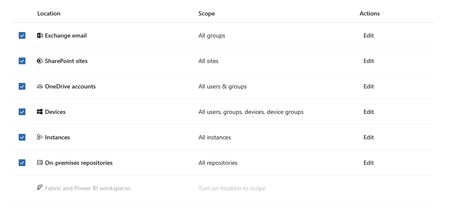
Microsoft 365 Copilot not showing up as location in DLP
Hi, I am working on implementing security measures for Microsoft Copilot in a client environment. I want to create a DLP policy to not process data with certain sensitivity labels but when I go into DLP to create the policy, the location for Microsoft 365 Copilot is not an option. I also noticed that the "Fabric and Power BI workspaces: location is also not available. I have checked other similar client M365 tenants, and both of these locations are available by default. Any insight would be appreciated.591Views0likes5CommentsSentinel RBAC in the Unified portal: who has activated Unified RBAC, and how did it go?
Following the RSAC 2026 announcements last month, I have been working through the full permission picture for the Unified portal and wanted to open a discussion here given how much has shifted in a short period. A quick framing of where things stand. The baseline is still that Azure RBAC carries across for Sentinel SIEM access when you onboard, no changes required. But there are now two significant additions in public preview: Unified RBAC for Sentinel SIEM itself (extending the Defender Unified RBAC model to cover Sentinel directly), and a new Defender-native GDAP model for non-CSP organisations managing delegated access across tenants. The GDAP piece in particular is worth discussing carefully, because I want to be precise about what has and has not changed. The existing limitation from Microsoft's onboarding documentation, that GDAP with Azure Lighthouse is not supported for Sentinel data in the Defender portal, has not changed. What is new is a separate, Defender-portal-native GDAP mechanism announced at RSAC, which is a different thing. These are not the same capability. If you were using Entra B2B as the interim path based on earlier guidance, that guidance was correct and that path remains the generally available option today. A few things I would genuinely like to hear from practitioners: For those who have activated Unified RBAC for a Sentinel workspace in the Defender portal: what did the migration from Azure RBAC roles look like in practice? Did the import function bring roles across cleanly, or did you find gaps particularly around custom roles? For environments using Playbook Operator, Automation Contributor, or Workbook Contributor role assignments: how are you handling the fact those three roles are not yet in Unified RBAC and still require Azure portal management? Is the dual-management posture creating operational friction? For MSSPs evaluating the new Defender-native GDAP model against their existing Entra B2B setup: what factors are driving the decision either way at your scale? Writing this up as Part 3 of the migration series and the community experience here is directly useful for making sure the practitioner angle is grounded.
How to remove/modify a sensitivity label for many SharePoint documents?
We would like to implement Purview sensitivity labels for our SharePoint sites. We would like to use auto labeling. Before we start the implementation, we would like to test some rollback scenario. How to remove/modify a sensitivity label for many SharePoint documents?Solved265Views0likes6CommentsHow to identify users handling SITs before purchasing Microsoft Purview licenses?
Posting this on behalf of a customer we are currently advising as a Microsoft Partner. The customer is in the evaluation stage of Microsoft Purview and has raised a licensing concern that we would like the community's guidance on. CUSTOMER'S CONCERN Purview licenses are user-based, meaning every user who directly or indirectly benefits from the service needs to be licensed. However, to determine which users actually handle sensitive data (and therefore require a license), tools like Content Explorer and Activity Explorer are needed — both of which require an E5 or equivalent license to access in the first place. This creates a chicken-and-egg problem for the customer: They need Purview to identify who handles sensitive data, but they need to know who handles sensitive data to decide how many Purview licenses to buy. QUESTIONS ON BEHALF OF THE CUSTOMER 1. Is there an official Microsoft-supported mechanism or tool that allows customers to assess their SIT exposure and identify affected users before committing to a full Purview license purchase? 2. Is it viable for the customer to purchase a single license (1 qty) assigned to an admin account to perform a tenant-wide scoping and discovery exercise — and would that single license provide sufficient access to identify all users handling SITs across the tenant? 3. If the 90-day Purview E5 trial is the recommended path, does Content Explorer automatically scan and surface SIT matches across all users in the tenant without requiring any pre-configured DLP policies or sensitivity labels to be set up first? As a partner, we want to ensure we are guiding our customer toward the correct pre-purchase assessment approach before recommending a licensing SKU and quantity. Any guidance from the community or Microsoft would be greatly appreciated.SolvedPurview DLP Behaviours in SharePoint and OneDrive
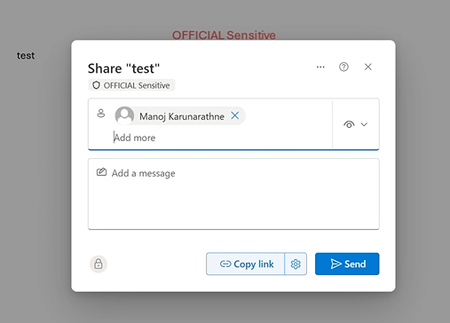
We are currently testing Microsoft Purview DLP policies for user awareness across SharePoint Online, and OneDrive. The policy is configured such that sensitive information (based on a sensitivity label-OFFICIAL Sensitive) shared externally triggers a policy tip, with override allowed (justification options enabled) and no blocking action configured. In SharePoint Online and OneDrive, users are not experiencing any DLP-related behaviour. When attempting to share labelled content externally: No policy tips are displayed No override prompts are presented No indication of DLP enforcement is shown Users are able to share content externally without any awareness prompt or restriction. Expected behaviour: Users should receive a policy tip during the sharing process Users should be prompted for justification when overriding, aligned with the DLP configuration Has anyone observed similar behaviour with DLP in SharePoint Online and OneDrive, particularly in scenarios where no blocking action is configured? Keen to understand if this is expected behaviour, a known limitation, or if there are any configuration considerations or workarounds to achieve a consistent user experience across workloads.98Views1like4CommentsPurview Integration during Merger and Acquisitions
a { text-decoration: none; color: #464feb; } tr th, tr td { border: 1px solid #e6e6e6; } tr th { background-color: #f5f5f5; } Hello, We are currently in the process of merging with two other organizations and are looking to integrate our Microsoft Purview environments. All three organizations have different sensitivity labeling schemes, and we would like guidance on the best approach to achieve a unified labeling strategy across the merged organization. Specifically, should we create a new, common set of sensitivity labels for the combined organization and plan a phased transition for users? One of the organizations already has the majority of its documents labeled, so maintaining those existing labels during the merger is a key concern. We are also looking for best practices to ensure that existing labels are preserved when the two additional organizations are onboarded into Purview, while still moving toward a consistent, unified labeling framework. Any suggestions or if any one had already been a part of such a merger, please share your experience93Views0likes8CommentsSensitivity Labels and CoPilot - "No AI"
As a Purview Administrator, I recently received a request that might resonate with many of you: add a “No AI” designation to every sublabel we have. Why? Because our contracts and EULAs explicitly state that certain documents must not be used with AI tools. This raises an important question: What’s the best way to implement this without creating unnecessary complexity? The Challenge If we simply append “NoAI” to every existing label and sublabel, we end up duplicating our entire labeling structure. For example, if you follow Microsoft’s guidance on default sensitivity labels and policies, doing this “times two” for every label and sublabel is clearly not scalable. How do you deploy it? Best regards Stephan202Views2likes2Comments





Events

Purview Lightning Talks Join the Microsoft Security Community for Purview Lightning Talks; quick technical sessions delivered by the community, for the community.
You’ll pick up practical Pu...
Thursday, Apr 30, 2026, 08:00 AM PDTOnline
1like
15Attendees
0Comments
