Accounting reconciliation is the process of comparing balances in your books with external records to ensure they match. These records can include bank statements, credit card statements, or customer and supplier balances. The goal is to confirm that all transactions are recorded completely and correctly, and that any differences are identified and resolved.
In this guide, you’ll learn how reconciliation works across key accounts, with step-by-step examples and how to apply each process in QuickBooks Online.
Bank account reconciliation
Bank account reconciliation is the process of matching what your books say is in the bank with what your bank statement shows. The goal is to make sure both records reflect the same balance after accounting for timing differences. Differences in book and bank balances don’t immediately mean you did a poor job in accounting.
This process matters because it helps prevent overdrafts, catch missing or duplicate transactions, and keep your cash balance accurate. Without reconciliation, your recorded cash balance will not match your bank statement. This makes it harder to identify which transactions are missing, duplicated, or still pending, and leaves discrepancies unresolved.
Consider a café owner whose books show $50,000 at month-end, while the bank statement shows $51,000. The reconciliation process starts by gathering the bank statement and the bookkeeping report for that same period.
Now, here’s how I would reconcile those accounts:
- Start by matching the transactions that appear in both records, such as daily sales deposits and supplier payments, and mark those as cleared.
- After matching, let’s assume I found certain items:
- Checks issued for $3,000 have not yet cleared the bank
- The bank statement charged a $500 service fee and $1,500 in interest charges that were not yet recorded in the books.
| Book | Bank | |
|---|---|---|
| Unadjusted balances | $50,000 | $51,000 |
| Outstanding checks | ($3,000) | |
| Bank service fee | ($500) | |
| Interest charges | ($1,500) | |
| Adjusted balance | $48,000 | $48,000 |
At this point, the difference is fully explained, and the adjusted balances now match. The initial gap appears to be only $1,000, but the breakdown shows separate issues on both sides.
The book balance is overstated by $2,000 due to unrecorded charges, while the bank side reflects $3,000 in outstanding checks that have not yet cleared. This shows that reconciliation does more than compare two balances. It identifies the specific items causing the difference and explains how each side is affected.
In QuickBooks Online, the reconciliation screen is where you match your recorded transactions with your bank statement to confirm that both balances agree.
The process starts by entering the statement ending balance and date from your bank statement. QuickBooks then compares this against your cleared balance, which is based on the transactions already recorded in your books.
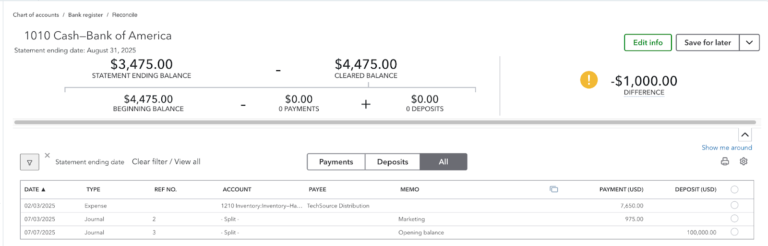
From there, you go through the list of transactions and mark each one that appears on the bank statement. These are considered “cleared” because both your books and the bank recognize them.
As you check off transactions, QuickBooks continuously updates the difference between your recorded balance and the statement balance. The goal is to bring this difference down to zero.
If there is a remaining difference, it means:
- Some transactions are missing from your books
- Some entries were recorded incorrectly (wrong amount or duplicate)
- Some items on your books have not yet cleared the bank
You then investigate and correct these items by adding missing transactions or fixing errors. Once all differences are resolved and the balance matches the statement, you can complete the reconciliation.
Credit card reconciliation
Credit card reconciliation ensures that the balance and transactions recorded in your books match your monthly credit card statement. It confirms that all charges, refunds, and payments are captured correctly.
It also helps identify charges made on the card without authorization, which happens in many businesses. Any unfamiliar transaction that appears on the statement but is not in your records can be flagged and investigated immediately.
For example, a marketing agency uses a credit card for operational expenses. The statement shows $20,000 due, while the books show $15,000. Initially, I’d see that as either an unrecorded or unapproved transaction. Here’s how I’d reconcile:
- I compare each transaction on the credit card statement with the entries in the books by reviewing expense records, receipts, and accounting reports. The amount and details of each charge must match across all three sources. For example, if the credit card statement shows a $2 charge for coffee, that same $2 charge should appear in the accounting records and be supported by a receipt showing the same amount.
- Transactions that appear in both records are marked as matched, leaving only the unmatched items for review.
- Any transaction that cannot be traced between the two records requires investigation. If a charge appears on the statement but not in the books, it may have been missed during recording, or it may be unauthorized. If a transaction exists in the books but does not appear on the statement, it may not have been processed by the card provider, although this situation occurs less frequently.
For illustrative purposes, let’s say I uncovered the following items.
- The bank charged an annual fee of $400.
- An expense amounting to $100 was entered twice in the books.
- There was an unfamiliar charge on the credit card for meals costing $300. Upon reviewing records, checking whether the charge was fraudulent, and consulting with the managers, the charge was valid but not authorized by the company. The employee will be held liable to pay the amount.
| Credit Card Statement | Credit Card Payable (Books) | |
|---|---|---|
| Balance due | $20,000 | $20,200 |
| Annual fee (a) | $400 | |
| Expense entered twice (b) | ($100) | |
| Unfamiliar charge (c) | $300 | |
| Adjusted balance | $20,000 | $20,000 |
Let’s break down what happened above:
- Transaction A: The annual fee appears on the credit card statement, but was not recorded in the books. An entry is needed to recognize the expense and increase the credit card payable.
- Transaction B: The expense was recorded twice, which caused the credit card payable to be overstated by $100. One of the duplicate entries must be removed to bring the balance down.
- Transaction C: The $300 meal charge appears on the credit card statement and is considered valid by the card provider. However, since it was not authorized by the company, it should not remain as a company expense. The amount is still recorded in the credit card payable, but it is reclassified as a receivable from the employee, which can be recovered through payroll deduction.
This process shows that the difference is not a single issue but a combination of missing, incorrect, or potentially unauthorized entries. Each item must be identified and resolved before the balances align.
In QuickBooks Online, credit card reconciliation focuses on verifying what you owe, not what you have in cash. Instead of tracking inflows and outflows like a bank account, you are confirming that all charges made on the card are properly recorded as liabilities and expenses.
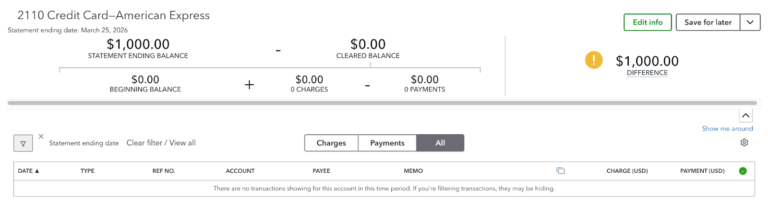
The process starts by entering the statement balance and date from the credit card statement. This represents the total amount owed to the card provider at the end of the period.
You then go through each charge on the statement and confirm that it exists in your books with the correct amount and category. Each charge should tie back to a supporting document, such as a receipt or bill.
Payments are handled differently from expenses. When reviewing them, the focus is on ensuring that payments are recorded as reductions of the credit card balance, not as new expenses. This keeps the liability accurate.
Accounts receivable & customer reconciliation
Accounts receivable reconciliation ensures that the balance and customer details in your books match what customers actually owe you. It confirms that all invoices, payments, and credits are recorded correctly. Reconciling A/R prevents overstating income, missing collections, and misapplied customer payments. It also ensures that customer balances in your records agree with what customers acknowledge.
Say we’re looking at a software developer’s books. The A/R aging reports of Summer Company and Winter Company are as follows: $100,000 and $120,000. The balance of accounts receivable in the general ledger is $500,000.
- Run an accounts receivable aging report to identify outstanding invoices by customer.
- Compare the total A/R balance in the aging report with the A/R control account in the balance sheet.
- Review customer records and match invoices, payments, and credits with supporting documents such as receipts or confirmations.
- Be on the lookout for missing payments, misapplied receipts, duplicate invoices, or incorrect journal entries.
Now, let’s assume I uncovered the following items:
- A payment of $30,000 from Summer Company was recorded in the records of Winter Company.
- An invoice of $20,000 to Summer Company was recorded as $2,000.
- A payment of $40,000 from Winter Company was received but never recorded in the books.
| Accounts Receivable (General Ledger) | Summer Company (Subsidiary record) | Winter Company (Subsidiary records) | |
|---|---|---|---|
| Balances | $500,000 | $100,000 | $120,000 |
| Misapplied payment (a) | $30,000 | ($30,000) | |
| Incorrect entry (b) | $12,000 | $12,000 | |
| Unrecorded payment (c) | ($40,000) | ($40,000) | |
| Adjusted balances | $472,000 | $142,000 | $50,000 |
Here’s the breakdown of what happened:
- Transaction A: The $30,000 payment from Summer Company was applied to Winter Company’s account. This does not affect total A/R, but it misstates individual customer balances. The payment must be reclassified from Winter Company to Summer Company.
- Transaction B: The invoice to Summer Company was recorded as $2,000 instead of $20,000, understating both the customer balance and total A/R by $18,000. An adjustment is required to increase accounts receivable and Summer Company’s balance by $18,000.
- Transaction C: The $40,000 payment from Winter Company was received but not recorded. This overstates both total A/R and Winter Company’s balance. The payment must be recorded to reduce accounts receivable by $40,000.
This example shows that reconciliation identifies both recording errors and posting issues. Differences are not always due to missing invoices. They can also come from incorrect application of payments or entries made outside the proper workflow.
In QuickBooks Online, A/R reconciliation is done directly through the A/R Aging report. You run the Accounts Receivable Aging Detail, then compare its total to the A/R balance in the balance sheet. These should match.
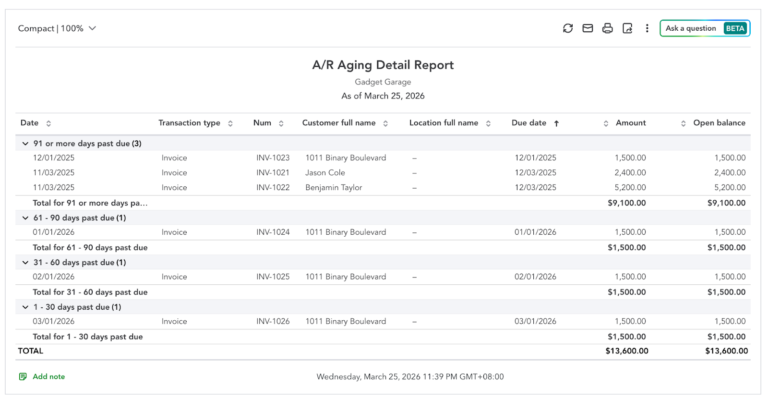
From there, you click into customer balances and review the invoices and payments that make up each total. If something is off, you correct it within the customer transactions by reapplying payments, fixing invoice amounts, or removing incorrect entries.
All adjustments are made through the customer workflow (Invoices and Receive Payment), not journal entries. Once corrected, the aging report updates and should fully align with the general ledger.
Accounts payable & vendor reconciliation
Accounts payable reconciliation ensures that the balance and vendor details in your books match what you actually owe to suppliers. It confirms that all bills, payments, and credits are recorded correctly. Reconciling A/P prevents overpayment, missed bills, and unclaimed vendor credits. It also ensures that vendor balances in your records agree with the supplier’s statement.
Say we’re looking at a construction firm’s books. A supplier sent an account statement showing that the firm owes them $200,000, but the firm’s records show $187,900. So here’s how I’ll do the reconciliation.
- Run an accounts payable aging report to see if there are any unpaid invoices related to the supplier.
- Review the supplier’s records to check if all payments were correctly made while matching this with the supplier’s statement.
- Be on the lookout for unpaid invoices, duplicate invoices, unapplied payments, or timing differences.
Now, let’s assume I uncovered the following items:
- The supplier’s statement includes a $5,000 invoice that does not appear in the books. The invoice was misplaced and was not recorded.
- The books show an invoice recorded at $3,200, but the correct amount based on the supplier’s document is $2,300.
- The supplier’s statement includes an $8,000 invoice for goods that were not delivered. There is no receiving report to support this transaction.
| Supplier’s statement | Supplier’s A/P records (books) | |
|---|---|---|
| Balance due | $200,000 | $187,900 |
| Unrecorded invoice (a) | $5,000 | |
| Erroneous recording (b) | ($900) | |
| Undelivered goods (c) | ($8,000) | |
| Adjusted balance | $192,000 | $192,000 |
Here’s the breakdown of what happened:
- Transaction A: The invoice was not recorded in the books, so the payable is understated. An entry is required to recognize the $5,000 liability in the supplier’s accounts payable balance.
- Transaction B: The invoice was recorded at $3,200 instead of the correct amount of $2,300. The payable must be reduced by $900 to reflect the correct balance.
- Transaction C: The $8,000 invoice relates to goods that were not delivered and has no supporting receiving report. The amount should be disputed with the supplier and excluded from the accounts payable balance until resolved.
This example shows that reconciliation is not limited to correcting internal errors. Differences can also come from the supplier’s side. In this case, the supplier included an $8,000 invoice for goods that were never delivered. Without reconciliation, the construction firm could have paid this amount without verifying the transaction.
In QuickBooks Online, A/P reconciliation centers on the Accounts Payable Aging report, but the focus is on verifying what you owe and whether those obligations are valid. You run the Accounts Payable Aging Detail, then check if its total matches the A/P balance in the balance sheet. If there’s a mismatch, it usually points to entries made outside the vendor workflow.
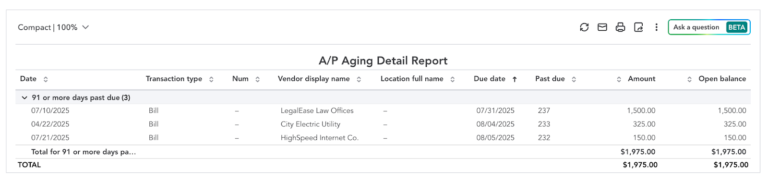
From there, you review vendor balances by checking the open bills listed in the aging report. Each bill should represent a valid obligation supported by a supplier invoice.
How often to reconcile
Reconciliation should be done on a consistent schedule so that differences are identified early and do not accumulate. The shorter the interval, the easier it is to trace issues back to specific transactions.
For the core accounts, a practical schedule looks like this:
- Bank accounts: Weekly reconciliation is useful when there are frequent deposits and payments. Monthly reconciliation is sufficient for lower transaction volume and should align with the bank statement.
- Credit cards: Reconcile based on the credit card statement cycle to capture all charges, fees, and payments for the period.
- Accounts receivable: Regular weekly review helps ensure customer balances are accurate, payments are applied correctly, and overdue accounts are identified early.
- Accounts payable: Weekly or biweekly checks help track outstanding bills, catch missing invoices, and ensure payments are applied to the correct suppliers.
Consistency is more important than frequency. Reconciliation should be performed at the same intervals every period to keep records reliable. Some best practices help maintain accuracy:
- Ensure all balances are verified before finalizing reports for the period.
- Match transactions with statements, invoices, receipts, and confirmations.
- Do not carry unresolved discrepancies into the next period.
- Use proper workflows for A/R and A/P to prevent mismatches between subledgers and the general ledger.
- Accounts with high volume or frequent adjustments should be checked more often.
Frequently asked questions (FAQs)
Account reconciliation ensures that balances in your books match external records such as bank statements, credit card statements, and customer or supplier records. It verifies that all transactions are recorded correctly and completely.
Unreconciled accounts lead to unresolved differences between records. This makes it difficult to identify missing, duplicated, or incorrect transactions and results in unreliable balances.
Reconciliation is complete when the adjusted balance in your books matches the external record, and all differences are identified and supported by specific items such as timing differences or corrections.
Yes, reconciliation can be done manually using spreadsheets and supporting documents. However, accounting software simplifies the process by organizing transactions and providing built-in reconciliation tools.
Each discrepancy should be investigated and traced to a specific cause, such as missing transactions, incorrect amounts, or misapplied entries. Corrections should be recorded immediately with proper documentation.
No, reconciliation is essential for businesses of all sizes. Even small businesses need accurate balances to track cash, manage obligations, and make informed decisions.