A human resources information system (HRIS) gives businesses a centralize place to store staff information, automate core HR functions, run reports, and offer self-service tools for employees and HR staff.
Picking the right platform goes beyond basic recordkeeping. The best HRIS system can save time on administrative work, support key processes like payroll and benefits, and make it easier to track and use employee data.
Many businesses turn to an HRIS when spreadsheets and paper processes start creating more work than they save. It often serves as a company’s first dedicated HR software, and add-on features as the company grows. While HRIS platforms centralize employee data, some come with other tools for leave management, payroll, and time tracking.
Top HRIS platforms
For this guide, I evaluated 11 HRIS software and narrowed them down to my top picks:
Provider
Best for
Starting monthly price
*Pricing is based on a quote we received.
**This is based on pricing information found in Rippling’s small business page. Contact the provider to get a quote.
Featured partners
The HRIS market is booming
According to GrowthMarketReports, the global HRIS software market was valued at $23.1 billion in 2024 and is projected to grow at a 9.7% CAGR through 2033. This rapid growth signals that more businesses are moving away from manual processes and investing in digital HR tools. Companies that adopt early gain a competitive edge in efficiency, compliance, and employee experience and late adopters risk falling behind.
To create this guide, I compared 11 HRIS tools across nine categories: workforce management, HRIS features, payroll, benefits administration, reporting and analytics, platform and interface, pricing, user reviews, and customer support. To ensure consistent comparisons and narrow the list down, I used a rubric where each software was scored across 54 data points.
My choices for the best HRIS systems are based on more than eight years of experience writing about and reviewing HR systems for small to mid-sized businesses (SMBs). I also have 10 years of expertise in handling different facets of human resources, including managing HR software. These allowed me to provide insights to help business owners determine which HR system best fits their needs.
- Mar. 23, 2026: Robie Ann Ferrer updated the pricing information for BambooHR and Deel HR, including the add-on options for Gusto. She enhanced the intro and made small revisions all throughout the article to enhance page readability. She also removed GoCo from the guide given the company’s acquisition by Intuit, where its features will be incorporated into Intuit Enterprise Suite and QuickBooks Payroll (Premium and Elite plans).
- Sep. 5, 2025: Hanna Sillo updated the pricing details for Gusto’s HR resources and priority support, now available under Simple and Plus plans.
- Feb. 18, 2025: Robie Ann Ferrer used a new scoring rubric with criteria that focused on the employee data and workforce management side of HRIS platforms. Paychex Flex and Paycor were added to the rubric, while TriNet HR Platform was removed because TriNet has incorporated it into its HR Plus outsourcing product. Then, she evaluated the newly added software and updated the scores of others on the list. As a result, Gusto replaced Rippling as the best overall. Robie also rewrote most of the article and updated product information, pricing, and key features.
- Sep. 19, 2024: Irene Casucian updated Bamboo HR’s pricing information and adjusted our analysis accordingly.
- Aug. 19, 2024: Kaylyn McKenna expanded the FAQs and added an overview of the benefits of HRIS systems. Kaylyn also updated information regarding countries serviced for vendors and updated the article to reflect that Rippling Unity is now Rippling Platform. Jessica Dennis also added the section “Why you can trust my advice.”
- Jun 21, 2024: Kaiti Norton updated the formatting to highlight Jessica’s expert scores and analysis.
- Apr. 19, 2024: Jessica Dennis updated her evaluation of TriNet Zenefits to reflect its rebranding as TriNet HR Platform. She also revised her analysis of BambooHR Essentials following its subscription tier change to BambooHR Core. Finally, she added sub-criteria ratings for each vendor, corrected the pricing tiers for GoCo, added a screenshot of GoCo’s customizable workspaces, and updated scoring where appropriate.
- Mar. 25, 2024: Jessica Dennis reevaluated our top HRIS choices for 2024 using an objective scoring rubric. She also updated the copy, product information, prices, and key features.
- While this article was in production, TriNet announced that the brand Zenefits no longer exists. BambooHR also changed its subscription plans. As we gather more details on these changes, we will update our analysis to reflect any new features that affect each product’s scores.
- Nov. 14, 2023: Kaiti Norton verified the current pricing information for each vendor and updated Zenefits to reflect the new pricing for its Zen package.
- Oct. 18, 2023: Kaiti Norton removed information about Gusto’s 529 college savings benefits, which the company no longer offers. She also updated some of the formatting elements.
- Aug. 30, 2023: We added videos for BambooHR and GoCo.
- Aug. 21, 2023: We updated some of the formatting elements and verified the current pricing details for each vendor.
- Jul. 26, 2023: We revised the formatting of the article for improved efficiency and visual flow. We also reviewed our choices for accuracy, replaced Cavu Essentials with GoCo, and outlined our methodology.

Gusto: Best HRIS software overall
Overall Score
3.99/5
User reviews
4.64/5
Pricing
3.5/5
Customer support
4/5
Platform and interface
3.88/5
HRIS features
4.33/5
Reporting and analytics
4/5
Payroll features
4.44/5
Benefits administration
3.5/5
Workforce management
3.88/5
What are the perks of using Gusto?
- Payroll, benefits, basic hiring, and onboarding in all plans.
- Access to Gusto-brokered health insurance.
- Global payroll capabilities.
- Customer service is available by phone, email, or chat.
What are the downsides of using Gusto?
- Time tracking, scheduling, and performance reviews are reserved for higher tiers.
- No electronic data interchange (EDI) for easy benefits data transfers to third-party insurers.
- A dedicated account manager is only available with the Premium plan.
Why I chose Gusto
If you’re new to paying employees and also want basic HR tools with your payroll system, Gusto is a great entry point into people management software. The interface is lean and easy to navigate. Besides offering a reasonably priced starter plan, Gusto handles state new hire reporting and has various HR tools to handle the entire employee lifecycle—from hiring to retiring. In my evaluation of the top HRIS systems, Gusto earned an overall score of 3.99 out of 5, with high marks of 3.5 and up in all criteria, mainly due to its feature-rich platform.
Gusto is widely known for its full-service payroll, compliance support, and tax filing services. However, it also offers financial management tools via its Gusto Wallet app and an extensive list of employee benefits plans like medical, dental, vision commuter, 401(k), health savings accounts (HSAs), and flexible spending accounts (FSAs). I appreciate its hiring and onboarding features, which make it easy to transition qualified candidates into new employees. You can create custom onboarding checklists and have your new hires submit documents and complete their Gusto profiles online. It even lets you send virtual cards to welcome new employees—a feature unique to Gusto.
Gusto is a cloud-based HR, payroll, and benefits platform for SMBs. It started out as a payroll company but has expanded its offerings to include time tracking, performance reviews, global contractor payments, and employer of record (EOR) services to help you hire and pay international employees.
As a payroll platform, it automatically calculates wages, deductions, and taxes. It ensures payroll compliance by handling tax remittances and filings at all levels (federal, state, and local). It also keeps track of changing labor laws and tax regulations, so you’re always up to date. With built-in time tracking and time off management tools, you don’t have to input attendance data manually—Gusto will capture the actual work hours for pay processing.
As an HRIS, it stores employee information and documents in a centralized database. It creates an online org chart and company directory based on your employee data. You can also build custom onboarding checklists, add the documents that new hires need to electronically sign or complete, and assign tasks to streamline the onboarding process. You can set due dates for tasks, and its HR automation tools will send reminders so you don’t have to. However, unlike the other HRIS systems on my list, you must upgrade to Gusto’s higher tiers to access online org charts, staff directories, and customization options.
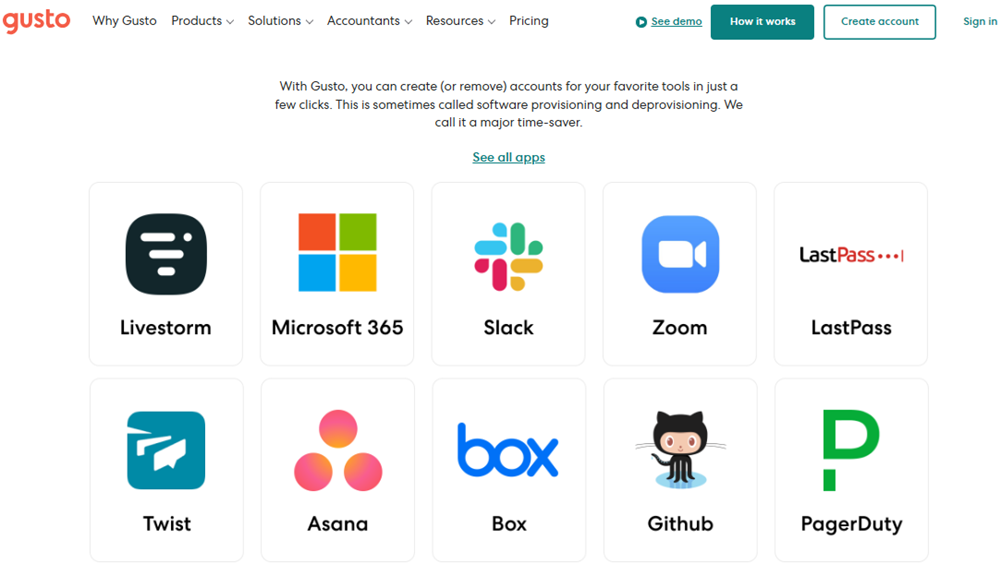
Software provisioning and de-provisioning
Gusto, Deel, and Rippling are the only HRIS platforms on my list that can create, manage, and remove your employees’ access to commonly used business software, such as Slack and Zoom. The only difference is that Rippling has a wider network of partner systems—more than 600; whereas Gusto and Deel only connect with over 150 and 110 apps, respectively.
However, Gusto offers these functionalities in its basic plan. With Rippling and Deel, you have to purchase its IT modules to manage business app access. Gusto also makes it easy to remember to set up new hire software accounts because its standard onboarding template includes a reminder for this.
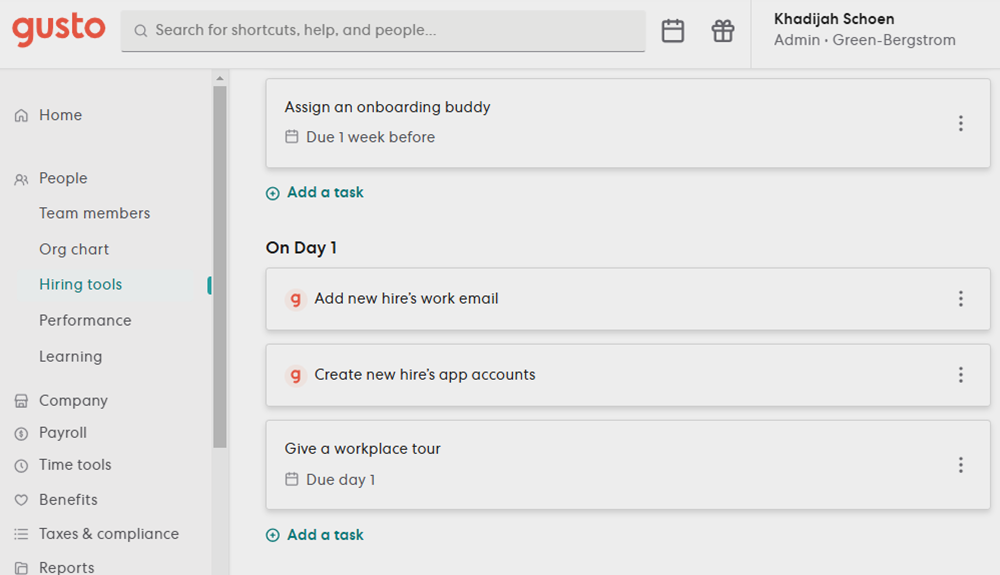
Onboarding checklists
I like how Gusto designed its onboarding checklist. It is segregated into three parts: Before Day 1, On Day 1, and After Day 1. This allows you to create an onboarding strategy with tasks that cover pre-boarding requirements, the first week or month orientation schedule, and planned 30-, 60-, or 90-day check-ins with new employees to get feedback and see how they’re doing.
While the standard template contains basic tasks, you can easily input your own. Plus, Gusto automatically adds the payroll and compliance tasks your new hires need to complete and submit, such as the I-9 and W-4 forms. This saves you time from manually including these requirements in your onboarding checklist and ensures that you don’t miss important new hire forms.
BambooHR may have a similar template, but it’s arranged by tasks and the departments responsible, such as HR and IT. While Rippling has an onboarding checklist you can download for free, it isn’t customizable. Although Rippling lets you build custom tasks to delegate assignments and custom reports to track who completed the onboarding, you have to go to separate modules. With Gusto, you can create tasks, assign the person responsible, and set deadlines, all within its onboarding checklist tool.
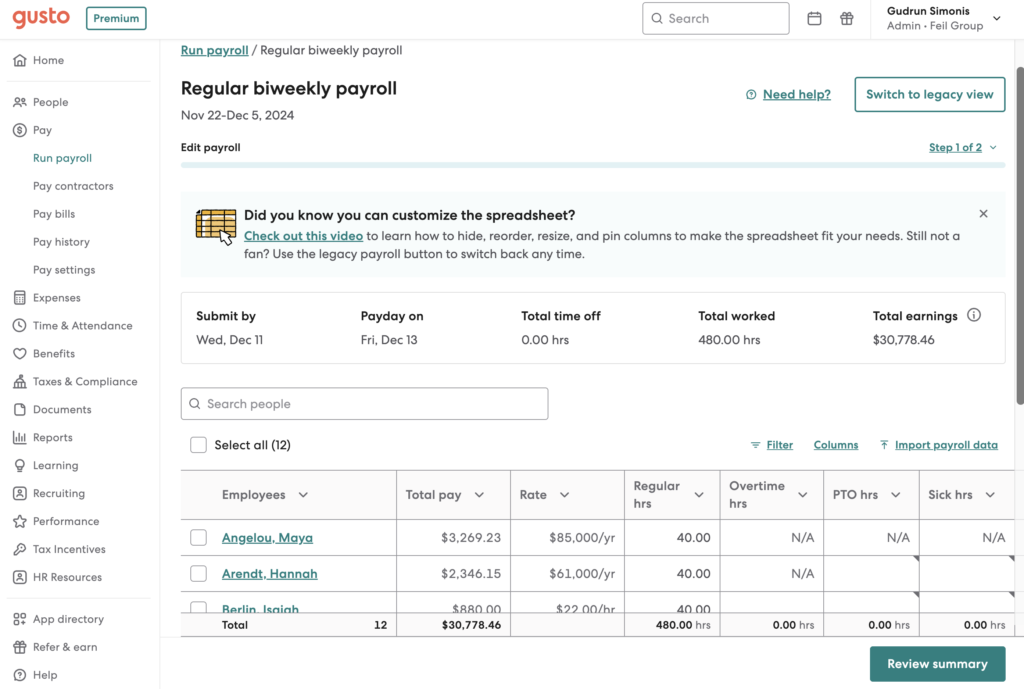
Simple pay runs
With Gusto, you can process employee payments with just a few clicks. If you don’t expect any changes to specific pay schedules like monthly payouts, you can set payroll to run automatically. It also has a customizable payroll spreadsheet, allowing you to filter and move columns so you can see the pay data you want.
In addition to US contractor payments, it also supports payouts for global contract workers in more than 120 countries. It can even pay international employees through its EOR service, but this is only limited to the following countries as of this writing:
- Australia
- Brazil
- Canada
- Germany
- India
- Ireland
- Mexico
- Spain
- Netherlands
- Philippines
- Portugal
- United Kingdom
Gusto’s pricing starts at $49 monthly plus $6 per employee per month (PEPM). You can choose between three tiers: Simple, Plus, and Premium. It also offers a contractor-only payroll plan for $35 per month plus $6 per contractor per month*.
Gusto plans
Simple
Plus
Premium
$49/mo. + $6 PEPM
$80/mo. + $12 PEPM
$180/mo. + $22 PEPM
Includes:
- Unlimited single-state full-service payroll.
- Auto-run payroll.
- Two- and four-day direct deposits.
- Basic support.
- Employee self-service.
- Gusto-brokered health insurance.
- Basic hiring and onboarding.
- Basic paid time off (PTO) policies.
- Custom admin permissions.
- Reports for payroll and time off.
- Accounting, time tracking, and expense management integrations.
Includes everything in Simple, plus:
- Unlimited multi-state full-service payroll.
- Next-day direct deposits.
- Advanced hiring and onboarding.
- PTO management.
- Time tracking and project tracking.
- Time kiosk.
- Scheduling.
- Reimbursement and expense claim management.
- Workforce costing and custom reports.
- Employee directory and printable org charts.
Includes everything in Plus, with:
- Dedicated customer success manager.
- HR templates for handbooks, job descriptions, and policies.
- Proactive federal and state labor law compliance alerts.
- Access to certified HR experts.
- Account setup and payroll data/HRIS migration support.
- Health insurance broker integration.
- R&D tax credit discount.
- Priority support.
Gusto contractor-only plan
- Monthly fee: $35 plus $6 per contractor.
- Includes unlimited US contractor payments, four-day direct deposits, 1099-NECs at the end of the year, and new hire reporting, if required in your state.
Add-ons
For all plans
- International contractor payments: Price varies by foreign exchange rate.
- State tax registration: Prices vary by state.
- R&D tax credits: Pay 15% of identified tax credits.
- Gusto Global: $699 PEPM.
- Health insurance broker integration: $6 per month per eligible employee.
- 401(k) retirement savings: Price varies by 401(k) integration.
- Health Savings Accounts (HSAs): $2.50 per month per participant.
- Flexible Spending Accounts (FSAs): $4 per month per participant, with a $20 per month minimum.
- Dependent care FSAs: $4 per month per participant, with a $20 per month minimum.
- Commuter benefits: $4 per month per participant, with a $20 per month minimum.
- Workers’ compensation: Price of premiums only.
- Life and disability insurance: Price of premiums only.
- Instant pay: $100 per payroll; instant employee payouts.
- Same-day pay: $90 per payroll; employee payouts within hours.
- Gusto Money Plus: $19 per month; includes tools for managing business funds.
For the Simple plan only (included in the Plus and Premium tiers)
- Next-day direct deposit: $15/mo. + $3 PEPM.
- Time & Attendance Plus: $6 PEPM.
- Performance reviews: $3 PEPM.
For Simple and Plus plans (included in the Premium tier)
- Priority support: $30/mo. + $3 PEPM
- HR resources: $50/mo. + $5 PEPM
*For new clients, Gusto waives the $35 monthly base fee for the first six months. This could change anytime, so please explore its website for the latest deals.

BambooHR: Best for employee experience
Overall Score
3.85/5
User reviews
4.57/5
Pricing
2.63/5
Customer support
3.63/5
Platform and interface
4.5/5
HRIS features
4.63/5
Reporting and analytics
4.5/5
Payroll features
4.13/5
Benefits administration
2.38/5
Workforce management
3.75/5
What are the perks of using BambooHR?
- Self-service features allow employees to find information and accomplish HR tasks independently.
- Built-in calendar to see employee availability and vacation time for easier PTO management.
- Out-of-the-box reporting and HR analytics for small businesses.
- Access to more than 125 integration partners.
What are the downsides of using BambooHR?
- Payroll, time tracking, and benefits administration are add-on features for an additional fee.
- No built-in scheduling tools.
Why I chose BambooHR
If you have both office and field employees with varying levels of digital literacy, BambooHR’s simple interface and quick access features make it stand out for the employee experience. Coming in with an overall score of 3.85 out of 5, BambooHR is an excellent HRIS for first-timers needing a single system of record for their people data.
BambooHR also consistently scored 3.5 or above in nearly every category except pricing and benefits administration, illustrating its jack-of-all-trades HR feature set. While this makes BambooHR a highly accessible platform, it also means its various modules lack some of the features to support more complicated business scenarios, like global payroll.
But, if your goal is to implement and track your HR data processes, BambooHR is the easiest to start with.
BambooHR’s intuitive interface makes it one of the easiest HRIS for first-timers to learn. One way it does this is by providing access to almost all of its capabilities on its mobile app. This is great if you or your HR team travel between multiple locations and need a way to complete HR processes on the go. I particularly like how employees can request time off directly from the app’s homepage, which immediately notifies their manager.
BambooHR also has pre-configured approval workflows, reports, and permission sets. Besides speeding up the implementation process, these functionalities help standardize and streamline time-off approvals and other company policies. This means less hassle if you’re a small business without clearly defined processes.
Compared to Gusto, which has payroll as its core platform, BambooHR’s main software is HR. Its starter plan, Core, includes document retention tools, time-off management, onboarding, and access to standard pre-built reports and analytics. It also comes with applicant tracking features, although it’s more manual than a standalone applicant tracking system (ATS). However, it is enough if you only want one platform to manage both your incoming and existing employees.
Intuitive user interface
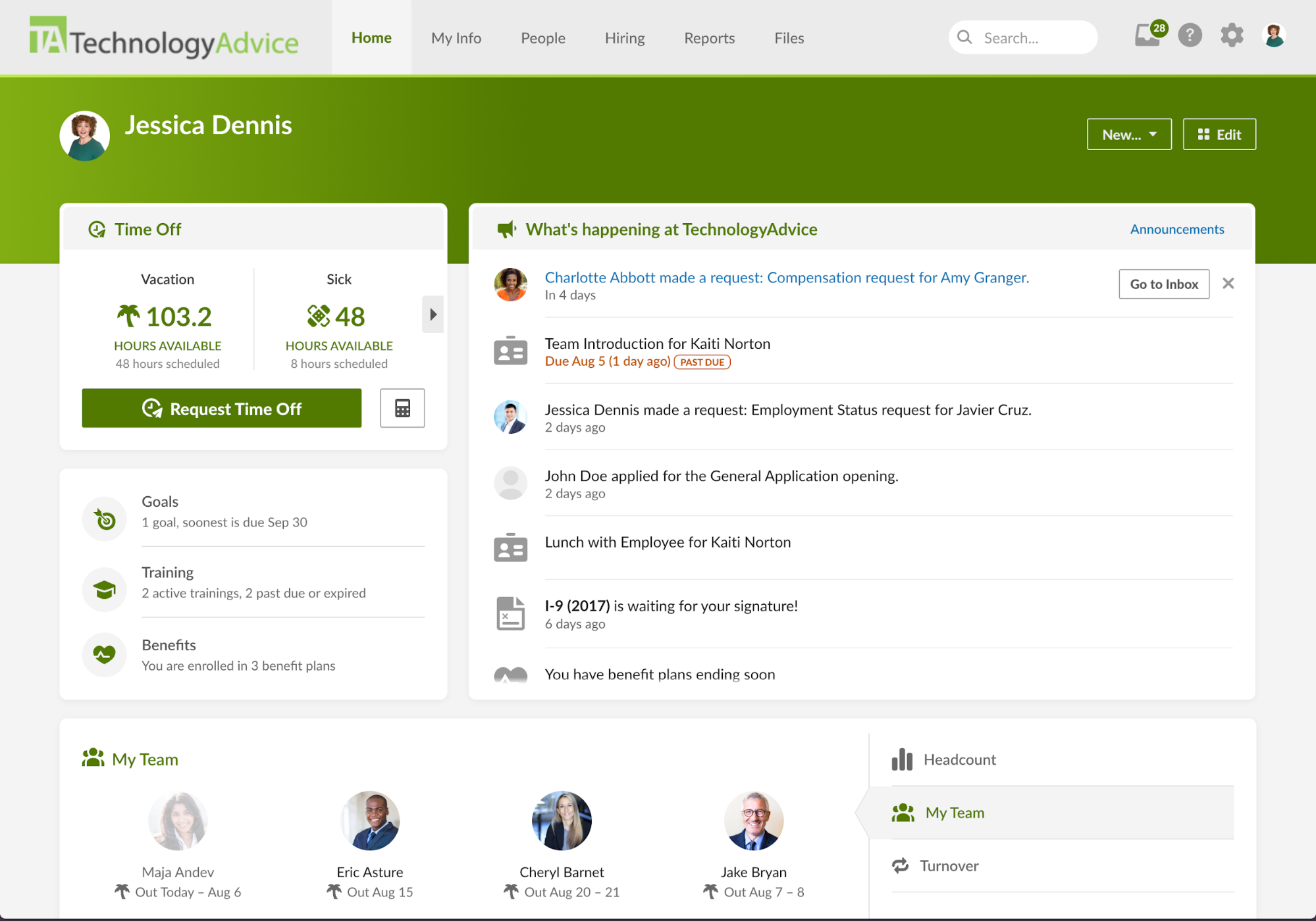
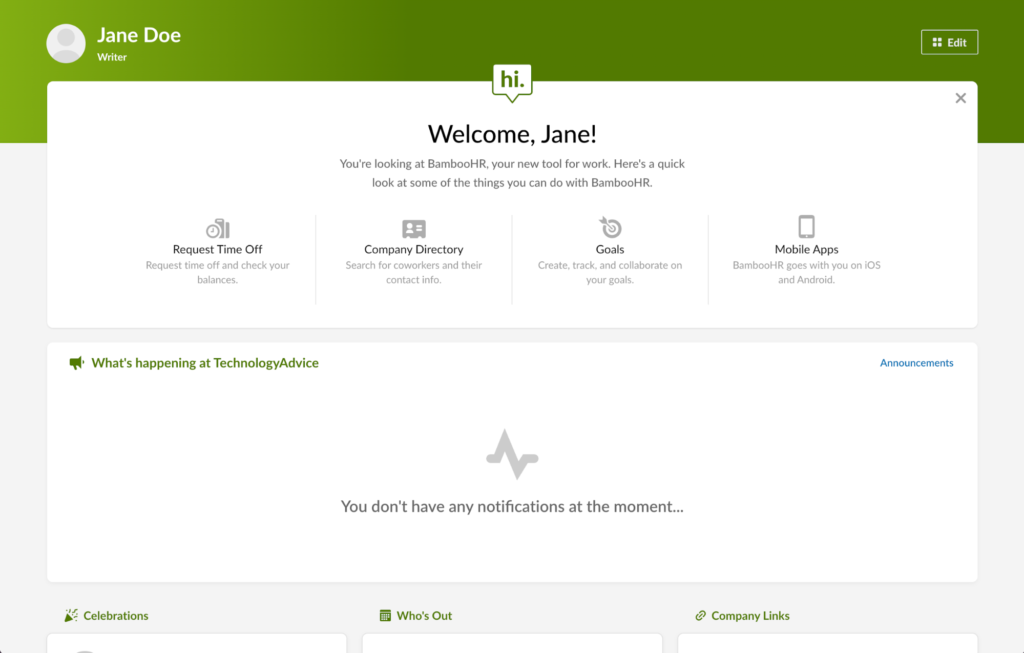
BambooHR is one of the easiest platforms to navigate as it uses a simple system of horizontal tabs to organize and access various people functions. It only takes one or two clicks to access the information you need.
One of the best features of BambooHR is the ability to rearrange and edit your homepage with widgets that are meaningful to you. For example, if you want your company’s turnover report front and center, you can drag and drop it to where you want on your homepage.
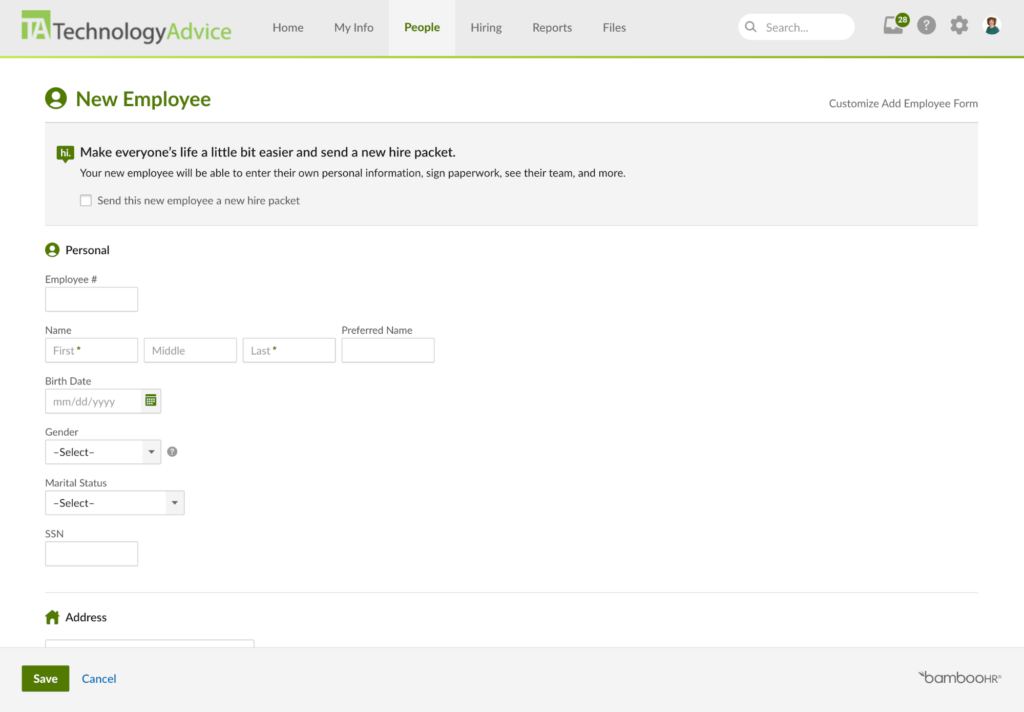
Similar customization options are available in your employee profile, allowing you to move your various tabs—like Personal, Time Off, and Documents—in the order you want. If you have permission access, you can edit and add different fields within each tab, like your address, job, and salary fields in the Personal tab, to quickly access the information that applies to you.
See what BambooHR’s homepage looks like in our video overview:
Employee self-service
BambooHR emphasizes employee self-service to free HR staff from completing mundane data entry tasks, like updating an employee’s address. It places the responsibility on employees to make these changes either on a desktop or within its mobile app.
If you purchase BambooHR’s Pro plan or other add-on modules like time tracking, the number of self-service options employees can access increases. This is unlike Gusto, which doesn’t have a mobile app, and Rippling, which offers separate apps for employee self-service and time tracking. Moreover, employees can access many self-service features directly from BambooHR’s homepage, such as requesting time off or clocking in and out of shifts.
While this may seem small, it makes it much easier for employees to complete everyday tasks with less effort. In contrast, clocking in for a shift on the desktop version of Rippling requires at least three clicks with its time and attendance module add-on. This adds unnecessary complexity to a common task, especially for tech-averse employees.
Source: TechnologyAdvice


Source: TechnologyAdvice
Source: TechnologyAdvice

Source: TechnologyAdvice
BambooHR follows a PEPM pricing model if you have more than 25 employees. For businesses with 25 or fewer workers, pricing changes to a flat monthly rate that starts at $250.
You can choose from three plans: Core, Pro, and Elite. It offers discounted pricing if you purchase the HR, payroll, and benefits modules. Volume discounts are also available. What I like about BambooHR is that it automatically applies the discount based on your headcount.
BambooHR only becomes competitive once you take advantage of its volume discounts, but even then, other top-rated HRIS systems like Gusto may be more affordable. While BambooHR remains the better choice if you want a cohesive interface built upon native modules, you should expect to pay more as a result.
BambooHR plans
Core
Pro
Elite
For up to 25 employees: $250 flat monthly rate
For more than 25 employees: $10.25 PEPM*
For up to 25 employees: Call for a quote
For more than 25 employees: $17.25 PEPM*
For up to 25 employees: Call for a quote
For more than 25 employees: $25 PEPM*
Includes:
- HRIS and reporting.
- Hiring and onboarding.
- Time off and benefits tracking.
- Employee experience surveys and rewards.
- Compliance intelligence.
- HR insights.
- 1 compliance training
- AI Assistant
Everything in Core, plus:
- Performance management
- Employee community tools
- 15 compliance courses
- Upgraded AI Assistant
Everything in Pro, plus:
- Compensation management
- Custom dashboards and analytics
- HR benchmarks
- Premium service like dedicated support
- 300+ compliance courses
- Advanced AI Assistant
Add-ons
- Payroll: Call for a quote.
- Benefits administration: Call for a quote.
- Time tracking: Call for a quote.
- Employer of Record (powered by Remote): Call for a quote.
*Pricing is based on a quote we received. Please note that additional factors, like the number of FEINs or states where you need payroll, can affect this price. Contact BambooHR for a quote.

Rippling: Best for growing businesses
Overall Score
3.64/5
User reviews
4.78/5
Pricing
1.88/5
Customer support
2.53/5
Platform and interface
4.5/5
HRIS features
4.63/5
Reporting and analytics
3/5
Payroll features
4.13/5
Benefits administration
3.13/5
Workforce management
4.19/5
What are the perks of using Rippling?
- Detailed reporting and analytics are included in every plan.
- Compensation banding to create salary consistency across roles and levels.
- Customizable workflows and automation tools.
- In-app compliance tracker to avoid potential domestic and international time and labor violations.
What are the downsides of using Rippling?
- Pricing isn’t all transparent or difficult to find on its website.
- Expensive solution if you only need an electronic employee record.
- Must purchase additional modules for payroll, time tracking, and benefits administration.
- High learning curve for custom reports and automation.
Why I chose Rippling
With a 3.64 out of 5 score, Rippling is the most versatile HRIS software in my lineup. It can easily adapt to your business needs without relying on a patchwork of third-party HR applications. Rippling’s HR, payroll, finance, and IT cloud modules build upon and amplify the core Rippling Platform so it becomes more advanced as you grow.
However, it can get pricey as you add more features. Plus, if you’re a new business owner looking for basic HRIS tools, Rippling may have more features than you need. You likely don’t require advanced system workflows and an integration network that connects with over 600 business apps.
That said, Rippling is ideal to use if you have plans to grow your business because the software can scale with you. You can start with the base Rippling Platform and then add advanced HR tools, like headcount planning and performance management, as your people’s needs become more complex.
Rippling Platform is the HRIS that serves as the backbone of the entire Rippling suite. You have to purchase it before accessing other modules in its HR, payroll, finance, and IT cloud product lines. Looking solely at its HRIS capabilities, Rippling is not the best choice if this is your first HR software or if you simply want a place to store your employment data electronically. For example, you must manually establish approval workflows for things like paid time off (PTO) requests. While it offers “Recipes” or pre-built automation templates, the extra step of choosing and modifying the right recipe can be tedious for new HR software users.
Plus, its standard customer service options are relatively disappointing. As a first-timer, you might want to call and speak to customer service representatives to troubleshoot issues. Unless you purchase Rippling’s HR Help Desk module, professional employer organization (PEO), or EOR services, you’re limited to emailing or submitting a support ticket.
Instead, Rippling’s strength comes from its flexibility, HR automation, and data analytics that overshadow its competition. This is likely a result of Rippling’s heavy IT focus as it looks for ways to integrate and access the workplace tools you use daily directly from its homepage. It can even shorten ramp-up times for employees by helping your HR and IT teams distribute and manage devices and apps directly within the platform.
Want to learn more about Rippling’s capabilities? Check out our video overview:
Workflow automation
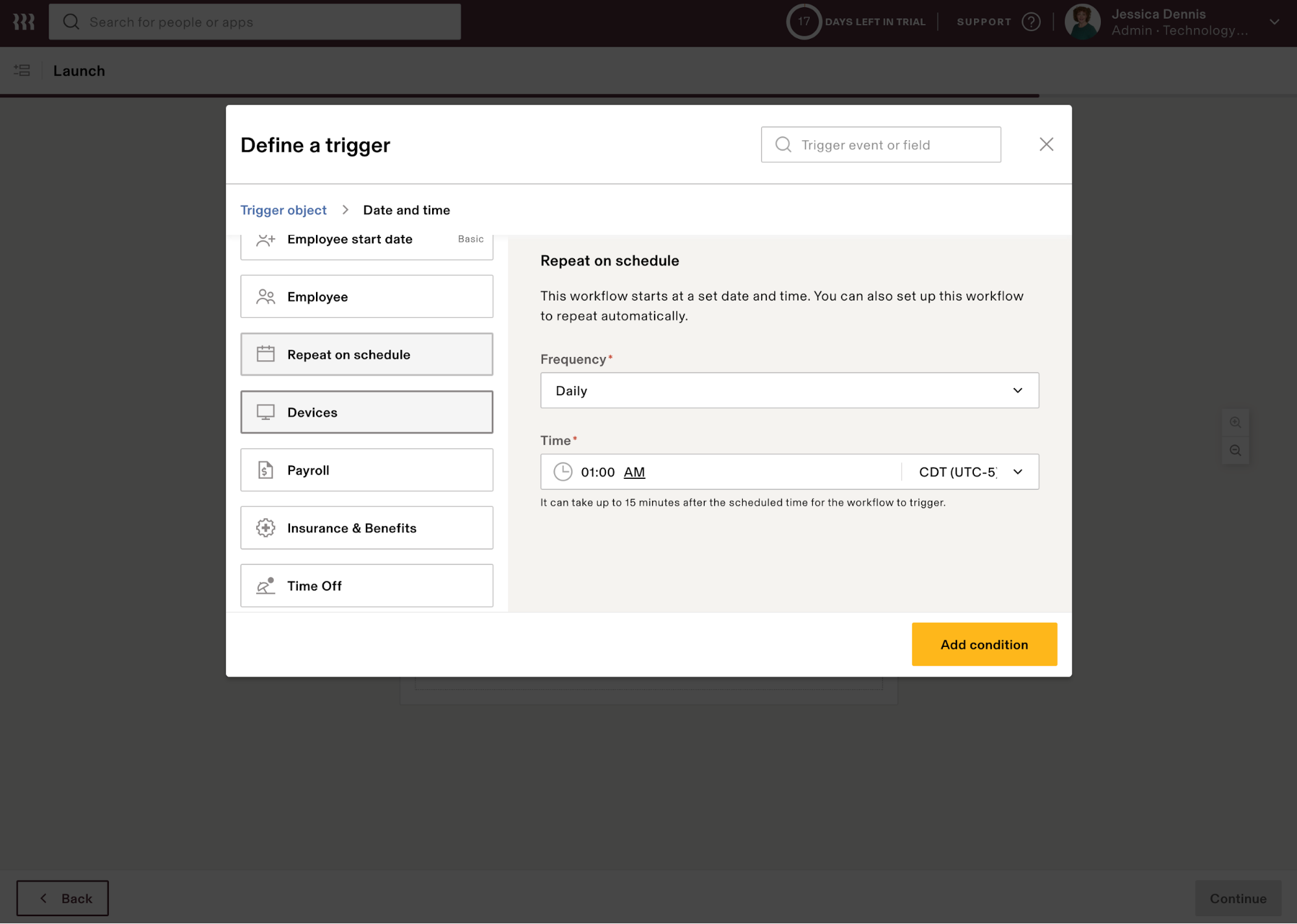
Rippling comes standard with Workflow Studio, a customizable automation builder. With it, you can automate processes for nearly every data field in the system.
Although the other HRIS tools on my list offer something similar, it functions much more as a way to monitor task completion for a process among various collaborators. For example, it helps notify appropriate stakeholders when to perform tasks like reviewing promotions or running background checks.
In contrast, Rippling’s automation capabilities support “set it and forget it” workflows. For example, you can automatically assign training courses based on data like employee start date or role. Or you can automatically send reports to relevant stakeholders each month. This can make your HR staff much more efficient so they can focus on more strategic work, like improving employee retention.
Workforce insights
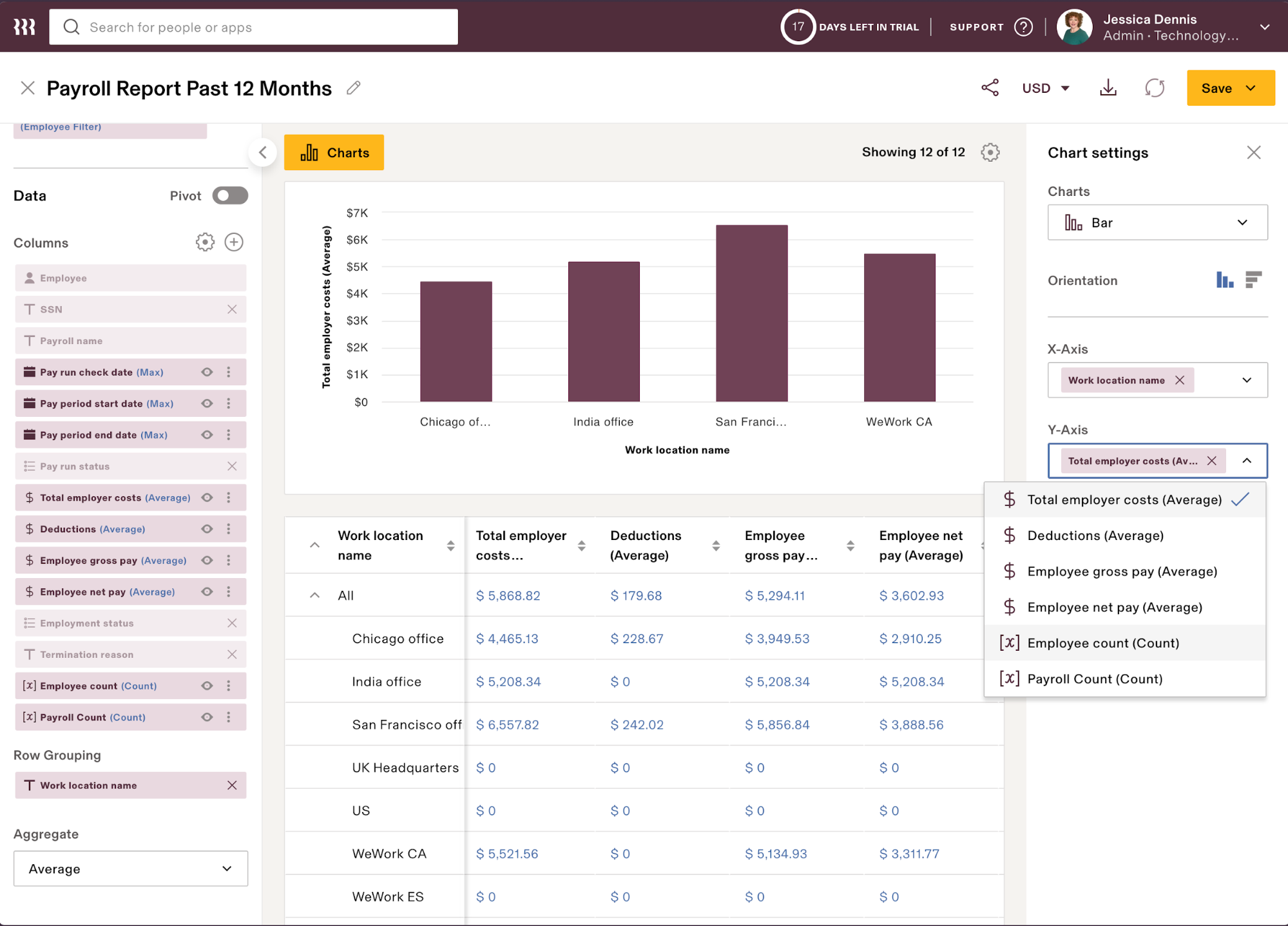
Rippling allows you to customize reports and rich data visualizations, which is impressive compared to most basic HRIS platforms. Plus, as you upgrade to higher Rippling plans or add on optional modules, its workforce analytics capabilities become more comprehensive and complex.
For example, Rippling lets you combine and manipulate data from three or more sources. This allows you to connect and draw insights about the data points that matter the most, like salary change trends relative to learning and development course completion. If you’re a spreadsheet whiz, you can use Excel-like formulas to construct your reports for even more granular conclusions.
Though Rippling’s analytics rival many human capital management (HCM) systems, they may be too complicated for some businesses. Rippling offers pre-configured report templates, but you must create the data visualizations you want yourself, which can take time to learn how to construct.
PEO and EOR services
Rippling offers PEO and EOR services to support your business operations as they grow. While Deel HR also offers PEO and EOR services, Rippling differentiates itself by making these services more of a strategic choice for your immediate business needs rather than a long-term commitment.
For example, as a small business, you may only have one person looking after HR, accounting, and other administrative responsibilities. You can leverage Rippling’s PEO services to cover the tedious but necessary processes of HR, like payroll, without compromising labor law compliance.
As you grow and add more knowledgeable HR staff, you may no longer need its PEO services. Rippling understands this and includes an easy on/off switch directly within the platform so you can sever PEO ties without any long-term contracts. This differs from other PEOs that rely on creating long-term partnerships with small businesses that have limited growth expectations.
The same flexibility extends to Rippling’s EOR services. For example, Rippling will help you transition to hiring, managing, and paying your international workforce once it makes sense for you financially to move these processes in-house. Rippling’s business model lets you transition between these different states, so you’re supported even when growth plans change.

Source: TechnologyAdvice

Source: TechnologyAdvice

Source: TechnologyAdvice

Source: TechnologyAdvice

Source: TechnologyAdvice
Rippling starts at $8 per employee per month (PEPM) plus a $40 per month base fee. However, it wasn’t specified on the website which Rippling Platform plan and modules are included in the starter fee. So, it’s best to contact Rippling to discuss your requirements and request and quote.
With the Rippling Platform plans, you get two options: Core and Pro. It comes with several paid add-ons, such as unlimited workflows, custom apps, and access to the Rippling API Platform, which enables you to connect its system with over 600 third-party business apps. You can also purchase its HR, finance, payroll, and IT modules to enhance the core platform’s overall functionality,
Rippling Platform plans
Core
Pro
Call for a quote
Call for a quote
Includes:
- Global employee graph.
- Workflows and automation.
- Role-based permissions.
- Auto-localization tool that automatically translates content based on employee location.
- Workflow studio for creating workflows.
- Custom workflows for onboarding events only.
Includes everything in Core, plus:
- Formula fields, which can be used in reports and workflows.
- Advanced reports.
- 10 custom workflows for any event or action in Rippling.
- Webhooks in workflows, which lets one app send automated notifications to another app based on specific events or actions.
Add ons
- U.S. and global payroll.
- Benefits administration.
- Time and attendance.
- Flex benefits (FSA, HSA, and commuter).
- Recruiting.
- Scheduling.
- Learning management.
- Pulse (employee engagement).
- Headcount planning.
- Performance management.
- App management.
- Device management.
- Inventory management.
- Corporate cards.
- Expense management.
Additional services
- ACA and COBRA administration.
- HR Help Desk (HR Support).
- PEO services.
- EOR.

Deel HR: Best HRIS for global HR management
Overall Score
3.58/5
User reviews
4.06/5
Pricing
3.13/5
Customer support
3.65/5
Platform and interface
3.19/5
HRIS features
4.25/5
Reporting and analytics
3.25/5
Payroll features
3.69/5
Benefits administration
3.5/5
Workforce management
3.5/5
What are the perks of using Deel HR?
- Deel HR includes various modules, such as HRIS, hiring, and talent management.
- Affordable Core HR module, especially for small teams.
- Offers US and global HR and payroll services.
What are the downsides of using Deel HR?
- US payroll is a paid add-on.
- Can get pricey depending on the features you get.
Why I chose Deel HR
If you’re on a budget and have a small team, consider Deel HR. With its Core HR module, you get all the basic HRIS features, such as a centralized database, document management, time tracking and time off management, AI help, compliance insights, and reports. Like Rippling, Deel HR localizes employee profiles for over 150 countries. You can even set user roles and approval settings.
I like that you can get Deel HR as a standalone product. It has several modules for managing employee information, hiring, and talent development. If you’re expanding internationally, Deel HR integrates with Deel’s global tools like international payroll and EOR.
In my evaluation, I gave it an overall score of 3.58 out of 5. While it earned the highest mark (4.25) in HRIS, Deel HR’s platform is much less feature-rich than competitors like Rippling. In particular, Deel HR lacks native staff scheduling solutions, forcing you to integrate with third-party solutions. It also does not support project tracking for your contingent workforce.
Deel is widely known for its EOR and global payroll tools, but it has also released products specific to the US market, such as its US Payroll and US PEO modules. The platform that brings all of its tools together is Deel HR, an online HRIS solution that can help you manage HR and your employees in over 150 countries.
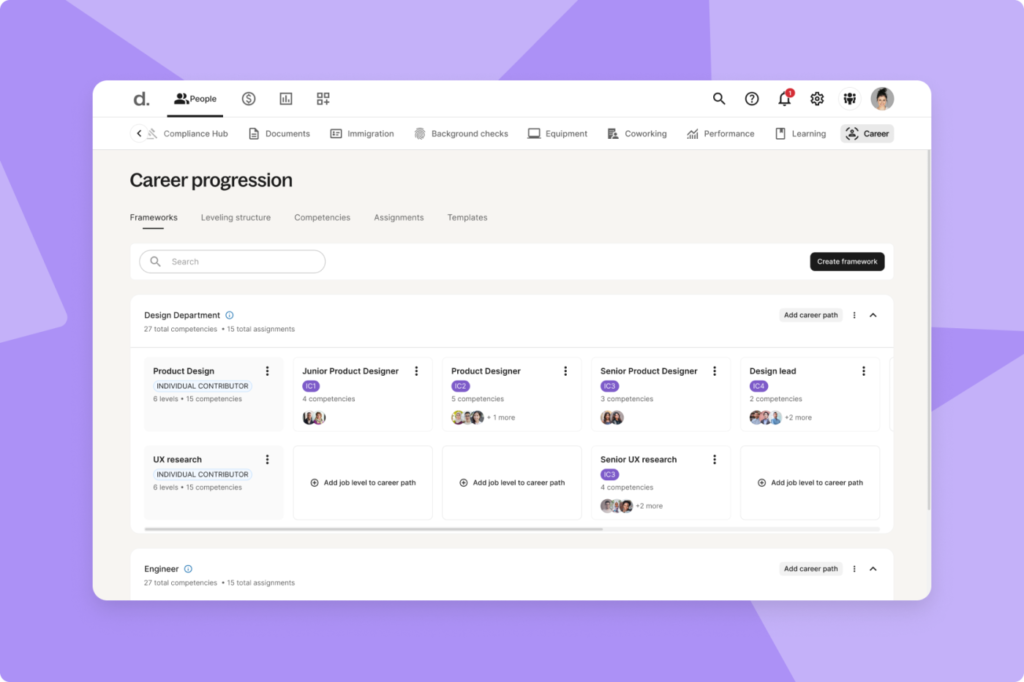
Out of the HRIS systems I reviewed, Deel HR is the most budget-friendly for businesses with small teams. This is great if you already have an outsourced payroll provider handling your employee payment processes and only need an HRIS to securely manage staff data. What I also like about Deel is the flexibility it offers to clients. You can start with Deel HR and then get its payroll add-on as your HR needs grow. If you need more advanced HR features, its career management module can help you plan and create career paths for every role and job level in your organization. With its AI tools, you can easily draft in-depth career path frameworks online.
However, pairing it with Deel’s other modules increases its price. If you add payroll, be prepared to shell out $24 PEPM for US payroll. In this case, Gusto is the better option since its basic plan comes with both HRIS and pay processing functionalities but at a lower monthly fee.
Feature-rich HRIS
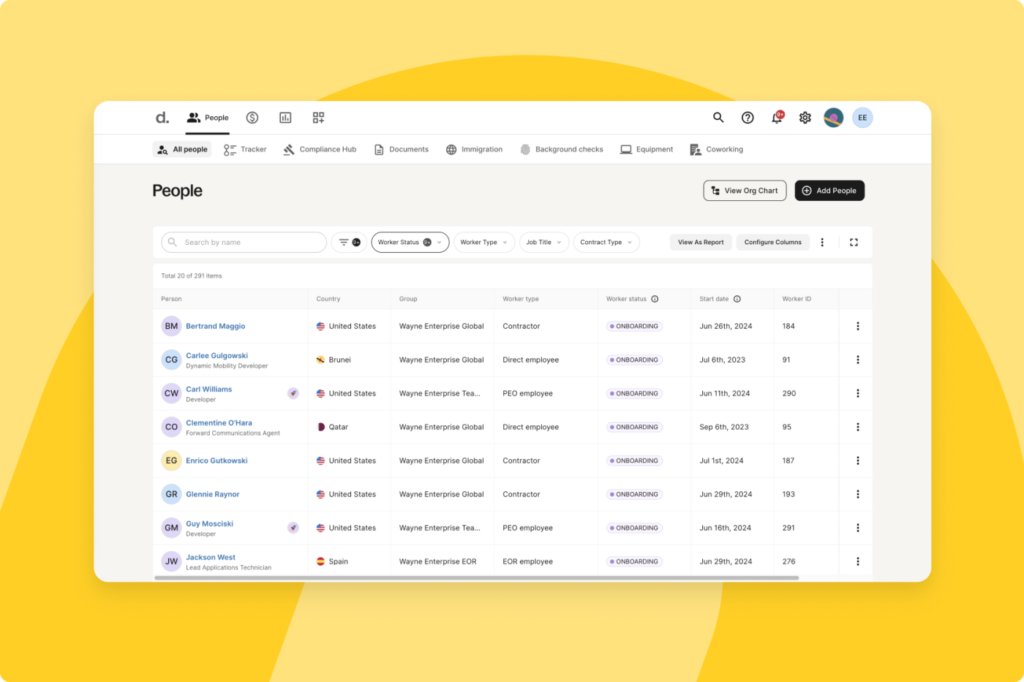
As an HRIS software, Deel HR not only stores employee data and documents, it also automates processes and comes with compliance insights. Its reporting function includes powerful dashboards that show actual and forecasted headcount, DEI data, analytics, and more. It creates employee directories, but you can customize them to fit your needs. It also includes self-onboarding tools, which Deel claims that new hires can complete through its platform in five minutes.
Talent development
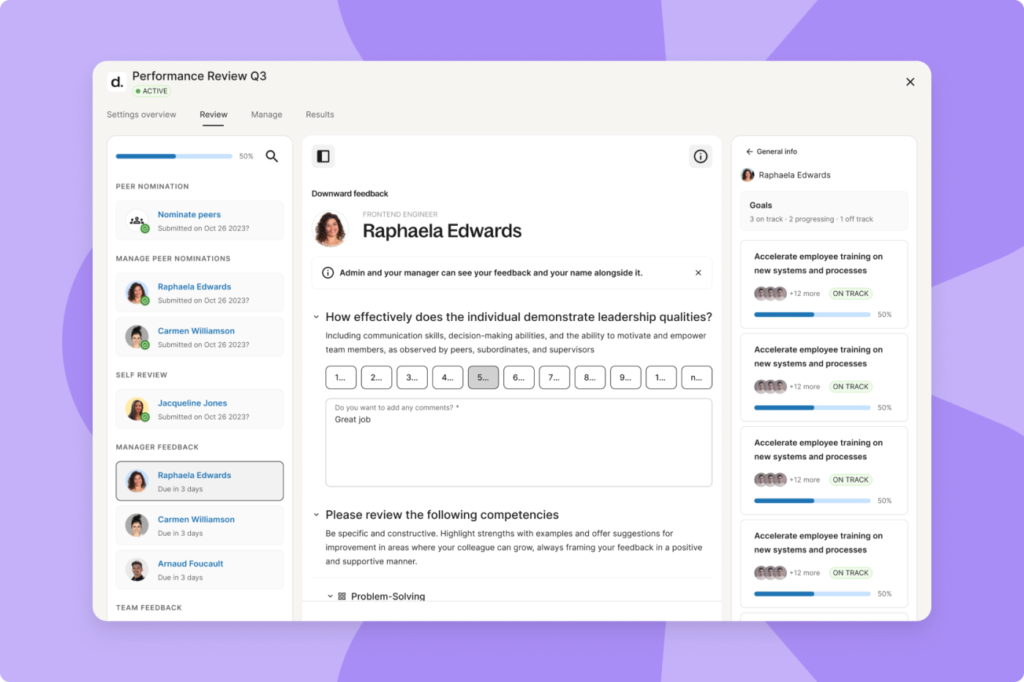
One of my favorite Deel modules is Deel Develop, which primarily contains talent development solutions. It has a drag-and-drop learning course builder with AI tools to help you create content faster. It also lets you run employee engagement surveys, build career paths, and manage performance reviews. Plus, its HR plugins for Slack help reduce the time it takes to switch between Deel and Slack if you want to share org charts, send surveys, and recognize a colleague for a job well done or a work milestone.
While Rippling may have similar functionalities, you have to purchase different modules to add training, performance, and survey management to its core platform. It also lacks the career paths that Deel offers.
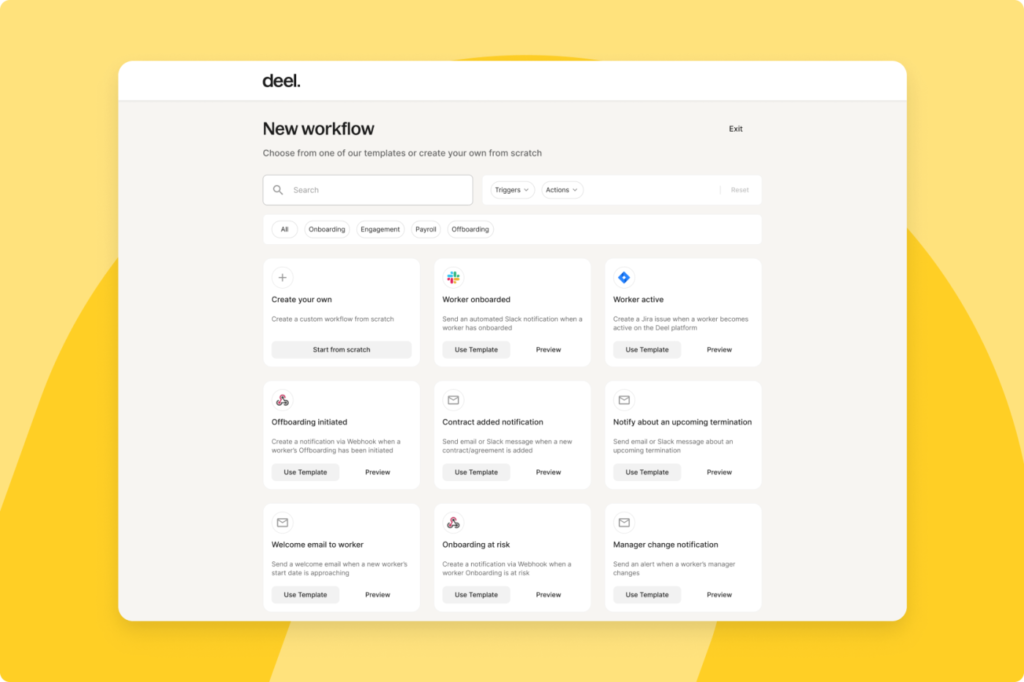
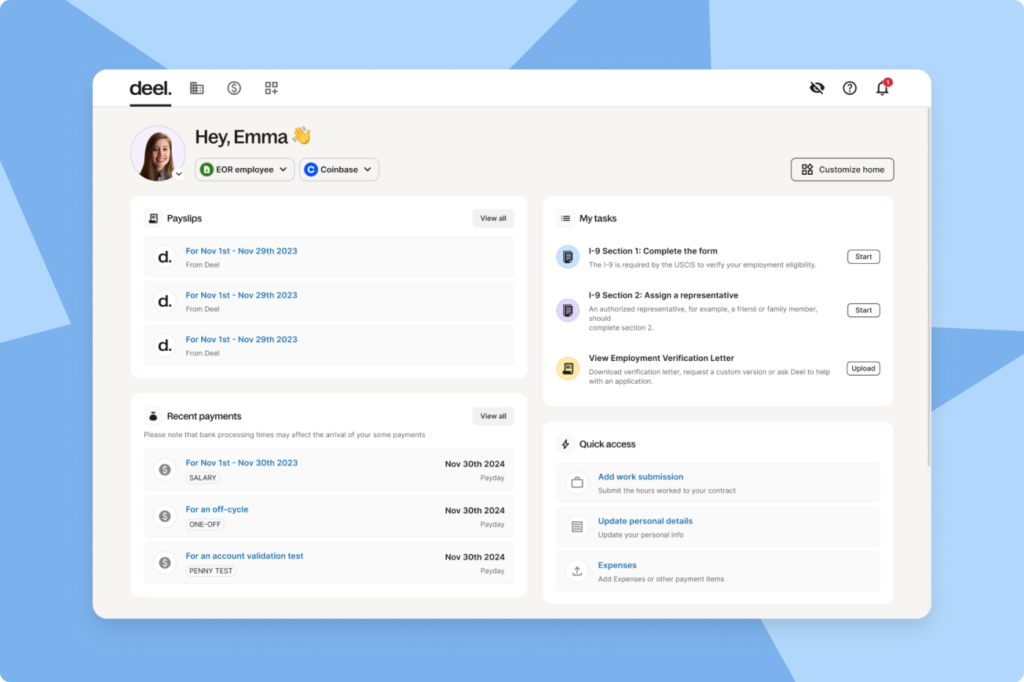
Deel offers HR and payroll services and products that cater to US and global businesses of all sizes. Pricing for its EOR service and global payroll tools are in the average range compared to the companies that offer similar products, but its core HRIS platform is the cheapest among those that I reviewed. It even has time tracking functionalities, a paid add-on with BambooHR and Rippling.
Deel HR modules
- Core HR: $5 PEPM.
- Recruit: $14 PEPM.
- Develop: $22 PEPM.
- Recruit & Develop: $30 PEPM.
- Full HR solution: $56 PEPM.
- Services: Call for a quote.
Other Deel products
- US payroll: Starts at $24 PEPM
- US PEO: Starts at $125 PEPM
- Global payroll: Starts $29 PEPM; this is for global companies with locally owned entities that need help handling employee payments
- EOR: Starts at $599 PEPM; employs international employees with Deel as legal entity
- Contractor of Record: Starts at $325 per contractor monthly; hires international contractors with Deel as legal entity
Human resources information system FAQs
Timelines often depend on the following:
- The vendor you choose
- White-glove vs. self-service implementation
- The volume of data you have to migrate
- The HRIS integrations you have to configure
- The customizations you need
A simple setup can take two to four weeks, while more complex implementations with payroll and benefits may stretch closer to 8 weeks.
Most HRIS platforms include:
- An employee database
- Compliance tools
- Reporting and analytics
- Time tracking
- Payroll
- Benefits administration
Each HR tool will have slightly different offerings. Some HRIS systems focus primarily on the employee database function while others support a broader range of human resource management functions.
If your preferred HRIS does not support an HR function that you need, you may be able to integrate a separate standalone solution with your HRIS platform to allow both systems to work together and share data.
An HRIS speeds up administrative work like file management and reporting, freeing HR staff for higher-value tasks. It also supports compliance with secure data storage and helps leaders make smarter decisions with easier access to workforce insights.
Payroll is sometimes built in but often comes as a separate module or add-on. Linking HRIS with your payroll software centralizes employee data and most core HR functions so it’s more convenient and efficient for HR staff and employees to use.
Some HRIS platforms provide basic recruiting tools, such as job postings and applicant tracking. For more advanced needs, there are optional add-ons for background checks or compensation benchmarking.
What’s the ideal type of HRIS for your business?
As a repository for employee data, the HRIS system houses various employee data to support the full scope of HR. There are five main types of HRIS: tactical, operational, strategic, comprehensive, and specialized.
Tactical HRIS supports HR in fulfilling basic aspects of employment, such as payroll and benefits management. These are the most typical types of information systems found in the solutions discussed here.
For example, Gusto includes tactical information systems to support both payroll and benefits administration, while Bamboo1HR can perform those functions if you add them to its basic system.
Operational HRIS are those that support talent acquisition and talent management. Applicant tracking features of some HRIS solutions help with talent acquisition, while performance management, also typically an optional feature of an HRIS system, assists with talent management.
The ATS and performance management functionalities usually come standard in more complex human resources management systems (HRMS). If your company needs recruiting tools and performance management, check out our Top HRMS solutions that support talent management and retention.
Strategic HRIS, such as learning management systems (LMS), helps companies retain employees by filling necessary skills gaps and supporting employee experience and career growth. These are most often found in human capital management (HCM) solutions but are included in some HRIS and HR management software solutions as well.
If you’re looking for tools that support strategic HR functions, such as workforce analytics and talent development, check out our list of Top HCM vendors.
Comprehensive HRIS platforms bundle all of the functions above—or a combination of them—into one platform. All vendors described here are considered comprehensive information systems.
Limited-function or specialized HRIS systems focus on one or a few core information systems to support a narrow list of HR functions. JazzHR, for example, is a standalone operational information system that supports recruitment and integrates with other HR systems.
Learn more about the different types of HRIS in our video below:
How can HRIS systems benefit your business?
HRIS systems offer several key benefits for businesses. The exact features and benefits will vary based on the HRIS technology vendor that you choose. Here are the biggest benefits that you can expect when investing in an HRIS platform for your organization.
Unsure of what an HRIS can do for you? Learn about the key benefits of HRIS software or check out our video below:
Better employee onboarding experience
HRIS platforms can support paperless onboarding for a more efficient and organized onboarding process. This makes it easier to onboard remote employees who will not be coming into the office in person to fill out their paperwork. It also cuts down on filing time and ensures that no paperwork goes missing, as the electronic onboarding documents can be instantly stored in the employee’s digital file.
HR analytics and reporting
Workforce analytics help your HR department make more informed, data-driven decisions. For example, HR analytics can help you monitor turnover rates to identify trends or potential contributing factors and implement an effective employee retention strategy. While the reporting capabilities of an HRIS may not be as robust as an HCM platform or full-service HR suite, HRIS systems can still be used to analyze employee data and generate basic reports.
Compliance support
HRIS systems offer a compliant solution for storing sensitive data. Electronic file management helps employers meet document storage requirements and provides a paper trail in the event of an audit. Some HRIS systems even offer federal, state, and local compliance tools or add-ons to help employers comply with meal break regulations, time off, and leave of absence, like FMLA.
Scalability
The HRIS functionality is the backbone of most HR software systems and HCMs, so investing in an HRIS is a smart investment for growth-stage businesses. For example, many HR software vendors offer a bare-bones HRIS that you can supplement with add-on modules and integrations as your employee headcount grows and your business needs begin to change. Then, once you’ve reached a critical mass, you’ll have the option to upgrade your HR software to the next tier of functionality without needing to switch vendors.
Fewer manual HR tasks
HRIS systems increase efficiency by streamlining common administrative HR workflows. The electronic paperwork management features of HRIS systems also cut down on filing and make it quicker to access and organize employee paperwork and information.
Looking for more advanced automations? Check out our roundup of the best HRMS software to find solutions with great workflow customization and automation tools.
What does an HRIS cost?
The cost of an HRIS will vary based on several factors, including your employee headcount, feature requirements, and deployment expectations. HRIS features are often wrapped into full-service HR software suites, which will typically cost more than a standalone HRIS system.
Most HRIS software vendors use a per employee per month (PEPM) pricing model, which is usually the most affordable structure if you have a low headcount. However, keep in mind that cost comparisons between vendors will likely change as your organization grows, so it’s worth factoring in your future hiring plans as well.
If you’re looking for a budget-friendly HRIS solution, you can find options in the $5-$10 PEPM range. Note that these systems sometimes include base fees that cost anywhere from $35–$50 per month. However, there are a few options, like Deel HR, that are free to use.
For more information on the cost of HRIS systems and other HR software options, explore the resources below:
How to choose the best HRIS systems
There are tons of top-rated HRIS systems in the market today, making it tough to decide which one is the right fit. Consider the steps below to help you find the right HRIS solution for your organization’s needs:
- Map out your current workflows and identify pain points
List the HR tasks that take the most time or cause bottlenecks (payroll, time tracking, onboarding). These pain points highlight where an HRIS will add the most value.
- Make a must-have vs. nice-to-have features list
Define the core features you can’t operate without—like compliance, employee records, or payroll—then note secondary features that would be helpful but aren’t essential.
- Set a realistic budget and factor in future headcount
Compare per-employee pricing to your current team size, then forecast growth. Many systems get more expensive as you scale, so plan for what your costs will look like in a year or two.
- Choose software that can scale with your business
Small HRIS platforms are great starters, but if you’re planning to grow, look for systems that let you add modules (like performance management or global payroll) as your needs expand.
- Demo and test drive before you buy
Schedule vendor demos or sign up for free trials. Watch how intuitive the system is for your team, and ask about customer support response times during onboarding.
- Check user reviews and real-world feedback
Browse sites like G2, Capterra, and TrustRadius, and read both the pros and cons. Look for trends in customer experiences with support, integrations, and implementation. Peer feedback helps reveal issues that may not show up in a demo.
Not ready to buy yet? Check out our comprehensive HR software guide to find the best HR system for your needs, or look at our list of the top enterprise HR software to compare solutions.
If you’re looking for a standalone payroll solution, check out our roundup of the best payroll software.