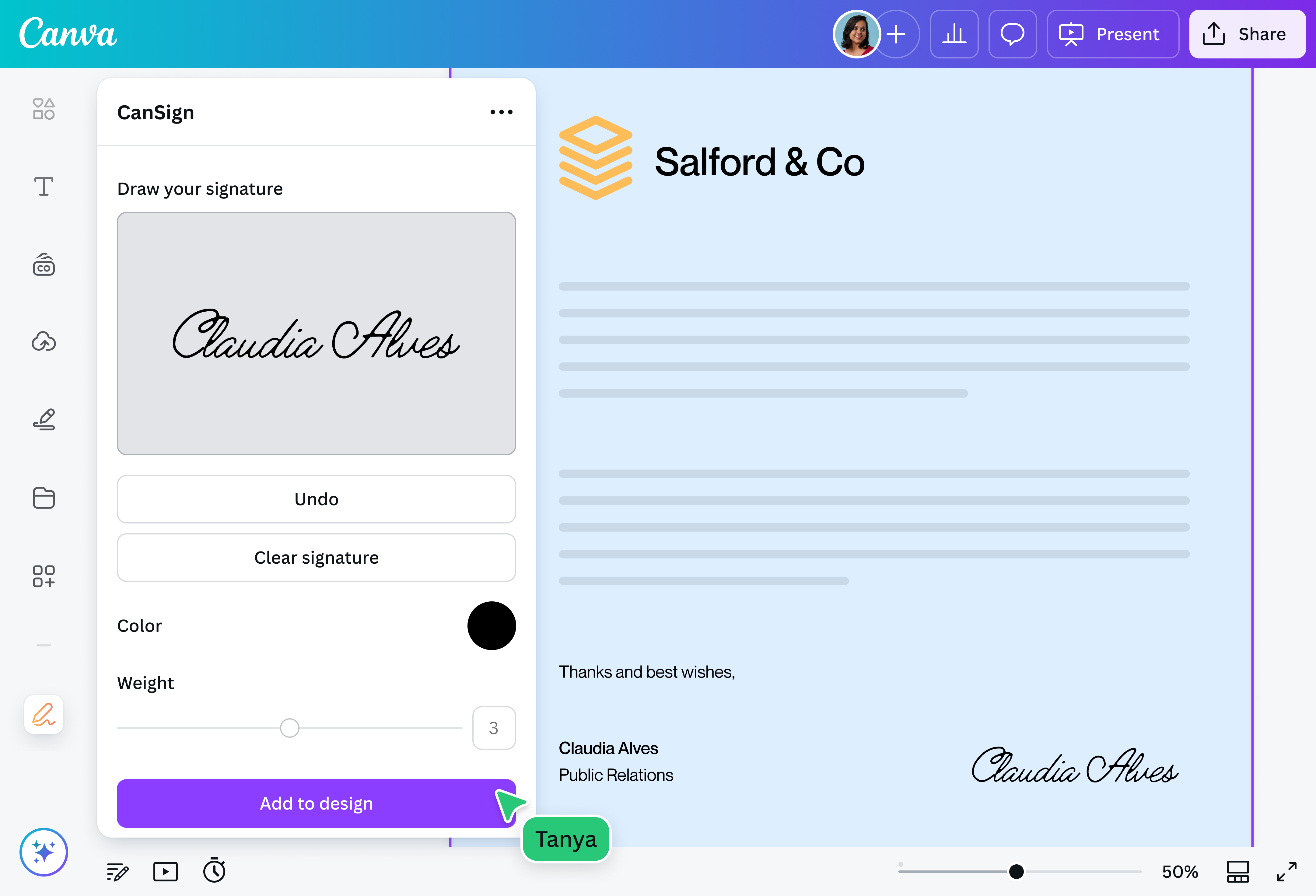
Skip the printer, pen, and scanner. Sign PDFs online for free with the CanSign app on Canva. Simply look for it on the Apps section and draw your signature. Then, add it directly to your PDF. In just a few seconds, you’ll have a professional-looking signed document. You can also opt to save your e-signature in your Uploads tab for later use.
Please note: It is the user's responsibility to ensure that the generated signature meets the legal requirements for signing a binding document.
Polish PDFs on one platform
Do more than just sign a PDF on Canva. Use our countless tools to create stunning PDFs that are perfect for printing and sharing.
Access the CanSign app on Canva whenever you need to through your desktop or mobile phone, and seamlessly sign your PDFs from anywhere. Perfect for marketers on-the-go and entrepreneurs who need to make quick approvals.
How to sign a PDF
Frequently asked questions
You can electronically sign a PDF using the CanSign app on our platform. This app allows you to draw your signature, meaning you don’t have to write your signature on a piece of paper for scanning. With the app, you can also save your e-signature as its own file or asset, or insert it directly onto a design.
Yes, it is safe to sign PDFs online as long as you use a platform that has security measures in place. Examples of these are encryption and digital certificates.
Additionally, please note that it’s your responsibility to ensure that your generated signature meets the legal requirements for signing a binding document.
You can create a signature for a PDF in multiple ways. You can do it the old-fashioned way, which is to sign on a piece of paper and scan it for electronic use. If you want a more convenient way of doing it, you can use a digital application like CanSign. All you have to do is draw your signature, and you can instantly add it to your PDFs.
@canva is simply outstanding as a tool to create designs. Using Canva is such a seamless experience that once you sit down to design, you don't feel like getting up. It's addictive and useful. Keep going Canva.
@navneet4
@canva is an incredible app for designing pretty much anything you need! A huge selection of templates, fonts and colours; endless choices at the tip of your fingers; easy editing and sending/sharing. Best app I’ve used for a long time. If you haven’t tried it... try it!
@SpotOnDomain
I don’t know where I was without @canva They have absolutely great graphics for any social media platform. Whether it be a YouTube thumbnail, an Instagram Post or whatever you want to create. Let @canva make the design process easier for you.
@IGchef_andrewb
Omg I love you guys! Thanks for making it so easy for me to use your templates. There’s so many selections and your site and app are very easy to use and navigate !!! 🥇💓💓💓💓💓💓
@curlyfrosista
@canva is such a life changing tool! One of the most well thought out websites I've ever seen. I use it to showcase my work with the community and it never ceases to amaze me! Kudos for all the love and effort you've put into it's development! #canvadesigns