Learn about Canva's upload formats and requirements. See how we use your content in our Privacy Policy.
Transform your .doc or docx files into shareable, accessible, and print-ready PDFs in a few clicks. Use our free Word to PDF converter to preserve text formatting, save storage space, and make document management a breeze.
Try these document editing tools
Edit, convert, translate PDFs and more. All the PDF editing tools you need!
Say goodbye to compatibility issues and confidently share your documents with various devices and operating systems. With our free MS Word to PDF converter, you'll convert Word files to PDF documents in a jiffy. Make your files easier to store, share, compress, print, and protect. Convert all kinds of .doc and .docx files, from data-heavy business proposals(opens in a new tab or window) to multi-page school essays to meal plans with lots of photos. Need to work with other file formats? Try our AI converter(opens in a new tab or window) for additional conversion options.
Change DOC to PDF to preserve formatting
Our online Word to PDF tool seamlessly transforms your files into easily scannable PDF documents, so that you can preserve all formatting styles, including fonts, line spacing, page numbers, and indentations. Share professional-looking PDFs effortlessly via email and other platforms, ensuring that the content remains intact, legible, and visually appealing to readers, no matter their device. You can also sign PDFs(opens in a new tab or window) or organize your PDFs(opens in a new tab or window) online for free.
Make last-minute changes easily
When you convert Word to PDF using our online tool, you can revise your files before conversion. Quickly fill out forms, resolve formatting issues, and fix any errors. Breathe life into your document by adding captivating images or changing the font colors into your brand colors. Leverage the power of data visualization tools and add charts, tables, and graphs. Our intuitive drag-and-drop document editor(opens in a new tab or window) allows you to edit directly, so you can improve the document before downloading it in its final, uneditable form.
How to convert Word to PDF
Frequently Asked Questions
PDF stands for Portable Document Format. It’s a widely used file format that works seamlessly on all devices and operating systems. When you convert a Word file to PDF, the resulting file retains the appearance of the original, whether it’s viewed from a Mac or a Windows computer. That’s because PDF files preserve the original document's formatting, fonts, images, and layout to ensure readability.
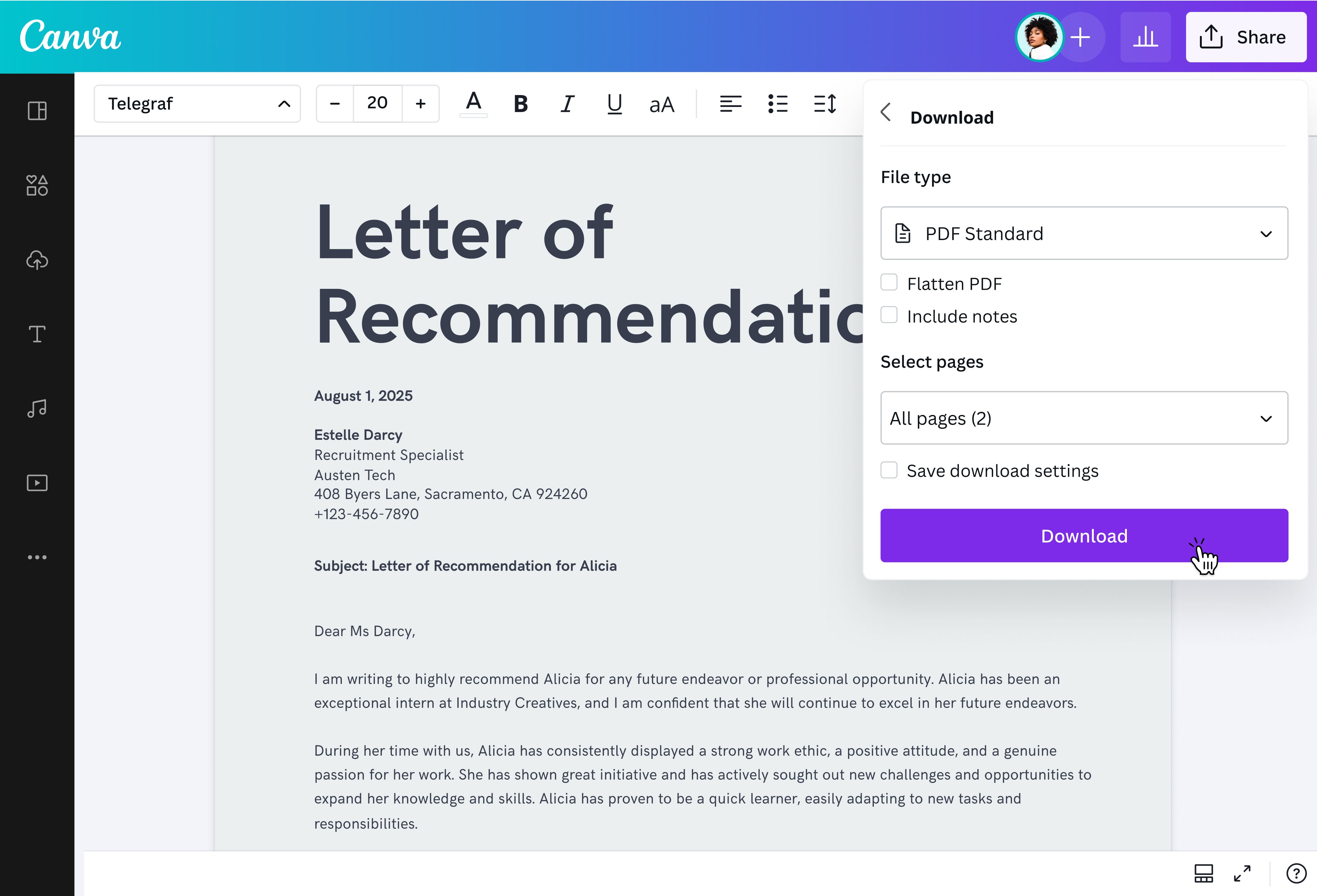
Effortlessly convert Word files to PDF with our user-friendly online converter. Just upload or drag and drop your .doc or .docx file, and our tool will convert it to PDF in seconds. Your document is now ready to be shared or printed. You can also change Word files to PDF using our mobile app.
A DOC file is an older format used by Microsoft Word 2003 and earlier. On the other hand, DOCX is the latest version compatible with Microsoft Word 2007 onwards. The most notable difference between the two formats is that DOCX files are generally smaller, easier to transfer, and work better with other software. Both files can be uploaded to our Word to PDF converter.
@canva is an incredible app for designing pretty much anything you need! A huge selection of templates, fonts and colours; endless choices at the tip of your fingers; easy editing and sending/sharing. Best app I’ve used for a long time. If you haven’t tried it... try it!
@SpotOnDomain
@canva is such a life changing tool! One of the most well thought out websites I've ever seen. I use it to showcase my work with the community and it never ceases to amaze me! Kudos for all the love and effort you've put into its development! #canvadesigns
@mahimagirdhar
@canva is simply outstanding as a tool to create designs. Using Canva is such a seamless experience that once you sit down to design, you don't feel like getting up. It's addictive and useful. Keep going Canva. I use Canva every day – I couldn’t do my job without it. The ability to style logos is my favorite
@navneet4
I don’t know where I was without @canva They have absolutely great graphics for any social media platform. Whether it be a YouTube thumbnail, an Instagram Post or whatever you want to create. Let @canva make the design process easier for you.
@IGchef_andrewb
Omg I love you guys! Thanks for making it so easy for me to use your templates. There’s so many selections and your site and app are very easy to use and navigate !!! 🥇💓💓💓💓💓💓