

Kathy Lin

Will Potts
The exponential growth of generative AI, LLMs, and high-performance computing workloads has created unprecedented demand for scarce GPU resources. Yet GPU infrastructure remains one of the most expensive and operationally complex components of running these AI or compute-intensive workloads at scale. While organizations are investing heavily in GPUs, many lack visibility into whether their investment is paying off or the guidance needed to optimize their GPU fleet. Even a 5% idle gap in GPU utilization can translate to millions of dollars lost. Meanwhile, infrastructure and ML engineers lose hours conducting siloed investigations of stalled training runs or spikes in inference latency where it is unclear whether the root cause is a software or hardware reliability issue.
Datadog GPU Monitoring brings clarity to GPU optimization by bridging the gaps among teams, their workloads, and the underlying GPU hardware. Instead of piecing together fragmented signals from separate tools, platform SREs, ML engineers, data scientists, and FinOps teams can understand GPU capacity, workload performance, health, and cost in one centralized view and take immediate action.
In this post, we’ll look at how GPU Monitoring helps you:
- Make data-driven provisioning decisions
- Troubleshoot stalled AI workloads
- Proactively catch unhealthy GPUs to prevent failure cascades
- Empower teams to remain in control of their GPU spend efficiency
Make data-driven provisioning decisions
Just by toggling a flag in the Datadog Agent, organizations get comprehensive visibility into their entire fleet, whether deployed across hyperscalers (like AWS, Google Cloud, Azure, Oracle), hosted on premises, or provisioned through GPU-as-a-Service platforms such as CoreWeave and Lambda Labs. No cumbersome setup or custom exporters required.
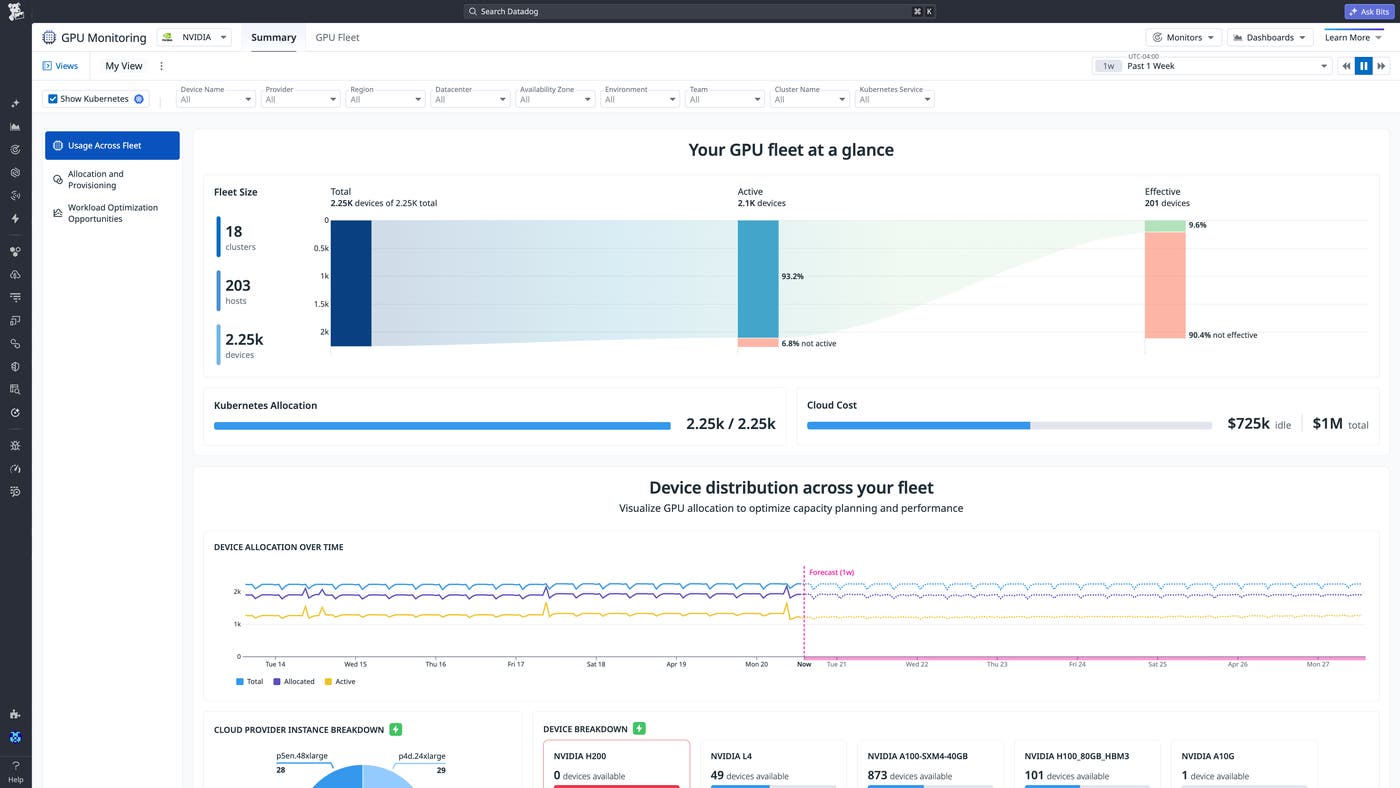
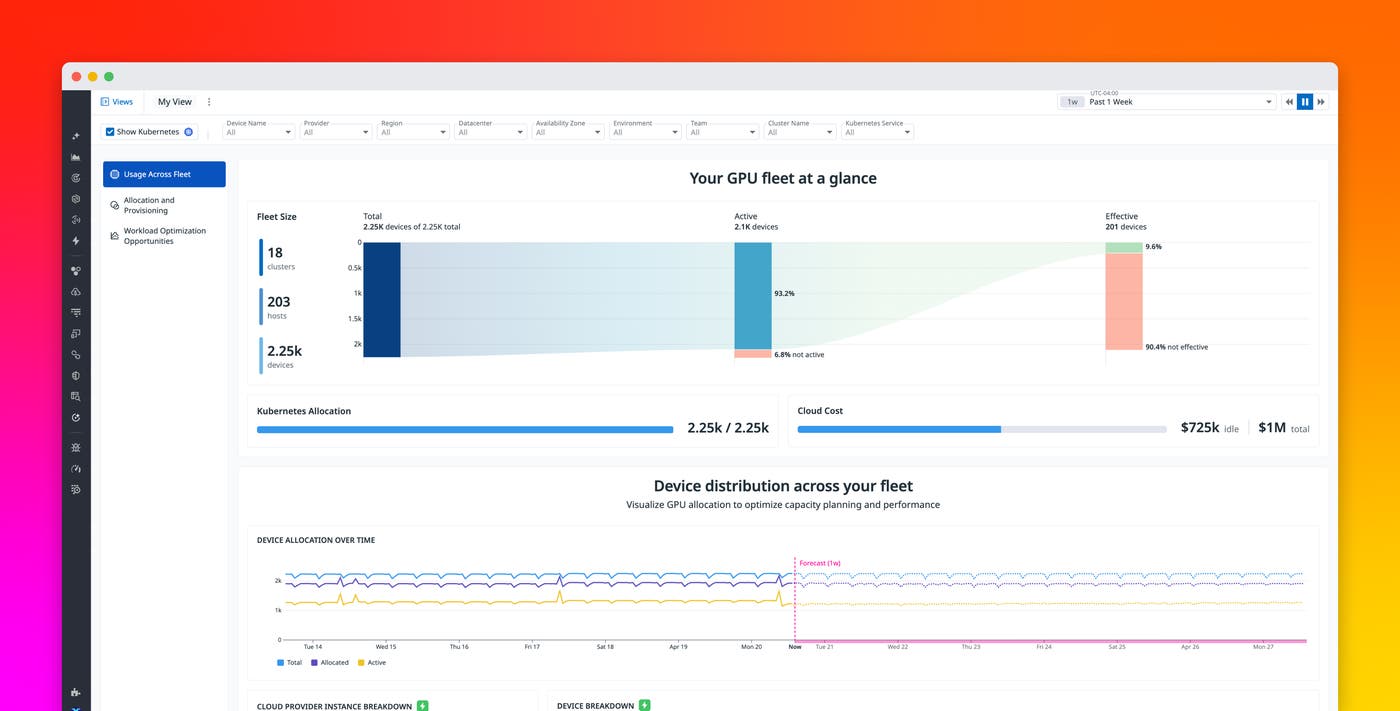
It’s easy to see how much of your fleet is sitting completely idle or being ineffectively consumed by a workload that doesn’t require GPUs at all. You can drill into the Fleet Explorer to hold each team accountable for their GPU utilization and spend.
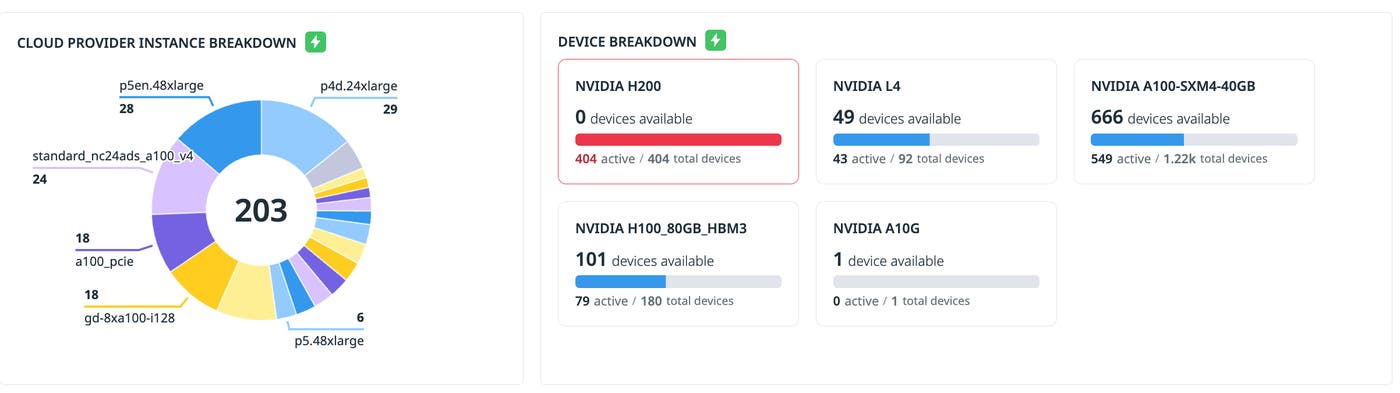
GPU Monitoring also provides real-time visibility into your GPU availability, so you can optimize device allocation across workloads to avoid underprovisioning or overallocation. To prevent resource contention, you can use the out-of-the-box monitor for unmet GPU requests by any tags of your choosing.
Let’s say a data scientist discovers their workload is stalling without knowing why. With GPU Monitoring, you can quickly see when you’re completely out of certain devices that are required for the workload and need more capacity reservations.
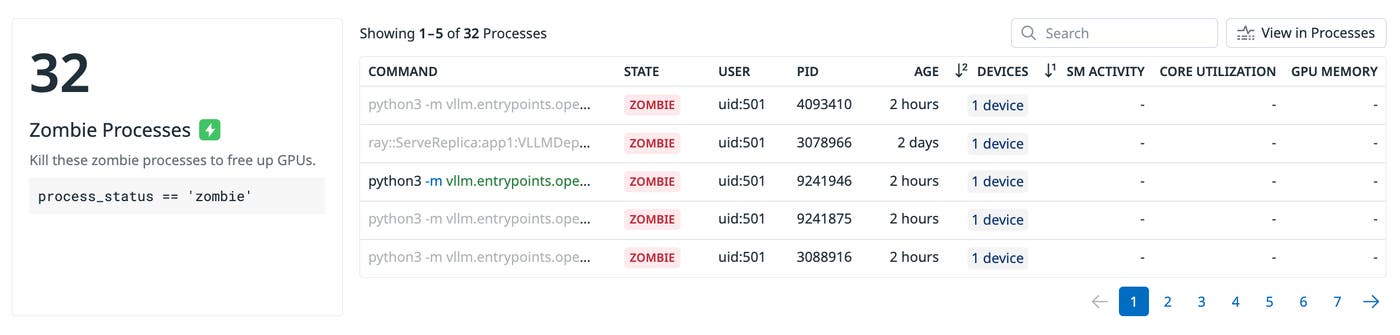
Often, teams can avoid long procurement cycles by improving operational efficiency. But not everyone is a hardware expert that understands how to do so. GPU Monitoring connects signals throughout the AI stack to surface guided recommendations that help teams better provision and optimize their spend. For example, zombie processes are often the primary source of wasted GPU spend, as they inappropriately hold on to GPU capacity. Simply terminating these processes frees up GPU capacity for other workloads.
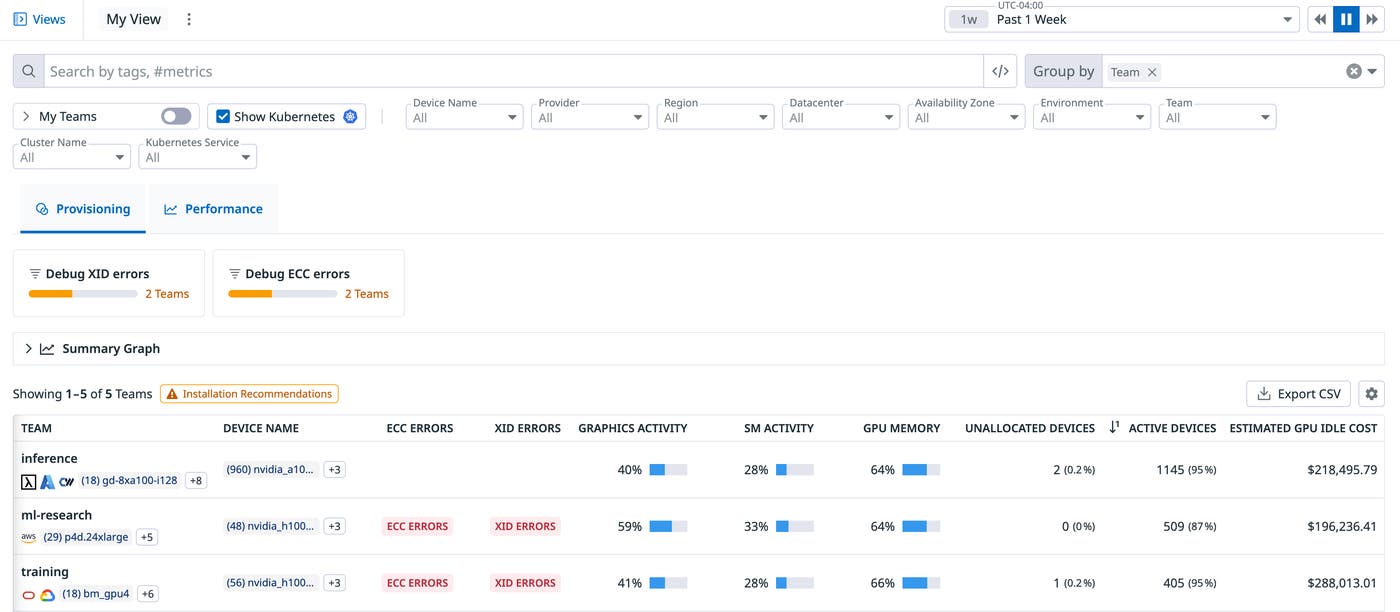
For provisioning, the GPU Fleet page also offers a dedicated view that attributes GPU inactivity and wasted resources back to its workloads, while also surfacing tailored recommendations to workload owners for reclaiming capacity. For example, a workload can unintentionally burn compute spend because the code was never configured to use GPUs as the computation backend. Platform and ML engineers can work from a shared source of truth: The platform team identifies the most wasteful workloads while the ML team adjusts its code to efficiently use GPU resources.
Troubleshoot stalled AI workloads
With GPU Monitoring, engineers can investigate across the layers of the AI stack—from the device-level up or the application-level down. Platform engineers can drill down to a specific host or device, while ML engineers can begin with their training or inference workloads and trace issues back to the underlying GPUs. This shared context reduces the back-and-forth that typically slows down investigations.
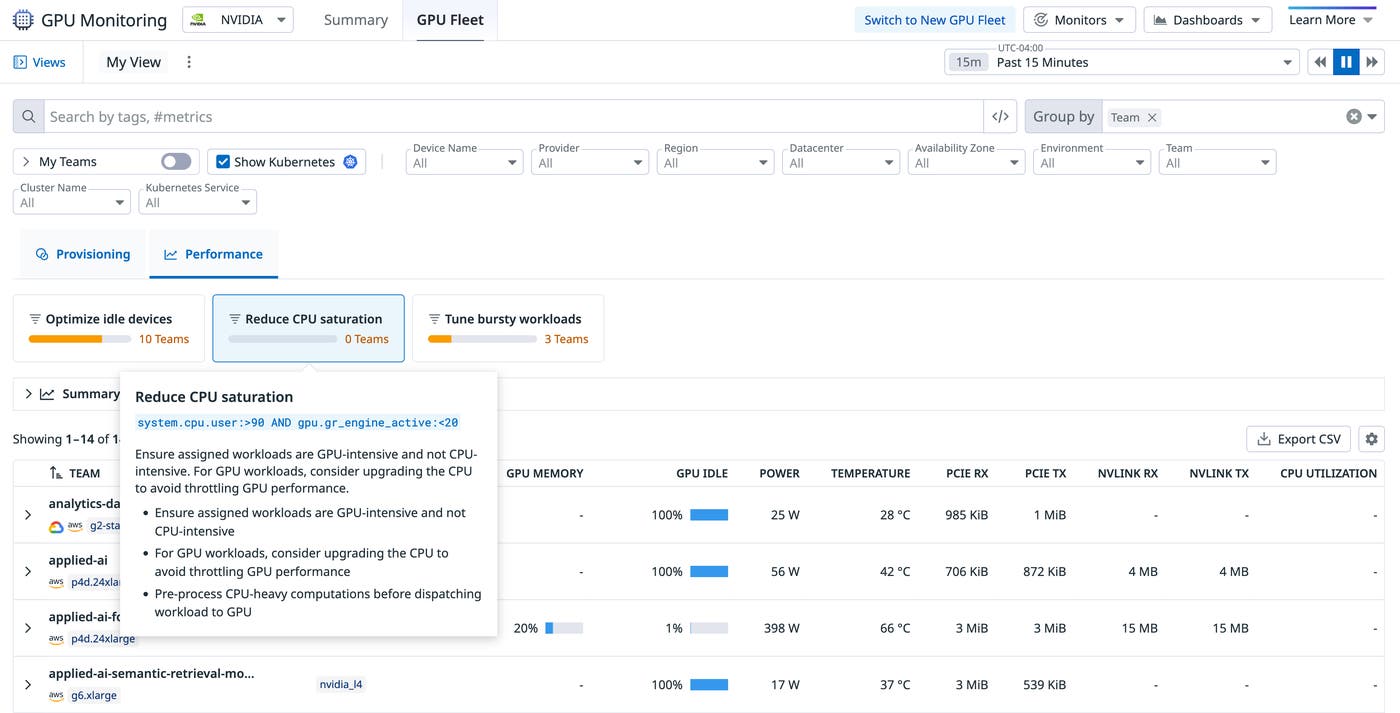
The Performance view in the Fleet page helps users understand workload execution and tune GPU utilization to use their devices more effectively by combining memory utilization, streaming multiprocessor activity, and PCIe throughput across any tags. For example, a serving workload might reserve multiple GPUs while running mostly CPU-bound work. Datadog proactively detects CPU saturation on your hosts and recommends preprocessing CPU-heavy computations before dispatching your workloads to GPUs.
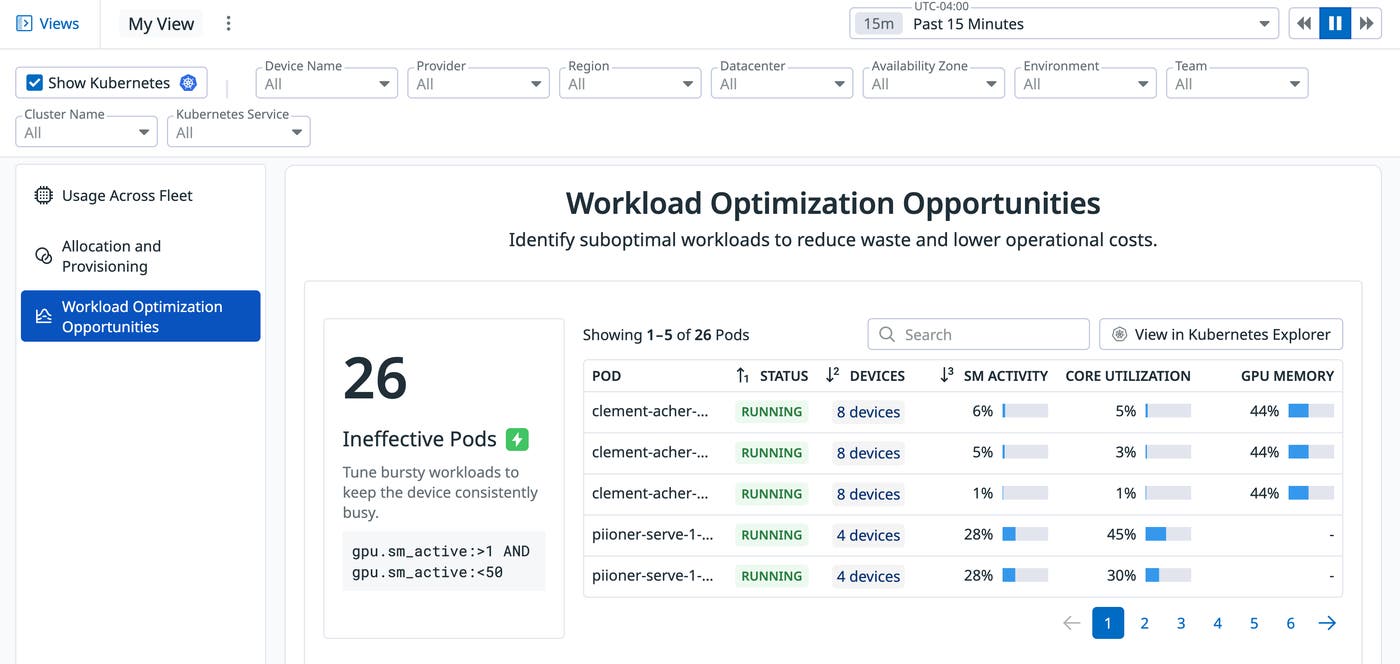
Similarly, ineffective pods can be a source of wasted spend for organizations. Internally at Datadog, GPU Monitoring helped us save tens of thousands in monthly expenses by identifying and removing a serving pod that had been stuck in the initialization phase.
Proactively catch unhealthy GPUs to prevent failure cascades
Hardware issues can quietly degrade performance or cause repeated job failures if undetected. Beyond table stakes health telemetry like power or SM clock, GPU Monitoring connects device-level health signals to workload and infrastructure context.
Out-of-the-box monitors flag costly thermal throttling risks and other anomalies, giving teams time to isolate problematic devices before they impact additional workloads.
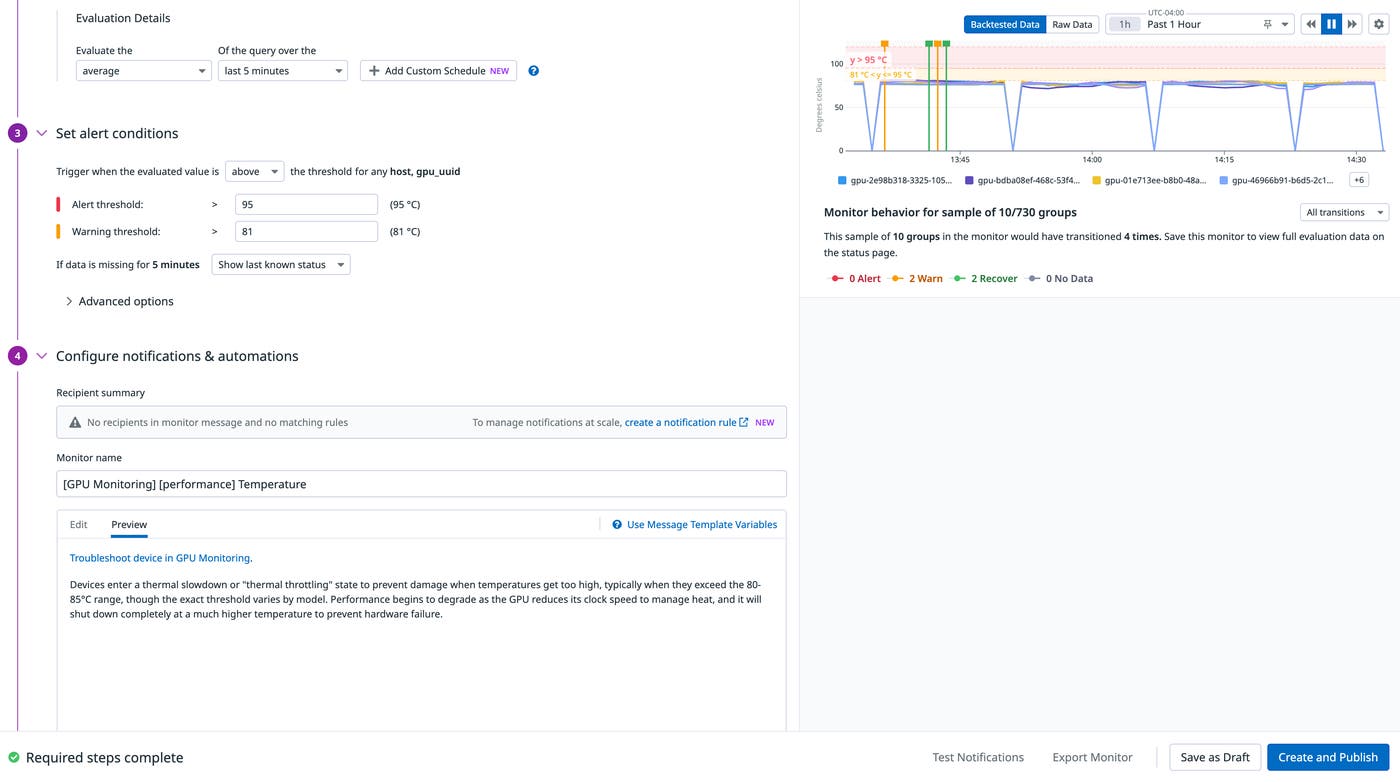
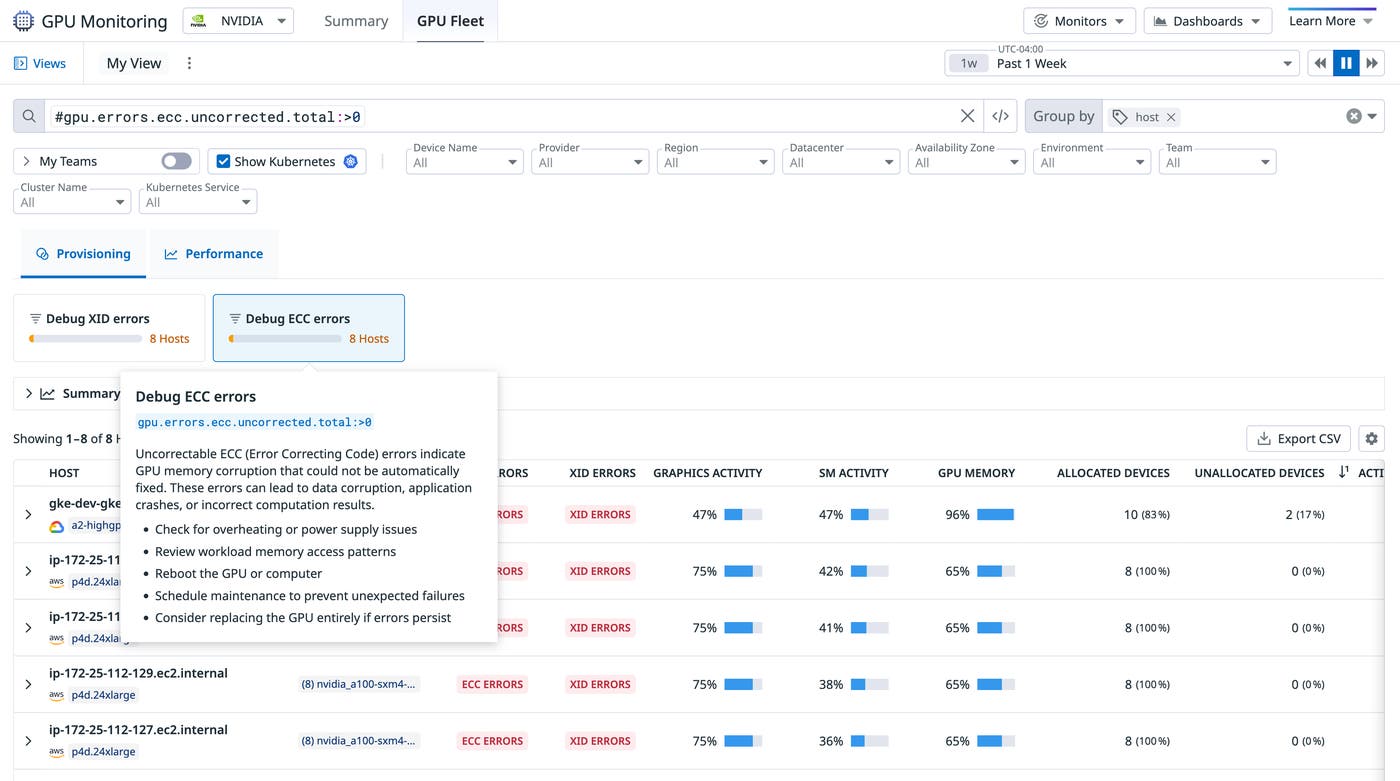
When a workload stalls, engineers have visibility into the exact GPU devices suffering from XID or ECC errors to isolate and enact guided recommended actions. GPU Monitoring helps teams focus on the right root cause instead of chasing symptoms across layers.
Empower teams to remain in control of their GPU spend efficiency
GPU Monitoring ties cost signals to actionable next steps. Teams can reprovision idle devices or reclaim capacity from overprovisioned workloads. Instead of static reports, cost visibility becomes part of day-to-day operations.
Teams can break down total and idle GPU cost by any tag, including service, namespace, training job, Kubernetes cluster, and owner, making it easy to identify which workloads are driving spend and which ones are underutilizing their share of resources.
Because cost data is integrated into the same views as capacity and performance, teams can move from identifying inefficiencies to resolving them without exporting data or switching tools. Idle workloads are exposed in the provisioning view alongside their associated cost, helping prioritize optimization efforts.
This approach reflects a broader pattern in AI infrastructure: Rising costs are often driven by operational inefficiency rather than hardware alone. By linking cost to utilization and workload behavior, teams can reduce waste while maintaining performance.
Get started with Datadog GPU Monitoring
Datadog GPU Monitoring is now generally available and works alongside Datadog Infrastructure Monitoring, APM, Log Management, and LLM Observability. With a unified view of GPU capacity, performance, health, and cost, teams can understand how their AI workloads are running and take action without switching tools just by enabling a single configuration flag in the Datadog Agent.
To learn more, see the GPU Monitoring documentation and explore how it fits into your existing observability workflows.
If you’re new to Datadog, sign up for a 14-day free trial.