

Bamboo Artifactory Plug-in
Migrate to the JFrog Bamboo Plugin
If you're already using the Artifactory Bamboo Plugin, we recommend also installing the JFrog Bamboo Plugin, and gradually migrate your jobs from the old plugin to the new one. You can also have your existing plans use the two plugins. The old plugin will continue to be supported, however for the latest updates, product features, and support for Atlassian Bamboo Data Center, use the latest JFrog Bamboo Plugin.
Why Did We Create the JFrog Bamboo Plugin?
We want to ensure that the Bamboo plugin continues receiving new functionality and improvements. that are added very frequently to JFrog CLI. JFrog CLI already includes significantly more features than the Artifactory Bamboo Plugin. The new JFrog plugin will be receiving these updates automatically.
How is the JFrog Bamboo Plugin Different from the Artifactory Bamboo Plugin?
Unlike the Artifactory Bamboo plugin, the JFrog Bamboo Plugin completely relies on JFrog CLI, and serves as a wrapper for it. This means that the APIs you'll be using in your jobs look very similar to JFrog CLI commands.
Artifactory provides tight integration with Bamboo through the Bamboo Artifactory Plug-in. Beyond managing efficient deployment of your artifacts to Artifactory, the plug-in lets you capture information about artifacts deployed, dependencies resolved, environment data associated with the Bamboo build runs and more. This data can be published to Artifactory as buildinfo using the Artifactory Publish Build Info task.
The Bamboo Artifactory Plug-in currently provides full support for Maven, Gradle, Ivy, NPM, Docker and NuGet through dedicated Artifactory tasks for each of these package managers. Generic download and upload using File Specs is also supported through dedicated tasks.
Sources: The Bamboo Artifactory Plugin is an open-source project on GitHub which you can freely browse and fork.
Download the Bamboo Artifactory Plugin
Plugin Compatibility: The Bamboo Artifactory Plugin is fully tested for compatibility with the version of Bamboo that is current when the plugin is released. When a new version of Bamboo is released, the Marketplace lists the Bamboo Artifactory Plugin as incompatible, however, since we regularly update the plugin it is likely to maintain compatibility with patch or minor version upgrades of Bamboo. We recommend testing new Bamboo and plugins releases on a staging environment before upgrading the production environment.
[Bamboo Data Center 12.x Compatibility Notice]
The Bamboo Artifactory Plugin (legacy) has not been certified for Bamboo Data Center 12.x versions. The last certified version supports Bamboo up to 10.x.
Recommendation: For users planning to upgrade to Bamboo DC 12.x, we recommend migrating to the newer JFrog for Bamboo Plugin, which uses JFrog CLI and will continue receiving updates.
Note: Atlassian has announced end-of-life for Bamboo Data Center products by Q1 2028. Please plan your CI/CD migration strategy accordingly.
Versions
The full list of versions is available here.
Note
Upgrading to version 2.x from version 1.x of the plugin requires new installation steps. For more information, see Installing the Plugin .
Install the Bamboo Artifactory Plugin
This section reviews how to install the Bamboo Artifactory Plugin.
Requirements
- Artifactory 2.2.5 or later. For best results and optimized communication, we recommend using the latest version of Artifactory.
- Maven 3.
- Gradle 4.10 or later.
- Ant and Ivy 2.1.0 or later.
Upgrade to Bamboo Artifactory Plugin Versions 2.x from Versions 1.x
If you are currently using a version of the plugin below 2.0.0 and would like to upgrade to version 2.0.0 or above, you need to migrate your Artifactory configuration data to the format expected by the type 2 plugin as described in the following steps:
-
If you are not already on version 1.13.0 of the plugin, upgrade to that version first.
-
From Bamboo Administration | Artifactory Plugin, click on the "Migrate data to v2" button.
-
Remove plugin version 1.13.0 and restart Bamboo.
-
You're now ready to install version 2.x according to the below instructions.
Install Bamboo Artifactory Bamboo Artifactory Versions 2.x
From version 2.0.0, the Bamboo Artifactory Plugin is released as a type 2 plugin. You can read about installing type 2 plugins in the Bamboo documentation for Installing add-ons.
Install Bamboo Artifactory Versions 1.x
Remove older versions
If you have an older version of the plug-in, be sure to remove it before upgrading to a newer one
For versions below 2.0.0, the plugin was released as a type 1 plugin and is deployed to Bamboo by placing the packaged plugin jar file into the $BAMBOO_INSTALLATION_HOME/atlassian-bamboo/WEB-INF/lib folder and restarting Bamboo.
For more details please refer to the Bamboo documentation for Installing Plugins type 1 add-ons.
Integration Benefits JFrog Artifactory and Bamboo
Configure the Bamboo Artifactory Plugin
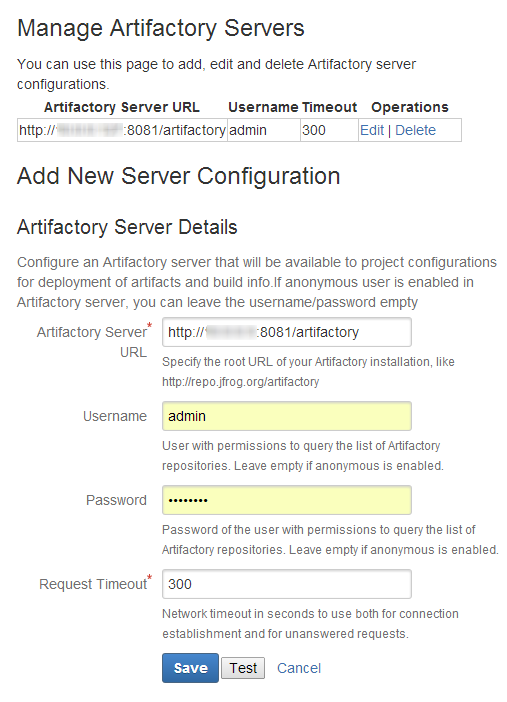
To use the Bamboo Artifactory plug-in you need to set up your Artifactory server(s) in Bamboo's server configuration. You can then set up a project builder to deploy artifacts and build-info to a repository on one of the configured Artifactory servers.
Configure System-wide Artifactory Server(s) for Bamboo Integration
To make Artifactory servers available to project configurations, they must be defined under Bamboo Administration | Manage Apps | Artifactory Plugin.
Press New Artifactory Server to add a new server, fill in the required fields and press save.
Configure Artifactory Tasks for the Bamboo Artifactory Plugin
This section reviews different tasks involved in configuring the Bamboo Artifactory Plugin.
Task | Description | For more information, see... | |
|---|---|---|---|
1 | Configure the Generic Resolve Task | Enable the downloading files from Artifactory using file specs. | |
2 | Configure the Generic Deploy Task | Enable uploading files to Artifactory using file specs. | |
3 | Configure NuGet and .NET Core Tasks | Enable using NuGet or .NET Core clients with Artifactory | |
4 | Configure the Build Issues Task | Enable the listing of issues collected by Bamboo in Artifactory. | |
5 | Configure the Publish Build Info Task | Enable publishing build-info in the plan. | |
6 | Configure the Xray Scan Task | Enable Bamboo build artifacts to be scanned for vulnerabilities by Xray. | |
7 | Use File Specs for the Plugin | Enable using File Specs to specify dependencies to be resolved by Artifactory. | |
8 | Enable Bamboo Deployment Projects | Enable using Bamboo deployment projects. | |
9 | Attach Searchable Parameters | Define parameters that should be attached to build info deployed by the plugin. | |
10 | Override Plan values using Bamboo Variables | Enable overriding variables in the plan configuration like Deployer and Resolver credentials, repositories and more. | |
11 | Conduct Release Management | Use the Artifactory Plugin for Bamboo for release management. |
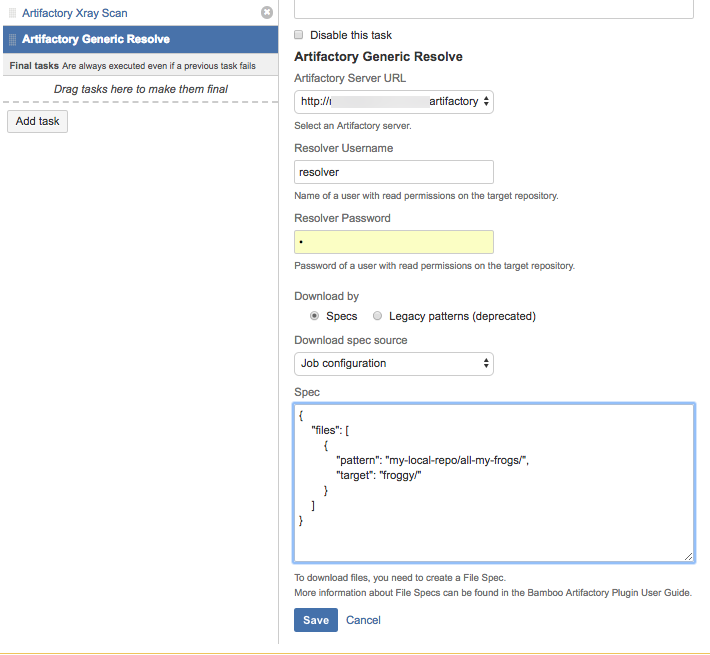
The Artifactory Generic Resolve Task
The Artifactory Generic Resolve task allows downloading files from Artifactory using file specs. It allows collecting build-info, which can be later published to Artifactory using by the Artifactory Publish Build Info task.
Note
- Before version 2.2.0, specifying artifact patterns was possible through Legacy Patterns, which became deprecated in version 2.2.0.
- Tasks which were created before version 2.7.0, publish the build-info to Artifactory directly, and not by the Publish Build Info task.
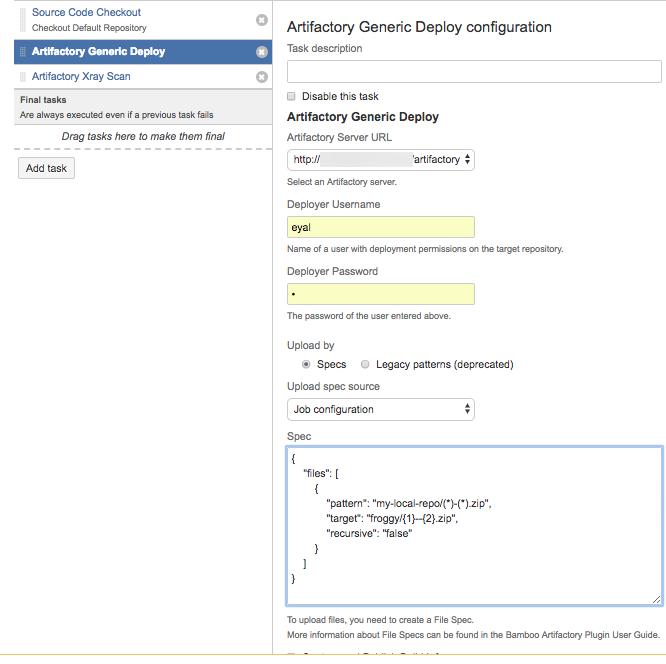
The Artifactory Generic Deploy Task
The Artifactory Generic Deploy task allows uploading files to Artifactory using file specs. It allows collecting build-info, which can be later published to Artifactory using by the Artifactory Publish Build Info task.
Note
- Before version 2.2.0, specifying artifact patterns was possible through Legacy Patterns, which became deprecated in version 2.2.0.
- Tasks which were created before version 2.7.0, publish the build-info to Artifactory directly, and not by the Publish Build Info task.
The Artifactory NuGet and Artifactory .NET Core tasks
Depending on whether you use the NuGet or .NET Core CLI to build your NuGet packages, the Artifactory NuGet and Artifactory .NET Core tasks support using the NuGet or .NET Core clients with Artifactory. The tasks allow resolving NuGet dependencies from Artifactory during the build, while collecting build-info, which can be later published to Artifactory using the Artifactory Publish Build Info task
Note
- Depending on the client you use, please make sure either the nuget or dotnet clients are included in the build agent's PATH.
- If you use the dotnet client, please note that .NET Core 3.1.200 SDK or above are supported.
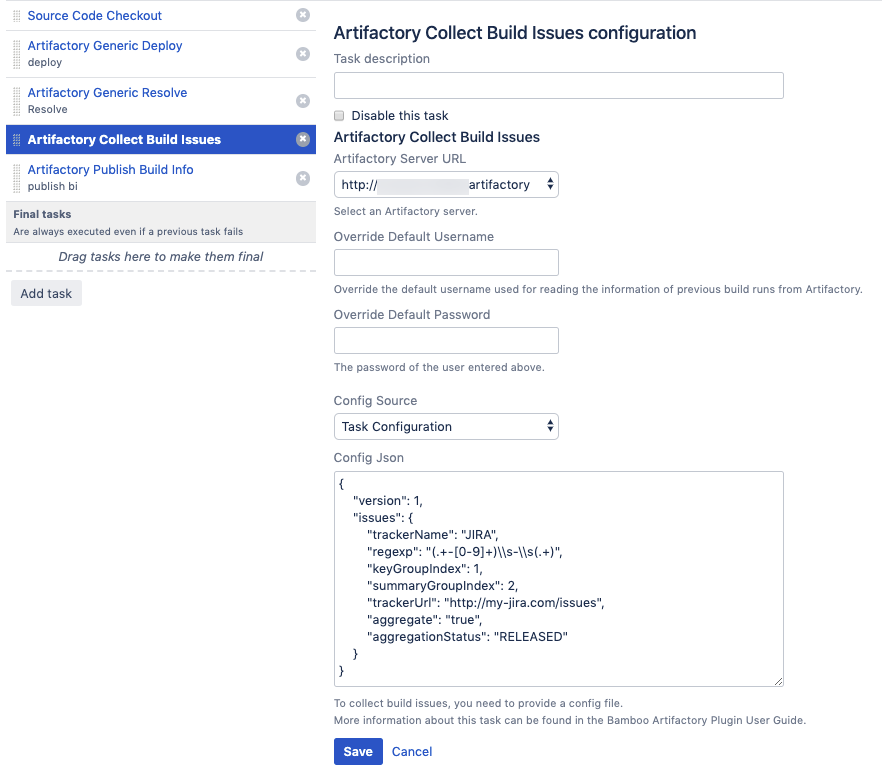
The Collect Build Issues task
The build-info collected by the various Artifactory tasks, can also include the issues which were handled as part of the build. The list of issues is automatically collected by Bamboo from the git commit messages. This requires the project developers to use a consistent commit message format, which includes the issue ID and issue summary, for example:
BAP-1364 - Replace tabs with spaces
The list of issues can be then viewed in the Builds UI in Artifactory, along with a link to the issue in the issues tracking system.
The information required for collecting the issues is provided through a JSON configuration. This configuration can be provided as a file or as a JSON string.
Here's an example for issues collection configuration.
{
    "version": 1,
    "issues": {
        "trackerName": "JIRA",
        "regexp": "(.+-[0-9]+)\s-\s(.+)",
        "keyGroupIndex": 1,
        "summaryGroupIndex": 2,
        "trackerUrl": "http://my-jira.com/issues",
        "aggregate": "true",
        "aggregationStatus": "RELEASED"
    }
}
Configuration file properties:
Property name | Description |
|---|---|
aggregate | Set to true, if you wish all builds to include issues from previous builds. |
aggregationStatus | If aggregate is set to true, this property indicates how far in time should the issues be aggregated. In the above example, issues will be aggregated from previous builds, until a build with a RELEASE status is found. The RELEASE status is set to a build when it is promoted using the Build Promotion functionality added by the Bamboo Artifactory Plugin. |
keyGroupIndex | The capturing group index in the regular expression used for retrieving the issue key. In the example above, setting the index to "1" retrieves BAP-1364 from this commit message: BAP-1364 - Replace tabs with spaces |
regexp | A regular expression used for matching the git commit messages. The expression should include two capturing groups - for the issue key (ID) and the issue summary. In the example above, the regular expression matches the commit messages as displayed in the following example: BAP-1364 - Replace tabs with spaces |
summaryGroupIndex | The capturing group index in the regular expression for retrieving the issue summary. In the example above, setting the index to "2" retrieves the sample issue from this commit message: BAP-1364 - Replace tabs with spaces |
trackerName | The name (type) of the issue tracking system. For example, JIRA. This property can take any value. |
trackerUrl | The issue tracking URL. This value is used for constructing a direct link to the issues in the Artifactory build UI. |
Version | The schema version is intended for internal use. Do not change! |
The Publish Build Info task
The Publish Build Info task has been added in version 2.7.0. The task publishes the build-info collected by previous Artifactory tasks in the plan, if they are configured to collect build-info. For plans which include the Publish Build info task, the link to the published build-info is available in the Build Results area.

Note
Plan tasks which were created before version 2.7.0, publish the build-info to Artifactory without the use of the Publish Build Info task.
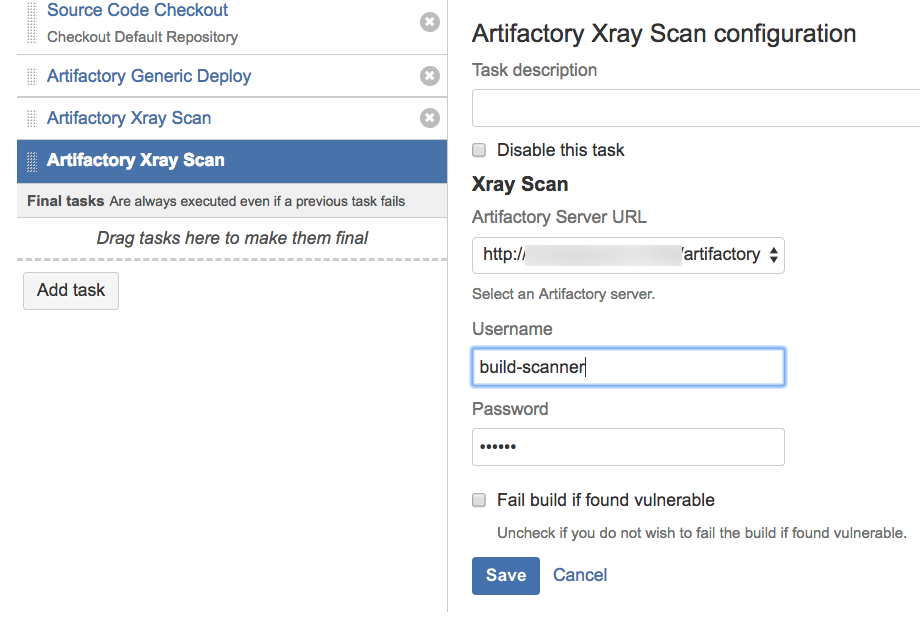
The Artifactory Xray Scan Task
The Bamboo Artifactory Plugin is integrated with JFrog Xray through JFrog Artifactory allowing you to have build artifacts scanned for vulnerabilities and other issues. If issues or vulnerabilities are found, you may choose to fail a build job. This integration requires JFrog Artifactory v4.16 and above and JFrog Xray v1.6 and above.
For Xray to scan builds, you need to configure a Watch with the right filters that specify which artifacts and vulnerabilities should trigger an alert, and set a Fail Build Job Action for that Watch. You can read more about CI/CD integration with Xray here.
Next, add the Artifactory Xray Scan task to your plan and configure it.
Note
To scan a build with Xray, the build-info must be already published to Artifactory. You should therefore make sure that one or more of the previous plan tasks is configured to collect build info and that the build-info is published to Artifactory.
Use File Specs for the Bamboo Artifactory Plugin
File Spec are specified in JSON format. They are used in the Generic Resolve and Generic Deploy tasks and in Bamboo Deployment tasks, File Specs are used in the Artifactory Download task, to specify the dependencies to be resolved from Artifactory or artifacts to be deployed to it.
You can use File Specs in one of the following ways:
- Manage them in your SCM, and then during the build, have them pulled to the workspace with the other sources. If you choose this option, you should select the "File" option in the "Upload spec source" or "Download spec source" field and specify the relative path to the File Spec in your workspace.
- Save the File Spec JSON as part of the job configuration. If you choose this option, you should select the "Job configuration" option in the "Upload spec source" or "Download spec source" field and specify the File Spec JSON content in your workspace in the "File path" field.
You can read the File Spec schema here.
Deployment Projects for the Bamboo Artifactory Plugin
The Bamboo Artifactory Plugin also supports Bamboo Deployment projects (read more about Deployment projects here).
- The Artifactory Download task downloads artifacts from Artifactory. The artifacts to be downloaded are defined using File Specs.
- The Artifactory Deployment task collects the build artifacts which are shared by the build plan associated with the deployment task, and uploads them to Artifactory. In addition, artifacts which were downloaded by Artifactory Download task are also available for deployment.
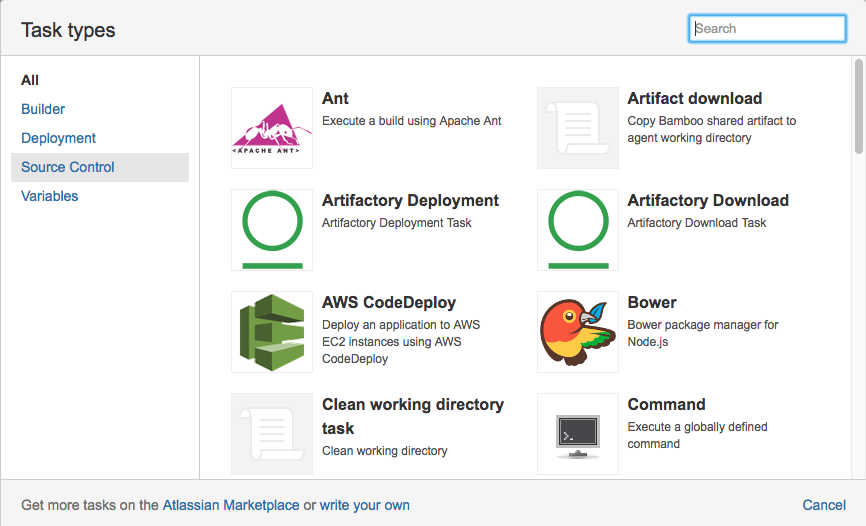
The "Artifacts Download" Task
The Artifacts Download task must be prior to the Artifactory Deployment task in the Deployment job flow.
Run a Build when using the Bamboo Artifactory Plugin
Once you have completed setting up a project builder you can run it. The Artifactory plug-in commences at the end of the build and:
- Deploys all artifacts to the selected target repository in one go (as opposed to the deploy at the end of each module build, used by Maven/Ivy).
- Deploys the Artifactory build-info to the selected server, which provides full traceability of the build in Artifactory, with links back to the build in Bamboo.
Attach Searchable Parameters
You can define parameters that should be attached to build info and artifacts that are deployed by the plugin.
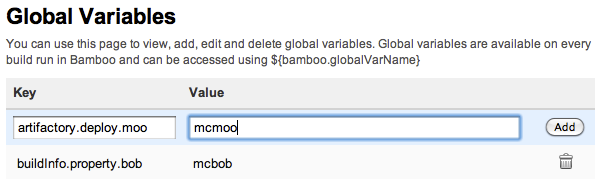
To define a parameter, under Administration go to Build Resources | Global Variables, fill in a Key/Value pair and click Save.
The available parameter types are:
buildInfo.property.*- All properties starting with this prefix will be added to the root properties of the build-info.artifactory.deploy.*- All properties starting with this prefix will be attached to any produced artifacts that are deployed.
Use a Properties File
Instead of defining properties manually, you can point the plug-in to a properties file.
To do so, define a property named buildInfoConfig.propertiesFile and set its value to the absolute path of the properties file.
Tip
The given path and file should be present on the machine that is running the build agent, not the server.
Override Plan values using Bamboo Variables
The Artifactory Plugin supports overriding variables in the plan configuration like Deployer credentials, Resolver credentials, repositories etc.
If you wish to override any of the values specified in the table below, you need to configure them as Bamboo variables either through the UI or append them to the REST URL request as a query parameters.
When assigning any value to these Bamboo variables, it will override the job configuration.
Example with REST
curl -ubamboo-user:bamboo-password -XPOST
"http://<BAMBOO HOST>:8085/rest/api/latest/queue/MVN-JOB?stage&executeAllStages&bamboo.variable.artifactory.override.deployer.username=new_username&bamboo.variable.artifactory.override.deployer.password=new_password"
In the example above, we use CURL to remotely invoke a Bamboo plan. We set the Deployer username and Deployer password for this specific request.
Note that we add the "bamboo.varaible" prefix to the query parameters.
Warning
Note that the sent values will be applied only if the specific task support them. For example: currently Artifactory Gradle tasks do not support Resolver credentials, hence those values will be ignored if sent.
Parameter name | Description | Supported jobs |
|---|---|---|
artifactory.override.deployer.username | Deployer username | Maven, Gradle, Ivy, Generic deploy |
artifactory.override.deployer.password | Deployer password | Maven, Gradle, Ivy, Generic deploy |
artifactory.override.resolver.username | Resolver username | Maven, Generic resolve |
artifactory.override.resolver.password | Resolver password | Maven, Generic resolve |
artifactory.override.resolve.repo | Resolve repository | Maven, Gradle |
artifactory.override.deploy.repo | Deploy repository | Maven, Gradle, Ivy, Generic deploy |
artifactory.task.override.jdk | If set to true, check the value of artifactory.task.override.jdk.env.var. If that variable is populated with an environment variable, use the value of that environment variable as the Build JDK path. If artifactory.task.override.jdk.env.varis not defined, use the value of JAVA_HOME for the Build JDK. | Maven, Gradle, Ivy |
artifactory.task.override.jdk.env.var | Stores the name of another environment variable whose value should be used for the build JDK. | Maven, Gradle, Ivy |
Release Management and the Bamboo Artifactory Plugin
The Artifactory Plugin provides a powerful feature for release management and promotion. For details please refer to Bamboo Artifactory Plugin - Release Management.
Release Notes for the Bamboo Artifactory Plugin
The release notes for versions 3.3.0 and above are available here.
3.2.10 (11 September 2022)
- Bug fix - Gradle wrapper should remove the requirement for capability - https://github.com/jfrog/bamboo-artifactory-plugin/pull/189
3.2.9 (24 April 2022)
- Bug fix - Build Info aggregation may pass the OS environment variable size limit - https://github.com/jfrog/bamboo-artifactory-plugin/pull/177
3.2.8 (1 March 2022)
- Bug fix - NullPointerException in Maven task when no deployment server is configured - https://github.com/jfrog/bamboo-artifactory-plugin/pull/172
3.2.7 (22 February 2022)
- Dependencies update - https://github.com/jfrog/bamboo-artifactory-plugin/pull/168 & https://github.com/jfrog/bamboo-artifactory-plugin/pull/170
3.2.6 (12 January 2022)
- Compatibility with 8.1.1 - https://github.com/jfrog/bamboo-artifactory-plugin/pull/165
3.2.5 (14 December 2021)
- Dependencies update - https://github.com/jfrog/bamboo-artifactory-plugin/pull/161
3.2.4 (12 December 2021)
- Bug fix - NullPointerException while executing task - https://github.com/jfrog/bamboo-artifactory-plugin/pull/155
- Bug fix - NoSuchMethodError: org.apache.commons.io.IOUtils.toString - https://github.com/jfrog/bamboo-artifactory-plugin/pull/158
3.2.3 (4 August 2021)
- Bug fix - Passwords with special characters cannot be used in tasks - https://github.com/jfrog/bamboo-artifactory-plugin/pull/145
3.2.2 (6 June 2021)
- Bug fix - Artifactory response parsing can fail due to missing JSON properties - https://github.com/jfrog/build-info/pull/502
3.2.1 (10 Jan 2021)
- Credentials are not encrypted in the UI. BAP-533- Authenticate to see issue details
- Using SSH shared credentials produces NPE. BAP-532 - Using SSH shared credentials produces NPE Resolved
3.2.0 (10 Nov 2020)
- Artifactory Docker task. BAP-515 - Add docker support Resolved
- Artifactory NuGet and .NET tasks. BAP-516 - Add NuGet and .Net support Resolved
- Support Bamboo shared credentials in all tasks. BAP-465 - Bamboo Artifactory Plugin Shared Credential Resolved
- Support running Maven, Gradle and Ivy builds in Docker containers. BAP-507 - maven3 - Could not find the Maven lib directory Resolved BAP-518 - Support for running Maven, Gradle and Ivy builds in Docker containers Resolved
- Support custom build name and number. BAP-476 - As a developer i would like to customize my build name and build number Resolved BAP-506 - Support custom build name and number Resolved
- Bamboo 7.1.4 compatibility. BAP-517 - Artifactory tasks UI fail to load on Bamboo server 7.1.3 Resolved
- Bug fixes and improvments ( BAP-448 - Prevent autofilled userid and password Resolved , BAP-510 - Plugin compatibility update for Bamboo v 7.1.1 Resolved , - Maven 3 task: JAVA_HOME is not correctly set Resolved , BAP-520 - Can't create Gradle task with Gradle wrapper Resolved , BAP-521 - Replace deprecated methods Resolved , BAP-522 - NPE when JDK capability is not well configured in agent Resolved ).
3.1.0 (31 Mar 2020)
- Breaking change: Maven and Gradle - remove restriction of build-info collection only when deployment is configured. BAP-503 - Breaking change: Maven and Gradle remove restriction of build-info collection only when deployment is configured Resolved
- Bamboo 7 upgrade and compatibility. BAP-504 - Upgrade to Bamboo 7 Resolved
- Improvements ( BAP-496 - Improve tasks descriptions Resolved , BAP-498 - File-specs defined in task configuration should be labeled as 'Task configuration' Resolved , BAP-499 - Add description for Maven 'Project file' field Resolved , BAP-500 - Add validations to tasks configurations Resolved , BAP-501 - Using overriding credentials requires saving the task in order to fetch repository list Resolved , BAP-502 - Improve UI of Artifactory tasks Resolved ).
3.0.1 (16 Jan 2020)
- Bug fixes ( BAP-494 - Missing 'Environment Variables' field in Maven, Gradle, Ivy tasks Resolved , BAP-495 - SSH key file selector is missing in Maven and Gradle task configurations Resolved ).
3.0.0 (23 Dec 2019)
- Artifactory npm task. BAP-487 - Add npm support Resolved
- Build Issues-Collection task. BAP-486 - Add issues collection task Resolved
- HTTP proxy support in Artifactory tasks. BAP-204 - Add an option for HTTP proxy configuration Resolved
- Gradle 6 support. BAP-493 - Support Gradle 6 Resolved
- Removed deprecated APIs. BAP-484 - Remove deprecated actions and APIs Resolved
- Bug fixes ( BAP-492 - Gradle task doesn't allow promoting a released build Resolved , BAP-488 - Bamboo Artifactory Gradle task fails with java.lang.NullPointerException Resolved , BAP-491 - Maven task failing with message "Failed to add Build Info to context" Resolved ).
2.7.2 (9 Sep 2019)
- Bug fix - Downloads using file specs may fail, if Artifactory's S3 Redirect feature is enabled. BAP-477 - Downloads using file specs may fail, if Artifactory's S3 Redirect feature is enabled Resolved
2.7.1 (30 Jul 2019)
- Bug fix - Releasing from plan branch broken. BAP-475 - Releasing from plan branches broken Resolved
2.7.0 (22 Jul 2019)
- Support aggregating build-info from multiple tasks. New tasks created since this version can publish build-info only by the use of the new Publish Build Info task. BAP-473 - Add the ability to aggregate build info's Resolved
- Bug fix - Gradle Artifactory Executable is not part of the plan requirements. BAP-474 - Adding an executable in Gradle task does not add it as a requirement automatically Resolved
2.6.3 (2 May 2019)
- Compatibility with Bamboo 6.8.1. BAP-470 - Compatibility with Bamboo 6.8.1 Resolved
- NPE when using different plans in one task with release management and picking wrong plan. BAP-469 - NPE when using different plans in one task with release management and picking wrong plan Resolved
2.6.2 (28 Oct 2018)
- When adding a new Generic Deploy task a javascript error appears. BAP-453 - When adding a new Generic Deploy task a javascript error appears Resolved
- The vcs.url property is not displayed properly in Artifactory. BAP-452 - The vcs.url property is not displayed properly in Artifactory Resolved
2.6.1 (14 Oct 2018)
- Gradle, Maven and Ivy builds no longer support JDK 7
- Bamboo Deployment Project - Support deployment using FileSpecs BAP-443 - Bamboo Deployment Project - Artifactory Deployment using FileSpecs Resolved
- Artifactory FileSpec from file ignores variable BAP-447 - Artifactory spec from File ignors variable Resolved
- Concurrency issue in parallel deployment of artifacts using FileSpecs BAP-450 - Generic upload job running in several threads throwing a NullPointerException Resolved
- Matrix Parameters are not passed correctly BAP-446 - Matrix Parameters are not passed correctly Resolved
2.5.1 (26 June 2018)
- Gradle skips deployment to Artifactory when "Project uses the Artifactory Gradle Plugin" option is unchecked ( BAP-442 - Deploying artifact faild without error Resolved )
2.5.0 (18 June 2018)
- Support for build scan with JFrog Xray ( BAP-426 - Support for Xray scan build feature Resolved )
- Files uploaded to Artifactory using Files Specs are now uploaded in parallel using three threads ( BAP-433 - Parallel deployment of Artifacts when using FileSpecs Resolved )
- Large files downloads from Artifactory are now downloaded concurrently (using range request) ( BAP-427 - Download artifacts concurrently using range-request Resolved )
- Bug fixes ( BAP-441 - Remove the limitation of Generic Deploy task must be a final task Resolved , BAP-432 - Bamboo artifactory plugin fails with Gradle 4.7 Resolved , BAP-430 - When using the same file with filespec it will upload for the same target Resolved , BAP-425 - Build info extractor replaces spaces in file names with '+' Resolved , BAP-423 - Maven fails to resolve snapshot parent pom from Artifactory Resolved )
2.4.2 (3 June 2018)
- Compatibility with Bamboo 6.5.x ( BAP-439 - Bamboo 6.5.0 compatibility Resolved )
2.4.1 (21 Jan 2018)
- Bug fix ( BAP-422)
2.4.0 (17 Jan 2018)
- Support Download from Artifactory in Deployment Plans ( BAP-413)
- Compatibility with Bamboo 6.3.x ( BAP-415, BAP-419, BAP-421)
- Bug fixes ( BAP-399, BAP-401, BAP-403, BAP-404, BAP-408, BAP-409, BAP-410, BAP-411, BAP-412, BAP-413, BAP-414, BAP-417)
2.3.0 (10 Oct 2017)
- Support pattern exclusion in File Specs ( BAP-391)
- File specs AQL optimizations ( BAP-395)
- Dependencies repositories have been added to the plugin's maven descriptor ( BAP-397)
- Bug fixes ( BAP-385, BAP-390, BAP-396)
2.2.0 (6 Aug 2017)
- File Specs support for the Generic Resolve and Generic Deploy Tasks (BAP-377)
- Upgrade JGit ( BAP-381)
- Bug fixes ( BAP-378, BAP-379, BAP-380, BAP-382, BAP-383, BAP-384, BAP-387)
2.1.1 (22 Jun 2017)
- Compatibility with Bamboo 6.0.x ( BAP-376)
2.1.0 (20 Apr 2017)
2.0.2 (16 Feb 2017) 2.0.1 (29 Jan 2017)- Bug fix ( BAP-369)
1.10.2 (22 Sep 2016) 1.10.1 (7 Apr 2016)- Bug fixes ( BAP-345)
1.10.0 (25 Feb 2016)- Compatibility with Bamboo 5.10.x ( BAP-336)
- Coordinate the deployment order of artifacts according to module info in the Gradle task ( BAP-294)
- Bug fix ( BAP-303)
1.9.2 (22 Dec 2015) 1.9.1 (13 Dec 2015)- Bug fix ( BAP-312)
1.9.0 (26 Nov 2015)
- Support sending parameters when invoking Bamboo Artifactory tasks remotely. ( BAP-281, BAP-232)
- New "Push to Maven Central" ( BAP-284)
- Bug fixes ( BAP-313, BAP-306, BAP-290, BAP-288)
1.8.2 (27 Oct 2015) 1.8.1 (4 Aug 2015)- Bug fix ( BAP-282)
1.8.0 (15 Jun 2015)- Add push to Bintray support ( BAP-257)
- Make Artifactory Upload Task available for Deployment projects ( BAP-264)
- Ability not to promote the version on Gradle Release Staging ( BAP-258)
- Bug fixes ( BAP-270, BAP-269, BAP-267, BAP-266, BAP-261, BAP-260, BAP-254, BAP-246)
1.7.7 (30 Mar 2015)- Support for Bamboo 5.8.x ( BAP-249)
1.7.6 (14 Jan 2015)- Support for Bamboo 5.7.x ( BAP-230)
- Compatibility with Maven 3.2.5 ( BAP-244)
- Enable overriding the Build JDK value using Bamboo variables ( BAP-240)
- Bug fix ( BAP-241)
1.7.5 (10 Nov 2014)- Support Atlassian Stash source control management ( BAP-206)
- Artifactory generic Resolve task ( BAP-207)
- Maven 3 tasks - Record Implicit Project Dependencies and Build-Time Dependencies ( BAP-225)
1.7.4 (12 Aug 2014) 1.7.3 (29 Jul 2014) 1.7.2 (25 Jun 2014)1.7.1 (26 MAY 2014)
- A new check box that gives the ability to ignore artifacts that are not deployed according to include/exclude patterns. ( BAP-180)
1.7.0 (06 Apr 2014)
- Fix Support for Bamboo 5.4+
- Supporting Git Shared Credentials in Release Management functionality ( BAP-189)
- Adding Version Control Url property to the Artifactory Build Info JSON. ( BAP-200)
- Bug fixes ( BAP-197)
1.6.2 (24 Nov 2013)
- Fix Support for Bamboo 5.2
- Add Artifactory BlackDuck integration
- Bug fixes ( BAP-182 BAP-184 BAP-186 BAP-184)
1.6.1 (03 Oct 2013)
- Support form Bamboo 5.1.1
- Bug fixes 1.6.1
1.6.0 (16 Jul 2013)
- Support form Bamboo 5.0
1.5.6 (03 Sep 2013)
- Support form Bamboo 4.2
1.5.5 (03 Sep 2012)
- Support for include/exclude captured environment variables ( BAP-143)
- Bug fixes ( MAP-41 MAP-40 GAP-129 BAP-148 IAP-32)
1.5.4 (25 Jun 2012)
- Support Bamboo 4.1.
1.5.3 (02 Apr 2012)
- Support Bamboo 4.0.
1.5.2 (02 Apr 2012)
- Support Perforce for release management. ( BAP-133)
1.5.1 (05 Jan 2012)
- Compatible release plugin for version 3.4.2. ( BAP-116)
- Support for Gradle properties deployment.
- Uniqueicon for each Artifactory task type.
- Setting Bamboo job requirements correctly for all builder types. ( BAP-125)
1.5.0 (11 Dec 2011)
- Compatible with bamboo version 3.3.x.
- Compatible with Gradle 1.0-milestone-6.
1.4.2 (19 Sep 2011)
- Bug fix ( BAP-91)
1.4.1 (01 Aug 2011)
- Support for Bamboo 3.2.x
- Bug fix ( BAP-90)
1.4.0 (14 Jul 2011)
- Introducing Release Management capabilities.
- Generic Build Info support for all job types.
- Bug fixes.
1.3.2 (14 Jun 2011)
- Bug fix ( BAP-65)
1.3.1 (13 Jun 2011)
- Bug fix ( BAP-64)
1.3.0 (30 May 2011)
- Support for Bamboo 3.1.x
1.2.0 (2 Mar 2011)
- Support for Bamboo 3.x
1.1.0 (2 Jan 2011)- Gradle Support - Gradle builds are now fully supported with the new Gradle builder
- Ivy builds now support custom Ivy patterns for artifacts and descriptors
- Support for Bamboo 2.7.x
1.0.3 (21 Nov 2010)
- Add Include/exclude pattern for artifacts deployment
- Bug fix ( BAP-26)
1.0.2 (7 Nov 2010)
- Control for including published artifacts when running license checks
- Limiting license checks to scopes
- Control for turning off license discovery when running license checks
Bamboo Artifactory Plugin - Release Management
Artifactory supports release management through the Bamboo Artifactory Plugin.
When you run your builds using Maven or Gradle with jobs that use Git or Perforce as your version control system, you can manually stage a release build allowing you to:
- Change values for the release and next development version
- Choose a target staging repository for deployment of the release, and
- Create a VCS tag for the release.
Staged release builds can later be promoted or rolled-back, changing their release status in Artifactory and, optionally, moving the build artifacts to a different target repository.
Inside Artifactory, the history of all build status change activities (staged, promoted, rolled-back, etc.) is recorded and displayed for full traceability.
When release management is enabled, the Artifactory release staging link appears on the top header bar in the job page.
Displaying the Release and Promotion Tab
To display the Artifactory Release & Promotion tab you need to click the small arrow indicated below.

Release management tab moved from plugin version 1.7.0
From Bamboo Artifactory Plugin version 1.7.0, the Release Management tab was moved from the Plan page level to the Job page level because the process applies to artifacts in the context of a single job rather than a whole plan (which may hold several jobs).
The tab name was also changed from Artifactory Release management to Artifactory Release & Promotion.
Maven Release Management and the Bamboo Artifactory Plugin
The Bamboo Artifactory Plugin manages a release with Maven running the build only once using the following basic steps:
- Change the POM versions to the release version (before the build starts).
- Trigger the Maven build (with optionally different goals).
- Commit/push changes to the release branch.
- Change the POM versions to the next development version.
- Commit/push changes to the trunk.
If the build fails, the plugin attempts to rollback the changes (both local and committed).
For more information including configuration of Maven Runners, and Jobs and staging a release build, please refer to Bamboo Artifactory Plugin.
Configure Maven Jobs with the Bamboo Artifactory Plugin
To enable release management in Maven jobs, edit the job configuration and check the Enable Artifactory release management checkbox.
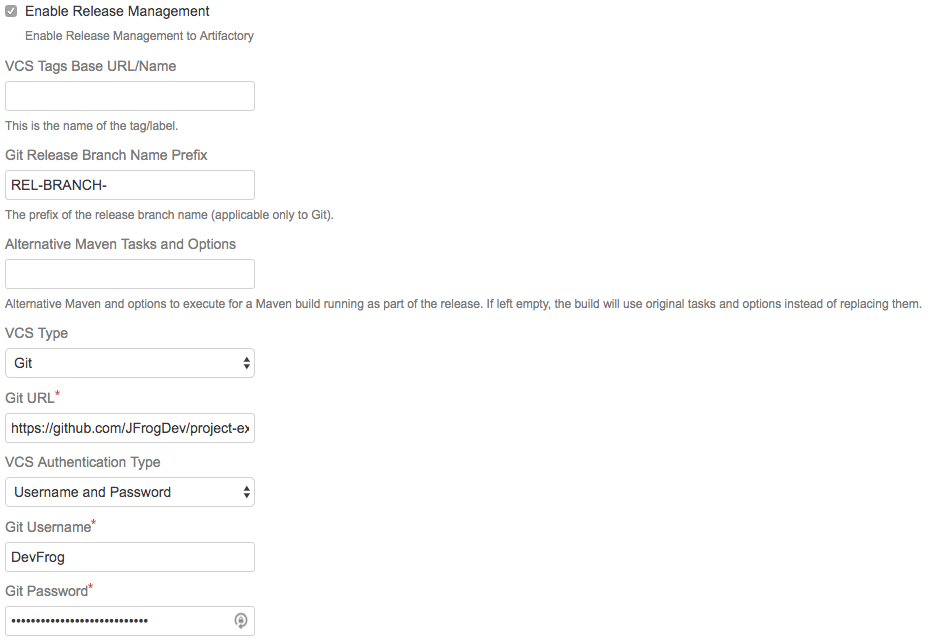
Stage a Maven Release Build with the Bamboo Artifactory Plugin
Clicking on the release staging link opens a new page with configuration options for the release build:
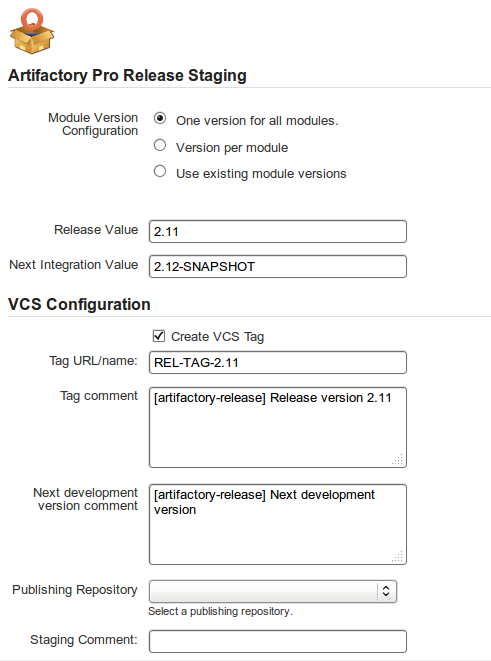
The release staging page displays the last version built (the version tag is that of the root POM, and is taken from the last build that is not a release). Most of the fields in the form are populated with default values.
Version configuration controls how the plugin changes the version in the POM files (global version for all modules, version per module or no version changes).
If the Create VCS tag checkbox is checked (default), the plugin commits/pushes the POMs with the release version to the version control system with the commit comment. When using Git, there's also an option to create a release branch.
Click on the Build and Release to Artifactory button to trigger the release build.
Target server is Artifactory Pro?
If the target Artifactory server is a Pro edition, you can change the target repository, (the default is the release repository configured in Artifactory publisher) and add a staging comment which is included in the build info deployed to Artifactory.
Gradle Release Management and the Bamboo Artifactory Plugin
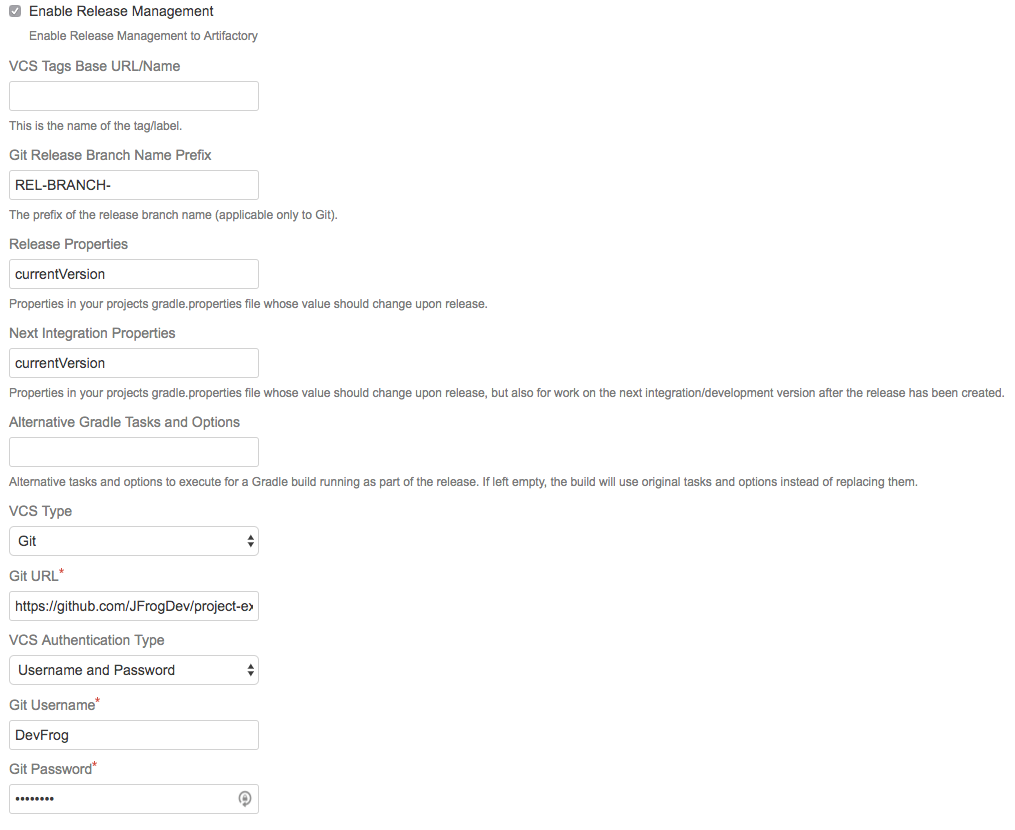
The Bamboo Artifactory Plugin supports release management when running builds with Gradle. This relies on the version property (and others) managed by the gradle.properties file. The plugin reads the properties from the Artifactory release management configuration, and modifies those properties in the gradle.properties file.
The plugin manages a release using the following basic steps:
- Modify properties in the
gradle.propertiesto release values (before the build starts). - Trigger the Gradle build (with optionally different tasks and options).
- Commit/push changes to the release branch.
- Modify the
gradle.propertiesto the next integration values. - Commit/push changes to the trunk.
Configure Gradle Jobs when using the Bamboo Artifactory Plugin
To enable Gradle release management, edit the Artifactory Gradle Task configuration and check the Enable Release Management checkbox.
Stage a Gradle Release Build when using the Bamboo Artifactory Plugin
Once release management is enabled, the Artifactory Release staging tab appears in the top header bar on the job page.
Clicking on the Release staging tab opens a new page with configuration options for the release build:
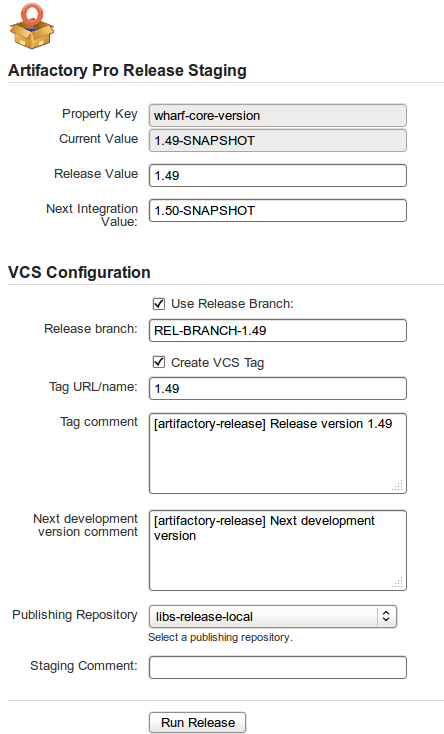
The Release staging tab displays the Release and Next development properties configured for the job. The plugin reads these values from the gradle.properties file and attempts to calculate and display Release and Next integration version in the text fields.
If Create VCS tag is checked (default), the plugin commits/pushes the POMs with the release version to the version control system with the commit comment. When using Git, if Use release branch is checked, the Next release version changes are carried out on the release branch instead of the current checkout branch. The final section allows you to change the target repository (the default is the release repository configured in Artifactory publisher) and an optional staging comment which includes the build info deployed to Artifactory.
Click on the Build and Release to Artifactory button to trigger the release build.
Promote a Release Build when using the Bamboo Artifactory Plugin
You can promote a release build after it completes successfully.
This is not a mandatory step but is very useful because it allows you to mark the build as released in Artifactory, and move or copy the built artifacts to another repository so they are available to other users.
To promote a build, browse to the build's result page and click the Artifactory Release & Promotion tab.
Artifactory Pro required
Promotion features are only available with Artifactory Pro
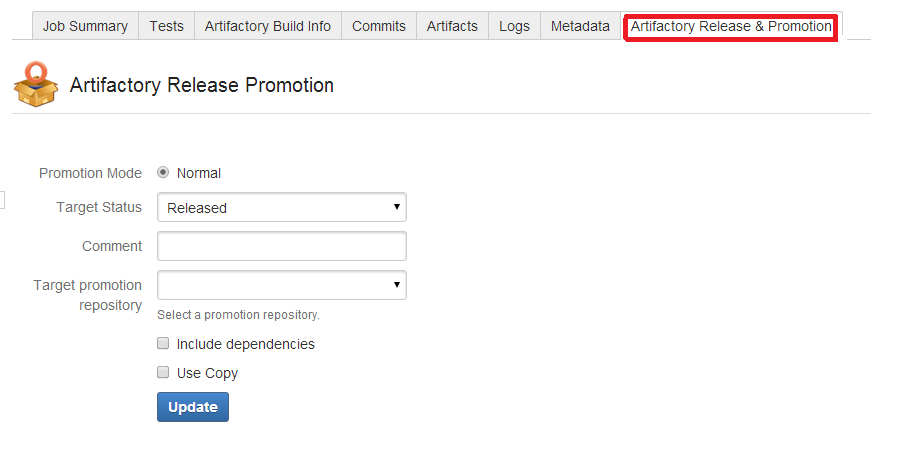
Select the target status of the build ("Released" or "Rolled-Back"). You may also enter a comment to display in the build in Artifactory.
To move or copy the build artifacts, select the Target promotion repository.
Release management
From Bamboo Artifactory Plug-in version 1.7.0, the Artifactory Release Promotion was moved from the Artifactory tab to the new Artifactory Release & Promotion tab.
Work with Git and the Bamboo Artifactory Plugin
To work with Git, the Git plugin must be configured to build one branch AND to checkout to the same local branch.
The remote URL should allow Read+Write access.
The Bamboo Artifactory Plugin uses the Git client installed on the machine and uses its credentials to push back to the remote Git repository.
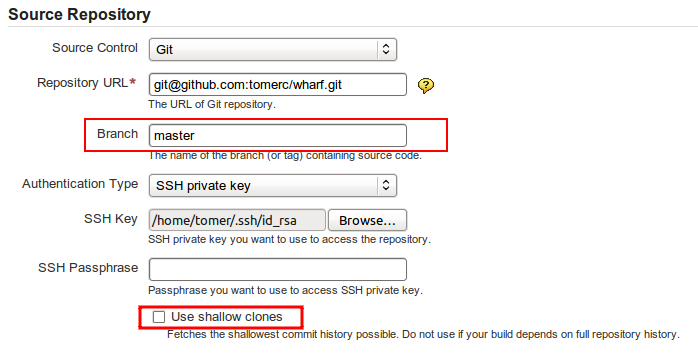
During the release, the plugin performs the following steps:
- If Create Branch is checked, create and switch to the release branch.
- Commit the release version to the current branch.
- Create a release tag.
- Push the changes.
- Switch to the checkout branch and commit the next development version.
- Push the next development version to the working branch
Shallow Clones
Bamboo's Git plugin allows the use of shallow clones, however this causes the "push" not to work.
Therefore, when using the Artifactory Bamboo Plugin, you must have shallow clones unchecked.
For more information about shallow clones, please refer to git-clone Manual Page.
Work with Perforce and the Bamboo Artifactory Plugin
Release management with Bamboo Artifactory Plug-in supports Perforce when using one checkout directory.
During the release the plugin does the following:
- Commits the release version directly to the tag (if Create VCStag is checked). The release version is not committed to the working branch.
- Commits the next development version to the working branch
Changes
Changes are only committed if the files are modified (POM files or
gradle.properties).
Updated 20 days ago
