Your AI is great at thinking. It drafts, summarizes, plans, and researches. But ask it to check your email, update a spreadsheet, or log a task and then it hits a wall. It can talk about doing things. It can't actually act on them.
The average knowledge worker uses 15+ apps daily. Zapier MCP is the bridge. One setup. Every app. Every AI.
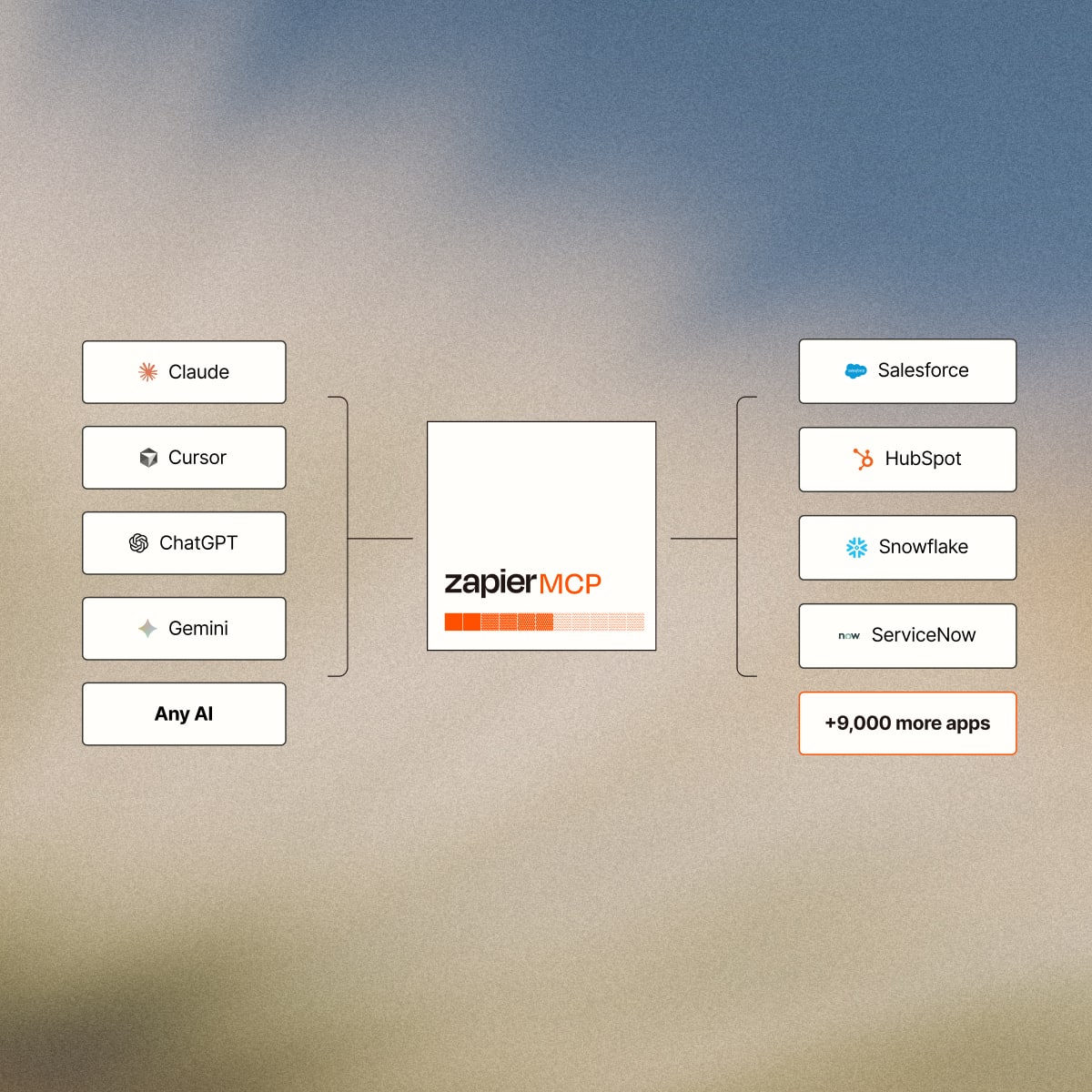
Whether you're a team of one or an organization of thousands, Zapier MCP makes your AI useful.
Your AI is only as useful as the tools it can reach. Zapier MCP gives it access to Gmail, Slack, Salesforce, and 9,000+ more. Set it up once, then ask your AI to do things you've been doing manually. No code required.

Your teams are already using AI agents to access business tools. The question is whether that's happening under your rules — or no one's. Zapier MCP gives IT one governed connection across every AI agent your org uses: Claude, ChatGPT, Cursor. Account-level restrictions, managed connections, and workspace controls apply to all of them. And because Zapier MCP is platform-agnostic, it works with every AI your teams use today — and every one that ships tomorrow.

step 1
Connect Zapier MCP to your AI agent
Choose your AI client — Claude, ChatGPT, Cursor, or others — and connect easily.
step 2
Your apps are automatically added
Zapier brings in your existing app connections automatically. Gmail, Slack, Salesforce, whatever you've already set up in Zapier is ready to go.
step 3
Ask your AI to do things
Describe what you need in plain language. Your AI calls the right Zapier action and confirms what it did.
EXEC ASSISTANT
My AI can't access my calendar
Schedule a meeting with one prompt. Your AI finds time on everyone's calendar and books it. No back and forth.


TEAM LEAD
I waste 30 minutes catching up every morning
Each morning, your AI summarizes your Slack channels so you can catch up in 2 minutes.

SALES REP
Meeting prep takes forever
Client meeting on your calendar? Your AI pulls from email, CRM, team chat, and web to build a prep doc automatically.


Features


APPS
No other product combines a non-technical setup experience with 9,000+ pre-authenticated integrations. Developer-first alternatives require terminal access, JSON editing, and manual OAuth setup. First-party AI tools are building native connectors for their top apps — but only their own. Zapier covers 9,000+ and works with every major AI client. One connection. Any AI. Every app.


















Can I build on Zapier MCP as a developer?
Yes. Zapier MCP gives developers access to 30,000+ actions across 9,000+ apps via the MCP standard. See our technical documentation for setup examples, API reference, and framework integrations.
What is Zapier MCP?
Zapier MCP lets your AI tools — Claude, ChatGPT, Cursor, and others — take actions in the apps you use every day. Send emails, update spreadsheets, manage your calendar, post messages. One connection gives your AI access to 9,000+ apps.
Is this too technical for me?
If you've ever connected an app in Zapier, you can set up MCP. The guided setup takes about 5 minutes. No terminal, no config files, no code. Claude is the easiest starting point — we recommend starting there.
How much does Zapier MCP cost?
MCP is available on all Zapier plans. Each MCP tool call uses two tasks from your plan's quota — the same task bucket your Zaps use. No separate SKU, no new procurement.
Is Zapier MCP secure?
Yes. MCP uses the same credential infrastructure Zapier has managed for 13+ years. You control which apps your AI can access and which actions are permitted. Every action is logged in your History tab. Zapier maintains SOC 2 Type II compliance.
What if my AI does something I didn't intend?
You choose exactly which apps and actions your AI can access: read only, send messages, update records. Every action shows up in your History log. You can remove access from any app at any time.
Can I use MCP with my Enterprise account?
Yes. Zapier MCP respects all account-level restrictions: action restrictions, managed connections, app access controls, and workspace scoping. IT can enable or disable MCP per workspace.
How is this different from my existing Zaps?
Zaps run automatically based on triggers — when an email arrives, when a form is submitted. MCP is different: it lets your AI take actions on demand, based on what you ask it to do in the moment. Think of Zaps as scheduled automation and MCP as giving your AI hands. Most people use both.
