
Log inSign up
Microsoft Support
530.7K posts
Image
user avatar
Microsoft Support
@MicrosoftHelps
The official account of Microsoft Customer Service & Support; YouTube: msft.it/6005e3Ya9│Support community: msft.it/6005e3YmF
support.microsoft.com
Joined September 2009
57
Following
587.4K
Followers

New to X?

Sign up now to get your own personalized timeline!

Create account

By signing up, you agree to the Terms of Service and Privacy Policy, including Cookie Use.

Terms·Privacy·Cookies·Accessibility·Ads Info·© 2026 X Corp.
Don't miss what's happening
People on X are the first to know.
Log inSign up
  • user avatar
    Microsoft Support
    @MicrosoftHelps
    Jul 3
    Replying to @MicrosoftHelps
    Hello again, Clo. We’re following up regarding your concern with your controller. We previously invited you to DM but haven’t heard back. If you still need further assistance, please reach out via DM anytime, we’re ready to assist. Thank you for contacting Microsoft Support. ~ SR
    310
    user avatar
    Microsoft Support
    @MicrosoftHelps
    13h
    Hello! As we have not received a response for an extended period, we will temporarily close the case. If you still need assistance, feel free to contact us again. Thank you for contacting Microsoft Support. ~KMD
    156
  • user avatar
    Microsoft Support
    @MicrosoftHelps
    Jul 3
    If your Word doc formatting goes from this 😃 to this 🥴 after you add a picture, this tip is for you: msft.it/6012vQpMp
    Image
    00:00
    6.1K
  • user avatar
    Microsoft Support
    @MicrosoftHelps
    Jul 2
    Now you see it 👀 Now you see it with more detail 🔍👀 Magnify images in Edge to get a better look:
    Image
    00:00
    4.5K
  • user avatar
    Microsoft Support
    @MicrosoftHelps
    Jul 2
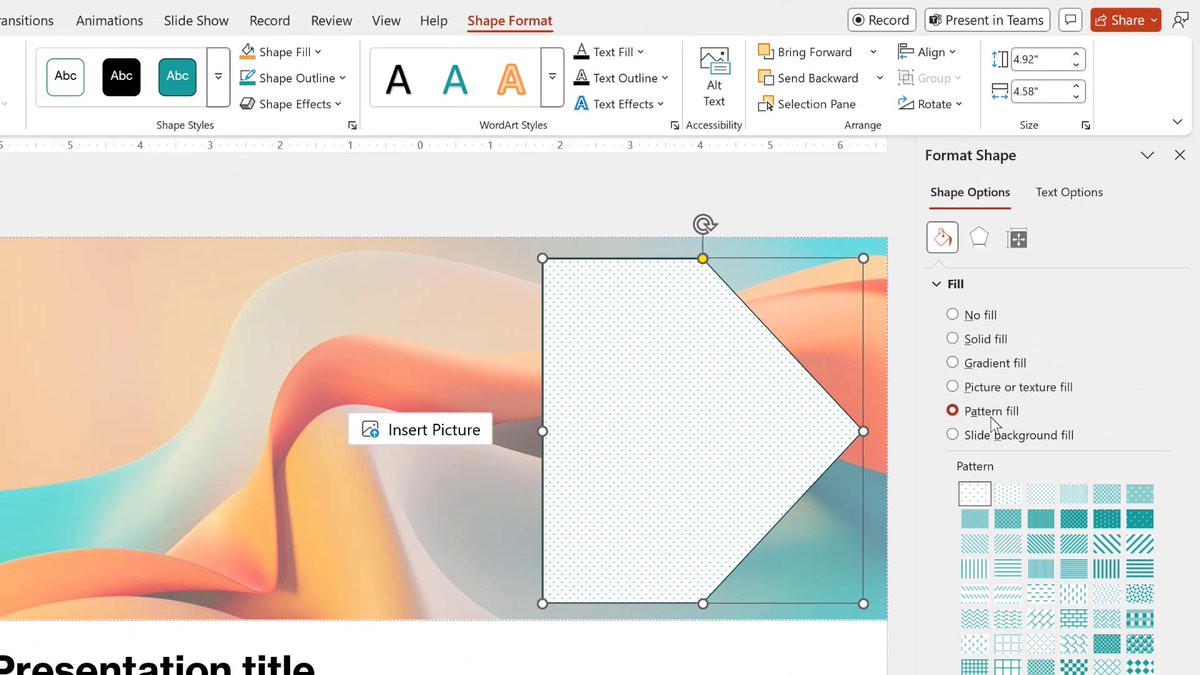
    Spice up your shapes 🌟 Fill them with patterns, textures, or pictures: msft.it/6010vQKP0
    Image
    00:00
    6.8K
  • user avatar
    Microsoft Support
    @MicrosoftHelps
    Jun 30
    Plan. Sync. Create. Learn more about Microsoft Loop: msft.it/6017vsxub
    Image
    00:00
    15K
  • user avatar
    Microsoft Support
    @MicrosoftHelps
    Jun 29
    Workspaces can be used for more than work. Try using them to save, organize, and share your travel ideas, plans, and itineraries.
    Image
    00:00
    6.4K
  • user avatar
    Microsoft Support
    @MicrosoftHelps
    Jun 28
    Writing a document? Keep track of how it's going with Word: msft.it/6014vUCc4
    Image
    00:00
    7.4K
  • user avatar
    Microsoft Support
    @MicrosoftHelps
    Jun 27
    If you like us on X, you'll love us on YouTube 📺 Follow us there: msft.it/6015vUfuH
    Image
    GIF
    8.2K
  • user avatar
    Microsoft Support
    @MicrosoftHelps
    Jun 26
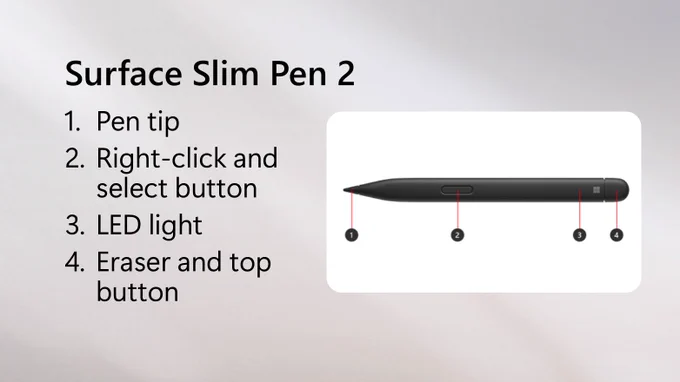
    Do you know which Surface pen you're using? 👇 (Don't see it? There's more here: msft.it/6019vU4v3)
    Text beside a photo of a Surface Slim Pen says Identify your Surface Pen and features.
    Text beside a photo of a Surface Slim Pen 2 with callouts says 1. Pen tip, 2. Right-click and select button, 3. LED light, 4. Eraser and top button.
    Text beside a photo of a Surface Slim Pen 2 with callouts says 1. Eraser and top button., 2. LED light, 3. Right-click and select button, 4. Pen tip.
    Text beside a photo of a Surface Slim Pen 2 with callouts says 1. Pen tip, 2. Eraser button, 3. Right-click and select button, 4. Storage clip and tether slot.
    4.8K
  • user avatar
    Microsoft Support
    @MicrosoftHelps
    Jun 25
    Approvals in Teams: because “can you sign this?” shouldn’t require a quest. Learn more: msft.it/6011vU4lP
    Image
    00:00
    6.8K
  • user avatar
    Microsoft Support
    @MicrosoftHelps
    Jun 25
    One desktop for work. One for travel planning. One for everything else. Multiple desktops help keep you organized ⬇️
    Image
    GIF
    8.2K
  • user avatar
    Microsoft Support
    @MicrosoftHelps
    Jun 24
    Snapping windows is easier than ever. Press Windows key + Z to view all the layouts.
    Image
    GIF
    8.1K
  • user avatar
    Microsoft Support
    @MicrosoftHelps
    Jun 23
    Replying to @MannyRzo
    Hi! We noticed your public post. It appears that your account was compromised. If you’d like our help with this, please send us a DM to discuss the issue further & to maximize character usage. We’ll be glad to assist however possible.
    537
    user avatar
    Microsoft Support
    @MicrosoftHelps
    Jun 24
    Good day! We're following up to see if you still need our help with recovering your compromised account. If yes, send us a DM to maximize our characters. JA
    410