Beginner's Guide to the Bus

Whether you’re getting to work, catching a meeting, or catching up with friends, MBTA buses can help get you around Boston and its surrounding communities.
If you need assistance during your trip, ask your bus operator or MBTA staff for help.
Jump to a section to learn more:
Getting to Know the Bus
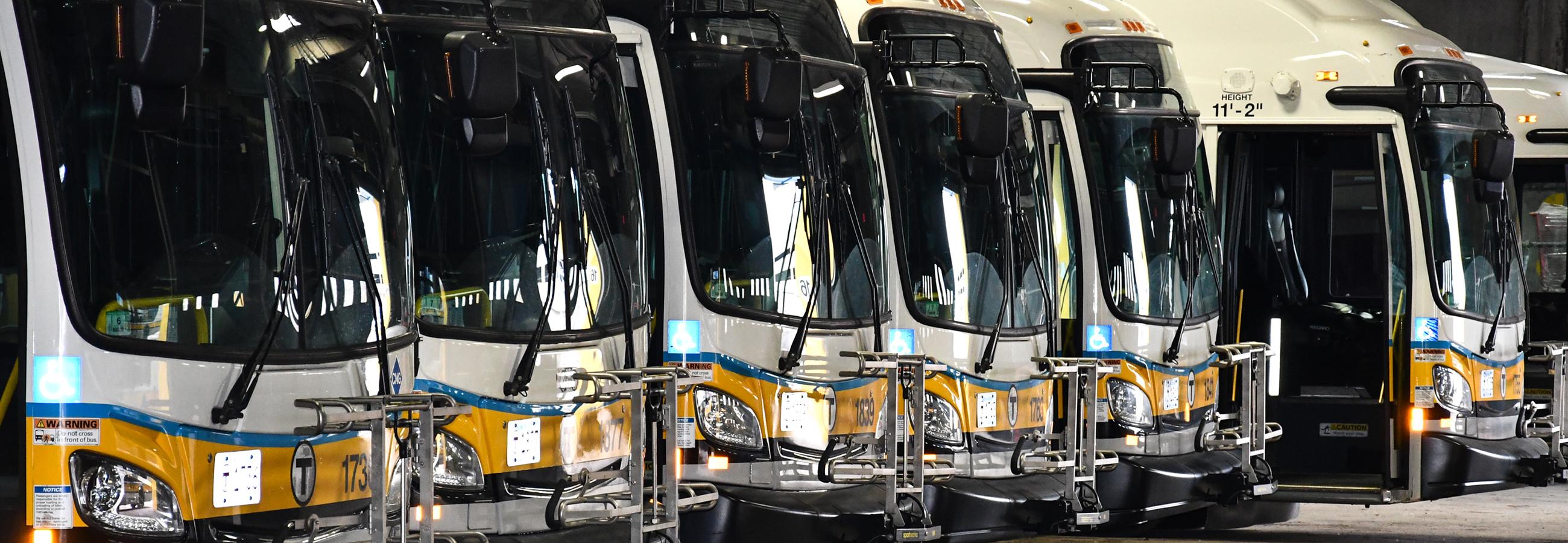
Here are some basics of the system to help you get the most out of your trip.
MBTA buses connect neighborhoods in Greater Boston with each other, and offer service to several surrounding cities and towns, from Bedford and Medford to Saugus and Salem.
The service area includes more than 150 routes that run between 5 and 7 days a week. There are 7,000 stops throughout the region.
It’s easy to connect to or from other MBTA bus routes, the subway, Commuter Rail, Amtrak, and regional bus services.
Each bus route has its own schedule, with most routes running between 5 AM and 1 AM. Some routes also run between 1 AM and 5 AM. Every bus route has a dedicated page on our website where you can view alerts, schedule and stop location changes, and connections to other modes of transit.
Schedules are adjusted every 3 months to account for service demands. You can view bus schedules on our website at any time to plan ahead.
Bus schedules are available in several formats:
- On schedule pages on our website: Simply click on any route to see pick-up times and real-time bus locations.
- As PDFs: Select your route online, and download a PDF on the right side of the page.
- Paper printouts: Schedules for all lines are available at Airport, Back Bay, Harvard, North Station, and South Station. Schedules for nearby routes are available at most subway stations, municipal buildings, libraries, and malls. You can also request regular and large-print schedules from Customer Support.
On the busy streets of Boston, delays and traffic can impact bus arrival times. We recommend using MBTA Go, our official app for the latest service information. You can also check our website as your departure time approaches to track the location of your bus.
On PDF and paper schedules, there are several letter designations that give more information about certain trips. For example:
- Times marked with an “s” indicate buses that DO NOT run during school vacations.
- Times marked with a “w” indicate buses that wait at T stations for the last train to arrive before departing.
If you have questions about a route or schedule, call Customer Service at 617-222-3200.
Local buses only travel within Boston and the communities in the immediate area. Express buses make stops in suburbs and communities outside the city and then drive directly to downtown Boston.
As of September 1, 2026, Express Bus fares will be the same as Local Bus fares on a pilot basis.
You might be confused to find the Silver Line listed with train routes sometimes, but it's actually a bus! Technically, it's a bus rapid transit system, which means part of its route is on its own dedicated lane or road. There are 5 routes, and fares vary depending on which route you take.
Passengers traveling on SL1, SL2, and SL3 buses pay the standard MBTA subway fare.
Passengers traveling on SL4 and SL5 buses pay the standard MBTA bus fare.
Some Silver Line stops are underground and use fare gates, just like subway stations.
Yes, you can. The SL1 picks up and drops off at every Logan Airport terminal, with connections to the Red Line and Commuter Rail at South Station in downtown Boston.
Service from Logan Airport is always free.
If you're headed to Logan Airport, transfers from the Red Line to the SL1 are free.
The SL3 has a stop at Airport Station, which connects to every airport terminal with the Massport Shuttle.
Learn more about getting to Logan Airport
MBTA Go is our official app for live service information. Check arrival times, track vehicles, and learn about the latest service changes and closures.
Stay updated about delays with our bus alerts.
Each bus route schedule page offers real-time updates about bus locations. Several stations also have solar-powered E Ink signs that will show a countdown to your bus’s arrival.
The easiest way to plan a bus trip is to use our trip planner.
You can also check bus schedules on our website, or track your bus's movement in real time with MBTA Go.
Paying Your Fare
Local Buses make up the majority of the T's bus service, but there are also Express Bus routes.
A 1-way trip costs $1.70. Several pass options are available. Reduced fares are available for eligible riders.
The 1-way bus fare is $1.70 with a CharlieCard, CharlieTicket, contactless payment, or cash.
Your fare includes unlimited transfers between bus, subway, and ferry within two hours of your first tap. You must use the same payment method across all modes for transfers to apply. Cash payments do not include transfers to other modes of transit.
In addition to one-way fares, there are 1-day and 7-day passes available on CharlieCards and CharlieTickets. Local Bus passes also include Express Bus travel on a pilot basis as of September 1, 2026:
- A 1-Day Pass is $11.00 and includes unlimited travel for 24 hours on Local Bus, Express Bus, and the subway from the first time they are used.
- A 7-Day Pass is $22.50 and includes unlimited travel on Local Bus, Express Bus, and the subway from the first time they are used.
- A Commuter Rail Zone 1A 1-day or 7-day CharlieTicket includes travel by Local Bus, Express Bus, subway, Commuter Rail, and the Charlestown ferry for the same price as the passes above.
There are two types of monthly passes, which are valid until the end of the month in which they were purchased:
- Local Bus Monthly Pass: $55.00
- Monthly LinkPass for travel on Local Bus, Express Bus, and subway: $90.00
The most popular pass for commuters is the LinkPass, which is now available as a CharlieCard that automatically renews every month.
There are several options for buying tickets or loading your CharlieCard.
Learn more about where you can get a CharlieCard
Fare Vending Machines
You can buy or renew 1-day, 7-day, cash value, and monthly passes at fare vending machines. They are located at all subway stations. Fare vending machines accept cash, contactless payment, credit/debit cards, and EBT cards.
If you are planning to also ride the Commuter Rail or the ferry, you can buy a 1-day or 7-day Commuter Rail Zone 1A CharlieTicket to travel on the Local Bus, subway, Commuter Rail Zone 1A and Charlestown ferry.
Retail Sales Locations
Tickets and passes are available at retail stores throughout the region. Stores accept cash, contactless, and credit/debit card payments.
Online
You can sign up for Auto-pay, a monthly LinkPass that automatically renews each month. We recommend that you register your card with a MyCharlie account to protect it from loss, damage, or theft.
Onboard the Bus
You can pay your fare in cash onboard all MBTA buses. We encourage riders to pay cash fares with exact change. If you expect to pay more than the required one-way fare, you can load cash and keep your change on a CharlieCard provided onboard.
View a tutorial on how to load a CharlieCard with cash onboard
Fare Calculator
Choose your origin and destination to calculate your fare with our Trip Planner.
At Your Stop
There are a few things to remember as you wait for your bus. Here’s what to look for and expect at an MBTA bus stop.
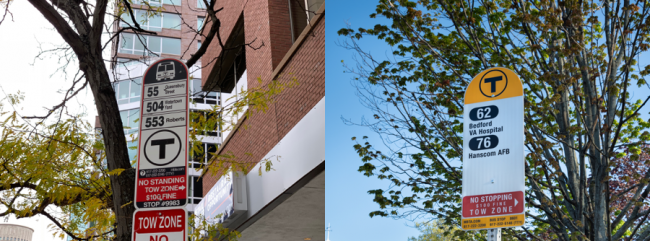
Most bus stops are labeled with white, black, red, and yellow signs with a large “T” logo. Signs include a list of the bus routes that serve that particular stop. Many bus stops also have shelters.
Stops at hub stations are a little bit different. Some are located on busways, which are busier than street stops because multiple routes access the same area. Some have fare vending machines and digital arrival and departure signs. You can wait for your bus near the sign that has your route number on it.
Stay a safe distance from the curb. As the bus approaches, try to position yourself near the bus stop sign, where you’ll be most visible to the operator so they know they need to stop.
The destination and route of each bus is displayed on the front and side of every vehicle. You can also ask the operator for the bus route number if you’re unsure.
Routes with flag stops mostly do not have physical, set locations where the bus will always make a routine stop. Instead, the bus will stop anywhere along the route where it is safe to pick up and drop off riders.
Riders must wave or otherwise clearly signal that they wish to board the bus for it to stop for them. We recommend waiting in a well-lit area where you will be visible to bus drivers. Once you are on the bus, you can ask the driver to drop you off anywhere on the route.
The T and cities and towns do their best to keep bus stops clear for easy boarding.
If your stop is blocked by unshoveled snow, you can contact the owner of the stop.
If your stop is blocked by an illegally parked vehicle, you can text 617-600-0683 or use the MBTA See Say app to inform Transit Police.
If your stop has an emergency call box, you can also use it to contact Transit Ambassadors or MBTA staff directly.
On the Bus
We hope your journey on the bus is comfortable and convenient. Once you’re onboard, there are some things to keep in mind.
Local Bus and Silver Line fares are paid at the onboard fare box at the front of the bus. You can also tap a contactless payment method on the Charlie readers at the front of the bus. At underground Silver Line stops, you pay at a fare gate to access the platform.
CharlieCard or CharlieTicket
Tap your card on the fare box target to pay your fare. The display will show how much value remains on your card.
Contactless payment
Check if your card has the four-waved contactless symbol on the front or back, or if your phone or watch has a card set up in the mobile wallet. Tap your card or device on the Charlie reader located at the front door.
Cash
The fare amount is displayed on the fare box. Insert bills and coins into the marked slots on the fare box. If you expect to pay more than the required one-way fare, you can load value and keep your change on a CharlieCard provided onboard.
If you're not sure if your fare payment went through, listen for the beeps: 1 long beep means your payment was successful, 3 quick beeps means the machine wasn't able to process your payment. You may need to try again or load more money on your card.
Buses can get crowded. We ask riders to follow a few rules for the comfort and safety of everyone on board:
- Let passengers exit the bus before attempting to board, especially during rush hour.
- When boarding the bus, please move all the way into the vehicle, as far away from the doors as possible, to help make room for other passengers.
- Only take 1 seat. And if you have a seat and no other seats are available, please offer your seat to seniors, pregnant people, and people with disabilities.
- Take off your backpack, and keep large personal items on the floor and out of the way.
Service animals are allowed on the T at all times. Allowing animals off leash, out of carriers and/or taking up vehicle seats is not permitted.
During the peak hours of 7 AM – 9 AM and 4 PM – 7 PM, non-service, small, domestic animals should be in a secure animal carrier. Please keep carriers on your lap if possible and away from vehicle doors, especially during rush hour. Larger pet dogs that cannot fit in a carrier are prohibited during this time. During the off-peak hours of 9 AM – 4 PM and after 7 PM, large pet dogs are permitted. Larger dogs should be leashed at all times.
Riders should avoid bringing pets onto the T during holidays or large events, such as the Boston Marathon. MBTA personnel have the right to restrict pet access to T vehicles and stations within their own judgment due to conditions such as crowds or the animal’s behavior.
All non-electric MBTA buses are equipped with bike racks that can hold 2 conventional bikes. Let the driver know you’re going to use the bike rack before you load your bike.
When using an MBTA bus bike rack, never crouch down below the driver’s sight line in front of the bus. And don’t cross the street in front of the bus with your bike—traffic can’t see around it.
Folding bikes and folding micromobility devices may be taken on board MBTA buses if fully folded.
All stops and transfer points are announced automatically and displayed on a screen at the front of the bus. If the automated system isn’t working, the MBTA operator will make those announcements.
You can also see the stops and transfer points on your route in the MBTA Go app.
Stops may be requested by pressing the yellow or gray strips located near the windows of the bus, or the red “Stop” buttons located on vertical handrails.
If you need help finding your stop, ask the operator for assistance.
Every MBTA staff member is trained on emergency procedures and preparedness.
If you see something suspicious or need to report an emergency, please dial 911 or call the Transit Police at 617-222-1212.
If there is an emergency on board a bus, the exterior lights will flash green, and the destination displays will say “Emergency. Call Transit Police.” If you see this, call the Transit Police immediately.
Planning an Accessible Trip
The entire MBTA bus fleet is accessible to people with disabilities, and we offer trip planning assistance to help you get the most out of your journey.
We also offer a Bus Access Guide to help you plan an easy and accessible trip.
You may be eligible for reduced fares if you are:

All MBTA buses are accessible to people with disabilities.
Some stops may have barriers to accessibility, but the operator is required to find a safe location for you to board.
We’d be happy to help you plan an accessible trip. Call our Customer Support team at 617-222-3200 or 617-222-5146 (TTY).
You can also learn more about planning an accessible bus trip with our access guide.
Priority seats are available near the front of the bus. Operators are required to ask riders to make priority seating available upon request. Riders are expected to yield their seats to seniors and people with disabilities, but cannot be forced to move.
If you’re a person with a disability, aged 65 or older, and/or are legally blind, you may be eligible for free or reduced fares.
Once enrolled in a reduced fare program, you can also link your benefits to your contactless debit or credit card, phone, or watch.
Fare Calculator
Choose your origin and destination to calculate your fare with our Trip Planner.