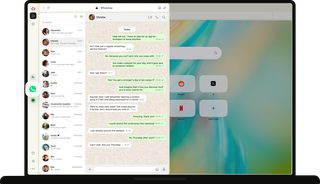
WhatsApp on desktop

Conversations are where ideas, plans, and decisions are made.

Opera has built WhatsApp Web into the sidebar, so you can reply to friends, message a client, and check the family group chat without leaving the page you're on. See more
Opera browser with WhatsApp Web open in the sidebar, showing a chat list and an open conversation.

Bring your people to you

Always on hand

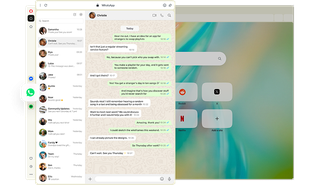
Collaborating with others? Keep those conversations available without swapping apps.

Call, message, and read group chats alongside your browsing. No extensions, no extra apps, and no reaching for your phone.

WhatsApp chat open in an Opera sidebar panel with conversation about planning a brainstorm session.

Mobile to desktop

Continue WhatsApp conversations on desktop to add links or files, and type longer messages.

Just scan a QR code to pair WhatsApp on your phone with the sidebar app in your Opera browser. All your conversations are there.

Laptop with WhatsApp QR code in Opera, next to a phone showing the Scan QR Code screen.

Notifications - or silence

When you use WhatsApp in Opera, notifications and updates are easily visible so you don’t miss a thing.

Keep working or browsing without losing track of conversations. And when you don't want interruptions, mute notifications with a click.

WhatsApp icon with unread badge and a Mute WhatsApp menu in the Opera sidebar panel.

Move things forward

See files on a big screen, confirm plans with family, or organize a weekend trip with friends.

Use the WhatsApp desktop app in your Opera browser’s sidebar to get things moving alongside your tasks and browsing.

WhatsApp group chat planning a weekend trip in the Opera sidebar, beside a train booking site.

Stay in the loop

Respond directly while scheduling, send longer messages with your full keyboard, and get notification alongside your browsing.

When you’re running a business, syncing with your kid’s school group, or waiting for an update, WhatsApp Web in Opera’s sidebar keeps you informed.

WhatsApp chat list in the Opera sidebar with a booking conversation, next to Google Calendar appointments.

Keep people close

From a group call with classmates to a quick call with mom, keep up with work and life in your Opera browser.

Chat in WhatsApp on desktop while you work, browse, or even watch shows. It’s easy to stay close to people when they’re right there with you.


WhatsApp video call in the Opera sidebar, beside a man with headphones working on a laptop.
Bring WhatsApp to desktop in Opera

Bring WhatsApp to desktop in Opera

Opera AI

Chat and create for free with built-in Opera AI.

Vertical Tabs

See every page title.

Ad Blocker

Begin without ads.

Google Services

Your essential Google tools, always at hand.

Free VPN

Start whatever you want, privately.

Music Player

A world of music and podcasts at your fingertips.

Easy Files

Upload files without searching.

AI Image Generator

Create stunning AI images from text prompts for free.

Browser AI

Ideate with Opera AI, ChatGPT, and Gemini.

Split Screen

Split your screen across multiple tabs.

Snapshot

Easily capture, edit and share your snapshots from webpages.

Tab Islands

Save space, keep organized, and switch contexts easily with Tab Islands.

Tab Emojis

Personalize your tabs and express yourself with Tab Emojis.

Workspaces

Organize tab groups in separate customizable workspaces.

Search in Tabs

Work and browse more efficiently with many open tabs.

VPN Pro

Browse privately anywhere with VPN Pro.

Spotify

Unlock Spotify in Opera.

Translate in Opera

Translate pages and text instantly.

Spotify Billions Club

Unlock Spotify in Opera.

Integrated messengers

A space for people and ideas.

Slack in Opera

Stay focused and organized with Slack in Opera’s sidebar.

Discord in Opera

Stay connected with your Discord communities in Opera’s sidebar.

Bluesky in Opera

Stay connected with Bluesky in Opera’s sidebar.

Messenger

Stay connected while browsing.

Telegram Messenger

Chat in Telegram on desktop in the Opera browser.

Integrated Social Media

Instant access to X, Bluesky and Instagram.

Instagram

Use Instagram in Opera’s sidebar while you browse.

X

Explore and tweet conveniently with a better view on desktop.

YouTube

Your favorite videos, alongside your browsing.

Opera Sync

Synchronize the Opera browsers on any of your devices.

Opera Bookmarks

Easily manage, customize and keep your favorite places online.

Video Popout

Pop out online videos so they float on top of webpages as you browse.

Lucid Mode

Enhance online videos and images in one click.

Volume Booster

Increase browser volume by up to 5x natively.

Unit Converter

Automatically convert time-zones, currencies and units of measurement.

Personal News

A customizable and convenient newsfeed on your start page.

Battery Saver

An easy way to noticeably extend your laptop’s battery life.

Flow

Instantly send files, links and notes between your devices.

Pinboards

Save and collect web content easily, share it visually.

Opera Cashback

Automatically get money back when shopping in Opera.

Opera Themes

Completely transform the look, sound and feel of your browser.

Deezer

Play your favorite music in Opera’s sidebar.
01

Ready to start something new?

Begin your next idea with Opera
Ready to start something new?