


We know our macOS and Linux users have been waiting for more attention on these platforms. UltraEdit for Windows has traditionally been the most mature version of the product, and we know there is still work to do to bring the macOS and Linux experience closer to that level.
UltraEdit 2025.0 for macOS and Linux is an important step in that direction.
This release is focused on stability, reliability, performance, and the core editing experience. You’ll find lower CPU usage in specific editing scenarios, fewer interruptions, better handling of multi-file workflows, improved terminal compatibility, more predictable search and replace behavior, and a range of UI and platform-specific refinements.
For Linux users, this release is especially significant: it is the first Linux release in two years, bringing the Linux edition fully up to date with the macOS version while adding major Linux-specific improvements around distribution support, packaging, SSH/Telnet terminal behavior, docking, deployment, and stability.
It is not the final step. But it is a meaningful one. Let’s take a closer look at what’s new in UltraEdit 2025.0 for macOS and Linux.
Better stability and lower CPU usage
One of the biggest areas of improvement in UltraEdit 2025.0 is stability.
This release includes fixes for repeated crashes while editing on macOS and Linux, crashes when modifying settings on macOS, crashes related to wordfile paths, and startup crashes with certain configurations.
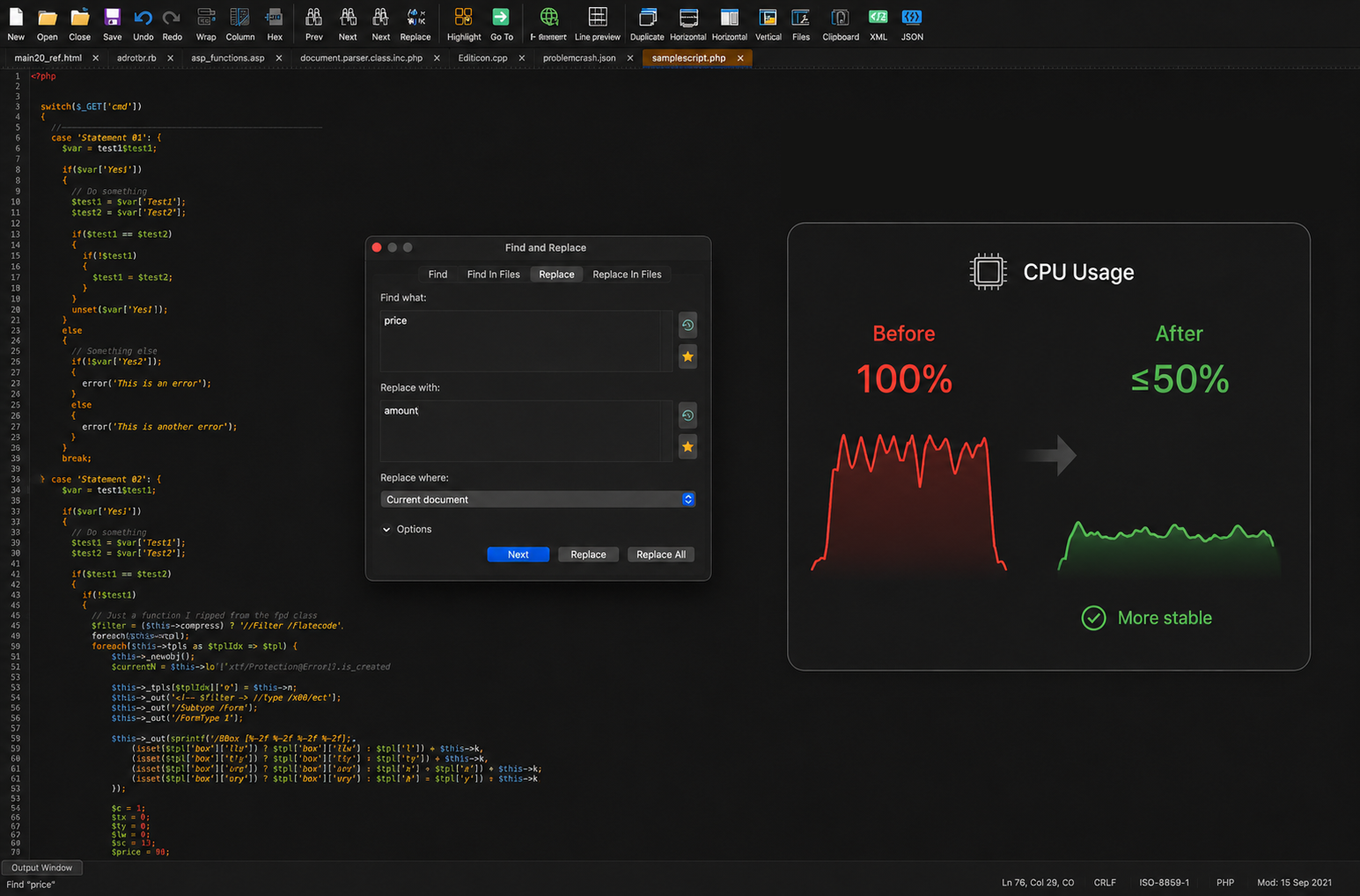
We also addressed a hang that could lead to 100% CPU usage while editing. In affected scenarios, CPU usage has been reduced by at least 50%, helping UltraEdit feel more stable and responsive during longer editing sessions.
This release also improves behavior around multi-file workflows, including a hang that could happen when working with multiple open files, invoking New Window, and closing windows.
On Linux specifically, this release fixes several crash and freeze scenarios, including issues around app startup, FTP/SFTP files restored at startup, HTML/browser preview, shutting down with active transfers, and quitting with dialogs open.
If you use UltraEdit for larger editing sessions, longer-running work, or multiple open files, these improvements should make the experience feel smoother and more dependable.
Smoother everyday editing behavior
UltraEdit 2025.0 also includes several improvements to the core editing experience on macOS and Linux. These are the kinds of updates that make daily work feel more predictable: how navigation behaves, how selections work, how files are detected, how dialogs respond, and how UltraEdit handles specific characters and editing modes.
This release includes improvements such as:
- Better arrow key navigation at file boundaries while editing
- Improved detection of files that are already open
- Improved behavior when replacing “En space” characters in ASCII and hex mode
- Improved undo behavior in hex mode
- Improved Replace All behavior for umlauted characters in UTF-8 files
- Improved regular expression behavior where “Perl” was sometimes not shown as an option
- Improved double-click selection behavior for quoted strings and strings containing $ and >
- Improved behavior when switching from hex mode back to normal edit mode
- Fixed a spelling issue in the Hex Find/Replace dialog
- Improved Quick Find input behavior
- Improved Markdown bold highlighting and Live Preview rendering
Together, these changes help make UltraEdit feel more consistent across the editing workflows you use every day.
Better file tabs and multi-file workflows
This release also improves how UltraEdit behaves when working with multiple files and tabs. If you often keep many files open at once, you’ll notice improvements around tab sorting, multiline tabs, file detection, and unexpected tab behavior.
UltraEdit 2025.0 adds Sort File Tabs to the list of commands that can be added to the toolbar, giving you quicker access to tab organization.
It also includes fixes for:
-
- Multiline tabs behaving unexpectedly when a new file forces a second row of tabs
- Screen splits appearing unexpectedly when clicking one of several open file tabs
- Blank edit files being created unexpectedly after clicking through the tab bar row
- Favorite Files dialog sizing and resizing behavior
- UltraEdit creating Edit files in the user’s home directory when it should not
- UltraEdit appending .s to newly created files saved with a .sql extension
- File-open detection issues
- Save state and file recovery issues on Linux
The goal is to make multi-file work feel cleaner, especially when your editing session starts to grow.
Improved terminal, SSH, and Telnet compatibility
UltraEdit 2025.0 also improves SSH/Telnet terminal compatibility. This matters for users who rely on UltraEdit as part of a broader technical workflow across local files, remote systems, terminals, and server environments.
On Linux, the built-in SSH/Telnet terminal received a significant update. UltraEdit now supports multiple terminal sessions in tabs, with Add terminal and Remove terminal actions. SSH/Telnet account persistence has also been improved, and password storage now uses the operating system’s native credential store.
This release also improves terminal session handling, resizing, re-wrapping of terminal history, keyboard focus, control-character rendering, Telnet command-line handling, and terminal teardown behavior.
Linux users should also see better clipboard and paste behavior, including fixes for copying from a Linux terminal into UltraEdit after extended use and paste issues from certain sources across various Linux distributions.
If you use UltraEdit alongside terminal workflows, remote systems, or Linux desktop environments, these improvements should make terminal-related work more reliable.
Expanded Linux support and deployment options
For Linux users, UltraEdit 2025.0 also brings broader platform and deployment support.
This release adds native RPM package support alongside TAR and DEB packages, making installation cleaner across the systems many organizations already use.
UltraEdit for Linux now supports:
- Rocky Linux 8, 9, and 10
- Debian 13
- Ubuntu 22.04, 24.04, and 26.04
RPM and TAR installations are also now fully relocatable, allowing UltraEdit to run from any location.
For enterprise customers, UltraEdit now supports volume-license package variants for Linux, available through a separate download page. Packaging has also been improved with automatic runtime dependency detection and correct version and release-date embedding.
These changes make UltraEdit easier to deploy and maintain in Linux environments, especially for teams managing installations across multiple systems.
Linux desktop and docking improvements
UltraEdit 2025.0 also improves the Linux desktop experience.
Dockable panes now behave more reliably across major Linux display technologies, including support for docking floating panes on Wayland. This release also improves dock and undock behavior, including dock/undock by double-clicking, and fixes auto-hide pane positioning issues.
For users who customize their workspace with panels, panes, and floating windows, these improvements should make the Linux interface feel more predictable and less frustrating.
More flexible commands, toolbars, and project files
UltraEdit 2025.0 adds several useful workflow improvements for users who customize their setup or move between systems.
On macOS, you can now move custom toolbars above the edit window, giving you more flexibility in how your workspace is arranged.
This release also adds support for specifying line and column position from the command line, which is useful when opening files directly at a specific location.
Project files are now more portable, too. They can be created on one system and moved to another more easily, helping users who work across machines or environments. UltraEdit 2025.0 also adds an option to disable user clipboards, giving users and teams more control over clipboard behavior inside the editor.
JSON, live preview, and markdown refinements
UltraEdit 2025.0 also improves several content-specific editing workflows.
You can now use Reformat JSON and Compress JSON on files even when JSON syntax highlighting has not been applied. This makes JSON cleanup easier when working with files that contain JSON-like content but are not formally detected or highlighted as JSON.
For markdown users, this release includes improvements to bold text highlighting and live preview behavior, including cases where live preview did not display content as expected or rendered incorrectly after adding and saving a blank line.
These updates help make UltraEdit more dependable for structured content, documentation, markdown files, and JSON cleanup.
macOS-specific improvements
UltraEdit 2025.0 includes several refinements specifically for macOS users.
The release adds support for macOS dictation and transcription, making it easier to use system-level input features inside UltraEdit.
It also improves several macOS application behavior issues, including:
-
- UltraEdit not coming to the foreground when its icon is clicked in the menu bar
- UltraEdit not remembering the desktop it is assigned to
- UltraEdit not adjusting size when Mission Control is invoked
- Crashes when modifying settings on macOS
- Support for moving custom toolbars above the edit window
These changes are part of making UltraEdit feel more natural and reliable on macOS.
Linux-specific improvements
Linux users should see one of the biggest improvements in this release cycle. UltraEdit 2025.0 for Linux brings the Linux edition up to date with the macOS 2025.0 release, while adding a significant amount of Linux-specific work across installation, deployment, terminal behavior, docking, stability, FTP/SFTP workflows, and desktop integration.
Highlights include:
- Native RPM package support
- Expanded support for Rocky Linux, Debian, and Ubuntu
- Fully relocatable RPM and TAR installations
- Volume-license package variants for enterprise customers
- Rebuilt SSH/Telnet terminal behavior with multiple terminal tabs
- Native OS credential-store support for saved terminal passwords
- Better Linux docking and Wayland pane behavior
- Improved FTP/SFTP/FTPS transfer stability
- Fixed hangs when closing with active FTP/SFTP transfers
- Fixed file recovery and save state issues
- Improved terminal clipboard and paste behavior across distributions
This release should make UltraEdit for Linux easier to install, easier to deploy, and more reliable in the Linux environments businesses actually run.
Under-the-hood modernization
Some of the work in UltraEdit 2025.0 is not immediately visible in the interface, but it matters for long-term reliability, security, and enterprise readiness.
For Linux, core third-party components, including encryption and secure-networking libraries, have been upgraded to current, supported versions. This helps keep the product maintainable, compatible with enterprise security expectations, and ready for future development.
These updates are part of the broader effort to keep UltraEdit reliable across macOS and Linux, not only as an editor, but as a tool that can fit into professional and enterprise environments.
An important step for macOS and Linux
UltraEdit 2025.0 for macOS and Linux is focused on the things that matter most for these platforms right now: stability, reliability, performance, and smoother everyday editing. We know there is still work to do. This release does not close every gap between Windows, macOS, and Linux, but it does represent a clear step forward.
With lower CPU usage in affected scenarios, improved editing stability, better multi-file behavior, stronger terminal compatibility, more predictable search and replace behavior, broader Linux distribution support, improved Linux packaging, and platform-specific refinements for macOS and Linux, UltraEdit 2025.0 gives you a more dependable experience across both platforms.
And it is just the beginning of our renewed focus on making UltraEdit better across every operating system you use.
Download UltraEdit 2025.0 for macOS and Linux
UltraEdit 2025.0 for macOS is available now.
Update today to get the latest stability, performance, editing, terminal, toolbar, and platform-specific improvements.





Download for Linux is still v2023.0, released 2024-10-16.
Apologise for the release mistake. The 2025.0 Linux version is going live next week!
Is there an update for my Linux PC or do I have to download the entire thing?
Hi Robert,
To update to the latest version of UltraEdit for Linux (currently 2025.0 released August 20), you need to download the entire new build, yes.
Do you support multi-tunnel/port creation/access?
Most of my clients have multi hop paths to reach production where I usually use an SSH client to build and connect thru multiple tunnels. However I have never been successful in getting UltraEdit to connect thru these ports. Many times all I need is ability to grab and edit a file quickly. I would consider renewing if this were possible.
Hi John,
UltraEdit supports SSH/Telnet connections, but it does not natively support multi-hop SSH tunneling directly within the application. You can perform command line executions from the embedded SSH/Telnet console, but for complex multi-hop paths, you might need to use an external SSH client to establish the tunnels first.
For quick file access and editing, you can use UltraEdit’s FTP/SFTP capabilities to connect directly to servers if they are accessible through a single SSH hop.
For more details on using SSH/Telnet in UltraEdit, you can refer to the official documentation: UltraEdit SSH/Telnet