Actual behavior
When running compose with more that one container search doesn't filter containers grouped by compose.
For example if I input "test" and container with that name exists inside compose - application will show me grouping with every container (even those with completly different name).
If I input "xxx" and there is no container named that way - application won't show me any containers.

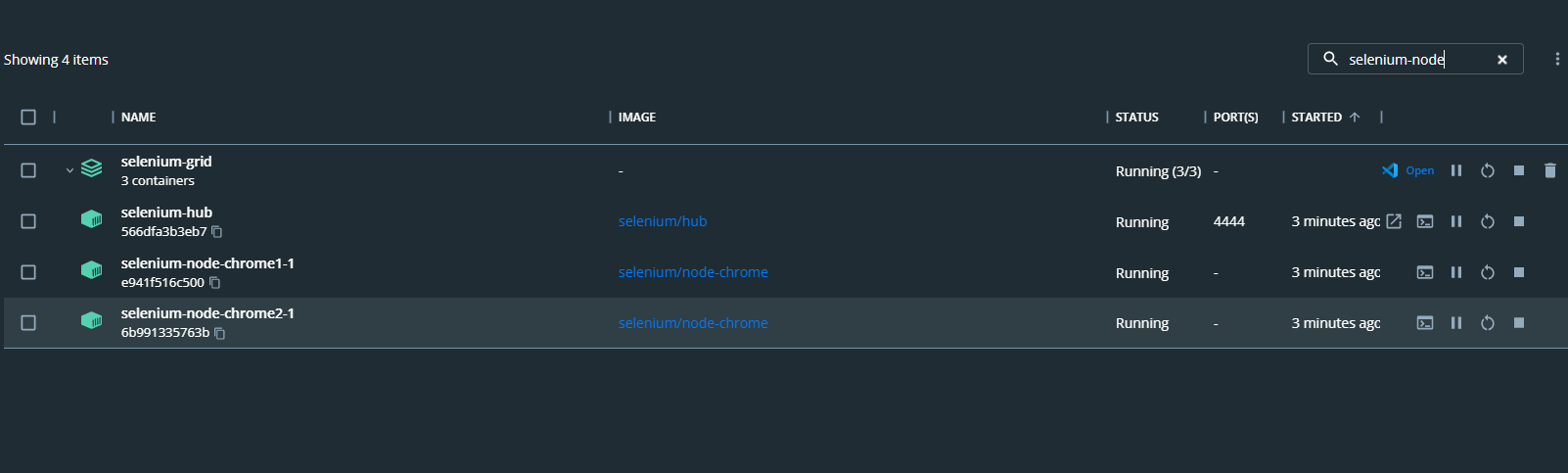

Expected behavior
I should be albe to filter containers inside compose (it worked that way before you slightly changed list design recently).
Information
- Windows Version:
- Docker Desktop Version:
- WSL2 or Hyper-V backend?
- Are you running inside a virtualized Windows e.g. on a cloud server or a VM:
Output of & "C:\Program Files\Docker\Docker\resources\com.docker.diagnose.exe" check
Starting diagnostics
[PASS] DD0027: is there available disk space on the host?
[PASS] DD0028: is there available VM disk space?
[PASS] DD0031: does the Docker API work?
[PASS] DD0004: is the Docker engine running?
[PASS] DD0011: are the LinuxKit services running?
[PASS] DD0016: is the LinuxKit VM running?
[PASS] DD0001: is the application running?
[SKIP] DD0018: does the host support virtualization?
[PASS] DD0002: does the bootloader have virtualization enabled?
[PASS] DD0017: can a VM be started?
[PASS] DD0024: is WSL installed?
[PASS] DD0021: is the WSL 2 Windows Feature enabled?
[PASS] DD0022: is the Virtual Machine Platform Windows Feature enabled?
[PASS] DD0025: are WSL distros installed?
[PASS] DD0026: is the WSL LxssManager service running?
[PASS] DD0029: is the WSL 2 Linux filesystem corrupt?
[PASS] DD0035: is the VM time synchronized?
[PASS] DD0015: are the binary symlinks installed?
[PASS] DD0003: is the Docker CLI working?
[PASS] DD0013: is the $PATH ok?
[FAIL] DD0005: is the user in the docker-users group? Nie można odnaleźć nazwy użytkownika.
[PASS] DD0007: is the backend responding?
[FAIL] DD0014: are the backend processes running? 1 error occurred:
* vpnkit.exe is not running
[PASS] DD0008: is the native API responding?
[PASS] DD0009: is the vpnkit API responding?
[PASS] DD0010: is the Docker API proxy responding?
[PASS] DD0006: is the Docker Desktop Service responding?
[PASS] DD0012: is the VM networking working?
[PASS] DD0032: do Docker networks overlap with host IPs?
[SKIP] DD0030: is the image access management authorized?
[PASS] DD0033: does the host have Internet access?
Please investigate the following 2 issues:
1 : The test: is the user in the docker-users group?
Failed with: Nie można odnaleźć nazwy użytkownika.
The current user must be member of the docker-users group. Press the Win + R keys to open Run, type lusrmgr.msc into Run, followed by Enter to open Local Users and Groups.
2 : The test: are the backend processes running?
Failed with: 1 error occurred:
* vpnkit.exe is not running
Not all of the backend processes are running.
Steps to reproduce the behavior
- Start docker-compose with more that one container.
- Input name of one of containers from compose into search field
- Container list won't be filterd


Actual behavior
When running compose with more that one container search doesn't filter containers grouped by compose.
For example if I input "test" and container with that name exists inside compose - application will show me grouping with every container (even those with completly different name).
If I input "xxx" and there is no container named that way - application won't show me any containers.
Expected behavior
I should be albe to filter containers inside compose (it worked that way before you slightly changed list design recently).
Information
Output of
& "C:\Program Files\Docker\Docker\resources\com.docker.diagnose.exe" checkStarting diagnostics
[PASS] DD0027: is there available disk space on the host?
[PASS] DD0028: is there available VM disk space?
[PASS] DD0031: does the Docker API work?
[PASS] DD0004: is the Docker engine running?
[PASS] DD0011: are the LinuxKit services running?
[PASS] DD0016: is the LinuxKit VM running?
[PASS] DD0001: is the application running?
[SKIP] DD0018: does the host support virtualization?
[PASS] DD0002: does the bootloader have virtualization enabled?
[PASS] DD0017: can a VM be started?
[PASS] DD0024: is WSL installed?
[PASS] DD0021: is the WSL 2 Windows Feature enabled?
[PASS] DD0022: is the Virtual Machine Platform Windows Feature enabled?
[PASS] DD0025: are WSL distros installed?
[PASS] DD0026: is the WSL LxssManager service running?
[PASS] DD0029: is the WSL 2 Linux filesystem corrupt?
[PASS] DD0035: is the VM time synchronized?
[PASS] DD0015: are the binary symlinks installed?
[PASS] DD0003: is the Docker CLI working?
[PASS] DD0013: is the $PATH ok?
[FAIL] DD0005: is the user in the docker-users group? Nie można odnaleźć nazwy użytkownika.
[PASS] DD0007: is the backend responding?
[FAIL] DD0014: are the backend processes running? 1 error occurred:
* vpnkit.exe is not running
[PASS] DD0008: is the native API responding?
[PASS] DD0009: is the vpnkit API responding?
[PASS] DD0010: is the Docker API proxy responding?
[PASS] DD0006: is the Docker Desktop Service responding?
[PASS] DD0012: is the VM networking working?
[PASS] DD0032: do Docker networks overlap with host IPs?
[SKIP] DD0030: is the image access management authorized?
[PASS] DD0033: does the host have Internet access?
Please investigate the following 2 issues:
1 : The test: is the user in the docker-users group?
Failed with: Nie można odnaleźć nazwy użytkownika.
The current user must be member of the docker-users group. Press the Win + R keys to open Run, type lusrmgr.msc into Run, followed by Enter to open Local Users and Groups.
2 : The test: are the backend processes running?
Failed with: 1 error occurred:
* vpnkit.exe is not running
Not all of the backend processes are running.
Steps to reproduce the behavior