SABRE BASIC & ADVANCED TRAINING MANUAL BOOK
2025
SABRE BASIC &
ADVANCED TRAINING
MANUAL BOOK
Md Shaifullar Rabbi
CUSTOMER SUPPORT: 09611664466
SABRE BASIC & ADVANCED TRAINING MANUAL BOOK
Table of Contents :
Information Sheet 01
1.1 IATA Coding and Language
1.2 Months of the Year
1.3 Day of the Week
1.4 Sabre Import Entries
Information Sheet 02
2. Practice Global Distribution System (Sabre-GDS)
2.1 Entry procedures
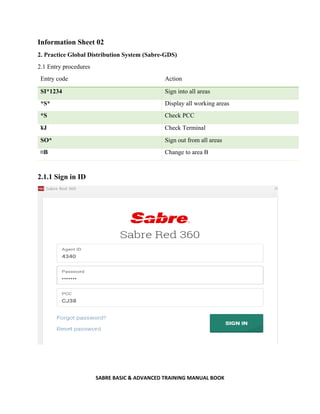
2.1.1 Sign in ID
2.1.2 Password
2.2 Operating procedure of GDS
2.2.1 Command based
2.2.2 Graphical
2.3 Encode and Decode functions
2.3.1 City
2.3.2 Airport
2.3.3 Country
2.3.4 Airlines
2.3.5 Currency
2.3.6 Equipment
2.4 Features for reservation
2.4.1 Flight schedule
2.4.2 Flight availability
2.4.3 Minimum connecting time
2.4.4 Local time check
2.4.5 Baggage Allowance Check
2.4.6 Currency check
SABRE BASIC & ADVANCED TRAINING MANUAL BOOK
2.4.7 Aircraft check
2.5 PNR Creation
2.5.1 Name insert
2.5.2 Itinerary creation (Seat Sell)
2.5.3 Phone field insert
2.5.4 Ticketing field insert
2.5.5 Received field insert
2.5.6 End of transaction
2.6 Special Service Request (SSR) and Other Service Information (OSI)
2.6.1 Special Service Request (SSR)
2.6.2 DOCS (Passport information)
2.6.3 DOCO (Visa information)
2.6.4 DOCA (Destination information)
2.7.5 CTC (Contact information)
2.4.6 Wheelchair
2.6.7 Meal request
2.6.8 Seat assign
2.6.9 Mileage card
2.6.10 Meet and Assist
2.6.11 Language Assist
2.6.2 Other Service Information (OSI)
2.6.2.1 VIP/ CIP message
2.6.2.2 Total Complete Party (TCP)
2.7 Fare quotation
2.7.1 Fare check
2.7.2 Fare breakdown
2.7.3 Fare save
SABRE BASIC & ADVANCED TRAINING MANUAL BOOK
2.8 Queue
2.8.1 Queue in
2.8.2 Enter queue
2.8.3 Queue details
2.8.4 Queue ignore
2.8.5 Queue share
2.8.6 Queue remove
Information Sheet 03
Issue E-Ticket
Void E-Ticket
Refund E-Ticket
Reissue E-Ticket
Sale Report check
SABRE BASIC & ADVANCED TRAINING MANUAL BOOK
1.1 SABRE Global Distribution System
Sabre is a leading software and technology company that powers the global travel industry. With
decades of revolutionary firsts, our team of experts drive innovation and ingenuity across the travel
ecosystem. Sabre partners with airlines, hoteliers, agencies and other travel partners to retail,
distribute and fulfill travel.
Our technology is the intelligence behind mobile apps, airport check-in kiosks, online travel sites,
airline and hotel reservation networks, travel agent terminals, and scores of other travel solutions.
Positioned at the center of the travel ecosystem, our platform enables our customers to connect
people with experiences that matter in their lives.
Dating back to 1960, Sabre was born out of a joint initiative between American Airlines and IBM
to create the world’s first computerized airline reservation system. We have since evolved into a
technology ecosystem that touches almost every stage of a traveler’s experience.
For over half a century, Sabre’s technology has revolutionized the way people travel. The history
of Sabre is a fascinating look inside one of the industry’s more enduring technologies. From the
birth of airline automation, to #7 on the list of InformationWeek’s “Greatest Software Ever
Written,” learn about the technology and the people who helped Sabre become what it is today.
Sabre Global Distribution System, owned by Sabre Corporation, is a travel reservation
system used by travel agents and companies to search, price, book, and ticket travel services
provided by airlines, hotels, car rental companies, rail providers and tour operators. Originally
developed by American Airlines with the assistance of IBM in 1960, the booking service became
available for use by external travel agents in 1976 and became independent of the airline in March
2000.
The system's parent company is organized into three business units:
 Sabre Travel Network: global distribution system
 Sabre Airline Solutions: airline technology
 Sabre Hospitality Solutions: hotel technology solutions
SABRE BASIC & ADVANCED TRAINING MANUAL BOOK
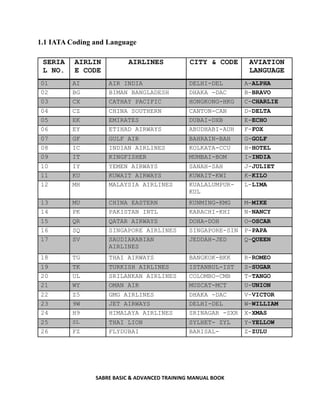
1.1 IATA Coding and Language
SERIA
L NO.
AIRLIN
E CODE
AIRLINES CITY & CODE AVIATION
LANGUAGE
01 AI AIR INDIA DELHI-DEL A-ALPHA
02 BG BIMAN BANGLADESH DHAKA -DAC B-BRAVO
03 CX CATHAY PACIFIC HONGKONG-HKG C-CHARLIE
04 CZ CHINA SOUTHERN CANTON-CAN D-DELTA
05 EK EMIRATES DUBAI-DXB E-ECHO
06 EY ETIHAD AIRWAYS ABUDHABI-AUH F-FOX
07 GF GULF AIR BAHRAIN-BAH G-GOLF
08 IC INDIAN AIRLINES KOLKATA-CCU H-HOTEL
09 IT KINGFISHER MUMBAI-BOM I-INDIA
10 IY YEMEN AIRWAYS SANAH-SAH J-JULIET
11 KU KUWAIT AIRWAYS KUWAIT-KWI K-KILO
12 MH MALAYSIA AIRLINES KUALALUMPUR-
KUL
L-LIMA
13 MU CHINA EASTERN KUNMING-KMG M-MIKE
14 PK PAKISTAN INTL KARACHI-KHI N-NANCY
15 QR QATAR AIRWAYS DOHA-DOH O-OSCAR
16 SQ SINGAPORE AIRLINES SINGAPORE-SIN P-PAPA
17 SV SAUDIARABIAN
AIRLINES
JEDDAH-JED Q-QUEEN
18 TG THAI AIRWAYS BANGKOK-BKK R-ROMEO
19 TK TURKISH AIRLINES ISTANBUL-IST S-SUGAR
20 UL SRILANKAN AIRLINES COLOMBO-CMB T-TANGO
21 WY OMAN AIR MUSCAT-MCT U-UNION
22 Z5 GMG AIRLINES DHAKA -DAC V-VICTOR
23 9W JET AIRWAYS DELHI-DEL W-WILLIAM
24 H9 HIMALAYA AIRLINES SRINAGAR -SXR X-XMAS
25 SL THAI LION SYLHET- ZYL Y-YELLOW
26 FZ FLYDUBAI BARISAL- Z-ZULU
SABRE BASIC & ADVANCED TRAINING MANUAL BOOK
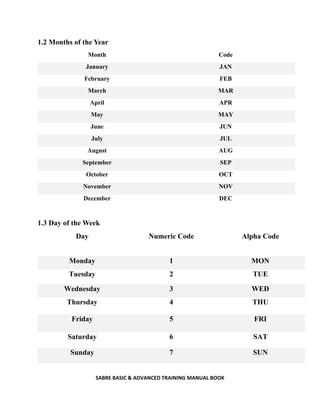
1.2 Months of the Year
Month Code
January JAN
February FEB
March MAR
April APR
May MAY
June JUN
July JUL
August AUG
September SEP
October OCT
November NOV
December DEC
1.3 Day of the Week
Day Numeric Code Alpha Code
Monday 1 MON
Tuesday 2 TUE
Wednesday 3 WED
Thursday 4 THU
Friday 5 FRI
Saturday 6 SAT
Sunday 7 SUN
SABRE BASIC & ADVANCED TRAINING MANUAL BOOK
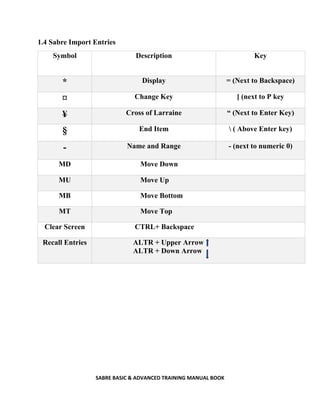
1.4 Sabre Import Entries
Symbol Description Key
* Display = (Next to Backspace)
¤ Change Key [ (next to P key
¥ Cross of Larraine “ (Next to Enter Key)
§ End Item  ( Above Enter key)
- Name and Range - (next to numeric 0)
MD Move Down
MU Move Up
MB Move Bottom
MT Move Top
Clear Screen CTRL+ Backspace
Recall Entries ALTR + Upper Arrow
ALTR + Down Arrow
SABRE BASIC & ADVANCED TRAINING MANUAL BOOK
Information Sheet 02
2. Practice Global Distribution System (Sabre-GDS)
2.1 Entry procedures
Entry code Action
SI*1234 Sign into all areas
*S* Display all working areas
*S Check PCC
¥J Check Terminal
SO* Sign out from all areas
¤B Change to area B
2.1.1 Sign in ID
SABRE BASIC & ADVANCED TRAINING MANUAL BOOK
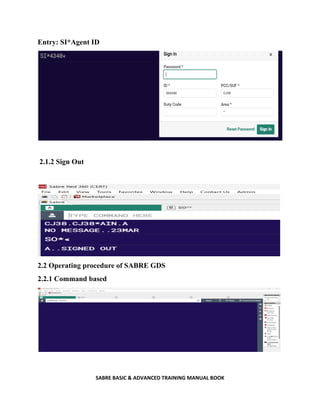
Entry: SI*Agent ID
2.1.2 Sign Out
2.2 Operating procedure of SABRE GDS
2.2.1 Command based
SABRE BASIC & ADVANCED TRAINING MANUAL BOOK
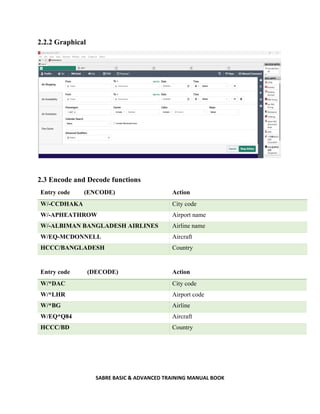
2.2.2 Graphical
2.3 Encode and Decode functions
Entry code (ENCODE) Action
W/-CCDHAKA City code
W/-APHEATHROW Airport name
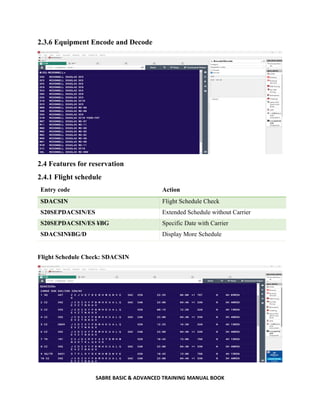
W/-ALBIMAN BANGLADESH AIRLINES Airline name
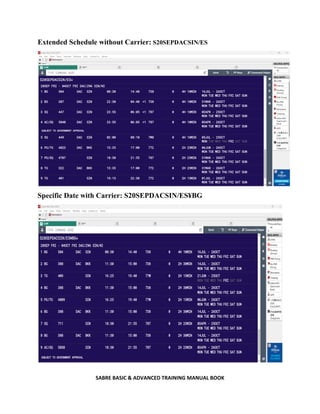
W/EQ-MCDONNELL Aircraft
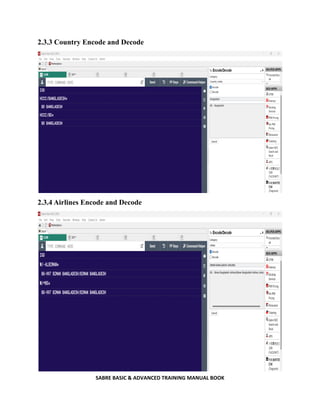
HCCC/BANGLADESH Country
Entry code (DECODE) Action
W/*DAC City code
W/*LHR Airport code
W/*BG Airline
W/EQ*Q84 Aircraft
HCCC/BD Country
SABRE BASIC & ADVANCED TRAINING MANUAL BOOK
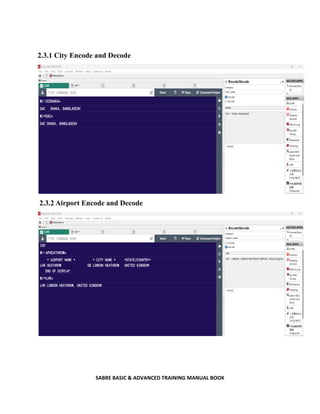
2.3.1 City Encode and Decode
2.3.2 Airport Encode and Decode
SABRE BASIC & ADVANCED TRAINING MANUAL BOOK
2.3.3 Country Encode and Decode
2.3.4 Airlines Encode and Decode
SABRE BASIC & ADVANCED TRAINING MANUAL BOOK
2.3.6 Equipment Encode and Decode
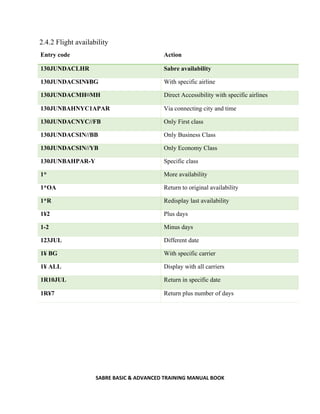
2.4 Features for reservation
2.4.1 Flight schedule
Entry code Action
SDACSIN Flight Schedule Check
S20SEPDACSIN/ES Extended Schedule without Carrier
S20SEPDACSIN/ES ¥BG Specific Date with Carrier
SDACSIN¥BG/D Display More Schedule
Flight Schedule Check: SDACSIN
SABRE BASIC & ADVANCED TRAINING MANUAL BOOK
Extended Schedule without Carrier: S20SEPDACSIN/ES
Specific Date with Carrier: S20SEPDACSIN/ES¥BG
SABRE BASIC & ADVANCED TRAINING MANUAL BOOK
2.4.2 Flight availability
Entry code Action
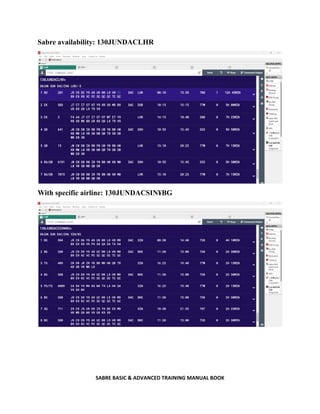
130JUNDACLHR Sabre availability
130JUNDACSIN¥BG With specific airline
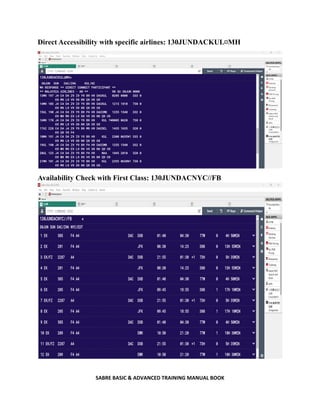
130JUNDACMH¤MH Direct Accessibility with specific airlines
130JUNBAHNYC1APAR Via connecting city and time
130JUNDACNYC//FB Only First class
130JUNDACSIN//BB Only Business Class
130JUNDACSIN//YB Only Economy Class
130JUNBAHPAR-Y Specific class
1* More availability
1*OA Return to original availability
1*R Redisplay last availability
1¥2 Plus days
1-2 Minus days
123JUL Different date
1¥ BG With specific carrier
1¥ ALL Display with all carriers
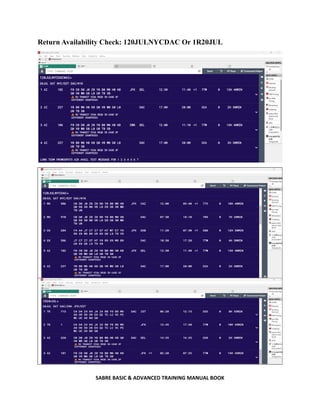
1R10JUL Return in specific date
1R¥7 Return plus number of days
SABRE BASIC & ADVANCED TRAINING MANUAL BOOK
Sabre availability: 130JUNDACLHR
With specific airline: 130JUNDACSIN¥BG
SABRE BASIC & ADVANCED TRAINING MANUAL BOOK
Direct Accessibility with specific airlines: 130JUNDACKUL¤MH
Availability Check with First Class: 130JUNDACNYC//FB
SABRE BASIC & ADVANCED TRAINING MANUAL BOOK
Return Availability Check: 120JULNYCDAC Or 1R20JUL
SABRE BASIC & ADVANCED TRAINING MANUAL BOOK
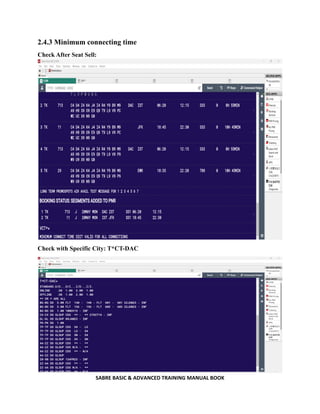
2.4.3 Minimum connecting time
Check After Seat Sell:
Check with Specific City: T*CT-DAC
SABRE BASIC & ADVANCED TRAINING MANUAL BOOK
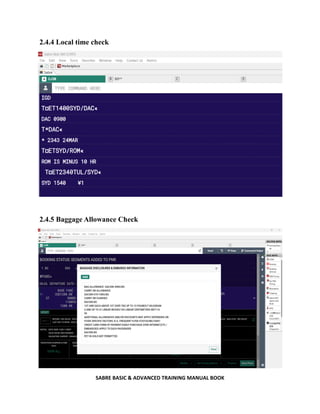
2.4.4 Local time check
2.4.5 Baggage Allowance Check
SABRE BASIC & ADVANCED TRAINING MANUAL BOOK
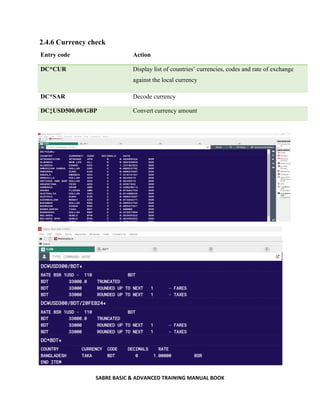
2.4.6 Currency check
Entry code Action
DC*CUR Display list of countries’ currencies, codes and rate of exchange
against the local currency
DC*SAR Decode currency
DC‡USD500.00/GBP Convert currency amount
SABRE BASIC & ADVANCED TRAINING MANUAL BOOK
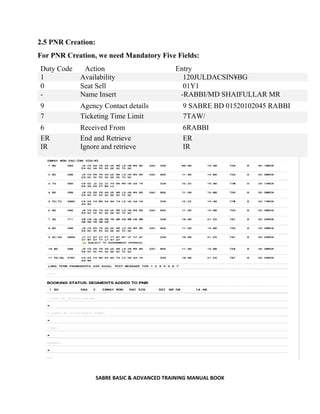
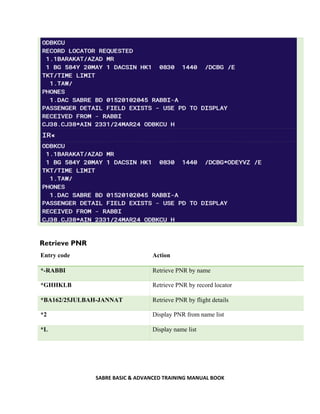
2.5 PNR Creation:
For PNR Creation, we need Mandatory Five Fields:
Duty Code Action Entry
1 Availability 120JULDACSIN¥BG
0 Seat Sell 01Y1
- Name Insert -RABBI/MD SHAIFULLAR MR
9 Agency Contact details 9 SABRE BD 01520102045 RABBI
7 Ticketing Time Limit 7TAW/
6 Received From 6RABBI
ER
IR
End and Retrieve
Ignore and retrieve
ER
IR
SABRE BASIC & ADVANCED TRAINING MANUAL BOOK
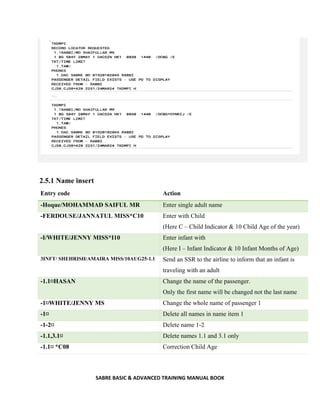
2.5.1 Name insert
Entry code Action
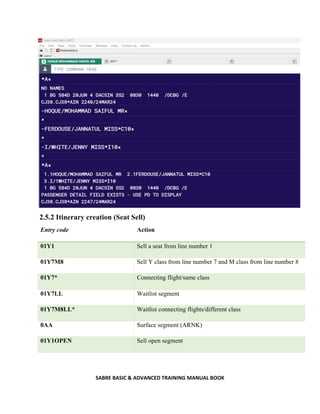
-Hoque/MOHAMMAD SAIFUL MR Enter single adult name
-FERDOUSE/JANNATUL MISS*C10 Enter with Child
(Here C – Child Indicator & 10 Child Age of the year)
-I/WHITE/JENNY MISS*I10 Enter infant with
(Here I – Infant Indicator & 10 Infant Months of Age)
3INFT/ SHEHRISH/AMAIRA MISS/10AUG25-1.1 Send an SSR to the airline to inform that an infant is
traveling with an adult
-1.1¤HASAN Change the name of the passenger.
Only the first name will be changed not the last name
-1¤WHITE/JENNY MS Change the whole name of passenger 1
-1¤ Delete all names in name item 1
-1-2¤ Delete name 1-2
-1.1,3.1¤ Delete names 1.1 and 3.1 only
-1.1¤ *C08 Correction Child Age
SABRE BASIC & ADVANCED TRAINING MANUAL BOOK
2.5.2 Itinerary creation (Seat Sell)
Entry code Action
01Y1 Sell a seat from line number 1
01Y7M8 Sell Y class from line number 7 and M class from line number 8
01Y7* Connecting flight/same class
01Y7LL Waitlist segment
01Y7M8LL* Waitlist connecting flights/different class
0AA Surface segment (ARNK)
01Y1OPEN Sell open segment
SABRE BASIC & ADVANCED TRAINING MANUAL BOOK
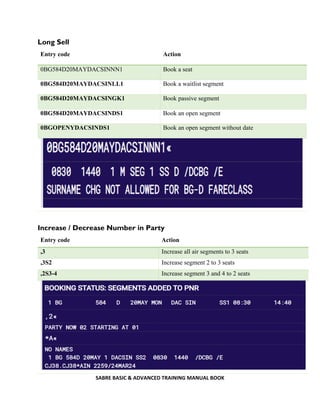
Long Sell
Entry code Action
0BG584D20MAYDACSINNN1 Book a seat
0BG584D20MAYDACSINLL1 Book a waitlist segment
0BG584D20MAYDACSINGK1 Book passive segment
0BG584D20MAYDACSINDS1 Book an open segment
0BGOPENYDACSINDS1 Book an open segment without date
Increase / Decrease Number in Party
Entry code Action
,3 Increase all air segments to 3 seats
,3S2 Increase segment 2 to 3 seats
,2S3-4 Increase segment 3 and 4 to 2 seats
SABRE BASIC & ADVANCED TRAINING MANUAL BOOK
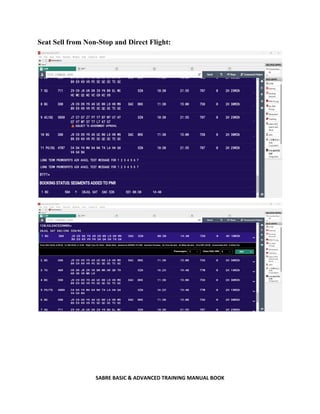
Seat Sell from Non-Stop and Direct Flight:
SABRE BASIC & ADVANCED TRAINING MANUAL BOOK
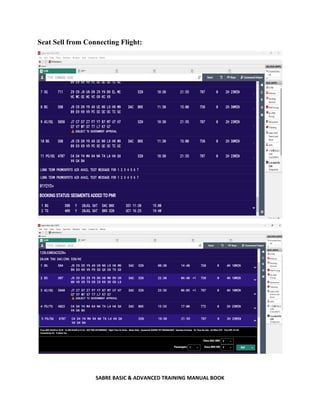
Seat Sell from Connecting Flight:
SABRE BASIC & ADVANCED TRAINING MANUAL BOOK
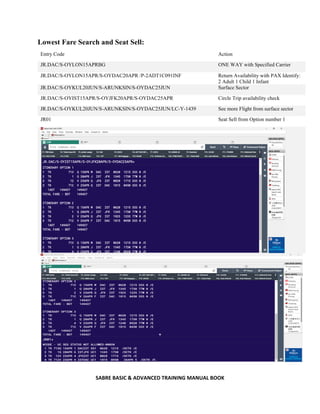
Lowest Fare Search and Seat Sell:
Entry Code Action
JR.DAC/S-OYLON15APRBG ONE WAY with Specified Carrier
JR.DAC/S-OYLON15APR/S-OYDAC20APR /P-2ADT1C091INF Return Availability with PAX Identify:
2 Adult 1 Child 1 Infant
JR.DAC/S-OYKUL20JUN/S-ARUNKSIN/S-OYDAC25JUN Surface Sector
JR.DAC/S-OYIST15APR/S-OYJFK20APR/S-OYDAC25APR Circle Trip availability check
JR.DAC/S-OYKUL20JUN/S-ARUNKSIN/S-OYDAC25JUN/LC-Y-1439 See more Flight from surface sector
JR01 Seat Sell from Option number 1
SABRE BASIC & ADVANCED TRAINING MANUAL BOOK
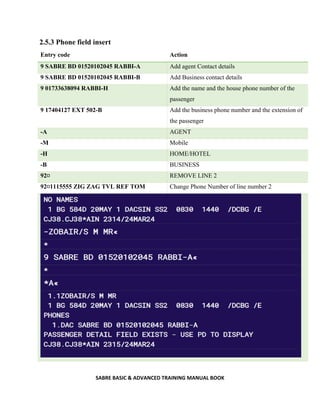
2.5.3 Phone field insert
Entry code Action
9 SABRE BD 01520102045 RABBI-A Add agent Contact details
9 SABRE BD 01520102045 RABBI-B Add Business contact details
9 01733638094 RABBI-H Add the name and the house phone number of the
passenger
9 17404127 EXT 502-B Add the business phone number and the extension of
the passenger
-A AGENT
-M Mobile
-H HOME/HOTEL
-B BUSINESS
92¤ REMOVE LINE 2
92¤1115555 ZIG ZAG TVL REF TOM Change Phone Number of line number 2
SABRE BASIC & ADVANCED TRAINING MANUAL BOOK
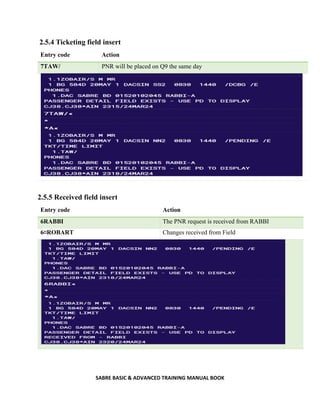
2.5.4 Ticketing field insert
Entry code Action
7TAW/ PNR will be placed on Q9 the same day
2.5.5 Received field insert
Entry code Action
6RABBI The PNR request is received from RABBI
6¤ROBART Changes received from Field
SABRE BASIC & ADVANCED TRAINING MANUAL BOOK
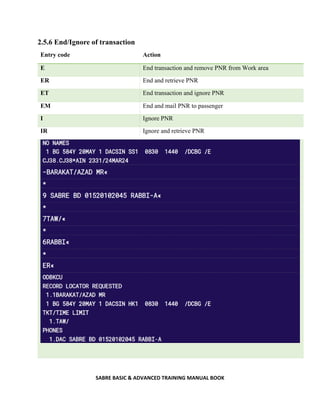
2.5.6 End/Ignore of transaction
Entry code Action
E End transaction and remove PNR from Work area
ER End and retrieve PNR
ET End transaction and ignore PNR
EM End and mail PNR to passenger
I Ignore PNR
IR Ignore and retrieve PNR
SABRE BASIC & ADVANCED TRAINING MANUAL BOOK
Retrieve PNR
Entry code Action
*-RABBI Retrieve PNR by name
*GHHKLB Retrieve PNR by record locator
*BA162/25JULBAH-JANNAT Retrieve PNR by flight details
*2 Display PNR from name list
*L Display name list
SABRE BASIC & ADVANCED TRAINING MANUAL BOOK
Cancel Segment:
Entry code Action
X2 Cancel segment 2
X1/4 Cancel segment 1 and 4
X1-3 Cancel segment 1-3
XI Cancel whole itinerary
Display PNR elements:
Entry code Action
*A Display PNR
*I Display itinerary
*N Display names
*T Display ticket field
*B Display pre-reserved seats
*H Display history
*P3 Display general facts
*FF Display frequent flyer number
*PE Display email address
*PQ Display price quote
*P5 Display Remarks
*P7 Display Ticket Time Limit
SABRE BASIC & ADVANCED TRAINING MANUAL BOOK
Insert/Move Segment:
Entry code Action
/2 Insert after segment 2
/2/1 Move segment 1 after segment 2
/0/4,5 Move segment 4 & 5 to 1st position
/1A Insert ARNK after segment 1
/2/01Y7 Insert a sell after segment 2
Change Segment Status:
Entry code Action
EWR Updates schedule changes/segment status
.1HK Confirm segment number 1
Change Class of Service:
Entry code Action
WC1Q Will change segment 1 to Q class
WC1Q/2B Change segment 1 to Q and segment 2 to B
WCAY Will change all segments to Y class
SABRE BASIC & ADVANCED TRAINING MANUAL BOOK
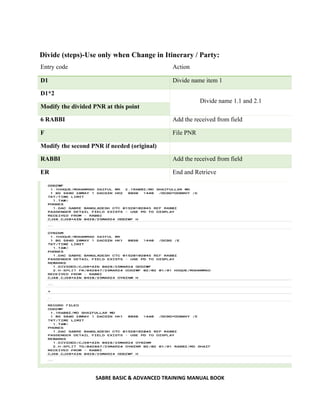
Divide (steps)-Use only when Change in Itinerary / Party:
Entry code Action
D1 Divide name item 1
D1*2
Divide name 1.1 and 2.1
Modify the divided PNR at this point
6 RABBI Add the received from field
F File PNR
Modify the second PNR if needed (original)
RABBI Add the received from field
ER End and Retrieve
SABRE BASIC & ADVANCED TRAINING MANUAL BOOK
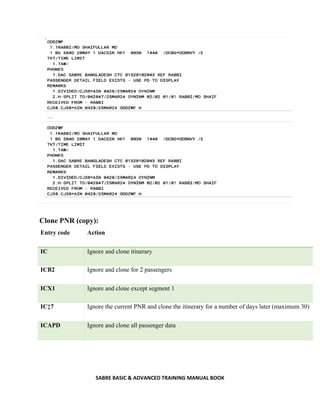
Clone PNR (copy):
Entry code Action
IC Ignore and clone itinerary
ICB2 Ignore and clone for 2 passengers
ICX1 Ignore and clone except segment 1
IC‡7 Ignore the current PNR and clone the itinerary for a number of days later (maximum 30)
ICAPD Ignore and clone all passenger data
SABRE BASIC & ADVANCED TRAINING MANUAL BOOK
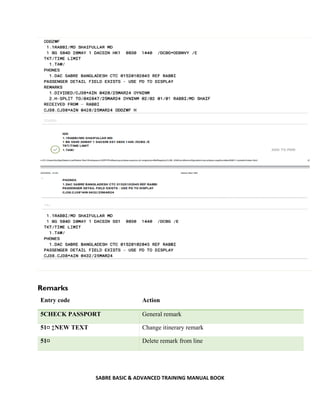
Remarks
Entry code Action
5CHECK PASSPORT General remark
51¤ ‡NEW TEXT Change itinerary remark
51¤ Delete remark from line
SABRE BASIC & ADVANCED TRAINING MANUAL BOOK
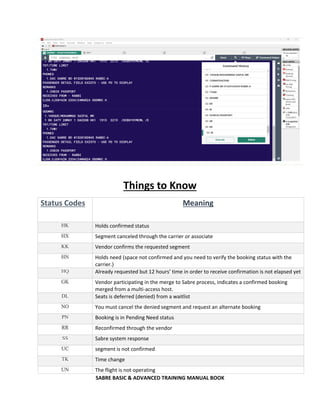
Things to Know
Status Codes Meaning
HK Holds confirmed status
HX Segment canceled through the carrier or associate
KK Vendor confirms the requested segment
HN Holds need (space not confirmed and you need to verify the booking status with the
carrier.)
HQ Already requested but 12 hours’ time in order to receive confirmation is not elapsed yet
GK Vendor participating in the merge to Sabre process, indicates a confirmed booking
merged from a multi-access host.
DL Seats is deferred (denied) from a waitlist
NO You must cancel the denied segment and request an alternate booking
PN Booking is in Pending Need status
RR Reconfirmed through the vendor
SS Sabre system response
UC segment is not confirmed
TK Time change
UN The flight is not operating
SABRE BASIC & ADVANCED TRAINING MANUAL BOOK
2.6 Special Service Request (SSR) and Other Service Information (OSI)
SSR-Special Service Request:
Entry code Action
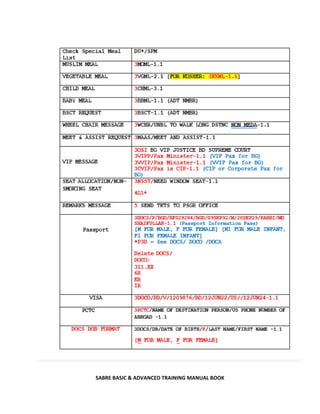
3VGML1-2.1 Request vegetarian meal for segment 1 passenger 2.1
3MOML2,3-1.1,2.1 Request Muslim meal for segment 2 and 3 passenger 1.1 and 2.1
3BSCT-1.1 Request baby cot for passenger 1.1
3NSST1/12A-1.1 Request seat 12A for segment 1 passenger 1.1
3TKNM/12345678904455-1.1 Advise ticket number manually
N*/TICKET NUMBER
31¤PASSENGER SPEAKS
FRENCH ONLY-3.1
Change an SSR facts for all airline in the PNR for passenger 3.1
31¤ Cancel SSR item from
41¤ Cancel AA messages
OSI-Other Service Information:
Entry code Action
3OSI AI CHD AGE 6 YRS Send OSI message to a particular airline in the PNR
3OSI AI CIP CEO OF SABRE
BANGLADESH-1.1
Send OSI message to a particular airline in the PNR for a
specific passenger
31¤PASSENGER SPEAKS FRENCH
ONLY-3.1
Change an OSI facts for all airline in the PNR
31¤EK VIP PASSNGER-2.1 Change an OSI facts for a particular airline in the PNR
32¤ Delete an OSI Remark
SABRE BASIC & ADVANCED TRAINING MANUAL BOOK
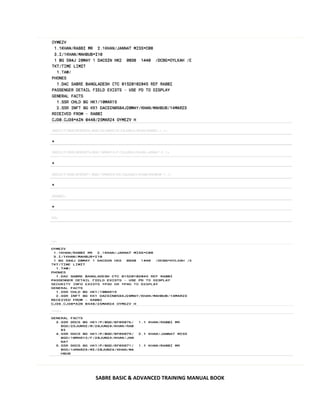
2.6.2 DOCS (Passport information)
Entry code Action
3DOCS/P/BGD/BF029284/BGD/09SEP92/M/20SEP33/RABBI/MD
SHAIFULLAR-1.1
Add Adult passenger
passport information
3DOCS/P/BGD/BF029285/BGD/09SEP18/F/20SEP33/SAH/JABED-2.1 For Female Child
3DOCS/P/BGD/BF029287/BGD/09SEP23/MI/20SEP33/SAH/ARIF-1.1 For Male Infant
Infant always tag with Adult
3- Duty Code
DOCS – Passport
P- Passport Information
BGD- Passport Issuing Country
BF029284- Passport Number
BGD- Nationality of Passport Holder
09SEP92- Passenger Date of Birth
M- Gender Indicator
20SEP33- Passport date of Expired
RABBI- Last name of PAX
MD SHAIFULLAR – First Name of PAX
M- FOR MALE
F- FOR FEMALE for
ADULT and CHILD PAX
MI- Male Infant
FI- Female Infant
*P3D Check DOCS/DOCO Details
36.XX Delete DOCS
Here 6 is DOCS line number
SABRE BASIC & ADVANCED TRAINING MANUAL BOOK
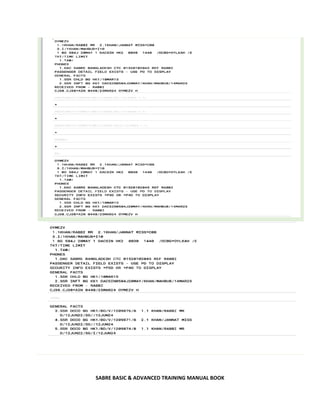
2.6.3 DOCO (Visa information)
Entry code Action
3DOCO/BD/V/1209876/BD/12JUN22/US//12JUN24-1.1 Insert Adult Visa
Information
3DOCO/BD/V/1209877/BD/12JUN22/US//12JUN24-2.1 Insert Child Visa
Information
3DOCO/BD/V/1209887/BD/12JUN22/US/I/12JUN24-1.1 Insert Infant Visa
Information
I Infant Indicator
3 - Duty Code
DOCO – Visa
BD – Birth country of Visa Holder
V – Visa Information
1209876 – Visa Number
BD – Visa issuing country
12JUN22 – Visa issue date
US – Visa for Travelling country (US- USA)
// - Mandatory
12JUN24 – Visa Expiry date
1.1 - Passenger Line Number
*P3D Check DOCO Details
37.XX Delete DOCO
SABRE BASIC & ADVANCED TRAINING MANUAL BOOK
2.6.4 DOCA (Destination information)
Entry code Action
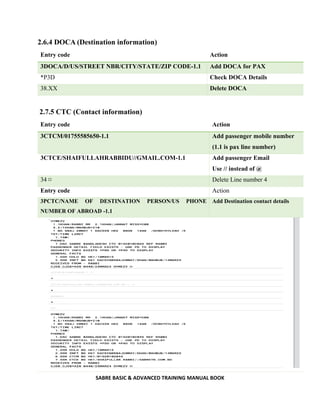
3DOCA/D/US/STREET NBR/CITY/STATE/ZIP CODE-1.1 Add DOCA for PAX
*P3D Check DOCA Details
38.XX Delete DOCA
2.7.5 CTC (Contact information)
Entry code Action
3CTCM/01755585650-1.1 Add passenger mobile number
(1.1 is pax line number)
3CTCE/SHAIFULLAHRABBIDU//GMAIL.COM-1.1 Add passenger Email
Use // instead of @
34 ¤ Delete Line number 4
Entry code Action
3PCTC/NAME OF DESTINATION PERSON/US PHONE
NUMBER OF ABROAD -1.1
Add Destination contact details
SABRE BASIC & ADVANCED TRAINING MANUAL BOOK
2.4.6 Wheelchair
Entry code Action
3WCHR/UNBL TO WALK LONG DSTNC NONMEDA-1.1 Wheel chair request
3OSI SQ PAX NEED WCHR DUE TO SICKNESS-1.1 Wheel chair request
310¤ Remove wheel chair
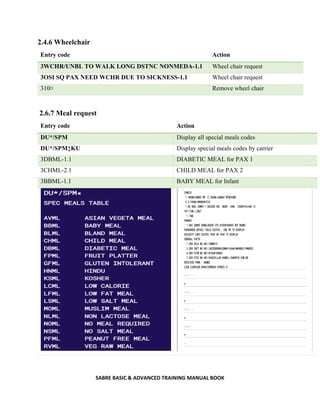
2.6.7 Meal request
Entry code Action
DU*/SPM Display all special meals codes
DU*/SPM‡KU Display special meals codes by carrier
3DBML-1.1 DIABETIC MEAL for PAX 1
3CHML-2.1 CHILD MEAL for PAX 2
3BBML-1.1 BABY MEAL for Infant
SABRE BASIC & ADVANCED TRAINING MANUAL BOOK
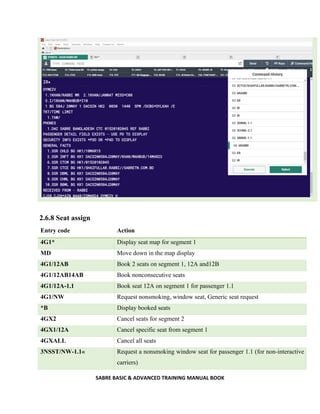
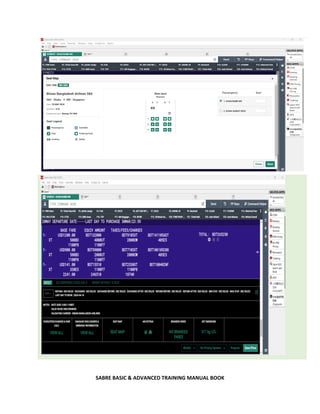
2.6.8 Seat assign
Entry code Action
4G1* Display seat map for segment 1
MD Move down in the map display
4G1/12AB Book 2 seats on segment 1, 12A and12B
4G1/12AB14AB Book nonconsecutive seats
4G1/12A-1.1 Book seat 12A on segment 1 for passenger 1.1
4G1/NW Request nonsmoking, window seat, Generic seat request
*B Display booked seats
4GX2 Cancel seats for segment 2
4GX1/12A Cancel specific seat from segment 1
4GXALL Cancel all seats
3NSST/NW-1.1« Request a nonsmoking window seat for passenger 1.1 (for non-interactive
carriers)
SABRE BASIC & ADVANCED TRAINING MANUAL BOOK
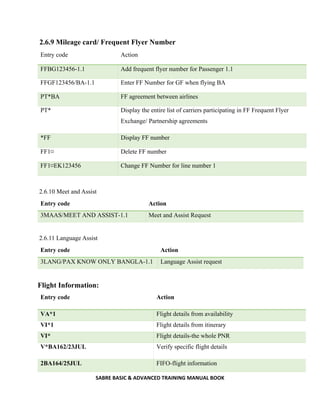
2.6.9 Mileage card/ Frequent Flyer Number
Entry code Action
FFBG123456-1.1 Add frequent flyer number for Passenger 1.1
FFGF123456/BA-1.1 Enter FF Number for GF when flying BA
PT*BA FF agreement between airlines
PT* Display the entire list of carriers participating in FF Frequent Flyer
Exchange/ Partnership agreements
*FF Display FF number
FF1¤ Delete FF number
FF1¤EK123456 Change FF Number for line number 1
2.6.10 Meet and Assist
Entry code Action
3MAAS/MEET AND ASSIST-1.1 Meet and Assist Request
2.6.11 Language Assist
Entry code Action
3LANG/PAX KNOW ONLY BANGLA-1.1 Language Assist request
Flight Information:
Entry code Action
VA*1 Flight details from availability
VI*1 Flight details from itinerary
VI* Flight details-the whole PNR
V*BA162/23JUL Verify specific flight details
2BA164/25JUL FIFO-flight information
SABRE BASIC & ADVANCED TRAINING MANUAL BOOK
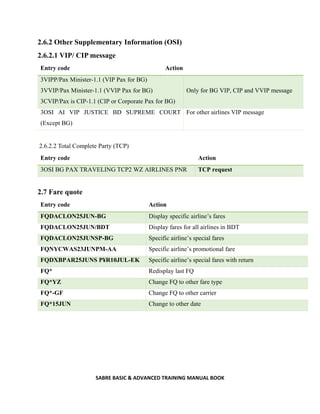
2.6.2 Other Supplementary Information (OSI)
2.6.2.1 VIP/ CIP message
Entry code Action
3VIPP/Pax Minister-1.1 (VIP Pax for BG)
3VVIP/Pax Minister-1.1 (VVIP Pax for BG)
3CVIP/Pax is CIP-1.1 (CIP or Corporate Pax for BG)
Only for BG VIP, CIP and VVIP message
3OSI AI VIP JUSTICE BD SUPREME COURT
(Except BG)
For other airlines VIP message
2.6.2.2 Total Complete Party (TCP)
Entry code Action
3OSI BG PAX TRAVELING TCP2 WZ AIRLINES PNR TCP request
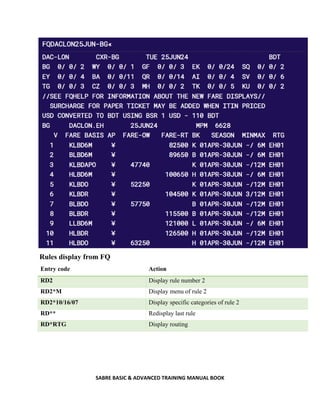
2.7 Fare quote
Entry code Action
FQDACLON25JUN-BG Display specific airline’s fares
FQDACLON25JUN/BDT Display fares for all airlines in BDT
FQDACLON25JUNSP-BG Specific airline’s special fares
FQNYCWAS23JUNPM-AA Specific airline’s promotional fare
FQDXBPAR25JUNS P¥R10JUL-EK Specific airline’s special fares with return
FQ* Redisplay last FQ
FQ*YZ Change FQ to other fare type
FQ*-GF Change FQ to other carrier
FQ*15JUN Change to other date
SABRE BASIC & ADVANCED TRAINING MANUAL BOOK
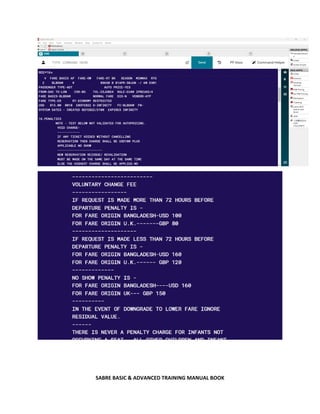
Rules display from FQ
Entry code Action
RD2 Display rule number 2
RD2*M Display menu of rule 2
RD2*10/16/07 Display specific categories of rule 2
RD** Redisplay last rule
RD*RTG Display routing
SABRE BASIC & ADVANCED TRAINING MANUAL BOOK
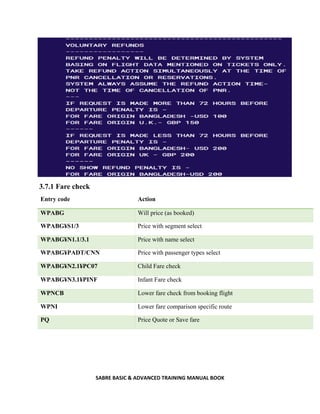
3.7.1 Fare check
Entry code Action
WPABG Will price (as booked)
WPABG¥S1/3 Price with segment select
WPABG¥N1.1/3.1 Price with name select
WPABG¥PADT/CNN Price with passenger types select
WPABG¥N2.1¥PC07 Child Fare check
WPABG¥N3.1¥PINF Infant Fare check
WPNCB Lower fare check from booking flight
WPNI Lower fare comparison specific route
PQ Price Quote or Save fare
SABRE BASIC & ADVANCED TRAINING MANUAL BOOK
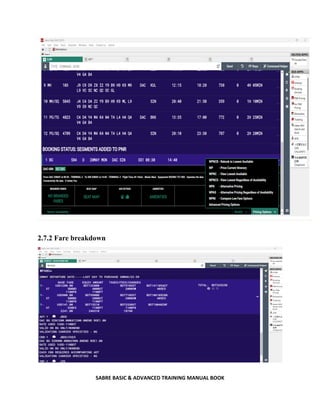
2.7.2 Fare breakdown
SABRE BASIC & ADVANCED TRAINING MANUAL BOOK
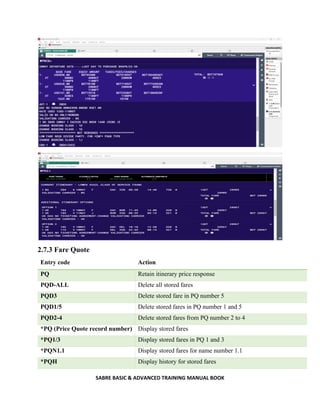
2.7.3 Fare Quote
Entry code Action
PQ Retain itinerary price response
PQD-ALL Delete all stored fares
PQD3 Delete stored fare in PQ number 5
PQD1/5 Delete stored fares in PQ number 1 and 5
PQD2-4 Delete stored fares from PQ number 2 to 4
*PQ (Price Quote record number) Display stored fares
*PQ1/3 Display stored fares in PQ 1 and 3
*PQN1.1 Display stored fares for name number 1.1
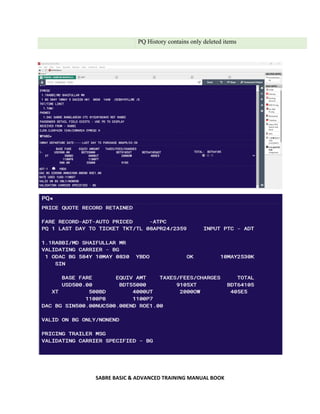
*PQH Display history for stored fares
SABRE BASIC & ADVANCED TRAINING MANUAL BOOK
PQ History contains only deleted items
SABRE BASIC & ADVANCED TRAINING MANUAL BOOK
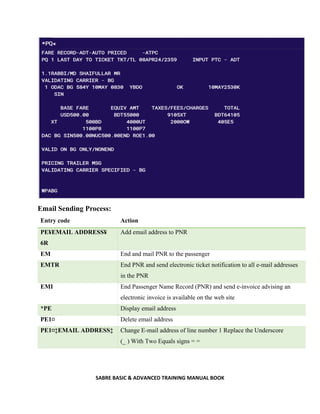
Email Sending Process:
Entry code Action
PE¥EMAIL ADDRESS¥
6R
Add email address to PNR
EM End and mail PNR to the passenger
EMTR End PNR and send electronic ticket notification to all e-mail addresses
in the PNR
EMI End Passenger Name Record (PNR) and send e-invoice advising an
electronic invoice is available on the web site
*PE Display email address
PE1¤ Delete email address
PE1¤‡EMAIL ADDRESS‡ Change E-mail address of line number 1 Replace the Underscore
(_ ) With Two Equals signs = =
SABRE BASIC & ADVANCED TRAINING MANUAL BOOK
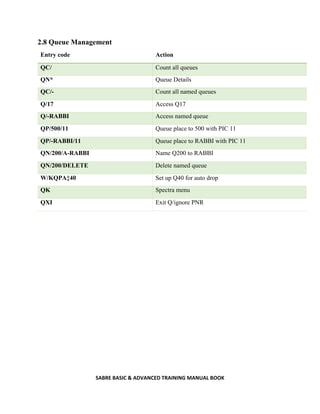
2.8 Queue Management
Entry code Action
QC/ Count all queues
QN* Queue Details
QC/- Count all named queues
Q/17 Access Q17
Q/-RABBI Access named queue
QP/500/11 Queue place to 500 with PIC 11
QP/-RABBI/11 Queue place to RABBI with PIC 11
QN/200/A-RABBI Name Q200 to RABBI
QN/200/DELETE Delete named queue
W/KQPA‡40 Set up Q40 for auto drop
QK Spectra menu
QXI Exit Q/ignore PNR
SABRE BASIC & ADVANCED TRAINING MANUAL BOOK
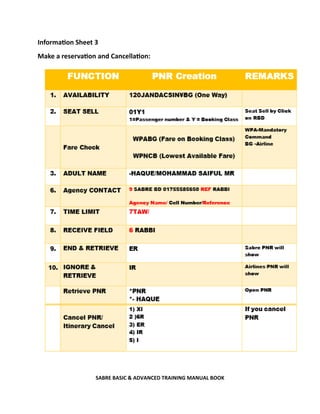
Information Sheet 3
Make a reservation and Cancellation:
SABRE BASIC & ADVANCED TRAINING MANUAL BOOK
3.0 Ticket Issue
Data Collection before Issuing an air Ticket:
 The date they wish to travel
 Where they are wish to travel from
 Where they are wish to Travel to
 Preferred Carrier / Airline
 Passenger (s) name (First Name, Middle Name, Last Name)
 Title of the passenger (Mr., Ms., Mrs., Mstr., Miss., Inf)
 Travel document (Passport, VISA and NID)
 Age (Date of birth)
 Birth place/Nationality
 Gender (Male/Female)
 Visa Type (For International Travel)
 Residency status
 Type of passenger (Adult, Child, Infant, Senior citizen)
 Type of Journey (One way, Round trip, Circle Trip, Open Jaw etc)
 Nature of travel (Business, Conference, Holiday, Pilgrims etc)
 Dietary requirement (Meal preference)
 Encashment certificate (If passenger foreigner)
 Travel Insurance
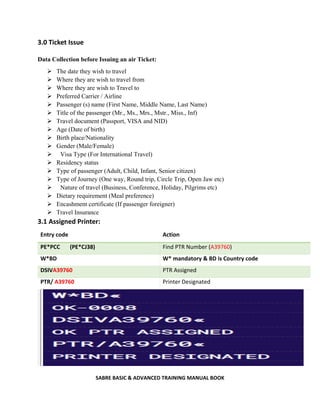
3.1 Assigned Printer:
Entry code Action
PE*PCC (PE*CJ38) Find PTR Number (A39760)
W*BD W* mandatory & BD is Country code
DSIVA39760 PTR Assigned
PTR/ A39760 Printer Designated
SABRE BASIC & ADVANCED TRAINING MANUAL BOOK
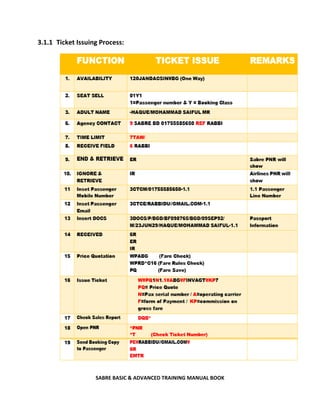
3.1.1 Ticket Issuing Process:
SABRE BASIC & ADVANCED TRAINING MANUAL BOOK
Entry code Action
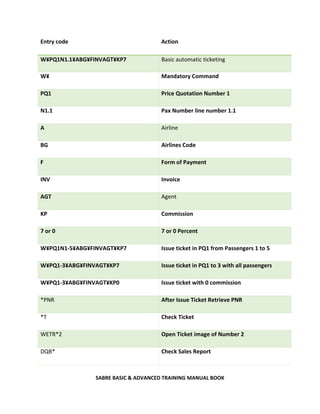
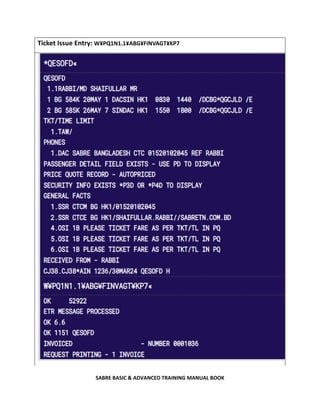
W¥PQ1N1.1¥ABG¥FINVAGT¥KP7 Basic automatic ticketing
W¥ Mandatory Command
PQ1 Price Quotation Number 1
N1.1 Pax Number line number 1.1
A Airline
BG Airlines Code
F Form of Payment
INV Invoice
AGT Agent
KP Commission
7 or 0 7 or 0 Percent
W¥PQ1N1-5¥ABG¥FINVAGT¥KP7 Issue ticket in PQ1 from Passengers 1 to 5
W¥PQ1-3¥ABG¥FINVAGT¥KP7 Issue ticket in PQ1 to 3 with all passengers
W¥PQ1-3¥ABG¥FINVAGT¥KP0 Issue ticket with 0 commission
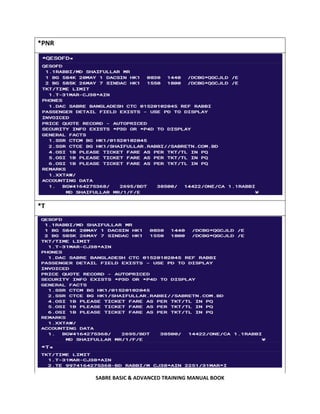
*PNR After Issue Ticket Retrieve PNR
*T Check Ticket
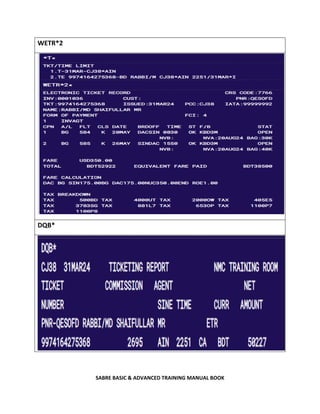
WETR*2 Open Ticket image of Number 2
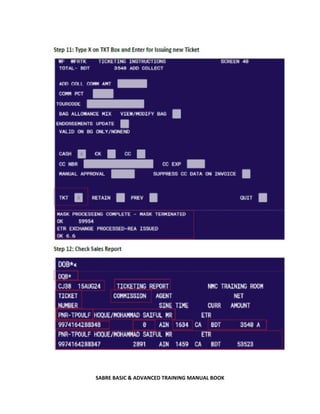
DQB* Check Sales Report
SABRE BASIC & ADVANCED TRAINING MANUAL BOOK
Ticket Issue Entry: W¥PQ1N1.1¥ABG¥FINVAGT¥KP7
SABRE BASIC & ADVANCED TRAINING MANUAL BOOK
*PNR
*T
SABRE BASIC & ADVANCED TRAINING MANUAL BOOK
WETR*2
DQB*
SABRE BASIC & ADVANCED TRAINING MANUAL BOOK
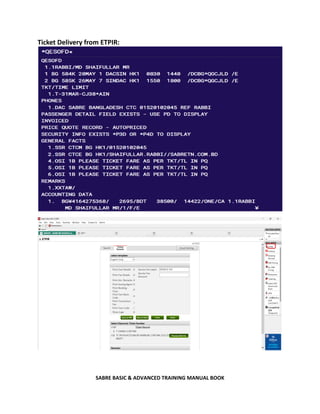
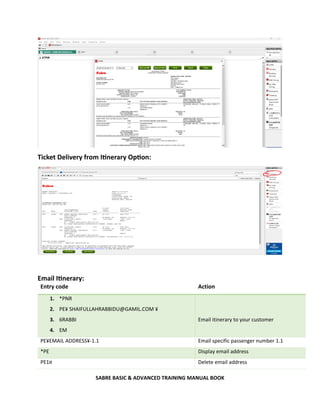
Ticket Delivery from ETPIR:
SABRE BASIC & ADVANCED TRAINING MANUAL BOOK
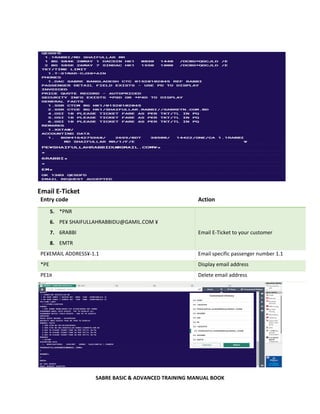
Ticket Delivery from Itinerary Option:
Email Itinerary:
Entry code Action
1. *PNR
2. PE¥ SHAIFULLAHRABBIDU@GAMIL.COM ¥
3. 6RABBI
4. EM
Email itinerary to your customer
PE¥EMAIL ADDRESS¥-1.1 Email specific passenger number 1.1
*PE Display email address
PE1¤ Delete email address
SABRE BASIC & ADVANCED TRAINING MANUAL BOOK
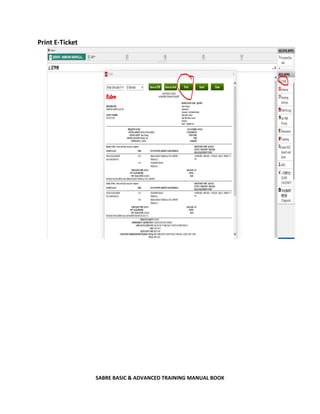
Email E-Ticket
Entry code Action
5. *PNR
6. PE¥ SHAIFULLAHRABBIDU@GAMIL.COM ¥
7. 6RABBI
8. EMTR
Email E-Ticket to your customer
PE¥EMAIL ADDRESS¥-1.1 Email specific passenger number 1.1
*PE Display email address
PE1¤ Delete email address
SABRE BASIC & ADVANCED TRAINING MANUAL BOOK
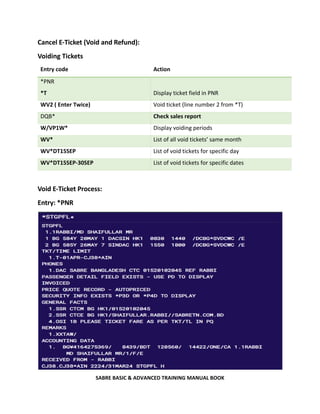
Print E-Ticket
SABRE BASIC & ADVANCED TRAINING MANUAL BOOK
Cancel E-Ticket (Void and Refund):
Voiding Tickets
Entry code Action
*PNR
*T Display ticket field in PNR
WV2 ( Enter Twice) Void ticket (line number 2 from *T)
DQB* Check sales report
W/VP1W* Display voiding periods
WV* List of all void tickets’ same month
WV*DT15SEP List of void tickets for specific day
WV*DT15SEP-30SEP List of void tickets for specific dates
Void E-Ticket Process:
Entry: *PNR
SABRE BASIC & ADVANCED TRAINING MANUAL BOOK
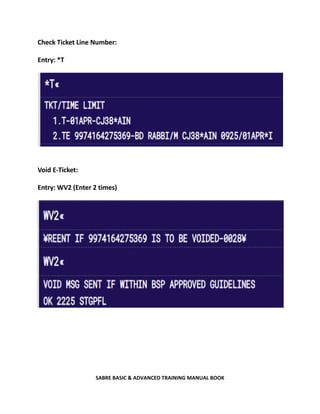
Check Ticket Line Number:
Entry: *T
Void E-Ticket:
Entry: WV2 (Enter 2 times)
SABRE BASIC & ADVANCED TRAINING MANUAL BOOK
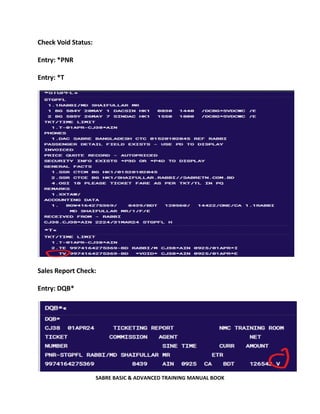
Check Void Status:
Entry: *PNR
Entry: *T
Sales Report Check:
Entry: DQB*
SABRE BASIC & ADVANCED TRAINING MANUAL BOOK
Refund Tickets
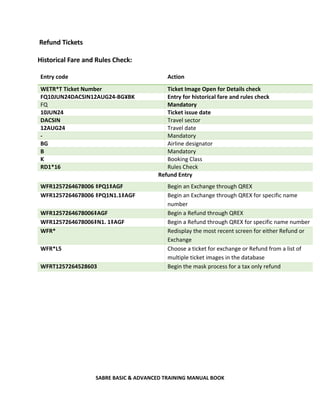
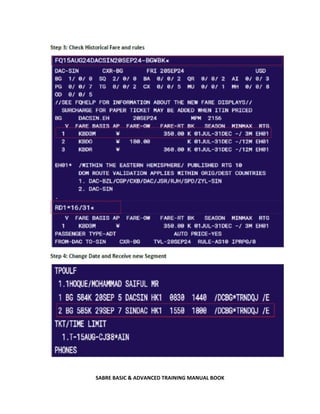
Historical Fare and Rules Check:
Entry code Action
WETR*T Ticket Number Ticket Image Open for Details check
FQ10JUN24DACSIN12AUG24-BG¥BK Entry for historical fare and rules check
FQ Mandatory
10JUN24 Ticket issue date
DACSIN Travel sector
12AUG24 Travel date
- Mandatory
BG Airline designator
B Mandatory
K Booking Class
RD1*16 Rules Check
Refund Entry
WFR1257264678006 ‡PQ1‡AGF Begin an Exchange through QREX
WFR1257264678006 ‡PQ1N1.1‡AGF Begin an Exchange through QREX for specific name
number
WFR1257264678006‡AGF Begin a Refund through QREX
WFR1257264678006‡N1. 1‡AGF Begin a Refund through QREX for specific name number
WFR* Redisplay the most recent screen for either Refund or
Exchange
WFR*L5 Choose a ticket for exchange or Refund from a list of
multiple ticket images in the database
WFRT1257264528603 Begin the mask process for a tax only refund
SABRE BASIC & ADVANCED TRAINING MANUAL BOOK
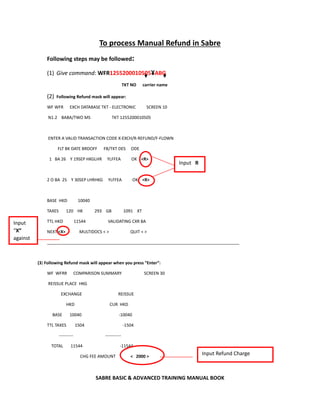
To process Manual Refund in Sabre
Following steps may be followed:
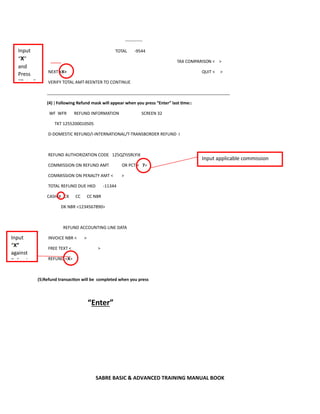
(1) Give command: WFR1255200010505¥ABG
TKT NO carrier name
(2) Following Refund mask will appear:
WF WFR EXCH DATABASE TKT - ELECTRONIC SCREEN 10
N1.2 BABA/TWO MS TKT 1255200010505
ENTER A VALID TRANSACTION CODE X-EXCH/R-REFUND/F-FLOWN
FLT BK DATE BRDOFF FB/TKT DES ODE
1 BA 26 Y 19SEP HKGLHR YLFFEA OK <R>
2 O BA 25 Y 30SEP LHRHKG YLFFEA OK <R>
BASE HKD 10040
TAXES 120 HK 293 GB 1091 XT
TTL HKD 11544 VALIDATING CXR BA
NEXT <X> MULTIDOCS < > QUIT < >
__________________________________________________________________________________
(3) Following Refund mask will appear when you press “Enter”:
WF WFRR COMPARISON SUMMARY SCREEN 30
REISSUE PLACE HKG
EXCHANGE REISSUE
HKD CUR HKD
BASE 10040 -10040
TTL TAXES 1504 -1504
---------- -----------
TOTAL 11544 -11544
CHG FEE AMOUNT < 2000 >
Input R
Input
“X”
against
Input Refund Charge
SABRE BASIC & ADVANCED TRAINING MANUAL BOOK
------------
TOTAL -9544
TAX COMPARISON < >
NEXT <X> QUIT < >
VERIFY TOTAL AMT-REENTER TO CONTINUE
______________________________________________________________________________
(4) ) Following Refund mask will appear when you press “Enter” last time::
WF WFR REFUND INFORMATION SCREEN 32
TKT 1255200010505
D-DOMESTIC REFUND/I-INTERNATIONAL/T-TRANSBORDER REFUND I
REFUND AUTHORIZATION CODE 125QZYJSRLYIX
COMMISSION ON REFUND AMT OR PCT < 7>
COMMISSION ON PENALTY AMT < >
TOTAL REFUND DUE HKD -11344
CASH X CK CC CC NBR
DK NBR <1234567890>
REFUND ACCOUNTING LINE DATA
INVOICE NBR < >
FREE TEXT < >
REFUND <X>
(5)Refund transaction will be completed when you press
“Enter”
Input applicable commission
Input
“X”
against
R f d
Input
“X”
and
Press
“E t ”
SABRE BASIC & ADVANCED TRAINING MANUAL BOOK
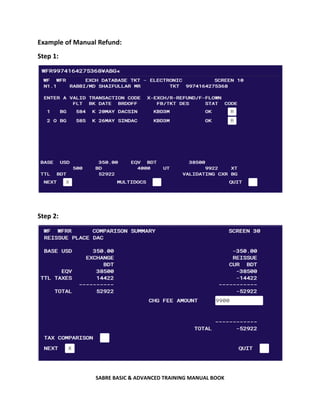
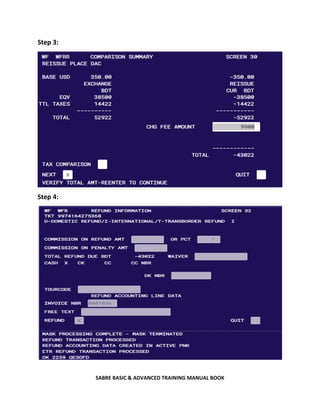
Example of Manual Refund:
Step 1:
Step 2:
SABRE BASIC & ADVANCED TRAINING MANUAL BOOK
Step 3:
Step 4:
SABRE BASIC & ADVANCED TRAINING MANUAL BOOK
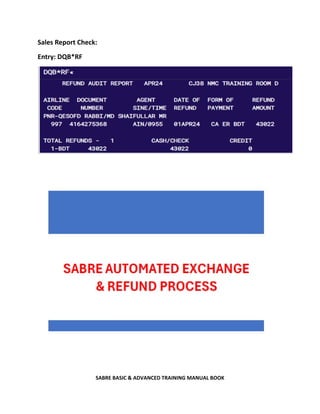
Sales Report Check:
Entry: DQB*RF
SABRE BASIC & ADVANCED TRAINING MANUAL BOOK
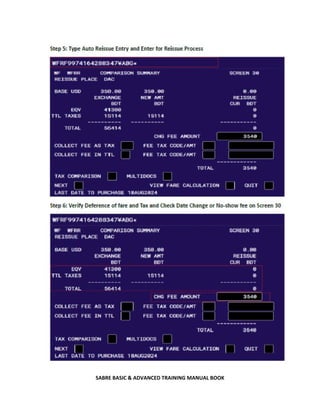
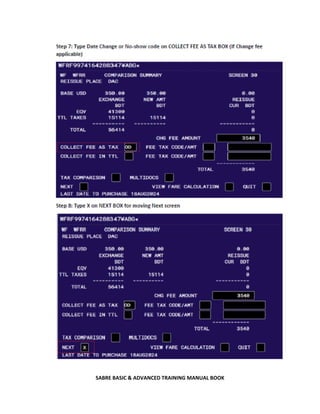
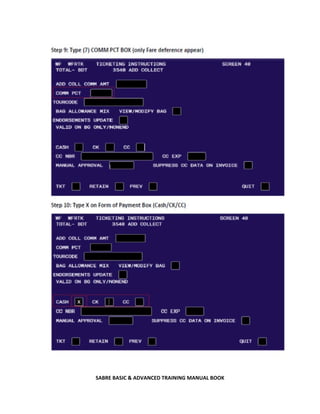
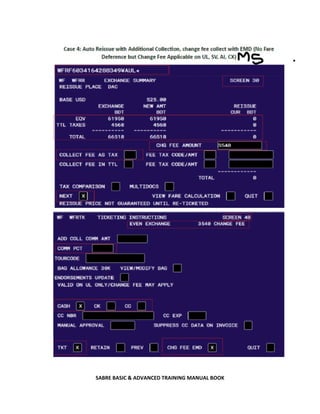
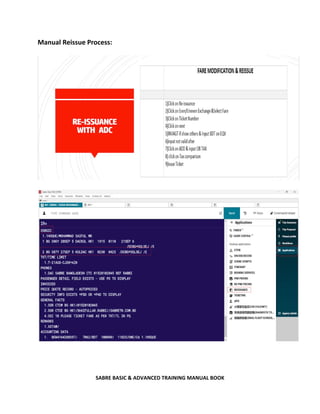
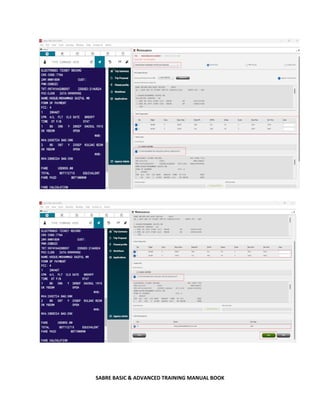
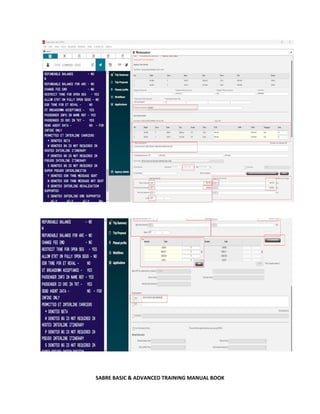
Manual Reissue Process:
SABRE BASIC & ADVANCED TRAINING MANUAL BOOK
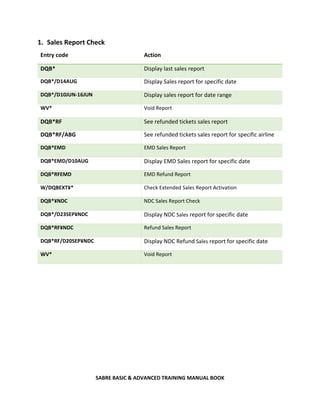
1. Sales Report Check
Entry code Action
DQB* Display last sales report
DQB*/D14AUG Display Sales report for specific date
DQB*/D10JUN-16JUN Display sales report for date range
WV* Void Report
DQB*RF See refunded tickets sales report
DQB*RF/ABG See refunded tickets sales report for specific airline
DQB*EMD EMD Sales Report
DQB*EMD/D10AUG Display EMD Sales report for specific date
DQB*RFEMD EMD Refund Report
W/DQBEXT¥* Check Extended Sales Report Activation
DQB*¥NDC NDC Sales Report Check
DQB*/D23SEP¥NDC Display NDC Sales report for specific date
DQB*RF¥NDC Refund Sales Report
DQB*RF/D20SEP¥NDC Display NDC Refund Sales report for specific date
WV* Void Report
SABRE BASIC & ADVANCED TRAINING MANUAL BOOK
Developed By:
Md Shaifullar Rabbi (BBA & MBA-THM, DU)
Assistant Manager, Customer Support and Training
Sabre Travel Network Bangladesh Limited
Assessor – Reservation and Ticketing, Bangladesh Technical Education Board
References:
1. www.sabre.com
2. Sabretn.com.bd
3. Sabre Travel Network Bangladesh Limited
4. Sabre Core Functionality
5. Sabre Fare and Ticketing
6. https://en.wikipedia.org/wiki/Sabre_Corporation
7. https://www.altexsoft.com/blog/flight-booking-process-structure-steps-and-key-systems/
8. https://www.bdtask.com/blog/air-ticket-booking-software
9. https://www.sabre.com/about/#:~:text=It%20all%20started%20over%2060,first%20computerize
d%20airline%20reservation%20system.
10. https://www.lodgify.com/encyclopedia/online-travel-agency/
11. https://travelpricedrops.com/cars
12. https://www.expedia.com/Vacation-Packages
13. https://en.wikipedia.org/wiki/Computer_reservation_system
14. https://booking.biman-airlines.com
15. https://usbair.com/holidays
16. https://www.sabre.com/insights/ndc/

SABRE BASIC AND ADVANCED TRAINING MANUAL BOOK BY MD SHAIFULLAR RABBI

  • 1.
    SABRE BASIC &ADVANCED TRAINING MANUAL BOOK 2025 SABRE BASIC & ADVANCED TRAINING MANUAL BOOK Md Shaifullar Rabbi CUSTOMER SUPPORT: 09611664466
  • 2.
    SABRE BASIC &ADVANCED TRAINING MANUAL BOOK Table of Contents : Information Sheet 01 1.1 IATA Coding and Language 1.2 Months of the Year 1.3 Day of the Week 1.4 Sabre Import Entries Information Sheet 02 2. Practice Global Distribution System (Sabre-GDS) 2.1 Entry procedures 2.1.1 Sign in ID 2.1.2 Password 2.2 Operating procedure of GDS 2.2.1 Command based 2.2.2 Graphical 2.3 Encode and Decode functions 2.3.1 City 2.3.2 Airport 2.3.3 Country 2.3.4 Airlines 2.3.5 Currency 2.3.6 Equipment 2.4 Features for reservation 2.4.1 Flight schedule 2.4.2 Flight availability 2.4.3 Minimum connecting time 2.4.4 Local time check 2.4.5 Baggage Allowance Check 2.4.6 Currency check
  • 3.
    SABRE BASIC &ADVANCED TRAINING MANUAL BOOK 2.4.7 Aircraft check 2.5 PNR Creation 2.5.1 Name insert 2.5.2 Itinerary creation (Seat Sell) 2.5.3 Phone field insert 2.5.4 Ticketing field insert 2.5.5 Received field insert 2.5.6 End of transaction 2.6 Special Service Request (SSR) and Other Service Information (OSI) 2.6.1 Special Service Request (SSR) 2.6.2 DOCS (Passport information) 2.6.3 DOCO (Visa information) 2.6.4 DOCA (Destination information) 2.7.5 CTC (Contact information) 2.4.6 Wheelchair 2.6.7 Meal request 2.6.8 Seat assign 2.6.9 Mileage card 2.6.10 Meet and Assist 2.6.11 Language Assist 2.6.2 Other Service Information (OSI) 2.6.2.1 VIP/ CIP message 2.6.2.2 Total Complete Party (TCP) 2.7 Fare quotation 2.7.1 Fare check 2.7.2 Fare breakdown 2.7.3 Fare save
  • 4.
    SABRE BASIC &ADVANCED TRAINING MANUAL BOOK 2.8 Queue 2.8.1 Queue in 2.8.2 Enter queue 2.8.3 Queue details 2.8.4 Queue ignore 2.8.5 Queue share 2.8.6 Queue remove Information Sheet 03 Issue E-Ticket Void E-Ticket Refund E-Ticket Reissue E-Ticket Sale Report check
  • 5.
    SABRE BASIC &ADVANCED TRAINING MANUAL BOOK 1.1 SABRE Global Distribution System Sabre is a leading software and technology company that powers the global travel industry. With decades of revolutionary firsts, our team of experts drive innovation and ingenuity across the travel ecosystem. Sabre partners with airlines, hoteliers, agencies and other travel partners to retail, distribute and fulfill travel. Our technology is the intelligence behind mobile apps, airport check-in kiosks, online travel sites, airline and hotel reservation networks, travel agent terminals, and scores of other travel solutions. Positioned at the center of the travel ecosystem, our platform enables our customers to connect people with experiences that matter in their lives. Dating back to 1960, Sabre was born out of a joint initiative between American Airlines and IBM to create the world’s first computerized airline reservation system. We have since evolved into a technology ecosystem that touches almost every stage of a traveler’s experience. For over half a century, Sabre’s technology has revolutionized the way people travel. The history of Sabre is a fascinating look inside one of the industry’s more enduring technologies. From the birth of airline automation, to #7 on the list of InformationWeek’s “Greatest Software Ever Written,” learn about the technology and the people who helped Sabre become what it is today. Sabre Global Distribution System, owned by Sabre Corporation, is a travel reservation system used by travel agents and companies to search, price, book, and ticket travel services provided by airlines, hotels, car rental companies, rail providers and tour operators. Originally developed by American Airlines with the assistance of IBM in 1960, the booking service became available for use by external travel agents in 1976 and became independent of the airline in March 2000. The system's parent company is organized into three business units:  Sabre Travel Network: global distribution system  Sabre Airline Solutions: airline technology  Sabre Hospitality Solutions: hotel technology solutions
  • 6.
    SABRE BASIC &ADVANCED TRAINING MANUAL BOOK 1.1 IATA Coding and Language SERIA L NO. AIRLIN E CODE AIRLINES CITY & CODE AVIATION LANGUAGE 01 AI AIR INDIA DELHI-DEL A-ALPHA 02 BG BIMAN BANGLADESH DHAKA -DAC B-BRAVO 03 CX CATHAY PACIFIC HONGKONG-HKG C-CHARLIE 04 CZ CHINA SOUTHERN CANTON-CAN D-DELTA 05 EK EMIRATES DUBAI-DXB E-ECHO 06 EY ETIHAD AIRWAYS ABUDHABI-AUH F-FOX 07 GF GULF AIR BAHRAIN-BAH G-GOLF 08 IC INDIAN AIRLINES KOLKATA-CCU H-HOTEL 09 IT KINGFISHER MUMBAI-BOM I-INDIA 10 IY YEMEN AIRWAYS SANAH-SAH J-JULIET 11 KU KUWAIT AIRWAYS KUWAIT-KWI K-KILO 12 MH MALAYSIA AIRLINES KUALALUMPUR- KUL L-LIMA 13 MU CHINA EASTERN KUNMING-KMG M-MIKE 14 PK PAKISTAN INTL KARACHI-KHI N-NANCY 15 QR QATAR AIRWAYS DOHA-DOH O-OSCAR 16 SQ SINGAPORE AIRLINES SINGAPORE-SIN P-PAPA 17 SV SAUDIARABIAN AIRLINES JEDDAH-JED Q-QUEEN 18 TG THAI AIRWAYS BANGKOK-BKK R-ROMEO 19 TK TURKISH AIRLINES ISTANBUL-IST S-SUGAR 20 UL SRILANKAN AIRLINES COLOMBO-CMB T-TANGO 21 WY OMAN AIR MUSCAT-MCT U-UNION 22 Z5 GMG AIRLINES DHAKA -DAC V-VICTOR 23 9W JET AIRWAYS DELHI-DEL W-WILLIAM 24 H9 HIMALAYA AIRLINES SRINAGAR -SXR X-XMAS 25 SL THAI LION SYLHET- ZYL Y-YELLOW 26 FZ FLYDUBAI BARISAL- Z-ZULU
  • 7.
    SABRE BASIC &ADVANCED TRAINING MANUAL BOOK 1.2 Months of the Year Month Code January JAN February FEB March MAR April APR May MAY June JUN July JUL August AUG September SEP October OCT November NOV December DEC 1.3 Day of the Week Day Numeric Code Alpha Code Monday 1 MON Tuesday 2 TUE Wednesday 3 WED Thursday 4 THU Friday 5 FRI Saturday 6 SAT Sunday 7 SUN
  • 8.
    SABRE BASIC &ADVANCED TRAINING MANUAL BOOK 1.4 Sabre Import Entries Symbol Description Key * Display = (Next to Backspace) ¤ Change Key [ (next to P key ¥ Cross of Larraine “ (Next to Enter Key) § End Item ( Above Enter key) - Name and Range - (next to numeric 0) MD Move Down MU Move Up MB Move Bottom MT Move Top Clear Screen CTRL+ Backspace Recall Entries ALTR + Upper Arrow ALTR + Down Arrow
  • 9.
    SABRE BASIC &ADVANCED TRAINING MANUAL BOOK Information Sheet 02 2. Practice Global Distribution System (Sabre-GDS) 2.1 Entry procedures Entry code Action SI*1234 Sign into all areas *S* Display all working areas *S Check PCC ¥J Check Terminal SO* Sign out from all areas ¤B Change to area B 2.1.1 Sign in ID
  • 10.
    SABRE BASIC &ADVANCED TRAINING MANUAL BOOK Entry: SI*Agent ID 2.1.2 Sign Out 2.2 Operating procedure of SABRE GDS 2.2.1 Command based
  • 11.
    SABRE BASIC &ADVANCED TRAINING MANUAL BOOK 2.2.2 Graphical 2.3 Encode and Decode functions Entry code (ENCODE) Action W/-CCDHAKA City code W/-APHEATHROW Airport name W/-ALBIMAN BANGLADESH AIRLINES Airline name W/EQ-MCDONNELL Aircraft HCCC/BANGLADESH Country Entry code (DECODE) Action W/*DAC City code W/*LHR Airport code W/*BG Airline W/EQ*Q84 Aircraft HCCC/BD Country
  • 12.
    SABRE BASIC &ADVANCED TRAINING MANUAL BOOK 2.3.1 City Encode and Decode 2.3.2 Airport Encode and Decode
  • 13.
    SABRE BASIC &ADVANCED TRAINING MANUAL BOOK 2.3.3 Country Encode and Decode 2.3.4 Airlines Encode and Decode
  • 14.
    SABRE BASIC &ADVANCED TRAINING MANUAL BOOK 2.3.6 Equipment Encode and Decode 2.4 Features for reservation 2.4.1 Flight schedule Entry code Action SDACSIN Flight Schedule Check S20SEPDACSIN/ES Extended Schedule without Carrier S20SEPDACSIN/ES ¥BG Specific Date with Carrier SDACSIN¥BG/D Display More Schedule Flight Schedule Check: SDACSIN
  • 15.
    SABRE BASIC &ADVANCED TRAINING MANUAL BOOK Extended Schedule without Carrier: S20SEPDACSIN/ES Specific Date with Carrier: S20SEPDACSIN/ES¥BG
  • 16.
    SABRE BASIC &ADVANCED TRAINING MANUAL BOOK 2.4.2 Flight availability Entry code Action 130JUNDACLHR Sabre availability 130JUNDACSIN¥BG With specific airline 130JUNDACMH¤MH Direct Accessibility with specific airlines 130JUNBAHNYC1APAR Via connecting city and time 130JUNDACNYC//FB Only First class 130JUNDACSIN//BB Only Business Class 130JUNDACSIN//YB Only Economy Class 130JUNBAHPAR-Y Specific class 1* More availability 1*OA Return to original availability 1*R Redisplay last availability 1¥2 Plus days 1-2 Minus days 123JUL Different date 1¥ BG With specific carrier 1¥ ALL Display with all carriers 1R10JUL Return in specific date 1R¥7 Return plus number of days
  • 17.
    SABRE BASIC &ADVANCED TRAINING MANUAL BOOK Sabre availability: 130JUNDACLHR With specific airline: 130JUNDACSIN¥BG
  • 18.
    SABRE BASIC &ADVANCED TRAINING MANUAL BOOK Direct Accessibility with specific airlines: 130JUNDACKUL¤MH Availability Check with First Class: 130JUNDACNYC//FB
  • 19.
    SABRE BASIC &ADVANCED TRAINING MANUAL BOOK Return Availability Check: 120JULNYCDAC Or 1R20JUL
  • 20.
    SABRE BASIC &ADVANCED TRAINING MANUAL BOOK 2.4.3 Minimum connecting time Check After Seat Sell: Check with Specific City: T*CT-DAC
  • 21.
    SABRE BASIC &ADVANCED TRAINING MANUAL BOOK 2.4.4 Local time check 2.4.5 Baggage Allowance Check
  • 22.
    SABRE BASIC &ADVANCED TRAINING MANUAL BOOK 2.4.6 Currency check Entry code Action DC*CUR Display list of countries’ currencies, codes and rate of exchange against the local currency DC*SAR Decode currency DC‡USD500.00/GBP Convert currency amount
  • 23.
    SABRE BASIC &ADVANCED TRAINING MANUAL BOOK 2.5 PNR Creation: For PNR Creation, we need Mandatory Five Fields: Duty Code Action Entry 1 Availability 120JULDACSIN¥BG 0 Seat Sell 01Y1 - Name Insert -RABBI/MD SHAIFULLAR MR 9 Agency Contact details 9 SABRE BD 01520102045 RABBI 7 Ticketing Time Limit 7TAW/ 6 Received From 6RABBI ER IR End and Retrieve Ignore and retrieve ER IR
  • 24.
    SABRE BASIC &ADVANCED TRAINING MANUAL BOOK 2.5.1 Name insert Entry code Action -Hoque/MOHAMMAD SAIFUL MR Enter single adult name -FERDOUSE/JANNATUL MISS*C10 Enter with Child (Here C – Child Indicator & 10 Child Age of the year) -I/WHITE/JENNY MISS*I10 Enter infant with (Here I – Infant Indicator & 10 Infant Months of Age) 3INFT/ SHEHRISH/AMAIRA MISS/10AUG25-1.1 Send an SSR to the airline to inform that an infant is traveling with an adult -1.1¤HASAN Change the name of the passenger. Only the first name will be changed not the last name -1¤WHITE/JENNY MS Change the whole name of passenger 1 -1¤ Delete all names in name item 1 -1-2¤ Delete name 1-2 -1.1,3.1¤ Delete names 1.1 and 3.1 only -1.1¤ *C08 Correction Child Age
  • 25.
    SABRE BASIC &ADVANCED TRAINING MANUAL BOOK 2.5.2 Itinerary creation (Seat Sell) Entry code Action 01Y1 Sell a seat from line number 1 01Y7M8 Sell Y class from line number 7 and M class from line number 8 01Y7* Connecting flight/same class 01Y7LL Waitlist segment 01Y7M8LL* Waitlist connecting flights/different class 0AA Surface segment (ARNK) 01Y1OPEN Sell open segment
  • 26.
    SABRE BASIC &ADVANCED TRAINING MANUAL BOOK Long Sell Entry code Action 0BG584D20MAYDACSINNN1 Book a seat 0BG584D20MAYDACSINLL1 Book a waitlist segment 0BG584D20MAYDACSINGK1 Book passive segment 0BG584D20MAYDACSINDS1 Book an open segment 0BGOPENYDACSINDS1 Book an open segment without date Increase / Decrease Number in Party Entry code Action ,3 Increase all air segments to 3 seats ,3S2 Increase segment 2 to 3 seats ,2S3-4 Increase segment 3 and 4 to 2 seats
  • 27.
    SABRE BASIC &ADVANCED TRAINING MANUAL BOOK Seat Sell from Non-Stop and Direct Flight:
  • 28.
    SABRE BASIC &ADVANCED TRAINING MANUAL BOOK Seat Sell from Connecting Flight:
  • 29.
    SABRE BASIC &ADVANCED TRAINING MANUAL BOOK Lowest Fare Search and Seat Sell: Entry Code Action JR.DAC/S-OYLON15APRBG ONE WAY with Specified Carrier JR.DAC/S-OYLON15APR/S-OYDAC20APR /P-2ADT1C091INF Return Availability with PAX Identify: 2 Adult 1 Child 1 Infant JR.DAC/S-OYKUL20JUN/S-ARUNKSIN/S-OYDAC25JUN Surface Sector JR.DAC/S-OYIST15APR/S-OYJFK20APR/S-OYDAC25APR Circle Trip availability check JR.DAC/S-OYKUL20JUN/S-ARUNKSIN/S-OYDAC25JUN/LC-Y-1439 See more Flight from surface sector JR01 Seat Sell from Option number 1
  • 30.
    SABRE BASIC &ADVANCED TRAINING MANUAL BOOK 2.5.3 Phone field insert Entry code Action 9 SABRE BD 01520102045 RABBI-A Add agent Contact details 9 SABRE BD 01520102045 RABBI-B Add Business contact details 9 01733638094 RABBI-H Add the name and the house phone number of the passenger 9 17404127 EXT 502-B Add the business phone number and the extension of the passenger -A AGENT -M Mobile -H HOME/HOTEL -B BUSINESS 92¤ REMOVE LINE 2 92¤1115555 ZIG ZAG TVL REF TOM Change Phone Number of line number 2
  • 31.
    SABRE BASIC &ADVANCED TRAINING MANUAL BOOK 2.5.4 Ticketing field insert Entry code Action 7TAW/ PNR will be placed on Q9 the same day 2.5.5 Received field insert Entry code Action 6RABBI The PNR request is received from RABBI 6¤ROBART Changes received from Field
  • 32.
    SABRE BASIC &ADVANCED TRAINING MANUAL BOOK 2.5.6 End/Ignore of transaction Entry code Action E End transaction and remove PNR from Work area ER End and retrieve PNR ET End transaction and ignore PNR EM End and mail PNR to passenger I Ignore PNR IR Ignore and retrieve PNR
  • 33.
    SABRE BASIC &ADVANCED TRAINING MANUAL BOOK Retrieve PNR Entry code Action *-RABBI Retrieve PNR by name *GHHKLB Retrieve PNR by record locator *BA162/25JULBAH-JANNAT Retrieve PNR by flight details *2 Display PNR from name list *L Display name list
  • 34.
    SABRE BASIC &ADVANCED TRAINING MANUAL BOOK Cancel Segment: Entry code Action X2 Cancel segment 2 X1/4 Cancel segment 1 and 4 X1-3 Cancel segment 1-3 XI Cancel whole itinerary Display PNR elements: Entry code Action *A Display PNR *I Display itinerary *N Display names *T Display ticket field *B Display pre-reserved seats *H Display history *P3 Display general facts *FF Display frequent flyer number *PE Display email address *PQ Display price quote *P5 Display Remarks *P7 Display Ticket Time Limit
  • 35.
    SABRE BASIC &ADVANCED TRAINING MANUAL BOOK Insert/Move Segment: Entry code Action /2 Insert after segment 2 /2/1 Move segment 1 after segment 2 /0/4,5 Move segment 4 & 5 to 1st position /1A Insert ARNK after segment 1 /2/01Y7 Insert a sell after segment 2 Change Segment Status: Entry code Action EWR Updates schedule changes/segment status .1HK Confirm segment number 1 Change Class of Service: Entry code Action WC1Q Will change segment 1 to Q class WC1Q/2B Change segment 1 to Q and segment 2 to B WCAY Will change all segments to Y class
  • 36.
    SABRE BASIC &ADVANCED TRAINING MANUAL BOOK Divide (steps)-Use only when Change in Itinerary / Party: Entry code Action D1 Divide name item 1 D1*2 Divide name 1.1 and 2.1 Modify the divided PNR at this point 6 RABBI Add the received from field F File PNR Modify the second PNR if needed (original) RABBI Add the received from field ER End and Retrieve
  • 37.
    SABRE BASIC &ADVANCED TRAINING MANUAL BOOK Clone PNR (copy): Entry code Action IC Ignore and clone itinerary ICB2 Ignore and clone for 2 passengers ICX1 Ignore and clone except segment 1 IC‡7 Ignore the current PNR and clone the itinerary for a number of days later (maximum 30) ICAPD Ignore and clone all passenger data
  • 38.
    SABRE BASIC &ADVANCED TRAINING MANUAL BOOK Remarks Entry code Action 5CHECK PASSPORT General remark 51¤ ‡NEW TEXT Change itinerary remark 51¤ Delete remark from line
  • 39.
    SABRE BASIC &ADVANCED TRAINING MANUAL BOOK Things to Know Status Codes Meaning HK Holds confirmed status HX Segment canceled through the carrier or associate KK Vendor confirms the requested segment HN Holds need (space not confirmed and you need to verify the booking status with the carrier.) HQ Already requested but 12 hours’ time in order to receive confirmation is not elapsed yet GK Vendor participating in the merge to Sabre process, indicates a confirmed booking merged from a multi-access host. DL Seats is deferred (denied) from a waitlist NO You must cancel the denied segment and request an alternate booking PN Booking is in Pending Need status RR Reconfirmed through the vendor SS Sabre system response UC segment is not confirmed TK Time change UN The flight is not operating
  • 40.
    SABRE BASIC &ADVANCED TRAINING MANUAL BOOK 2.6 Special Service Request (SSR) and Other Service Information (OSI) SSR-Special Service Request: Entry code Action 3VGML1-2.1 Request vegetarian meal for segment 1 passenger 2.1 3MOML2,3-1.1,2.1 Request Muslim meal for segment 2 and 3 passenger 1.1 and 2.1 3BSCT-1.1 Request baby cot for passenger 1.1 3NSST1/12A-1.1 Request seat 12A for segment 1 passenger 1.1 3TKNM/12345678904455-1.1 Advise ticket number manually N*/TICKET NUMBER 31¤PASSENGER SPEAKS FRENCH ONLY-3.1 Change an SSR facts for all airline in the PNR for passenger 3.1 31¤ Cancel SSR item from 41¤ Cancel AA messages OSI-Other Service Information: Entry code Action 3OSI AI CHD AGE 6 YRS Send OSI message to a particular airline in the PNR 3OSI AI CIP CEO OF SABRE BANGLADESH-1.1 Send OSI message to a particular airline in the PNR for a specific passenger 31¤PASSENGER SPEAKS FRENCH ONLY-3.1 Change an OSI facts for all airline in the PNR 31¤EK VIP PASSNGER-2.1 Change an OSI facts for a particular airline in the PNR 32¤ Delete an OSI Remark
  • 41.
    SABRE BASIC &ADVANCED TRAINING MANUAL BOOK 2.6.2 DOCS (Passport information) Entry code Action 3DOCS/P/BGD/BF029284/BGD/09SEP92/M/20SEP33/RABBI/MD SHAIFULLAR-1.1 Add Adult passenger passport information 3DOCS/P/BGD/BF029285/BGD/09SEP18/F/20SEP33/SAH/JABED-2.1 For Female Child 3DOCS/P/BGD/BF029287/BGD/09SEP23/MI/20SEP33/SAH/ARIF-1.1 For Male Infant Infant always tag with Adult 3- Duty Code DOCS – Passport P- Passport Information BGD- Passport Issuing Country BF029284- Passport Number BGD- Nationality of Passport Holder 09SEP92- Passenger Date of Birth M- Gender Indicator 20SEP33- Passport date of Expired RABBI- Last name of PAX MD SHAIFULLAR – First Name of PAX M- FOR MALE F- FOR FEMALE for ADULT and CHILD PAX MI- Male Infant FI- Female Infant *P3D Check DOCS/DOCO Details 36.XX Delete DOCS Here 6 is DOCS line number
  • 42.
    SABRE BASIC &ADVANCED TRAINING MANUAL BOOK
  • 43.
    SABRE BASIC &ADVANCED TRAINING MANUAL BOOK 2.6.3 DOCO (Visa information) Entry code Action 3DOCO/BD/V/1209876/BD/12JUN22/US//12JUN24-1.1 Insert Adult Visa Information 3DOCO/BD/V/1209877/BD/12JUN22/US//12JUN24-2.1 Insert Child Visa Information 3DOCO/BD/V/1209887/BD/12JUN22/US/I/12JUN24-1.1 Insert Infant Visa Information I Infant Indicator 3 - Duty Code DOCO – Visa BD – Birth country of Visa Holder V – Visa Information 1209876 – Visa Number BD – Visa issuing country 12JUN22 – Visa issue date US – Visa for Travelling country (US- USA) // - Mandatory 12JUN24 – Visa Expiry date 1.1 - Passenger Line Number *P3D Check DOCO Details 37.XX Delete DOCO
  • 44.
    SABRE BASIC &ADVANCED TRAINING MANUAL BOOK
  • 45.
    SABRE BASIC &ADVANCED TRAINING MANUAL BOOK 2.6.4 DOCA (Destination information) Entry code Action 3DOCA/D/US/STREET NBR/CITY/STATE/ZIP CODE-1.1 Add DOCA for PAX *P3D Check DOCA Details 38.XX Delete DOCA 2.7.5 CTC (Contact information) Entry code Action 3CTCM/01755585650-1.1 Add passenger mobile number (1.1 is pax line number) 3CTCE/SHAIFULLAHRABBIDU//GMAIL.COM-1.1 Add passenger Email Use // instead of @ 34 ¤ Delete Line number 4 Entry code Action 3PCTC/NAME OF DESTINATION PERSON/US PHONE NUMBER OF ABROAD -1.1 Add Destination contact details
  • 46.
    SABRE BASIC &ADVANCED TRAINING MANUAL BOOK 2.4.6 Wheelchair Entry code Action 3WCHR/UNBL TO WALK LONG DSTNC NONMEDA-1.1 Wheel chair request 3OSI SQ PAX NEED WCHR DUE TO SICKNESS-1.1 Wheel chair request 310¤ Remove wheel chair 2.6.7 Meal request Entry code Action DU*/SPM Display all special meals codes DU*/SPM‡KU Display special meals codes by carrier 3DBML-1.1 DIABETIC MEAL for PAX 1 3CHML-2.1 CHILD MEAL for PAX 2 3BBML-1.1 BABY MEAL for Infant
  • 47.
    SABRE BASIC &ADVANCED TRAINING MANUAL BOOK 2.6.8 Seat assign Entry code Action 4G1* Display seat map for segment 1 MD Move down in the map display 4G1/12AB Book 2 seats on segment 1, 12A and12B 4G1/12AB14AB Book nonconsecutive seats 4G1/12A-1.1 Book seat 12A on segment 1 for passenger 1.1 4G1/NW Request nonsmoking, window seat, Generic seat request *B Display booked seats 4GX2 Cancel seats for segment 2 4GX1/12A Cancel specific seat from segment 1 4GXALL Cancel all seats 3NSST/NW-1.1« Request a nonsmoking window seat for passenger 1.1 (for non-interactive carriers)
  • 48.
    SABRE BASIC &ADVANCED TRAINING MANUAL BOOK
  • 49.
    SABRE BASIC &ADVANCED TRAINING MANUAL BOOK 2.6.9 Mileage card/ Frequent Flyer Number Entry code Action FFBG123456-1.1 Add frequent flyer number for Passenger 1.1 FFGF123456/BA-1.1 Enter FF Number for GF when flying BA PT*BA FF agreement between airlines PT* Display the entire list of carriers participating in FF Frequent Flyer Exchange/ Partnership agreements *FF Display FF number FF1¤ Delete FF number FF1¤EK123456 Change FF Number for line number 1 2.6.10 Meet and Assist Entry code Action 3MAAS/MEET AND ASSIST-1.1 Meet and Assist Request 2.6.11 Language Assist Entry code Action 3LANG/PAX KNOW ONLY BANGLA-1.1 Language Assist request Flight Information: Entry code Action VA*1 Flight details from availability VI*1 Flight details from itinerary VI* Flight details-the whole PNR V*BA162/23JUL Verify specific flight details 2BA164/25JUL FIFO-flight information
  • 50.
    SABRE BASIC &ADVANCED TRAINING MANUAL BOOK 2.6.2 Other Supplementary Information (OSI) 2.6.2.1 VIP/ CIP message Entry code Action 3VIPP/Pax Minister-1.1 (VIP Pax for BG) 3VVIP/Pax Minister-1.1 (VVIP Pax for BG) 3CVIP/Pax is CIP-1.1 (CIP or Corporate Pax for BG) Only for BG VIP, CIP and VVIP message 3OSI AI VIP JUSTICE BD SUPREME COURT (Except BG) For other airlines VIP message 2.6.2.2 Total Complete Party (TCP) Entry code Action 3OSI BG PAX TRAVELING TCP2 WZ AIRLINES PNR TCP request 2.7 Fare quote Entry code Action FQDACLON25JUN-BG Display specific airline’s fares FQDACLON25JUN/BDT Display fares for all airlines in BDT FQDACLON25JUNSP-BG Specific airline’s special fares FQNYCWAS23JUNPM-AA Specific airline’s promotional fare FQDXBPAR25JUNS P¥R10JUL-EK Specific airline’s special fares with return FQ* Redisplay last FQ FQ*YZ Change FQ to other fare type FQ*-GF Change FQ to other carrier FQ*15JUN Change to other date
  • 51.
    SABRE BASIC &ADVANCED TRAINING MANUAL BOOK Rules display from FQ Entry code Action RD2 Display rule number 2 RD2*M Display menu of rule 2 RD2*10/16/07 Display specific categories of rule 2 RD** Redisplay last rule RD*RTG Display routing
  • 52.
    SABRE BASIC &ADVANCED TRAINING MANUAL BOOK
  • 53.
    SABRE BASIC &ADVANCED TRAINING MANUAL BOOK 3.7.1 Fare check Entry code Action WPABG Will price (as booked) WPABG¥S1/3 Price with segment select WPABG¥N1.1/3.1 Price with name select WPABG¥PADT/CNN Price with passenger types select WPABG¥N2.1¥PC07 Child Fare check WPABG¥N3.1¥PINF Infant Fare check WPNCB Lower fare check from booking flight WPNI Lower fare comparison specific route PQ Price Quote or Save fare
  • 54.
    SABRE BASIC &ADVANCED TRAINING MANUAL BOOK 2.7.2 Fare breakdown
  • 55.
    SABRE BASIC &ADVANCED TRAINING MANUAL BOOK 2.7.3 Fare Quote Entry code Action PQ Retain itinerary price response PQD-ALL Delete all stored fares PQD3 Delete stored fare in PQ number 5 PQD1/5 Delete stored fares in PQ number 1 and 5 PQD2-4 Delete stored fares from PQ number 2 to 4 *PQ (Price Quote record number) Display stored fares *PQ1/3 Display stored fares in PQ 1 and 3 *PQN1.1 Display stored fares for name number 1.1 *PQH Display history for stored fares
  • 56.
    SABRE BASIC &ADVANCED TRAINING MANUAL BOOK PQ History contains only deleted items
  • 57.
    SABRE BASIC &ADVANCED TRAINING MANUAL BOOK Email Sending Process: Entry code Action PE¥EMAIL ADDRESS¥ 6R Add email address to PNR EM End and mail PNR to the passenger EMTR End PNR and send electronic ticket notification to all e-mail addresses in the PNR EMI End Passenger Name Record (PNR) and send e-invoice advising an electronic invoice is available on the web site *PE Display email address PE1¤ Delete email address PE1¤‡EMAIL ADDRESS‡ Change E-mail address of line number 1 Replace the Underscore (_ ) With Two Equals signs = =
  • 58.
    SABRE BASIC &ADVANCED TRAINING MANUAL BOOK 2.8 Queue Management Entry code Action QC/ Count all queues QN* Queue Details QC/- Count all named queues Q/17 Access Q17 Q/-RABBI Access named queue QP/500/11 Queue place to 500 with PIC 11 QP/-RABBI/11 Queue place to RABBI with PIC 11 QN/200/A-RABBI Name Q200 to RABBI QN/200/DELETE Delete named queue W/KQPA‡40 Set up Q40 for auto drop QK Spectra menu QXI Exit Q/ignore PNR
  • 59.
    SABRE BASIC &ADVANCED TRAINING MANUAL BOOK Information Sheet 3 Make a reservation and Cancellation:
  • 60.
    SABRE BASIC &ADVANCED TRAINING MANUAL BOOK
  • 61.
    SABRE BASIC &ADVANCED TRAINING MANUAL BOOK
  • 62.
    SABRE BASIC &ADVANCED TRAINING MANUAL BOOK 3.0 Ticket Issue Data Collection before Issuing an air Ticket:  The date they wish to travel  Where they are wish to travel from  Where they are wish to Travel to  Preferred Carrier / Airline  Passenger (s) name (First Name, Middle Name, Last Name)  Title of the passenger (Mr., Ms., Mrs., Mstr., Miss., Inf)  Travel document (Passport, VISA and NID)  Age (Date of birth)  Birth place/Nationality  Gender (Male/Female)  Visa Type (For International Travel)  Residency status  Type of passenger (Adult, Child, Infant, Senior citizen)  Type of Journey (One way, Round trip, Circle Trip, Open Jaw etc)  Nature of travel (Business, Conference, Holiday, Pilgrims etc)  Dietary requirement (Meal preference)  Encashment certificate (If passenger foreigner)  Travel Insurance 3.1 Assigned Printer: Entry code Action PE*PCC (PE*CJ38) Find PTR Number (A39760) W*BD W* mandatory & BD is Country code DSIVA39760 PTR Assigned PTR/ A39760 Printer Designated
  • 63.
    SABRE BASIC &ADVANCED TRAINING MANUAL BOOK 3.1.1 Ticket Issuing Process:
  • 64.
    SABRE BASIC &ADVANCED TRAINING MANUAL BOOK Entry code Action W¥PQ1N1.1¥ABG¥FINVAGT¥KP7 Basic automatic ticketing W¥ Mandatory Command PQ1 Price Quotation Number 1 N1.1 Pax Number line number 1.1 A Airline BG Airlines Code F Form of Payment INV Invoice AGT Agent KP Commission 7 or 0 7 or 0 Percent W¥PQ1N1-5¥ABG¥FINVAGT¥KP7 Issue ticket in PQ1 from Passengers 1 to 5 W¥PQ1-3¥ABG¥FINVAGT¥KP7 Issue ticket in PQ1 to 3 with all passengers W¥PQ1-3¥ABG¥FINVAGT¥KP0 Issue ticket with 0 commission *PNR After Issue Ticket Retrieve PNR *T Check Ticket WETR*2 Open Ticket image of Number 2 DQB* Check Sales Report
  • 65.
    SABRE BASIC &ADVANCED TRAINING MANUAL BOOK Ticket Issue Entry: W¥PQ1N1.1¥ABG¥FINVAGT¥KP7
  • 66.
    SABRE BASIC &ADVANCED TRAINING MANUAL BOOK *PNR *T
  • 67.
    SABRE BASIC &ADVANCED TRAINING MANUAL BOOK WETR*2 DQB*
  • 68.
    SABRE BASIC &ADVANCED TRAINING MANUAL BOOK Ticket Delivery from ETPIR:
  • 69.
    SABRE BASIC &ADVANCED TRAINING MANUAL BOOK Ticket Delivery from Itinerary Option: Email Itinerary: Entry code Action 1. *PNR 2. PE¥ SHAIFULLAHRABBIDU@GAMIL.COM ¥ 3. 6RABBI 4. EM Email itinerary to your customer PE¥EMAIL ADDRESS¥-1.1 Email specific passenger number 1.1 *PE Display email address PE1¤ Delete email address
  • 70.
    SABRE BASIC &ADVANCED TRAINING MANUAL BOOK Email E-Ticket Entry code Action 5. *PNR 6. PE¥ SHAIFULLAHRABBIDU@GAMIL.COM ¥ 7. 6RABBI 8. EMTR Email E-Ticket to your customer PE¥EMAIL ADDRESS¥-1.1 Email specific passenger number 1.1 *PE Display email address PE1¤ Delete email address
  • 71.
    SABRE BASIC &ADVANCED TRAINING MANUAL BOOK Print E-Ticket
  • 72.
    SABRE BASIC &ADVANCED TRAINING MANUAL BOOK Cancel E-Ticket (Void and Refund): Voiding Tickets Entry code Action *PNR *T Display ticket field in PNR WV2 ( Enter Twice) Void ticket (line number 2 from *T) DQB* Check sales report W/VP1W* Display voiding periods WV* List of all void tickets’ same month WV*DT15SEP List of void tickets for specific day WV*DT15SEP-30SEP List of void tickets for specific dates Void E-Ticket Process: Entry: *PNR
  • 73.
    SABRE BASIC &ADVANCED TRAINING MANUAL BOOK Check Ticket Line Number: Entry: *T Void E-Ticket: Entry: WV2 (Enter 2 times)
  • 74.
    SABRE BASIC &ADVANCED TRAINING MANUAL BOOK Check Void Status: Entry: *PNR Entry: *T Sales Report Check: Entry: DQB*
  • 75.
    SABRE BASIC &ADVANCED TRAINING MANUAL BOOK Refund Tickets Historical Fare and Rules Check: Entry code Action WETR*T Ticket Number Ticket Image Open for Details check FQ10JUN24DACSIN12AUG24-BG¥BK Entry for historical fare and rules check FQ Mandatory 10JUN24 Ticket issue date DACSIN Travel sector 12AUG24 Travel date - Mandatory BG Airline designator B Mandatory K Booking Class RD1*16 Rules Check Refund Entry WFR1257264678006 ‡PQ1‡AGF Begin an Exchange through QREX WFR1257264678006 ‡PQ1N1.1‡AGF Begin an Exchange through QREX for specific name number WFR1257264678006‡AGF Begin a Refund through QREX WFR1257264678006‡N1. 1‡AGF Begin a Refund through QREX for specific name number WFR* Redisplay the most recent screen for either Refund or Exchange WFR*L5 Choose a ticket for exchange or Refund from a list of multiple ticket images in the database WFRT1257264528603 Begin the mask process for a tax only refund
  • 76.
    SABRE BASIC &ADVANCED TRAINING MANUAL BOOK To process Manual Refund in Sabre Following steps may be followed: (1) Give command: WFR1255200010505¥ABG TKT NO carrier name (2) Following Refund mask will appear: WF WFR EXCH DATABASE TKT - ELECTRONIC SCREEN 10 N1.2 BABA/TWO MS TKT 1255200010505 ENTER A VALID TRANSACTION CODE X-EXCH/R-REFUND/F-FLOWN FLT BK DATE BRDOFF FB/TKT DES ODE 1 BA 26 Y 19SEP HKGLHR YLFFEA OK <R> 2 O BA 25 Y 30SEP LHRHKG YLFFEA OK <R> BASE HKD 10040 TAXES 120 HK 293 GB 1091 XT TTL HKD 11544 VALIDATING CXR BA NEXT <X> MULTIDOCS < > QUIT < > __________________________________________________________________________________ (3) Following Refund mask will appear when you press “Enter”: WF WFRR COMPARISON SUMMARY SCREEN 30 REISSUE PLACE HKG EXCHANGE REISSUE HKD CUR HKD BASE 10040 -10040 TTL TAXES 1504 -1504 ---------- ----------- TOTAL 11544 -11544 CHG FEE AMOUNT < 2000 > Input R Input “X” against Input Refund Charge
  • 77.
    SABRE BASIC &ADVANCED TRAINING MANUAL BOOK ------------ TOTAL -9544 TAX COMPARISON < > NEXT <X> QUIT < > VERIFY TOTAL AMT-REENTER TO CONTINUE ______________________________________________________________________________ (4) ) Following Refund mask will appear when you press “Enter” last time:: WF WFR REFUND INFORMATION SCREEN 32 TKT 1255200010505 D-DOMESTIC REFUND/I-INTERNATIONAL/T-TRANSBORDER REFUND I REFUND AUTHORIZATION CODE 125QZYJSRLYIX COMMISSION ON REFUND AMT OR PCT < 7> COMMISSION ON PENALTY AMT < > TOTAL REFUND DUE HKD -11344 CASH X CK CC CC NBR DK NBR <1234567890> REFUND ACCOUNTING LINE DATA INVOICE NBR < > FREE TEXT < > REFUND <X> (5)Refund transaction will be completed when you press “Enter” Input applicable commission Input “X” against R f d Input “X” and Press “E t ”
  • 78.
    SABRE BASIC &ADVANCED TRAINING MANUAL BOOK Example of Manual Refund: Step 1: Step 2:
  • 79.
    SABRE BASIC &ADVANCED TRAINING MANUAL BOOK Step 3: Step 4:
  • 80.
    SABRE BASIC &ADVANCED TRAINING MANUAL BOOK Sales Report Check: Entry: DQB*RF
  • 81.
    SABRE BASIC &ADVANCED TRAINING MANUAL BOOK
  • 82.
    SABRE BASIC &ADVANCED TRAINING MANUAL BOOK
  • 83.
    SABRE BASIC &ADVANCED TRAINING MANUAL BOOK
  • 84.
    SABRE BASIC &ADVANCED TRAINING MANUAL BOOK
  • 85.
    SABRE BASIC &ADVANCED TRAINING MANUAL BOOK
  • 86.
    SABRE BASIC &ADVANCED TRAINING MANUAL BOOK
  • 87.
    SABRE BASIC &ADVANCED TRAINING MANUAL BOOK
  • 88.
    SABRE BASIC &ADVANCED TRAINING MANUAL BOOK
  • 89.
    SABRE BASIC &ADVANCED TRAINING MANUAL BOOK
  • 90.
    SABRE BASIC &ADVANCED TRAINING MANUAL BOOK
  • 91.
    SABRE BASIC &ADVANCED TRAINING MANUAL BOOK
  • 92.
    SABRE BASIC &ADVANCED TRAINING MANUAL BOOK
  • 93.
    SABRE BASIC &ADVANCED TRAINING MANUAL BOOK
  • 94.
    SABRE BASIC &ADVANCED TRAINING MANUAL BOOK Manual Reissue Process:
  • 95.
    SABRE BASIC &ADVANCED TRAINING MANUAL BOOK
  • 96.
    SABRE BASIC &ADVANCED TRAINING MANUAL BOOK
  • 97.
    SABRE BASIC &ADVANCED TRAINING MANUAL BOOK 1. Sales Report Check Entry code Action DQB* Display last sales report DQB*/D14AUG Display Sales report for specific date DQB*/D10JUN-16JUN Display sales report for date range WV* Void Report DQB*RF See refunded tickets sales report DQB*RF/ABG See refunded tickets sales report for specific airline DQB*EMD EMD Sales Report DQB*EMD/D10AUG Display EMD Sales report for specific date DQB*RFEMD EMD Refund Report W/DQBEXT¥* Check Extended Sales Report Activation DQB*¥NDC NDC Sales Report Check DQB*/D23SEP¥NDC Display NDC Sales report for specific date DQB*RF¥NDC Refund Sales Report DQB*RF/D20SEP¥NDC Display NDC Refund Sales report for specific date WV* Void Report
  • 98.
    SABRE BASIC &ADVANCED TRAINING MANUAL BOOK Developed By: Md Shaifullar Rabbi (BBA & MBA-THM, DU) Assistant Manager, Customer Support and Training Sabre Travel Network Bangladesh Limited Assessor – Reservation and Ticketing, Bangladesh Technical Education Board References: 1. www.sabre.com 2. Sabretn.com.bd 3. Sabre Travel Network Bangladesh Limited 4. Sabre Core Functionality 5. Sabre Fare and Ticketing 6. https://en.wikipedia.org/wiki/Sabre_Corporation 7. https://www.altexsoft.com/blog/flight-booking-process-structure-steps-and-key-systems/ 8. https://www.bdtask.com/blog/air-ticket-booking-software 9. https://www.sabre.com/about/#:~:text=It%20all%20started%20over%2060,first%20computerize d%20airline%20reservation%20system. 10. https://www.lodgify.com/encyclopedia/online-travel-agency/ 11. https://travelpricedrops.com/cars 12. https://www.expedia.com/Vacation-Packages 13. https://en.wikipedia.org/wiki/Computer_reservation_system 14. https://booking.biman-airlines.com 15. https://usbair.com/holidays 16. https://www.sabre.com/insights/ndc/